> ## Documentation Index
> Fetch the complete documentation index at: https://braintrust.dev/docs/llms.txt
> Use this file to discover all available pages before exploring further.
# Patterns
> Let Loop investigate your traces on a schedule and record recurring problems and trends as patterns, each with supporting evidence and a suggested fix.
export const feature_0 = "Patterns"
export const verb_0 = "is"
Once you're [capturing traces in Braintrust](/docs/tracing-quickstart), [** Patterns**](https://www.braintrust.dev/app/~/patterns) uses [Loop](/docs/loop) to find recurring problems and trends, including behavior your scorers don't measure.
A pattern is a saved finding with supporting evidence, an explanation, and a suggested next step.
{feature_0} {verb_0} in [public preview](/docs/feature-lifecycle) and can change before reaching general availability.
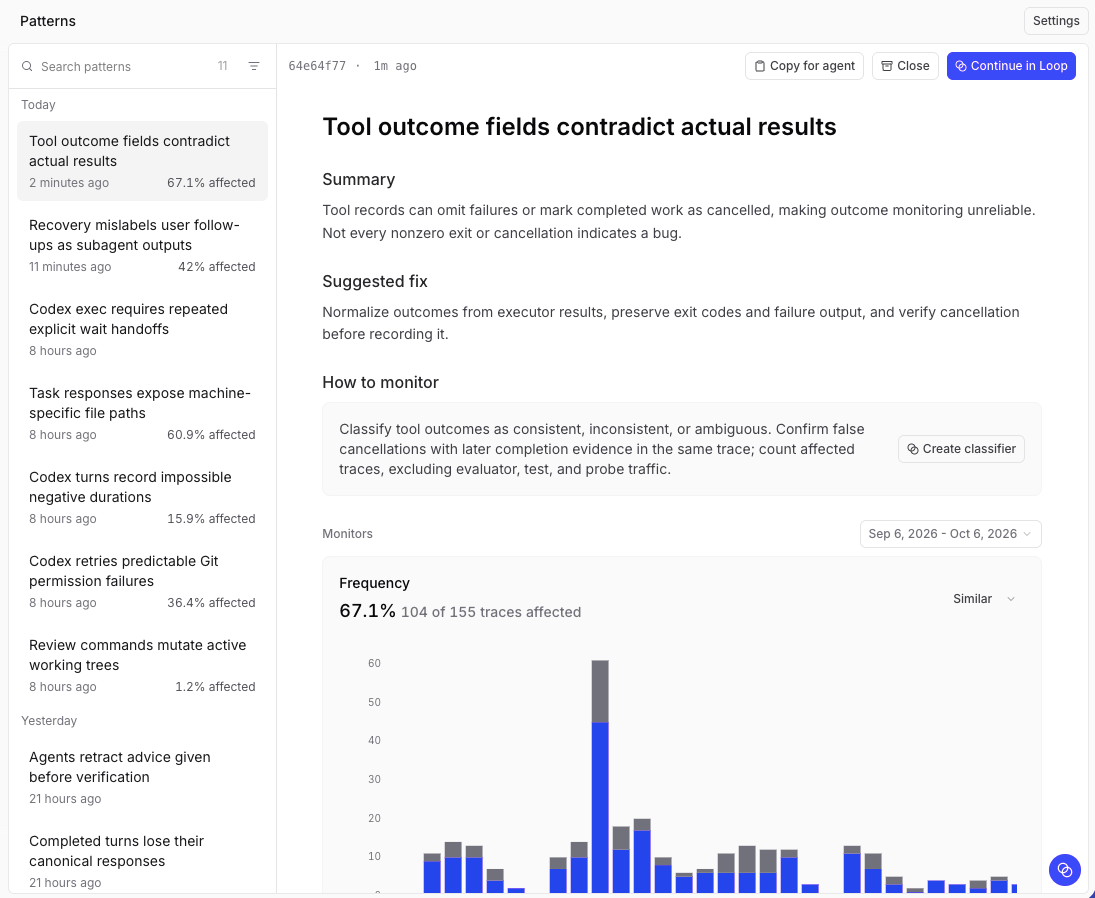 Use Patterns to:
* Find recurring failures and regressions.
* Track cost and latency drift in recurring LLM calls.
* Discover recurring successes and emerging use cases.
* Give a coding agent the evidence it needs to implement a fix.
To learn how to use Patterns to find recurring problems in your team's coding-agent sessions, read [Improving coding agents with coding agent insights](/docs/cookbook/recipes/CodingAgentInsights).
## How discovery works
Patterns runs as a scheduled [Loop automation](/docs/loop/automations). Each run has three goals:
* **Discover new patterns.** Following your instructions, Loop samples raw traces across the configured query range, independently of existing patterns. It investigates candidates through queries and the [Debugger](/docs/observe/debug-traces), then saves findings with supporting evidence. Before saving, Loop checks each candidate's cause and suggested fix against any relevant source code in a [connected repository](/docs/loop/github) and requirements or contracts from an [external MCP server](/docs/loop/mcp). If a relevant repository or server isn't available, the finding distinguishes confirmed causes from hypotheses. A completed investigation can find no new patterns.
* **Refresh existing patterns.** Loop updates evidence and [Frequency measurements](/docs/observe/patterns/review#frequency) for active patterns. Findings can include representative traces and monitor charts. When the behavior cannot be measured reliably, Loop provides trace evidence and recommends how to measure it.
* **Close patterns that have stopped.** Loop closes patterns only when recent, relevant data supports that conclusion. Missing data or a failed query is not enough. Your [closure outcomes and feedback](/docs/observe/patterns/review#close-or-reopen) guide later findings.
You can also ask Loop to [find patterns](/docs/loop/capabilities#find-patterns) in an interactive thread. They appear in the same list.
## Requirements
* **Model access.** Braintrust's [built-in models](/docs/admin/ai-providers#available-models) use your monthly [model credits](/docs/plans-and-limits#model-credits) and need no setup if you meet the [requirements](/docs/admin/ai-providers#requirements). To use your own key or continue after credits run out, configure an OpenAI-compatible [AI provider](/docs/admin/ai-providers).
* **Project permissions.** Anyone who can read the project's logs can read patterns. Closing and reopening a pattern also requires the project's [`Update` permission](/docs/admin/access-control#object-permissions).
## Patterns and Topics
[Topics](/docs/observe/topics) classifies and clusters traces so you can filter and chart them by user intent, sentiment, or issue. Patterns investigates findings in depth. Neither requires the other.
| | Topics | Patterns |
| - | - | - |
| Question it answers | What themes occur most often? | What keeps happening, why does it matter, and what should we do next? |
| Output | A classification on every trace | A focused set of findings, each with evidence and a suggested fix |
| Scope | Broad, across all your traces | Scans your traces, then investigates a subset of them in depth |
| Models | Braintrust built-in models, drawing on your [model credits](/docs/plans-and-limits#model-credits) | The same built-in models by default, or your own configured AI provider |
| Cadence | Daily pipeline | Scheduled Loop automation |
Topics runs as a separate, low-cost pipeline on Braintrust-served models, regardless of your Loop model selection.
Loop can use topic classifications, scores, and human feedback in its investigations. It can also turn a pattern into a facet, scorer, classifier, or monitor to measure the behavior continuously at lower cost. See [Act on a pattern](/docs/observe/patterns/review#act-on-a-pattern).
## Next steps
* [Enable Patterns](/docs/observe/patterns/enable) and configure how often Loop looks for them.
* [Review and act on patterns](/docs/observe/patterns/review) once the first run finishes.
* [Discover insights with Topics](/docs/observe/topics) to classify your traces at a broader scale.
* [Run Loop on a schedule](/docs/loop/automations) for recurring analysis beyond pattern discovery.
This documentation is built and hosted on [Mintlify](https://mintlify.com), a developer documentation platform.
Use Patterns to:
* Find recurring failures and regressions.
* Track cost and latency drift in recurring LLM calls.
* Discover recurring successes and emerging use cases.
* Give a coding agent the evidence it needs to implement a fix.
To learn how to use Patterns to find recurring problems in your team's coding-agent sessions, read [Improving coding agents with coding agent insights](/docs/cookbook/recipes/CodingAgentInsights).
## How discovery works
Patterns runs as a scheduled [Loop automation](/docs/loop/automations). Each run has three goals:
* **Discover new patterns.** Following your instructions, Loop samples raw traces across the configured query range, independently of existing patterns. It investigates candidates through queries and the [Debugger](/docs/observe/debug-traces), then saves findings with supporting evidence. Before saving, Loop checks each candidate's cause and suggested fix against any relevant source code in a [connected repository](/docs/loop/github) and requirements or contracts from an [external MCP server](/docs/loop/mcp). If a relevant repository or server isn't available, the finding distinguishes confirmed causes from hypotheses. A completed investigation can find no new patterns.
* **Refresh existing patterns.** Loop updates evidence and [Frequency measurements](/docs/observe/patterns/review#frequency) for active patterns. Findings can include representative traces and monitor charts. When the behavior cannot be measured reliably, Loop provides trace evidence and recommends how to measure it.
* **Close patterns that have stopped.** Loop closes patterns only when recent, relevant data supports that conclusion. Missing data or a failed query is not enough. Your [closure outcomes and feedback](/docs/observe/patterns/review#close-or-reopen) guide later findings.
You can also ask Loop to [find patterns](/docs/loop/capabilities#find-patterns) in an interactive thread. They appear in the same list.
## Requirements
* **Model access.** Braintrust's [built-in models](/docs/admin/ai-providers#available-models) use your monthly [model credits](/docs/plans-and-limits#model-credits) and need no setup if you meet the [requirements](/docs/admin/ai-providers#requirements). To use your own key or continue after credits run out, configure an OpenAI-compatible [AI provider](/docs/admin/ai-providers).
* **Project permissions.** Anyone who can read the project's logs can read patterns. Closing and reopening a pattern also requires the project's [`Update` permission](/docs/admin/access-control#object-permissions).
## Patterns and Topics
[Topics](/docs/observe/topics) classifies and clusters traces so you can filter and chart them by user intent, sentiment, or issue. Patterns investigates findings in depth. Neither requires the other.
| | Topics | Patterns |
| - | - | - |
| Question it answers | What themes occur most often? | What keeps happening, why does it matter, and what should we do next? |
| Output | A classification on every trace | A focused set of findings, each with evidence and a suggested fix |
| Scope | Broad, across all your traces | Scans your traces, then investigates a subset of them in depth |
| Models | Braintrust built-in models, drawing on your [model credits](/docs/plans-and-limits#model-credits) | The same built-in models by default, or your own configured AI provider |
| Cadence | Daily pipeline | Scheduled Loop automation |
Topics runs as a separate, low-cost pipeline on Braintrust-served models, regardless of your Loop model selection.
Loop can use topic classifications, scores, and human feedback in its investigations. It can also turn a pattern into a facet, scorer, classifier, or monitor to measure the behavior continuously at lower cost. See [Act on a pattern](/docs/observe/patterns/review#act-on-a-pattern).
## Next steps
* [Enable Patterns](/docs/observe/patterns/enable) and configure how often Loop looks for them.
* [Review and act on patterns](/docs/observe/patterns/review) once the first run finishes.
* [Discover insights with Topics](/docs/observe/topics) to classify your traces at a broader scale.
* [Run Loop on a schedule](/docs/loop/automations) for recurring analysis beyond pattern discovery.
This documentation is built and hosted on [Mintlify](https://mintlify.com), a developer documentation platform.