Building observable AI agents with Temporal
AI agents are the dominant pattern for LLM applications, but as they grow more sophisticated, durability and observability become harder. When your agent orchestrates multiple models, calls external APIs, and executes multi-step workflows, you need infrastructure that handles failures gracefully while giving you visibility into what's actually happening.
What happens when your agent crashes mid-task? How do you know which prompt version produced better results? How do you debug a workflow that touches five different models across dozens of API calls? The Braintrust and Temporal integration addresses these questions by bringing together durable execution and LLM observability.
AI agents in the real world
Getting an agent to production means dealing with mid-execution failures, black-box prompts, painful debugging across multiple LLM calls, and slow iteration cycles that require code deploys for every prompt change.
Temporal provides durable execution for your code. When you write a Temporal Workflow, failed Activities automatically retry with configurable backoff, and if your Worker crashes, another picks up exactly where it left off. You can see every Workflow execution, its state, and its history through Temporal's visibility features.
For AI agents, this means your multi-step research Workflow survives infrastructure failures. If the synthesis step fails after 20 successful web searches, Temporal replays the cached results and retries only the failed step. Some of the most sophisticated agentic applications on the market already run on Temporal, including those at OpenAI, Scale AI, and Replit.
The integration
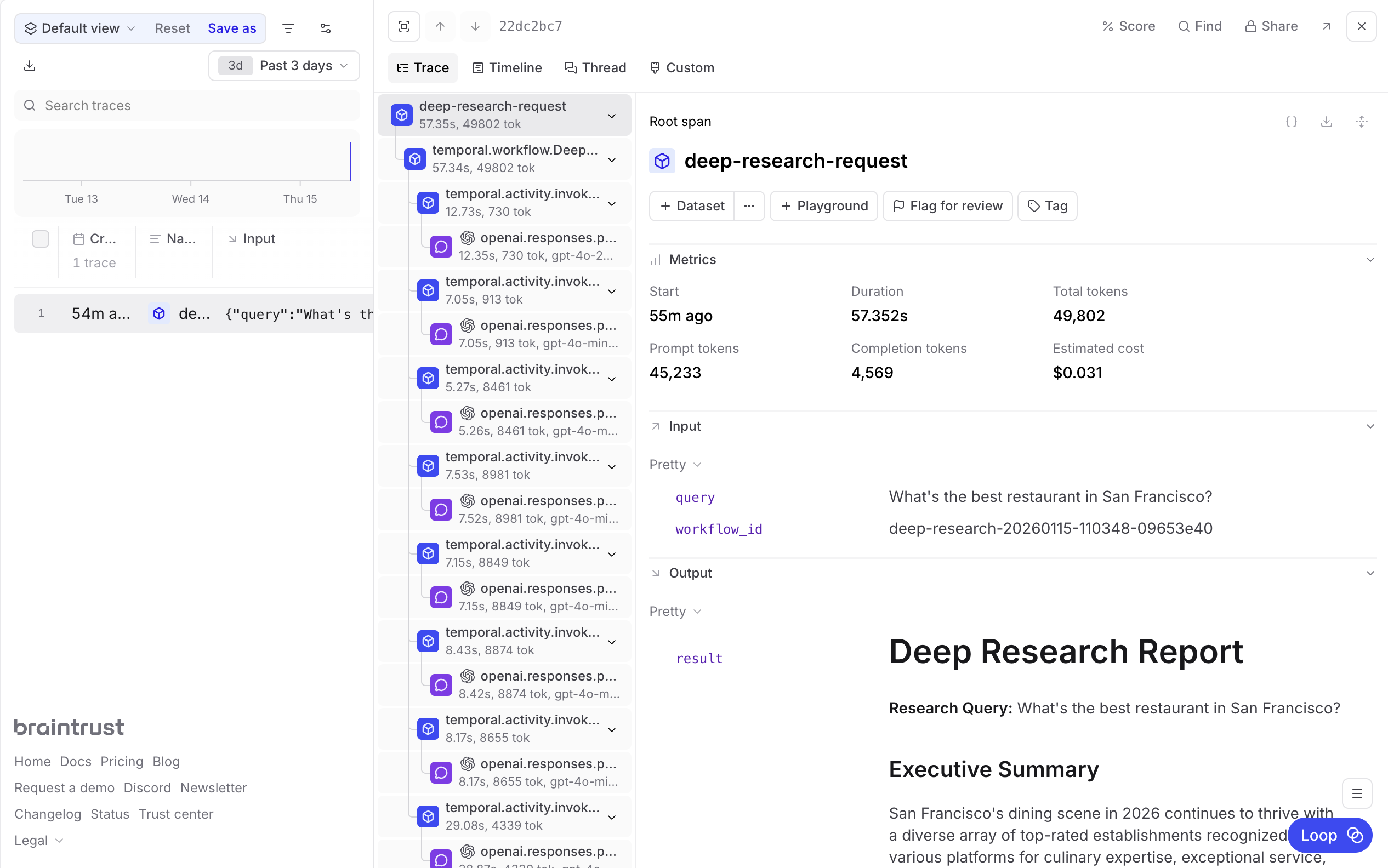
With the Braintrust plugin for Temporal, every Workflow and Activity becomes a Braintrust span with full context. Temporal handles durable workflow execution, automatic retries, and state persistence while Braintrust provides LLM call tracing, prompt versioning, evals, and cost tracking. Prompts can be managed in the Braintrust UI while your Temporal Workers pull the latest versions automatically.
Building a deep research agent
To illustrate how these tools work together, consider a deep research agent that takes a question, plans a research strategy, fans out into parallel web searches, and synthesizes findings into a report. The agent orchestrates four specialized sub-agents:
- Planning agent: Decomposes the question into research aspects
- Query generation agent: Creates optimized search queries
- Web search agents: Execute searches and extract findings in parallel
- Synthesis agent: Produces the final research report
This workflow can take several minutes and involves dozens of API calls. Without Temporal, a failure at any point means starting over. Without Braintrust, you have no visibility into which agent made a bad decision or why.
Setting up the integration
First, install the dependencies:
uv pip install temporalio braintrust openai
Wrapping your OpenAI client
A single line of code traces every LLM call:
# activities/invoke_model.py
from braintrust import wrap_openai
from openai import AsyncOpenAI

# Every call through this client is now traced in Braintrust
# max_retries=0 because Temporal handles retries
client = wrap_openai(AsyncOpenAI(max_retries=0))
Adding the Braintrust plugin to Temporal
Initialize the logger and add the plugin to your Worker:
# worker.py
import os
from braintrust import init_logger
from braintrust.contrib.temporal import BraintrustPlugin
from temporalio.client import Client
from temporalio.worker import Worker

# Initialize Braintrust before creating the worker
init_logger(project=os.environ.get("BRAINTRUST_PROJECT", "deep-research"))

async def main():
    client = await Client.connect("localhost:7233")

    worker = Worker(
        client,
        task_queue="deep-research-task-queue",
        workflows=[DeepResearchWorkflow],
        activities=[invoke_model],
        plugins=[BraintrustPlugin()],
    )

    await worker.run()
Add the plugin to your Client for full trace propagation:
# start_workflow.py
from braintrust import init_logger, start_span
from braintrust.contrib.temporal import BraintrustPlugin
from temporalio.client import Client

init_logger(project="deep-research")

async def main():
    client = await Client.connect(
        "localhost:7233",
        plugins=[BraintrustPlugin()],
    )

    with start_span(name="deep-research-request", type="task") as span:
        span.log(input={"query": research_query})

        result = await client.execute_workflow(
            DeepResearchWorkflow.run,
            research_query,
            id=workflow_id,
            task_queue="deep-research-task-queue",
        )

        span.log(output={"result": result})
Every Workflow execution now appears in Braintrust with full hierarchy.
Managing prompts with load_prompt()
Instead of hardcoding prompts, you can load them from Braintrust:
# activities/invoke_model.py
import braintrust
from temporalio import activity

@activity.defn
async def invoke_model(request: InvokeModelRequest) -> InvokeModelResponse:
    instructions = request.instructions  # Fallback

    # Load prompt from Braintrust if available
    if request.prompt_slug:
        try:
            prompt = braintrust.load_prompt(
                project=os.environ.get("BRAINTRUST_PROJECT", "deep-research"),
                slug=request.prompt_slug,
            )
            built = prompt.build()
            for msg in built.get("messages", []):
                if msg.get("role") == "system":
                    instructions = msg["content"]
                    activity.logger.info(
                        f"Loaded prompt '{request.prompt_slug}' from Braintrust"
                    )
                    break
        except Exception as e:
            activity.logger.warning(f"Failed to load prompt: {e}")

    client = wrap_openai(AsyncOpenAI(max_retries=0))
    # ... use instructions in your LLM call
Your synthesis agent can then reference a Braintrust-managed prompt:
# agents/research_report_synthesis.py
result = await workflow.execute_activity(
    invoke_model,
    InvokeModelRequest(
        model=COMPLEX_REASONING_MODEL,
        instructions=REPORT_SYNTHESIS_INSTRUCTIONS,  # Fallback
        prompt_slug="report-synthesis",
        input=synthesis_input,
        response_format=ResearchReport,
    ),
    start_to_close_timeout=timedelta(seconds=300),
)
This enables a workflow where you develop prompts in code, observe results in Braintrust traces, create a prompt in the UI from your best version, evaluate different versions with evals, and then iterate in the UI without code deploys.
What you see once integrated
In Braintrust, you get visibility into your agent's behavior:
- Full trace hierarchy from client request through every Workflow step
- LLM call details including inputs, outputs, token counts, and latency
- Which prompt version was used for each execution
- Cost metrics showing what each research query costs across models
On the Temporal side:
- Every research request with its full Event History
- Which Activities failed and how they recovered
- Where each Workflow is in its lifecycle
Try it yourself
The complete deep research example is available in the Braintrust cookbook. To run it locally:
# Terminal 1: Start Temporal
temporal server start-dev

# Terminal 2: Start the Worker
export BRAINTRUST_API_KEY="your-api-key"
export OPENAI_API_KEY="your-api-key"
export BRAINTRUST_PROJECT="deep-research"
uv run python -m worker

# Terminal 3: Run a research query
uv run python -m start_workflow "What are the latest advances in quantum computing?"
To get started, sign up for Braintrust and install the Temporal CLI. If you have questions or want to share what you're building, let us know on Discord.
Ethan Ruhe is the Product Lead for AI at Temporal.