

5 best AI evaluation tools for AI systems in production (2026)
AI evaluation tools test, monitor, and improve AI systems by automatically scoring outputs, tracking production performance, and converting failures into permanent regression tests. Without proper evaluation, teams discover quality issues only after shipping, when chatbots hallucinate facts, code generators fail on edge cases, or RAG systems retrieve wrong context.
The gap between development testing and production reliability makes AI evaluation critical. Most teams test AI systems by running a few examples manually, but this approach fails at scale. Production-grade AI evaluation tools solve this by:
- Scoring outputs automatically with custom scorers for hallucinations, safety, and task-specific quality
- Running continuously on production traces to catch degradation in real-time
- Converting failures to regression tests so fixed issues stay fixed
- Integrating with CI/CD to block bad changes before deployment
This guide compares the 5 best AI evaluation tools in 2026, helping you choose the right platform for testing and monitoring your AI systems.
- Best overall: Braintrust (offline experiments, online scoring, CI/CD integration, regression tests)
- Best for enterprise: Arize (ML observability, compliance, drift detection)
- Best for agent simulation: Maxim (multi-step agent testing, scenario validation)
- Best for automated hallucination detection: Galileo (model-consensus evaluation, EFMs)
- Best for in-environment evaluation: Fiddler (trust models, guardrails, explainability)
What is AI evaluation?
AI evaluation is a structured process that measures AI system performance against defined quality criteria using automated scoring, production monitoring, and systematic testing.
AI evaluation works in two phases:
Offline evaluation (pre-deployment testing):
- Run AI systems on test datasets with known correct outputs
- Measure accuracy, hallucination rates, relevance scores, and task-specific metrics
- Establish performance baselines before making changes
- Compare results across prompt changes, model updates, and configuration tweaks
Online evaluation (production monitoring):
- Score live production traffic automatically as it happens
- Monitor real user inputs for hallucinations, policy violations, and quality degradation
- Track performance trends over time
- Add human review for edge cases automated scoring misses
For LLMs and generative AI, evaluation transforms variable outputs into measurable signals. It answers critical questions: Did this prompt change improve performance? Which query types cause failures? Did the model update introduce regressions? Teams use evaluation results to catch issues in CI/CD pipelines, compare approaches systematically, and prevent quality drops before customers notice.
5 best AI evaluation tools in 2026
1. Braintrust
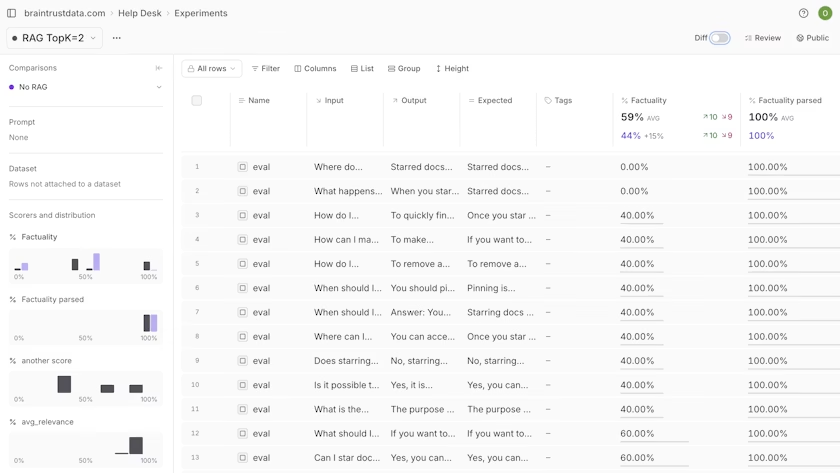
Braintrust connects evaluation directly to your development workflow. When you change a prompt, evaluation runs automatically and shows the quality impact before you merge. When a production query fails, you convert it to a test case with one click. When quality degrades, alerts fire immediately with context on which queries broke and why.
Offline evaluation tests changes before shipping. Run prompt changes, model swaps, or parameter tweaks in the prompt playground against test datasets. You see metrics for every scorer, baseline comparisons, and exact score deltas across all test cases. This makes it instantly clear which changes improved performance and which introduced regressions.
When something breaks, sort by score deltas and inspect the trace behind that output. Braintrust's native GitHub Action runs evaluations on every pull request and posts results as comments, catching regressions before merging code changes.
Online evaluation scores production traffic automatically as logs arrive, with asynchronous scoring that adds zero latency. Configure which scorers run, set sampling rates, and filter spans with SQL to control evaluation scope and depth.
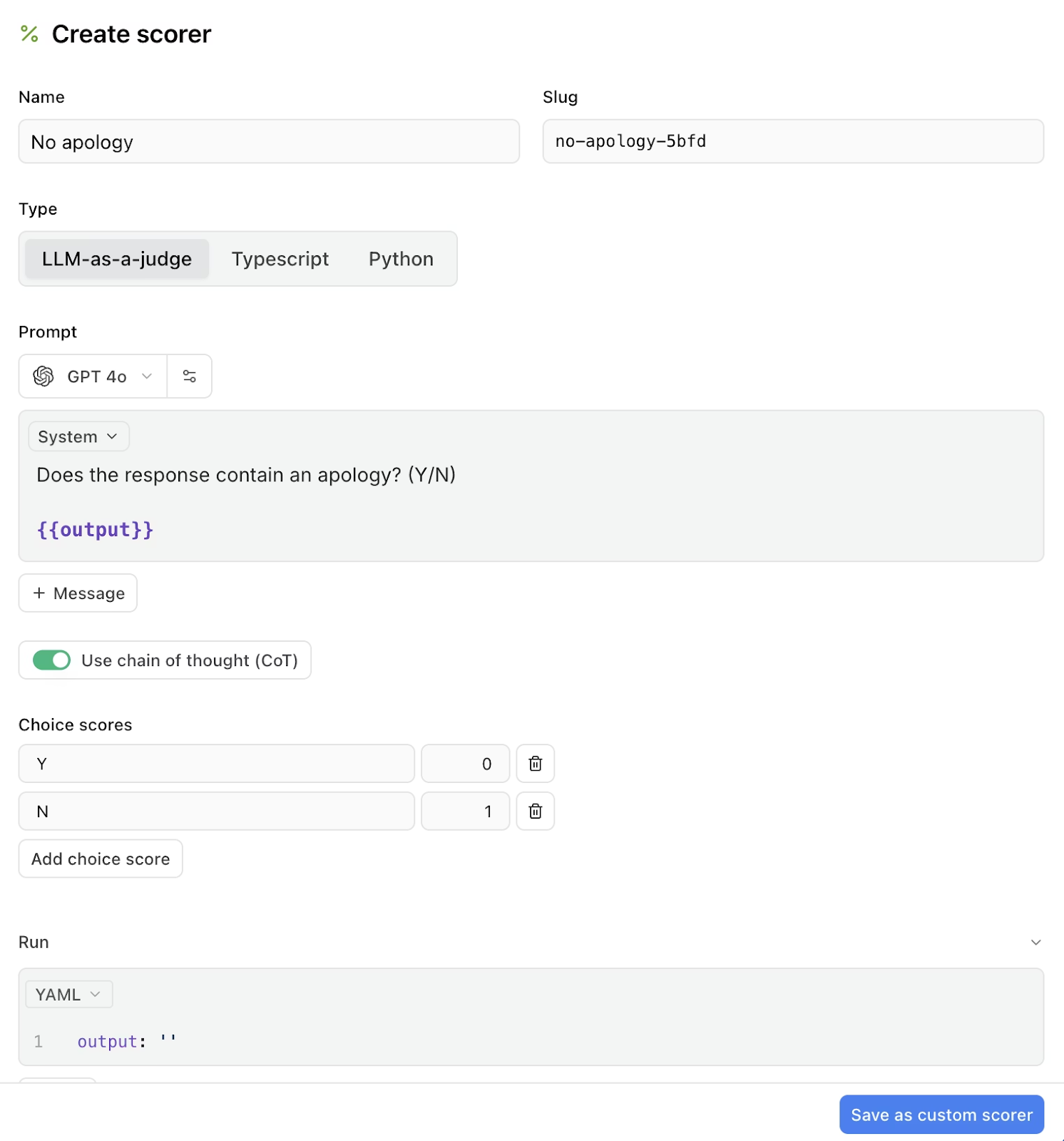
Use Autoevals for common patterns like LLM-as-judge, heuristic checks, and statistical metrics. Braintrust's AI, Loop, also generates eval components from production data. Loop enables non-technical teammates to draft scorers by describing failure modes in plain language.
Braintrust closes the gap between testing and shipping by turning failed production cases into test cases automatically.
Best for: Teams building production AI systems that need continuous evaluation from development to live traffic.
Pros
- Systematic offline and online evaluation: Supports structured experiments during development and automatic scoring of production traffic with the same metrics, avoiding mismatches between test and actual behavior
- Rigorous regression detection: Failed experiments automatically become part of the regression suite that runs in CI/CD, providing measurable metrics to teams
- Versioned datasets: Datasets built from production logs or curated test sets track performance over time for consistent evaluation across changes
- Loop for rapid eval creation: Braintrust's AI assistant generates custom scorers from plain-language descriptions, builds evaluation datasets from production logs, and optimizes prompts using real user examples
- Cross-functional workflows: Engineers, QA, and product teams view the same evaluation results, explore individual examples, and debug issues together
- Playgrounds for rapid iteration: Interactive interfaces for running evaluations, testing prompts, and comparing configurations side-by-side
- Unified scoring framework: Combine automated metrics (similarity, factuality) with custom logic or LLM-as-judge scores to fit your quality guidelines
- Continuous feedback loop: Evaluation results feed directly back into development decisions and prompt improvements
Cons
- Advanced evaluation workflows require setup and learning time for teams
- Costs can scale beyond the free tier for larger teams with high usage
Pricing
- Free tier: 1 GB of processed data, 10K scores, unlimited users
- Pro: $249/month (5 GB processed data, 50K scores)
- Enterprise: Custom pricing for advanced features and support
- See full pricing details
2. Arize
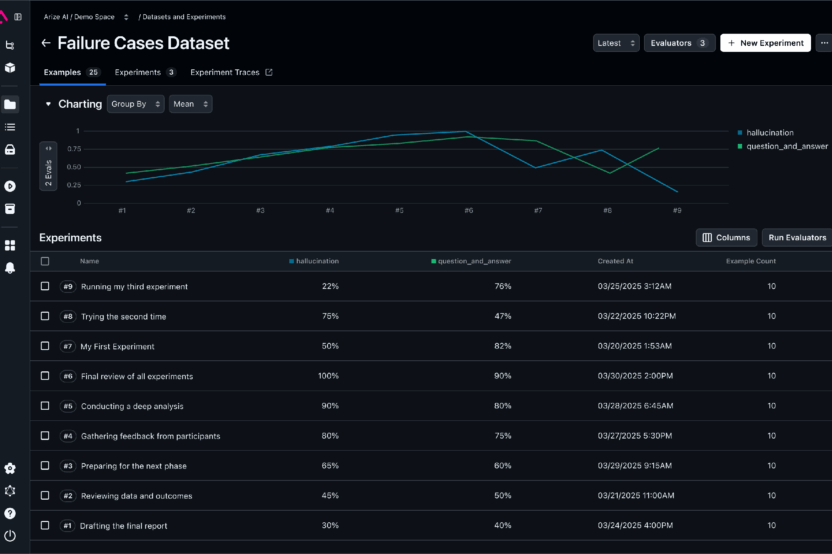
Arize combines evaluation workflows with production monitoring. It supports datasets, experiments, offline and online evaluations, and a playground for replaying traces and iterating on prompts.
Best for: Enterprises that already run ML at scale and need production-grade monitoring, compliance, and a path to self-hosted tracing.
Pros
- Open-source tracing and evaluation option via Arize Phoenix
- Production monitoring features for drift detection, alerting, and session-level traces
- Strong compliance and security posture (SOC 2 Type II, HIPAA support, ISO certifications) for regulated workloads
Cons
- Evaluation features depend on external tooling or custom scripts for structured experiments
- Less specialized support for multi-agent or session-level evaluation
- More emphasis on production monitoring than integrated pre-release workflows like simulation or prompt experimentation
Pricing
- Free: Open-source self-hosting (Arize Phoenix)
- Cloud: Starting at $50/month for managed service
- Enterprise: Custom pricing with compliance features
3. Maxim
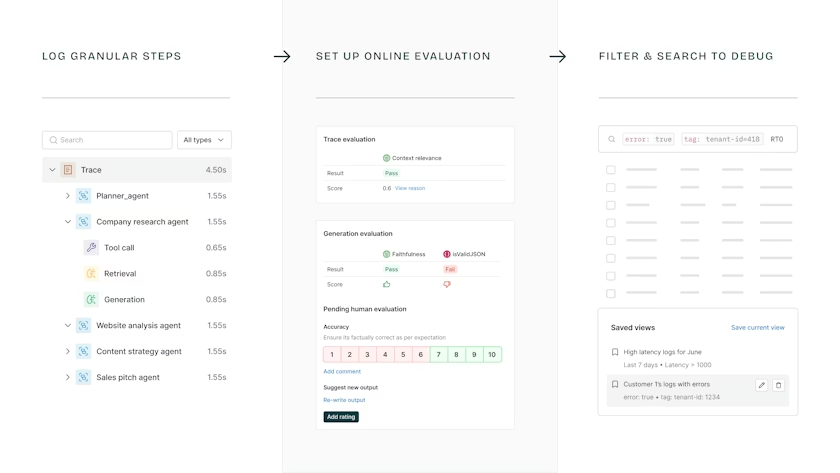
Maxim offers evaluation around offline eval runs and online evaluation on production data. It centers on realistic multi-turn simulation and scenario testing to help teams validate agent behavior before release.
Best for: Teams building multi-step agents that need agent simulation and evaluation before production.
Pros
- Built-in agent simulation to run hundreds of scenarios and personas for pre-production validation
- Unified evaluation workflows that move from offline experiments to online scoring
- Integrations for alerting and observability so simulated failures map to production signals
Cons
- Full value requires adopting Maxim's simulation and evaluation flow, which can require changes to existing test pipelines
- Online evaluations not available on free plan; free tier has short retention (3 days) and capped logs
- Per-seat and usage-based pricing can scale up quickly for larger teams
Pricing
- Developer: Free (up to 3 seats, 10K logs/month, 3-day retention)
- Professional: $29/seat/month
- Business: $49/seat/month
- Enterprise: Custom pricing
4. Galileo
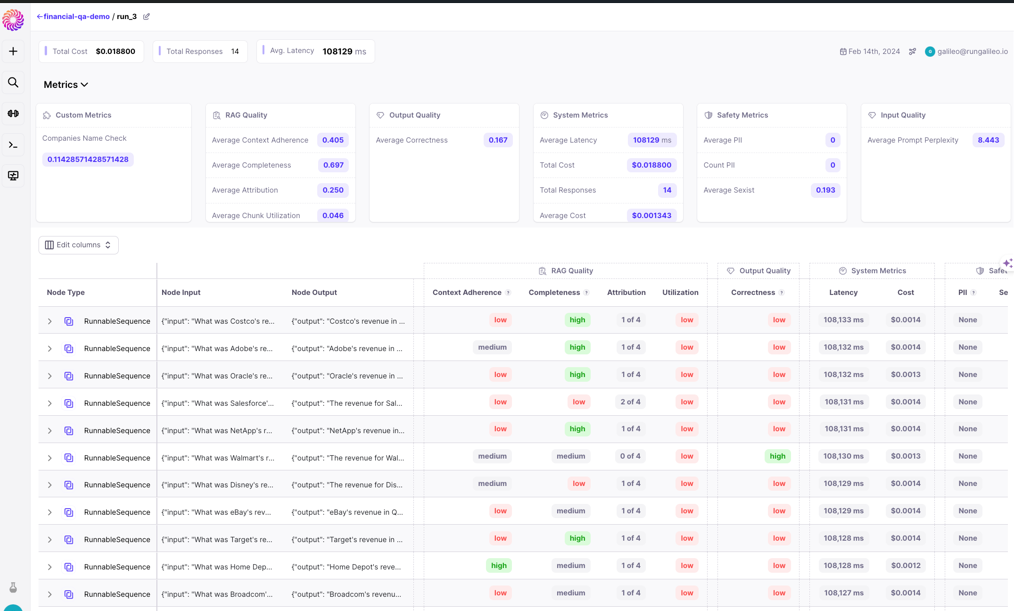
Galileo automates evaluation at scale using Luna, a suite of fine-tuned small language models trained for specific evaluation tasks like hallucination detection, prompt injection identification, and PII detection.
Best for: Organizations that need automated, model-driven evaluation at scale for generative outputs where reference answers don't exist.
Pros
- Detects hallucinations and measures factuality at scale at lower cost than manual review
- Real-time monitoring and guardrail features for production GenAI systems
- Comprehensive documentation for hallucination identification workflows
Cons
- Evaluation logic runs on vendor-maintained EFM models, requiring trust in Galileo's model quality and updates
- Teams preferring fully open-source or self-hosted evaluation models face trade-offs between control and convenience
- Initial setup and tuning for Luna model integration requires upfront investment
Pricing
- Free tier: 5,000 traces/month
- Pro: $100/month (50,000 traces/month)
- Enterprise: Custom pricing
5. Fiddler
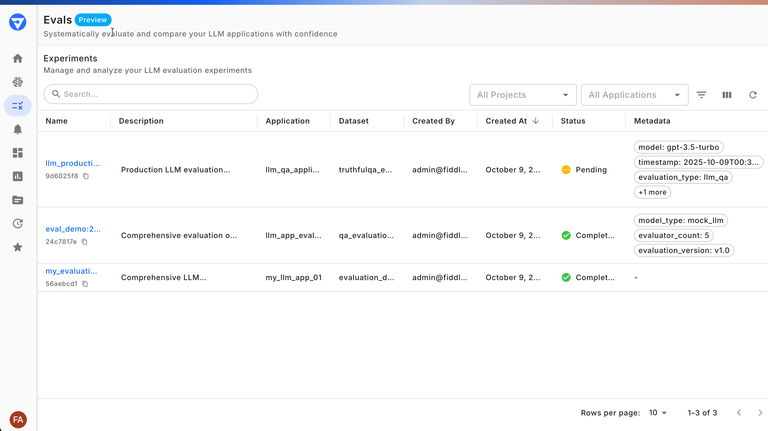
Fiddler adds explainability and compliance scoring to evaluation workflows. Scores and metrics serve as indicators of drift detection and interpretability to support audits and governance. Fiddler Trust Models power low-latency evaluators and guardrails that run inside customer environments to reduce external API exposure and per-call costs.
Best for: Teams that need evaluator-driven test suites with custom metrics and a comparison UI.
Pros
- SDK workflow for datasets, experiments, and analysis/export
- Built-in evaluators, custom evaluator support, and experiment comparison UI
- Agentic observability features for tracing multi-step workflows and tool use
Cons
- Moving evaluators into a trust service requires integration and validation against existing QA processes
- Requires engineering involvement for setup and custom metric definitions
- Less emphasis on UI-driven simulation or prompt-level iteration compared to competitors
Pricing
- Free: Guardrails tier available
- Enterprise: Custom pricing based on requirements (contact sales)
AI evaluation tools comparison table (2026)
| Platform | Starting Price (SaaS) | Best For | Standout Features |
|---|---|---|---|
| Braintrust | Free (1 GB processed data, unlimited users) | Production AI teams that need fast debugging and direct trace-to-eval workflows | Autoeval, Token-level tracing, timeline replay, Eval SDK, no-code playground, one-click convert of traces to eval cases, CI/GitHub Action integration, cost-per-trace reporting, Loop AI assistant, AI gateway. |
| Arize | Free (25K spans per month, 1 user) | Enterprises extending existing ML observability to LLMs | OpenTelemetry, OTLP tracing (Phoenix), data drift detection, session-level traces, real-time alerting, compliance features, RBAC, prebuilt monitoring dashboards. |
| Maxim | Free (10K logs per month) | Teams building multi-step agents that need pre-prod simulation tied to prod evals | High-fidelity agent simulation, prompt IDE with versioning, unified evals from offline to online, visual execution graphs, VPC, in-cloud deployment options. |
| Galileo | Free (5,000 traces per month) | Teams that need automated, model-consensus evaluation of generative outputs | ChainPoll multi-model consensus, Evaluation Foundation Models (EFMs), automated hallucination and factuality checks, low-latency production guardrails, SDK, LangChain, OpenAI integrations. |
| Fiddler | Free Guardrails and custom pricing | Enterprises that need evals, guardrails, and monitoring in one platform | Fiddler Evals and Agentic Observability, Trust Service for internal eval models (no external API calls), unified dev-to-prod evaluators, audit trails, RBAC, compliance features. |
Why Braintrust is the best choice for AI evaluation
Braintrust moves AI teams from vibes to verified. Instead of pushing new code and hoping it works, Braintrust runs evaluations before code hits production and continuously monitors performance afterwards.
The Braintrust workflow:
- Production failure → Test case (one click): Convert failed production queries into permanent regression tests
- Fix prompt → Full evaluation (before shipping): Run evaluations across your complete dataset to verify fixes
- Quality drop → Blocked PR (automatic): Evaluation results appear as PR comments that prevent bad code from merging
Most teams spend days recreating failures, manually building test cases, and hoping fixes work. Braintrust reduces this to minutes. Failed cases become permanent regression tests automatically. The same scorers run in development and production. Engineers and product managers collaborate in one interface without handoffs.
Unified evaluation framework: Braintrust uses identical scoring for offline testing and production monitoring. Run experiments locally, validate changes in CI, and monitor live traffic with the same scorers. When issues appear in any environment, trace back to the exact cause and verify your fix works everywhere.
Teams that catch regressions before deployment ship faster and avoid customer-facing failures. Braintrust makes this the default workflow instead of something you build yourself.
Start evaluating for free with Braintrust →
When Braintrust might not be the right fit
Braintrust focuses on AI evaluation through offline experiments and online production scoring. A few specific cases where you might consider alternatives:
- Open-source requirement: Braintrust is not open-source. Organizations with strict open-source policies may need to evaluate other options, though most teams find that the managed platform removes infrastructure overhead.
- Combined ML and LLM monitoring: Braintrust specializes in LLM evaluation. Enterprises running both traditional ML models and LLMs that need unified monitoring across both may want platforms that cover predictive and generative AI equally.
Frequently asked questions about AI evaluation tools
What is the best AI evaluation tool?
Braintrust is the best AI evaluation tool for most teams because it connects production traces, token-level metrics, and evaluation-driven experiments in a single platform with end-to-end trace-to-test workflows and CI/CD integration. It excels at converting production failures into permanent test cases, running identical scorers in development and production, and enabling engineers and product managers to collaborate without handoffs.
What are essential metrics in AI evaluation?
Essential metrics include task-agnostic checks for every system plus task-specific measures for your use case.
Task-agnostic metrics (for all AI systems):
- Hallucination detection: Does the output contain fabricated information?
- Safety checks: Policy violations, toxic content, or prompt injections
- Format validity: Does output match expected structure (JSON schema, tool call format)?
Task-specific metrics (by application):
- RAG systems: Retrieval precision and answer faithfulness
- Code generation: Syntax validity, test passage rates, execution success
- Customer support: Issue resolution and response appropriateness
- Summarization: Key point coverage and information preservation
The best evaluation frameworks combine code-based metrics (fast, cheap, deterministic) with LLM-as-judge metrics (for subjective criteria like tone or creativity), tracking both across development and production environments.
Can AI evaluation tools handle multi-agent workflows?
Yes. AI evaluation tools handle multi-agent workflows by recording inter-agent messages, tool calls, and state changes, then scoring each step individually and the complete session. Braintrust Playgrounds supports multi-step workflows through prompt chaining, allowing teams to evaluate both intermediate step outputs and final outcomes.
How do you choose the right AI evaluation tool?
Choose based on these workflow requirements:
- CI/CD integration: Can it catch regressions before deployment?
- Cross-functional access: Can product managers iterate on prompts without engineering bottlenecks?
- Failure-to-test conversion: How quickly can you convert production failures into permanent test cases?
- Scoring flexibility: Does it support LLM-as-judge, heuristic checks, and custom logic?
- Environment parity: Can the same scorers run in both development and production?
Braintrust addresses all these requirements by connecting production traces to test datasets, running evaluations in CI with GitHub Actions, and providing a unified interface for technical and non-technical team members.
What is the difference between offline and online AI evaluation?
Offline evaluation tests AI systems before deployment using fixed datasets with known correct outputs. It catches issues during development and validates changes before shipping.
Online evaluation scores production traffic automatically as it arrives, monitoring real user interactions for quality degradation, hallucinations, and policy violations in real-time.
The best AI evaluation tools use the same scoring framework for both offline and online evaluation, ensuring consistency between pre-deployment testing and production monitoring.
How much do AI evaluation tools cost?
Pricing varies by platform:
- Braintrust: Free tier with 1 GB of processed data, Pro at $249/month
- Arize: Free tier with 25K spans/month, paid plans from $50/month
- Maxim: Free up to 10K logs/month, Pro at $29/seat/month
- Galileo: Free tier with 5K traces/month, Pro at $100/month
- Fiddler: Custom enterprise pricing
Most platforms offer free tiers suitable for small teams and startups, with paid plans scaling based on usage volume and team size.