

What is prompt versioning? Best practices for iteration without breaking production
Most LLM applications start with a simple setup where a developer writes a prompt, tests it with a few inputs, and deploys it to production because it works well enough at the time. As the system evolves, small wording changes are made to handle edge cases, improve responses, or support new needs. These changes often seem minor, but they can quietly break other scenarios without anyone noticing.
When prompts are changed without version control, teams face a quality issue that is difficult to spot and even harder to debug, especially when prompts are hardcoded in source files or copied across documents and chat threads. Teams lose visibility into what changed and why, which makes it difficult to trace incorrect outputs back to a specific prompt version and creates hesitation around making even small edits. When output quality drops, rolling back usually means guessing what the previous prompt looked like rather than reverting to a known version.
Prompt versioning solves this by treating prompts as managed, trackable assets instead of disposable text scattered across the codebase. Every change is recorded and linked to the model and settings it runs with, so teams can reproduce past behavior, understand the impact of updates, and roll back safely when needed. This guide explains what prompt versioning involves, how structured release and testing workflows prevent silent regressions, and how evaluation and monitoring keep prompt changes aligned with production reliability.
What is prompt versioning and why does it matter?
Prompt versioning is the practice of tracking prompt changes in a structured way so teams can see what changed, when it changed, and how those changes affect production behavior. Instead of editing prompts inline and overwriting previous versions, each update is recorded and kept distinct, enabling comparison of iterations, tracing outputs, and safe rollbacks when needed.
Prompt versioning becomes important the moment prompts start changing in real systems. Small edits, model switches, or parameter updates can all affect output quality, but without a clear record of those changes, teams lose the ability to understand what is running in production and why it behaves the way it does.
Version identifiers
Each iteration receives a unique version ID that distinguishes it from all others, enabling consistent reference to a prompt version across logs, evaluations, and production traces. Some systems use content-addressable IDs, where the identifier is derived from the prompt's content, ensuring that identical prompts produce the same ID, which helps avoid duplication and ambiguity. Others use semantic versioning (such as v1.2.0) to signal whether a change represents a major behavioral shift, a minor tweak, or a small patch, giving teams an immediate sense of the scope and risk of a change before it reaches production.
Metadata and context
Prompt behavior depends on more than the prompt text alone. The model in use, parameter settings, tool configuration, and the rationale for the change all influence how a response is generated and how it should be evaluated. Without this surrounding context, it becomes difficult to explain why a prompt behaved differently after a change.
Recording metadata with each prompt version allows teams to reconstruct the conditions under which a response was produced. When an issue arises later, teams can reproduce past behavior accurately rather than relying on assumptions or incomplete information, making debugging faster and more reliable.
Templates and variables
Production prompts are rarely static strings. Prompts are often templates that inject user input, retrieved context, examples, or system instructions at runtime, which means the final prompt seen by the model can vary significantly from request to request. As a result, changes to template structure or variable handling can affect behavior just as much as changes to the visible prompt text.
Prompt versioning needs to account for this dynamic construction by tracking templates and variables alongside the prompt itself. When templates and variables are versioned together, teams can understand how the full prompt was assembled for a given request and avoid situations where structural changes reach production without clear visibility or review.
Immutability
Once a prompt version is created, it should remain unchanged. Any modification, no matter how small, should result in a new version rather than altering an existing one that may already be referenced in logs, traces, or evaluations.
Immutability is what makes tracing and rollback dependable over time. When a system references a specific prompt version, teams can trust that it represents exactly what ran in production at that moment. If output quality drops, recovery means reverting to a known version rather than trying to recreate it after the fact.
Why prompts differ from code
Traditional code behaves predictably, where the same input reliably produces the same output. Prompts behave differently, where the same prompt can generate different outputs depending on the model version in use, the temperature setting, or changes in the input distribution over time.
Because of this non-deterministic behavior, versioning prompt text alone is not enough. To make prompt behavior reproducible, teams need to version the full execution context as a single unit. This includes the prompt, the model, the parameter settings, and any retrieval configuration used to generate the response. Without capturing all of these pieces together, it becomes difficult to explain output changes or reproduce past behavior with confidence.
Prompt versioning vs. prompt management
Prompt versioning and prompt management are closely related but address different aspects of the same discipline. Understanding how versioning and management divide responsibilities clarifies which problems each solves.
Prompt versioning is the foundational mechanism. It focuses on tracking changes through unique version IDs, maintaining a version history, storing diffs, and enforcing immutability so past versions remain reproducible. Versioning answers basic but critical questions, such as which prompt version produced a given output and what changed between two iterations.
Prompt management builds on top of this foundation and turns versioning into an operational workflow. It includes organizing prompts into registries, controlling who can edit or deploy them through role-based permissions, promoting versions across environments, running evaluations, and monitoring quality in production. Management determines how versions move through the system and who is responsible for approving those changes.
Versioning provides the record of change, while management provides the process that makes those records actionable. Together, they allow teams to iterate on prompts with confidence, knowing that changes are tracked, reviewed, tested, and deployed in a controlled way.
How prompt version control works in production environments
Prompt version control in production draws on many principles from established software release practices, but adapts them to account for the non-deterministic behavior of LLMs. The goal is to enable teams to iterate quickly on prompts while maintaining clear control over what runs in production and how changes are validated.
Environment-based deployment
Effective prompt version control separates versions across distinct environments. Engineers and product managers experiment freely in development, refining prompt behavior without constraints. Once a version is ready, staging mirrors production conditions for final validation. Only after passing all quality checks does a version reach production.
Each environment pins a specific prompt version, and the application automatically fetches the correct version based on its runtime environment. When a team promotes a prompt from staging to production, the production environment simply points to the new version, while the previous version remains available for immediate rollback.
Promotion workflows and approval gates
Prompt versions should be moved between environments only after meeting the defined evaluation thresholds. For example, a prompt that scores below 90% on a gold dataset in staging should not be automatically promoted to production.
These approval gates act as the prompt equivalent of CI checks in software development. They prevent unvalidated changes from reaching users and give teams confidence that each promoted version meets an agreed quality bar.
Rollback strategies
When a new prompt version degrades quality in production, teams need to revert quickly. Reliable rollback depends on keeping previous versions intact, since deployed versions are never destroyed.
Reverting means redirecting traffic back to the last known good version. The failing version and the production inputs that exposed its weaknesses then become new test cases that help prevent the same regression from recurring.
Canary releases and A/B testing
Instead of deploying a new prompt version to all users at once, canary releases route a small portion of traffic, typically between one and ten percent, to the new version while the rest continues using the current production version. If quality metrics remain stable, the team gradually increases the canary's share. If metrics degrade, the rollout is stopped before most users are affected.
A/B testing follows a similar approach but focuses on structured comparisons. Multiple prompt variants run simultaneously against the same inputs, and teams compare quality scores, latency, cost, and token usage across versions. Feature flags can further control which user segments or request types receive a new version before full rollout.
Decoupling prompts from application releases
Prompt versioning infrastructure allows prompt changes to ship independently of application code releases. Teams can hotfix a prompt or roll back to a previous version without redeploying the application binary, which shortens iteration cycles and limits the impact of any single change.
Testing and evaluating prompt versions before deployment
Testing LLM prompts requires a different approach from testing traditional software because the same input can produce different outputs. The goal is to build a layered evaluation that detects regressions at multiple levels, rather than relying on a single signal.
Golden datasets
A golden dataset is a curated collection of inputs paired with known-good outputs or with clearly defined quality criteria. A well-constructed set of 50 to 200 cases, spanning core use cases, edge cases, and adversarial inputs, provides sufficient signal to detect regressions with reasonable confidence. These datasets should be version-controlled alongside prompts and refreshed regularly using real production inputs so they continue to reflect how the system is used.
Layered evaluation scoring
No single evaluation method covers all failure modes, so production teams layer multiple approaches.
Deterministic checks usually run first and catch structural failures such as missing required fields, invalid JSON schemas, or prohibited content. These checks are fast, binary, and well-suited for CI gates.
Semantic checks assess whether the output's meaning aligns with the expected answer, even when the wording differs. This is often measured through embedding similarity and key fact coverage rather than exact string matching.
LLM-as-a-judge scoring uses a separate model to evaluate responses against defined rubrics such as correctness, faithfulness, and tone. Teams need to calibrate these judges carefully to account for known biases, such as positional bias and a preference for verbose answers.
Non-functional checks measure latency, token usage, and cost per request to ensure that prompt changes do not degrade performance or exceed budget constraints.
Regression gates in CI/CD
Automated evaluations should run on every pull request that modifies a prompt. Each evaluation compares the new version's scores against the current production baseline, and if scores fall below defined thresholds, the pull request is blocked from merging. This allows engineers to experiment freely while ensuring that regressions are caught before changes reach users.
Human review for high-stakes decisions
Automated evaluation covers most scenarios, but some domains require human judgment. Annotation queues allow domain experts to review, label, and score a subset of outputs, particularly in ambiguous cases where automated metrics lack sufficient confidence.
Best practices for prompt versioning at scale
Prompt versioning only works when teams apply it consistently in daily workflows. Without clear rules for how prompt changes are created, tested, reviewed, and deployed, version history quickly becomes noise instead of signal.
| Best practice | Production consequence |
|---|---|
| Assign a version ID to every prompt change | Clear version identifiers make it possible to trace any production output back to the exact prompt that generated it and avoid confusion when multiple versions exist |
| Version prompts together with models and parameters | Prompt behavior depends on the full execution context, so tracking prompt text alone is not enough to reproduce or debug production behavior |
| Keep prompt versions immutable after deployment | Immutability ensures that logs, traces, and evaluations always refer to the same prompt version and makes rollback reliable |
| Track templates and variables alongside prompt text | Changes to template structure or variable handling can affect outputs as much as text changes and should be visible and reviewable |
| Run automated evaluations on every prompt change | Automated checks catch regressions early and prevent unvalidated prompt updates from reaching production |
| Use human review for high-risk or ambiguous cases | Some outputs require judgment that automated metrics cannot provide, especially in sensitive or complex domains |
| Promote prompt versions through environments | Separating development, staging, and production reduces risk and gives teams confidence before full rollout |
| Keep previous versions available for rollback | Fast rollback depends on having known good versions ready when quality drops |
Together, these practices turn prompt versioning from a record of changes into a reliable operating model. They reduce guesswork during debugging, shorten recovery time when quality drops, and help teams scale prompt iteration without losing visibility or control.
How prompt versioning connects to LLM evaluation and monitoring
Prompt versioning delivers real value only when each version is linked to measurable quality outcomes. Without that link, version history becomes passive record-keeping rather than an active tool for improving production behavior. Evaluation and monitoring provide the feedback that turns versioning into a controlled iteration process.
The iteration loop
The workflow follows a repeatable cycle. A team creates a new prompt version in development, evaluates it against golden datasets, and compares the results with the current production version. If the metrics improve, the version is promoted to staging and then to production. Once live, quality is monitored by the same scorers used during testing. When quality drifts, failing cases are added back into evaluation datasets and inform the next round of prompt changes.
Offline evaluation vs. online monitoring
Offline evaluation is designed to catch known failure modes before deployment. Online monitoring focuses on detecting new failures and distribution shifts that are not captured by offline test suites. These two stages work best when they share the same metrics, so the signals used to approve a prompt version during testing are the same signals tracked after it reaches production.
Production traces as evaluation data
Production traffic provides the most realistic source of evaluation data. Each live request that reveals a weakness or edge case can be added to the golden dataset. As production data improves evaluation coverage, evaluation results improve prompt quality, and stronger prompts lead to better production behavior. Over time, this feedback loop compounds and separates teams that improve steadily from teams that iterate without clear signals.
Detecting silent model regressions
Prompt behavior can change even when the prompt itself does not. A model checkpoint update or backend change can shift outputs without any modification to prompt text. Continuous evaluation running on production logs makes these regressions visible, and alerts should trigger when quality metrics drift from established baselines. This ensures that quality issues caused by model changes are detected as quickly as those caused by prompt updates.
How Braintrust simplifies prompt versioning, evaluation, and deployment
Braintrust connects the entire prompt lifecycle inside a single platform. Instead of managing versioning, evaluation, deployment, and monitoring across separate tools, Braintrust links every step so prompt changes trigger evaluations automatically, evaluation results guide promotion decisions, and production behavior continuously feeds back into testing. This unified approach enables rapid prompt iteration without sacrificing control or reliability.
Versioning and environment management
Every prompt change in Braintrust is assigned a content-addressable version ID, with a complete history and clear diffs that show exactly what changed. Teams can manage prompts through the UI or programmatically using the SDK with braintrust push and braintrust pull, with changes staying in sync across both interfaces. This removes ambiguity around which version is running and ensures that every production output can be traced back to a specific change.
Environment-based deployment separates development, staging, and production into clear promotion stages. Prompt versions move forward only after passing defined evaluation thresholds, and instant rollback restores the previous version when quality degrades. This gated approach lets teams ship prompt updates confidently while keeping recovery fast when something goes wrong.
Integrated evaluation and CI/CD gates
Braintrust includes built-in online and offline evaluations for factuality, helpfulness, and task-specific criteria, as well as support for custom scoring functions. Teams can compare multiple prompt versions side by side and immediately see quality differences, rather than relying on intuition. A dedicated GitHub Action runs evaluation suites on every pull request and blocks merges when quality drops below thresholds, preventing regressions from reaching production.
Collaborative playground
The Braintrust Playground provides product managers and engineers with a shared space for iteration. Product teams can test prompt variants, switch models, and compare outputs using real-time quality scores in the UI, while engineers use the same underlying versions and evaluations via the SDK.
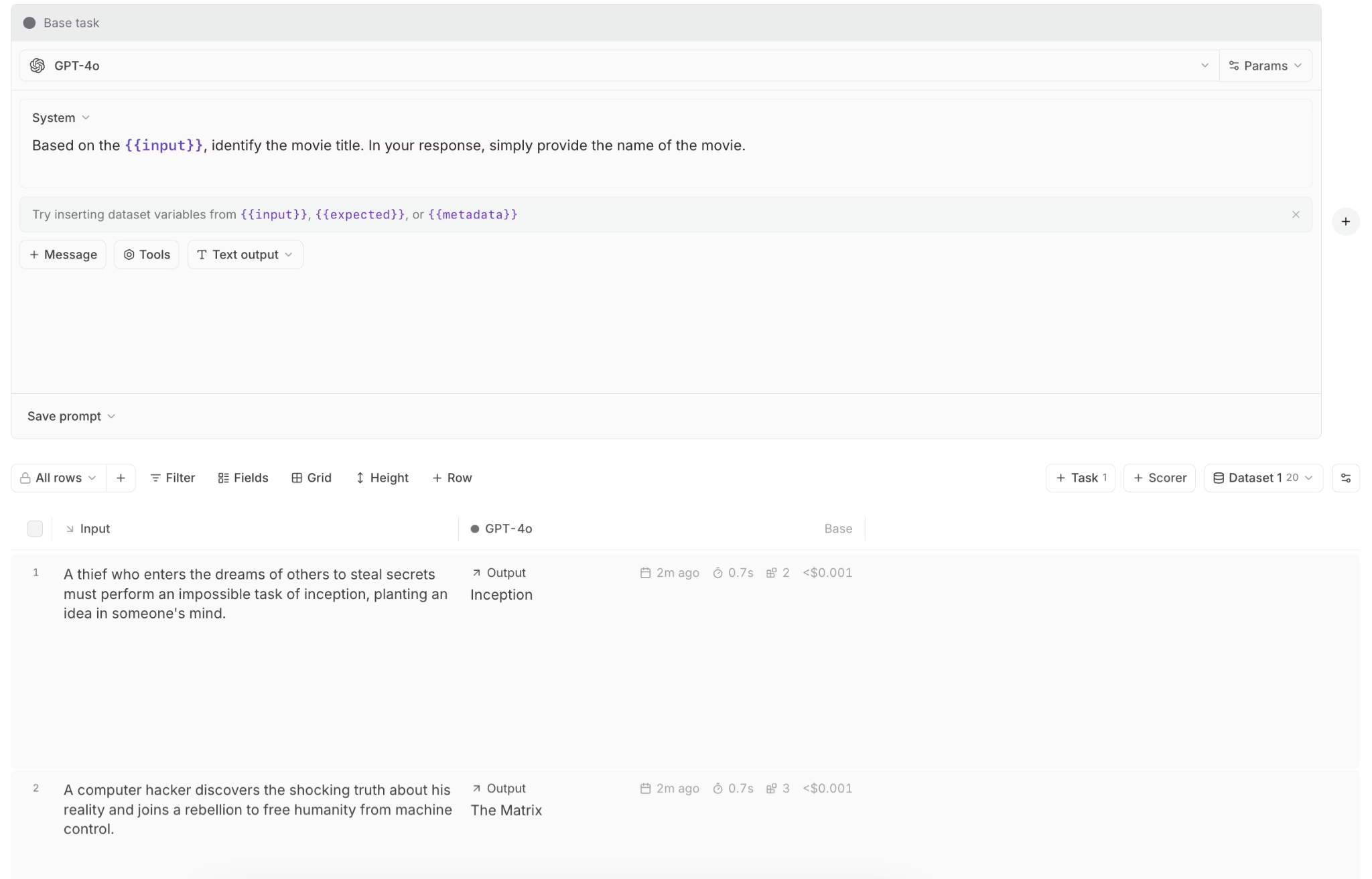
Loop, Braintrust's AI assistant, accelerates iteration by analyzing prompts and proposing higher-performing alternatives based on evaluation data rather than guesswork.
Production observability
Braintrust ties every production trace directly to its originating prompt version and parameters, so debugging starts with the exact configuration that produced an output. The same scorers used during testing run on live traffic, which keeps quality measurement consistent from development through production.
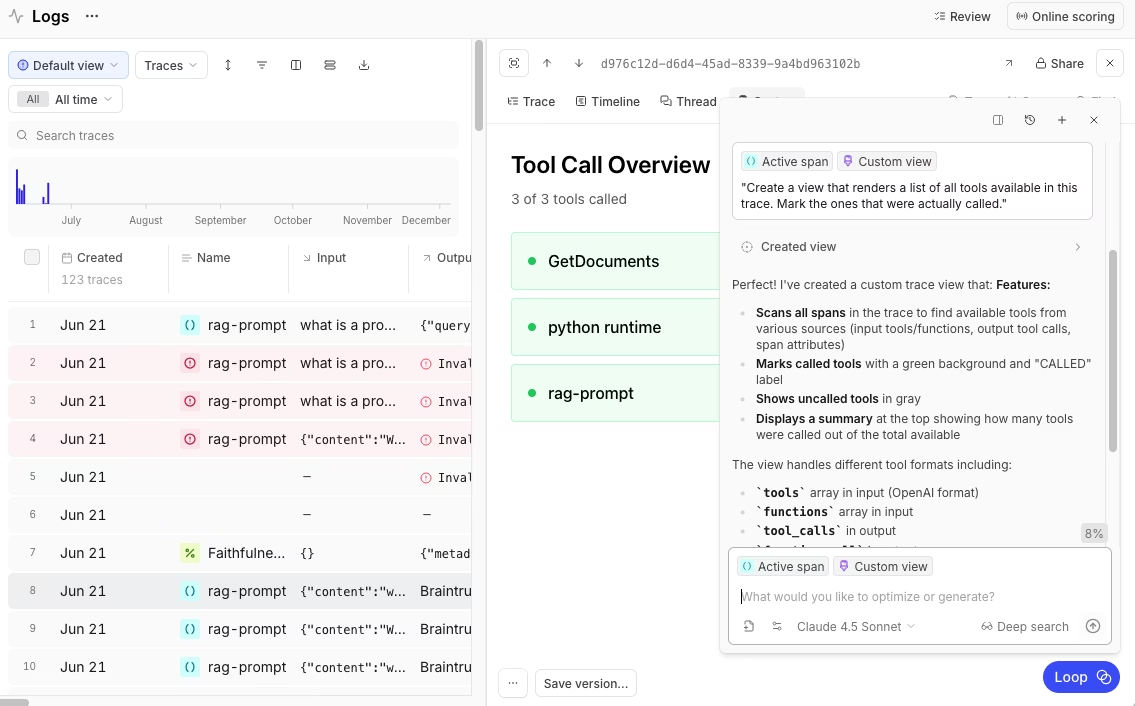
Brainstore enables fast search across large volumes of production logs, and quality alerts surface degradation early so teams can act before users are affected.
Enterprise controls
Braintrust includes role-based access control with built-in permission groups and custom roles across organizations, projects, and objects. Braintrust is SOC 2 Type II compliant, supports SSO and SAML, and offers self-hosted deployment for teams with strict data residency requirements. A unified AI gateway supports OpenAI, Anthropic, AWS Bedrock, and other providers, which allows teams to switch models without rewriting integration code or reworking prompt workflows.
Teams at Notion, Zapier, Stripe, Vercel, Ramp, and Lovable use Braintrust to ship reliable AI features at production speed, turning production data into continuous quality improvements. The Dropbox team uses Braintrust to evaluate and version-control prompt changes before deployment, reducing regressions and making prompt quality measurable before users see them.
Ready to stop guessing and start measuring prompt quality before it reaches users? Get started with Braintrust's free tier to version prompts, run evaluations, and deploy through environments from day one.
Conclusion
Prompt versioning is no longer optional for teams running LLM features in production. Without it, prompt changes introduce hidden risk, regressions are hard to trace, and quality issues surface only after users are affected. Teams that invest early gain a compounding advantage because production failures become test cases, evaluations guide decisions before rollout, and every change remains measurable, reversible, and auditable.
Braintrust brings this workflow into a single system by connecting prompt versioning, evaluation, deployment, and production monitoring end-to-end. Instead of guessing which changes are safe, teams can test, promote, and observe prompt updates with clear signals at every step. Start building with Braintrust and turn prompt iteration into a controlled engineering process that scales with production demand.
Prompt versioning FAQs
What is prompt versioning?
Prompt versioning is the practice of tracking every change to an AI prompt as an immutable, uniquely identified version. Each version includes the prompt text, a version ID, metadata such as author and timestamp, the reason for the change, a linked model and parameters, and evaluation results. This allows teams to compare iterations, roll back safely when quality drops, and trace production outputs back to the exact prompt that generated them.
What is the difference between prompt versioning and prompt management?
Prompt versioning is the core mechanism for tracking changes using unique IDs, diffs, and an immutable history. Prompt management builds on top of versioning and defines how prompts are organized, reviewed, tested, deployed across environments, and monitored in production. Versioning provides traceability, while management provides the workflow that makes versioning practical in day-to-day development.
Which tools do I need to version prompts?
A production-ready prompt versioning system should support unique version IDs, an immutable version history, environment-based deployment, integration with evaluation, and fast rollback. Braintrust combines prompt versioning, automated evaluations, staged deployment workflows, production observability, and cross-provider model support in a single platform, so teams do not need to stitch together separate tools to manage prompt quality in production.
How do I get started with prompt versioning?
Getting started with prompt versioning begins by separating prompts from application code so they can be tracked, tested, and deployed independently. Teams typically define clear versioning rules, set up development, staging, and production environments, and establish a baseline dataset that reflects real user requests and known edge cases. Automated evaluations are then run on every prompt change to compare new versions against the current production baseline before promotion.
Braintrust helps teams make prompt quality measurable from day one. Instead of relying on intuition or manual spot checks, teams can evaluate changes against production signals, promote only improvements, and learn from failures within a continuous feedback loop.