

How to evaluate multi-turn conversations
Most evals are designed to score a single AI output at a time. This works for tasks like summarization or classification, but it falls short for conversations with multiple back-and-forth interactions.
This is especially important for conversational AI products, like chatbots. An app can nail every individual reply on benchmarks like tone and politeness while still failing to resolve a customer's problem or return a correct answer to their question.
The only way to know if a multi-turn AI product is working as intended is to score conversations as a whole, in addition to scoring individual turns.
The limits of single-turn scoring
To understand multi-turn scoring, let's take the example of an e-commerce company. They get thousands of customer messages per day, and they've built an AI support chatbot to help manage certain issues without burdening their CX team.
But they need to know if the chatbot is any good. Was the tone right? Did it include actionable next steps? Was it empathetic? If the bot isn't performing against these benchmarks, then customer experience will degrade and hurt their bottom line.
Single-turn evals can be helpful in some instances, but they can't tell you if the bot asked for the same information twice, if it contradicted itself later on in the chat, or if it kept the customer in a polite, professional loop for ten minutes without ever solving anything.
These are the kinds of failures that only surface when you look at the entire conversation. Doing this properly requires both layers of scoring: one for individual responses, and one for entire conversations.
Building an example chat app
The example chatbot app is a Python script (chat_app.py) that runs an interactive chat loop. You type a customer message, then the script sends it to an LLM (GPT-4o in this case) with a system prompt that tells it to act as a helpful customer support agent. It's designed to be empathetic but efficient, ask clarifying questions when needed, do its best to resolve the issue, and explain when it needs to escalate.
A typical test conversation might go like this:
- Customer: "I ordered a t-shirt and it came a size too big."
- Bot: "Sorry to hear that. Can you provide your order number?"
- Customer: "Order 6767. I ordered a small and got a medium."
- Bot: "Thanks. I can arrange an exchange for you."
- Customer: "I don't want an exchange. I want a discount code."
- Bot: "Let me check on that. Have you returned the shirt yet?"
So far, nothing unusual. The app is managing a standard back-and-forth where the customer explains a problem and the bot tries to work through it.
The next step is to log every turn so you can score the entire conversation later.
Logging multi-turn conversations to Braintrust
To instrument this app and integrate it with Braintrust, you need three lines of code and one structural decision.
init_logger() initializes a Braintrust logger and points it at your project (in this case, "Customer Support Chatbot"). This is what sends conversation data to the platform. Every turn you log ends up in your project's Logs tab.
wrap_openai() wraps the OpenAI client so every API call is automatically captured as a span. This gives you metadata you'd otherwise have to instrument yourself, like call duration, time to first token, prompt and completion token counts, and estimated cost. It all shows up in the trace without any extra work.
The @traced decorator goes on the function that handles each turn. It creates a function span per turn, which is what gives the trace view its structure, with Turn 1, Turn 2, Turn 3, Turn 4 each having its own input and output, instead of everything dumped into a flat log.
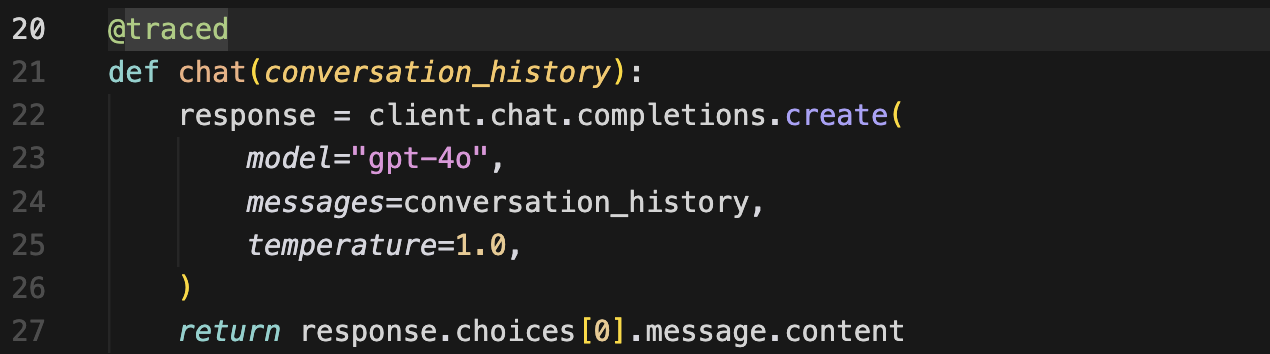
The structural decision is about grouping. The code uses a shared span ID to nest all turns under a single trace. This is the part that makes multi-turn scoring possible.
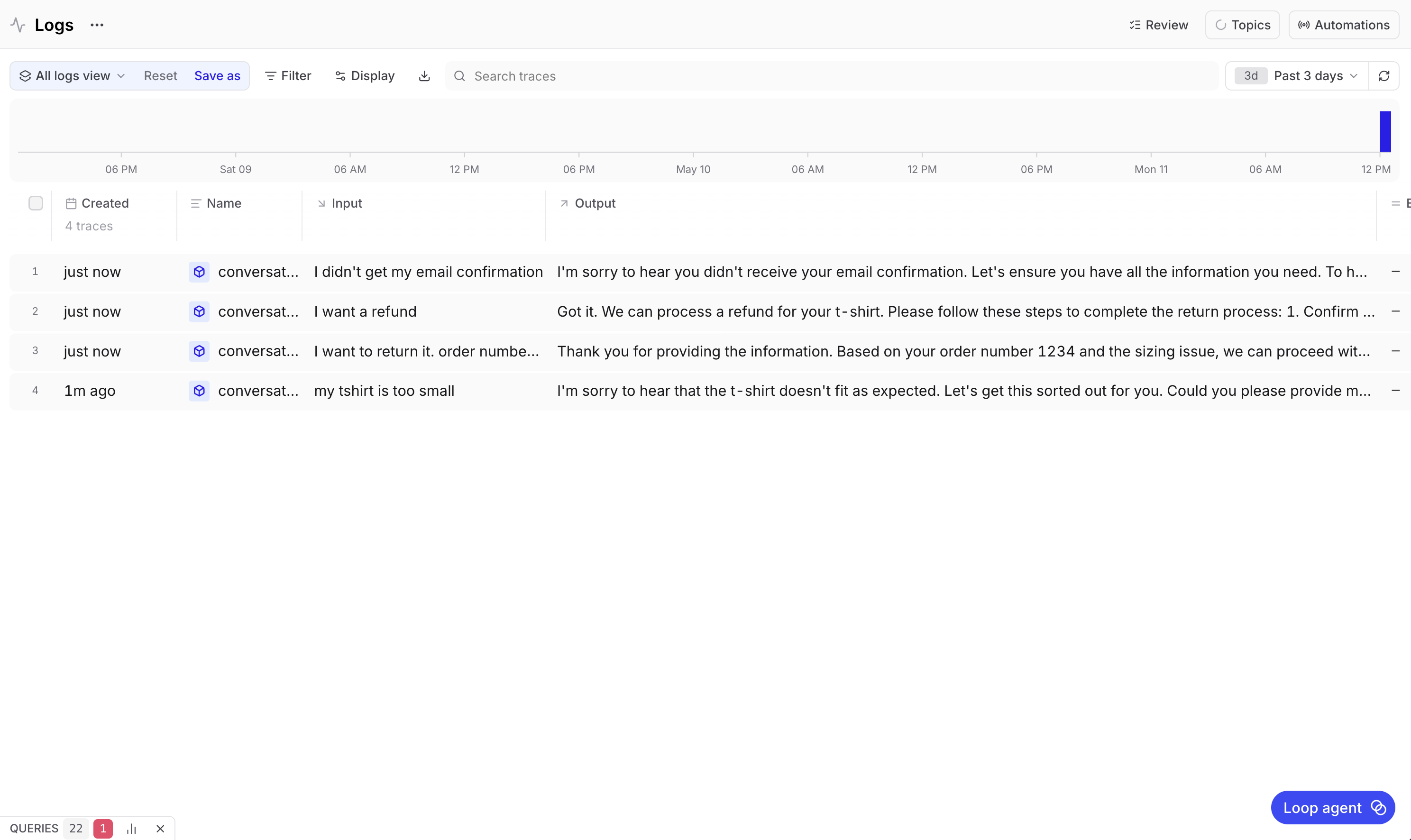
Without grouping, each turn logs as its own separate entry. Running a four-turn conversation would yield four unrelated rows in your logs, which look like four independent single-turn interactions. There's no way to analyze them as a conversation because Braintrust doesn't know they belong together. With grouping turned on, all four turns appear as children of one conversation trace.
Reading a trace
Once a conversation is logged, you can inspect it in the Braintrust UI. Go to your project, select the Logs tab, and select a conversation.
The trace view shows every turn with its input and output. Each turn is a span, and inside each span is the LLM call that generated the response along with all the metadata from wrap_openai(), like how long the call took, how many tokens it used, and what it cost.
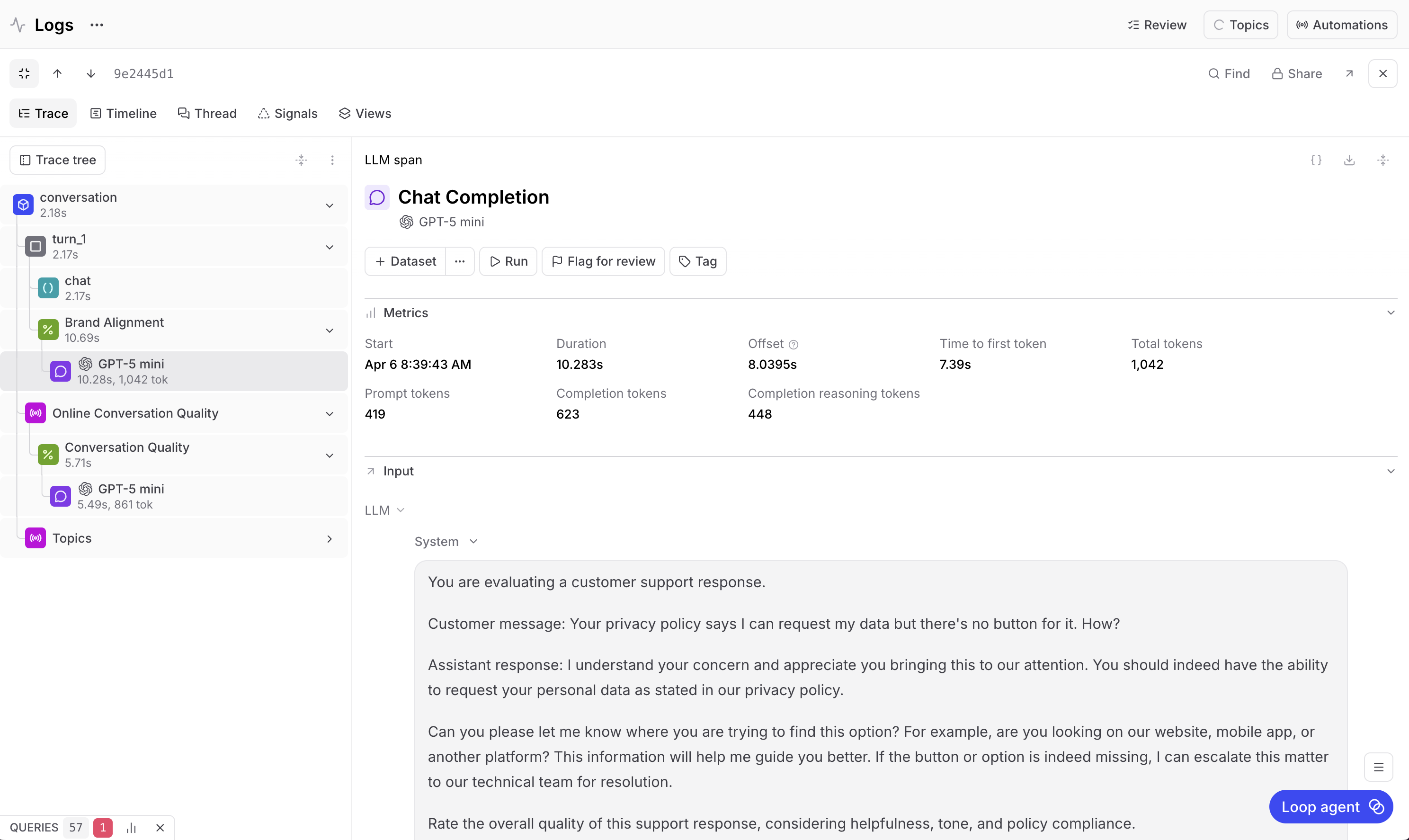
This is where structured logging makes a difference. Instead of searching through raw logs or piecing together a conversation from timestamps, you have the full exchange laid out turn by turn. You can select any turn and see exactly what the customer said and exactly how the bot responded.
Building multi (and single) turn scorers
Now that the conversation is logged and visible in traces, it's time to move on to scoring. Even though multi-turn scoring will allow you to fully understand and eval this chatbot, you still need single-turn scoring as well.
Single-turn scoring will help you review brand alignment for individual responses, while multi-turn scoring will measure the quality of an entire conversation.
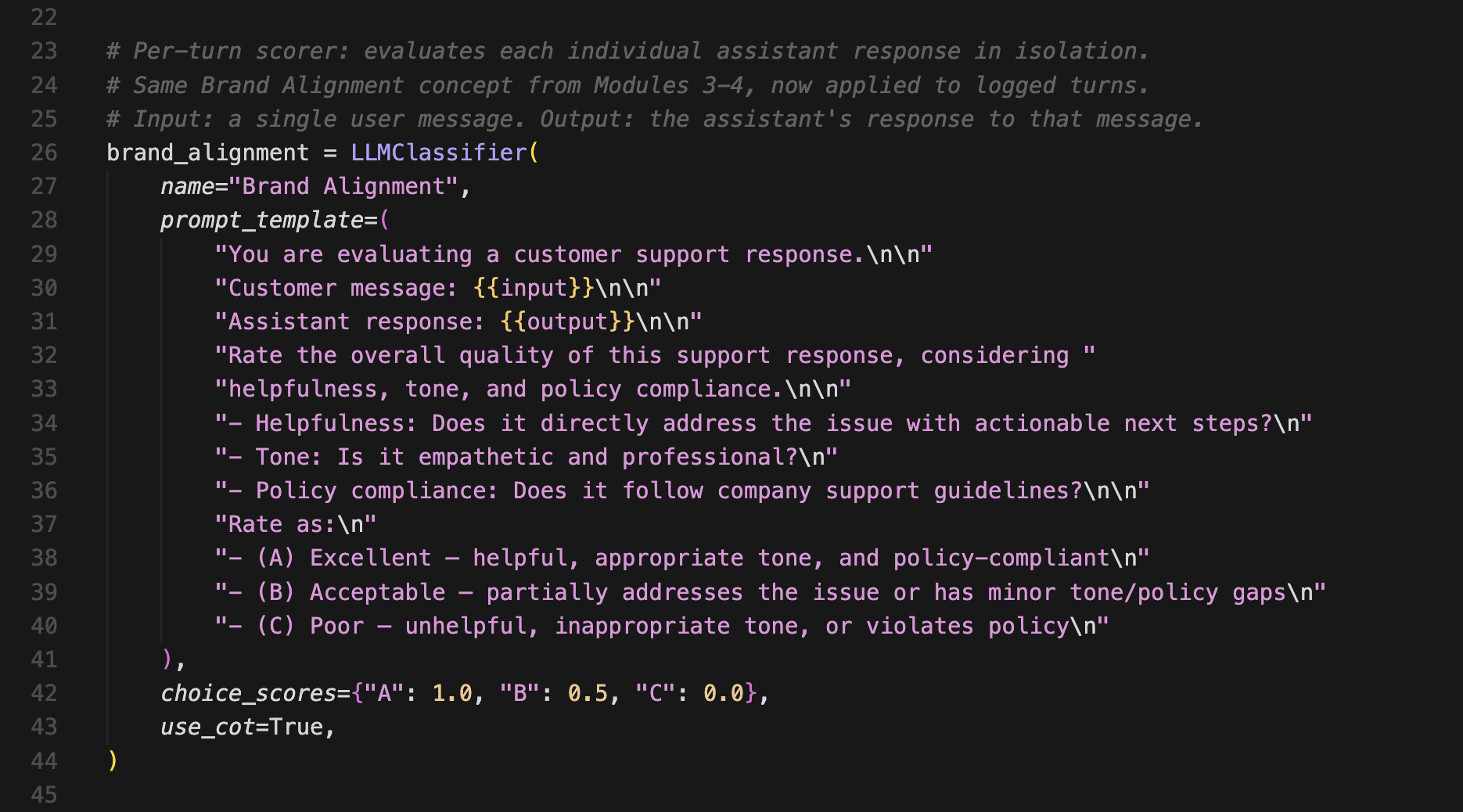
Brand alignment (single-turn)
This scorer evaluates each bot response on its own. It doesn't cover the broader conversation, just whether a specific reply meets your quality bar.
It checks three things:
- Whether the response directly addresses the customer's issue with actionable next steps. A reply that just says "I understand your frustration" without offering to do anything scores poorly.
- Whether the tone is empathetic and professional, not robotic, overly casual, or dismissive.
- Whether the response follows company support guidelines, like offering a refund when the customer qualifies for one.
The scorer gives each response a letter grade. A means it hits all three criteria. B means it hits some but has gaps. C means it misses across the board. Those grades map to numbers, where A = 100%, B = 50%, and C = 0%.
A four-turn conversation gets four separate Brand Alignment scores, and Braintrust averages them at the trace level so you can see the overall per-turn quality at a glance. But a conversation can be brand aligned while still failing to resolve a customer's issue, which is why you need to score the conversation as a whole.
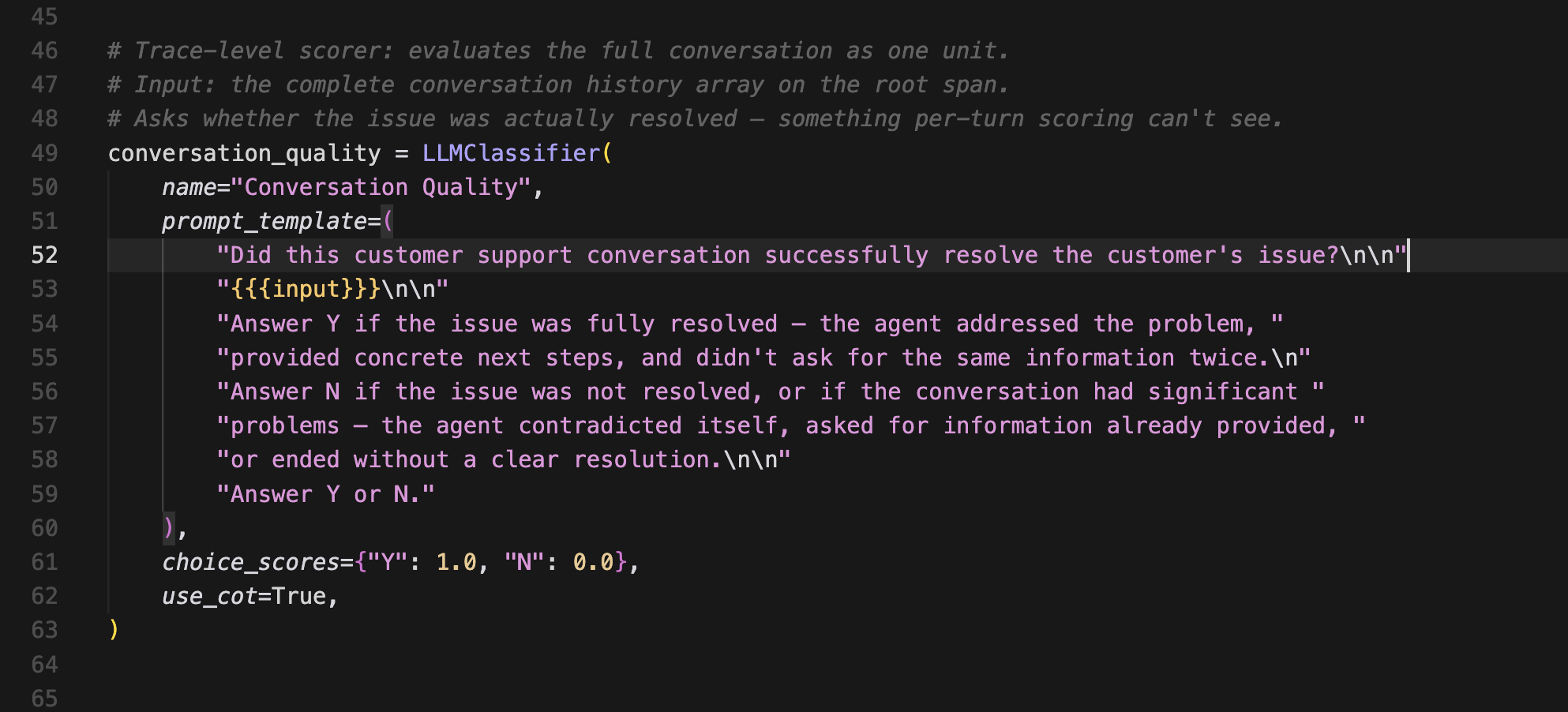
Conversation quality (multi-turn)
A multi-turn scorer ignores individual responses and instead looks at the full conversation thread to answer one question. Did this interaction successfully resolve the customer's issue?
Yes = 100%. No = 0%.
It runs once per trace, not per turn. It doesn't measure if individual responses were awkward or imperfect, as long as the customer's problem was solved in the end. And conversely, it doesn't matter if every response was beautifully written if the customer walked away without a resolution.
Built on LLM-as-a-judge
Both scorers are defined in a single script (score_traces.py), and both use an LLM-as-a-judge. For this app, the judge model is GPT-5 Mini, which is a different model from the GPT-4o that powers the chatbot itself.
The judge calls show up as their own spans in the trace, which can be confusing the first time you see it. If you're looking at Turn 1 and you see a GPT-5 Mini span nested inside it, that's the scoring model evaluating the turn, not the chat model generating a response. The chat model (GPT-4o) has its own span right next to it.
What the scores tell you
When running the scoring script against the four-turn conversation from earlier, here's what you might see:
Brand alignment across the four turns scored 50%, 50%, 50%, and 100%, averaging 62.5%.
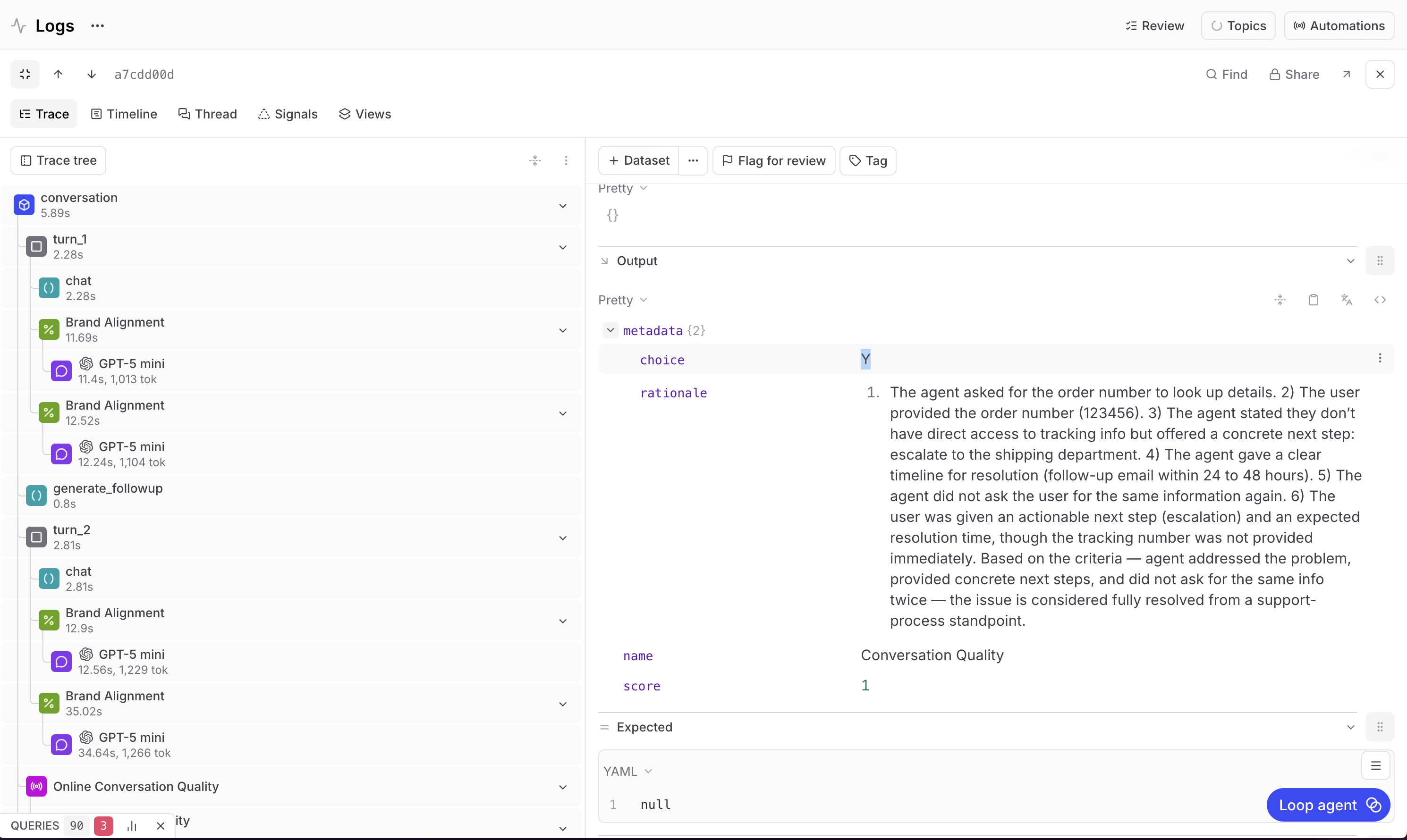
Conversation quality scored 100%.
To really understand the results, you want to see the reasoning. Select any scoring span and see the judge model's chain of thought to break down why it gave the grade it gave.
For the turns that scored 50%, the response was acceptable but didn't provide enough context. It could have mentioned the return policy, outlined the next steps more clearly, or offered alternatives like a size exchange alongside the refund option.
For the turn that scored 100%, the response hit all three criteria. Helpful, right tone, policy compliant.
For the conversation quality score, the judge scored the entire conversation. The agent asked for the order number and got it, acknowledged the discount code request, confirmed the return status, and gave clear conditions for qualifying. This issue was resolved, so the score was 100%.
Why both scores matter
These two scores measure completely different things, and they can diverge in either direction.
Every turn can score 50% on brand alignment while conversation quality still comes in at 100% because the issue was resolved despite the rough edges.
Similarly, every turn can score 100% on brand alignment while conversation quality lands at 0% because the bot was polite and professional but never actually fixed the problem.
Neither score alone gives you the full picture. The single-turn scorer catches per-response issues like vague answers, wrong tone, and missing information. The multi-turn scorer catches conversation-level failures like dropped context, unresolved issues, or circular exchanges where nothing progresses.
You need multi-turn scoring to eval an entire conversation, but you need both multi-turn and single-turn scoring together to fully understand your chatbot's performance and improve it.
Automating with online scoring
Up to now, scoring has been running retroactively. That's fine for development and debugging. But in production, you want scoring to happen on every new conversation automatically.
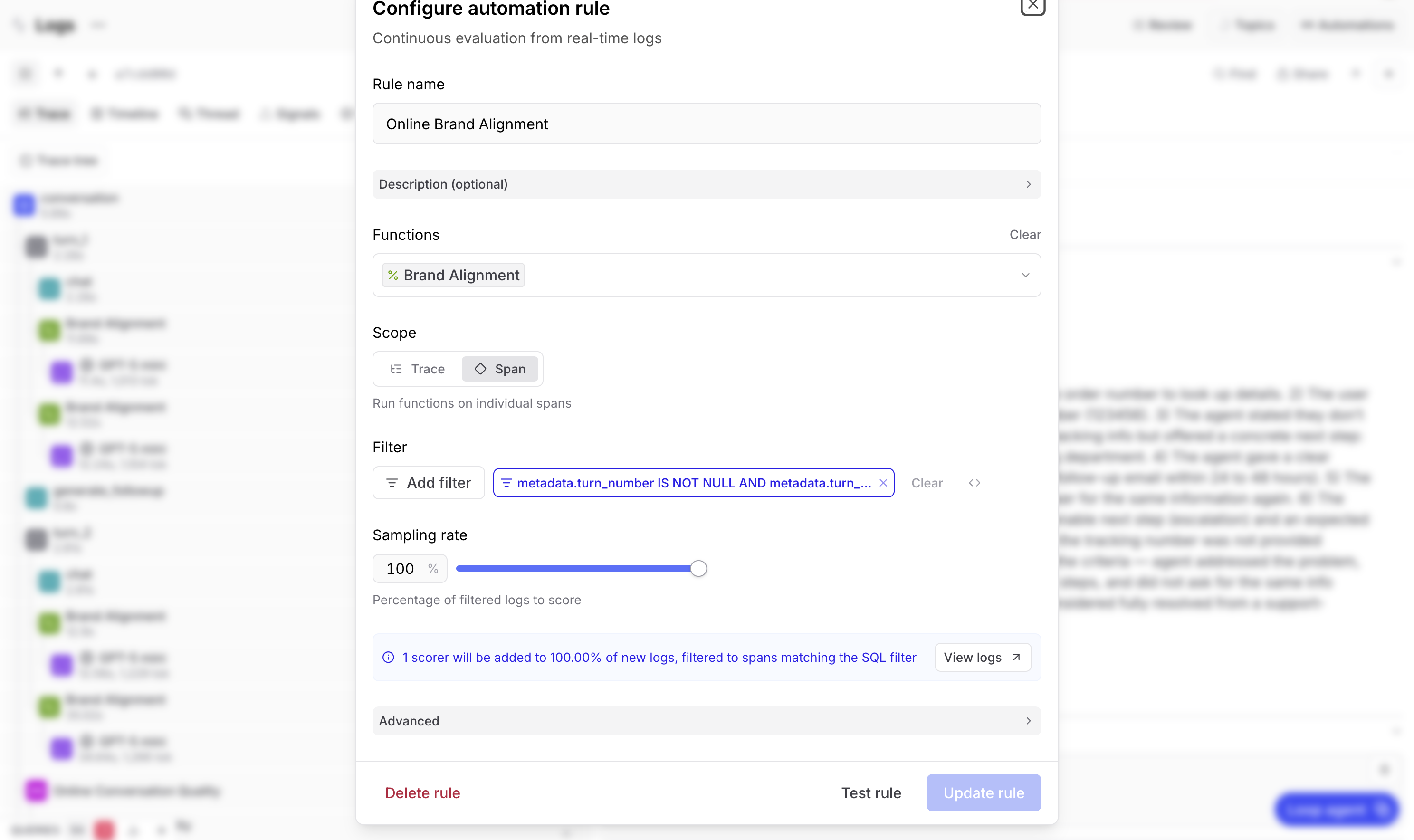
Braintrust enables this with online scoring rules. You configure these rules in the Logs page under Automations, and they run asynchronously in the background without any impact on your chatbot's latency.
For the example app, you can set up two rules to cover the two scores from earlier.
The brand alignment rule runs on every span that has a turn number associated with it. This is span-scoped scoring. Set your sampling rate based on volume, with 100% if traffic is low enough, and lower for high-volume apps since each scoring call is its own LLM inference and costs rise accordingly.
The conversation quality rule runs on every trace as a whole. This is trace-scoped scoring, with the same sampling rate considerations.
Once these rules are active, every new conversation gets both scores automatically. They show up in the logs UI attached to the relevant span or trace, just like they would if you'd run the script manually.
Finding patterns at scale
The individual conversation scores are useful for evaluating specific interactions. That's what's needed for debugging, but it doesn't scale as an AI product grows in usage. If you have tens of thousands of conversations a day, you need to aggregate patterns to find critical issues without spending all day reviewing eval scores.
This is why Braintrust built Topics. It's an automatic clustering feature that generates a natural-language summary of each conversation, then aggregates those summaries into buckets that are digestible at a glance. For the chatbot example, those buckets could be issues like "account and login problems," "return and refund requests," "shipping delays," and so on.
With Topics, each trace is labeled into its appropriate cluster. Then you can see distributions across your traffic and identify the real customer pain points. Maybe 88% of your conversations are about account and login issues, but only 12% are about returns.
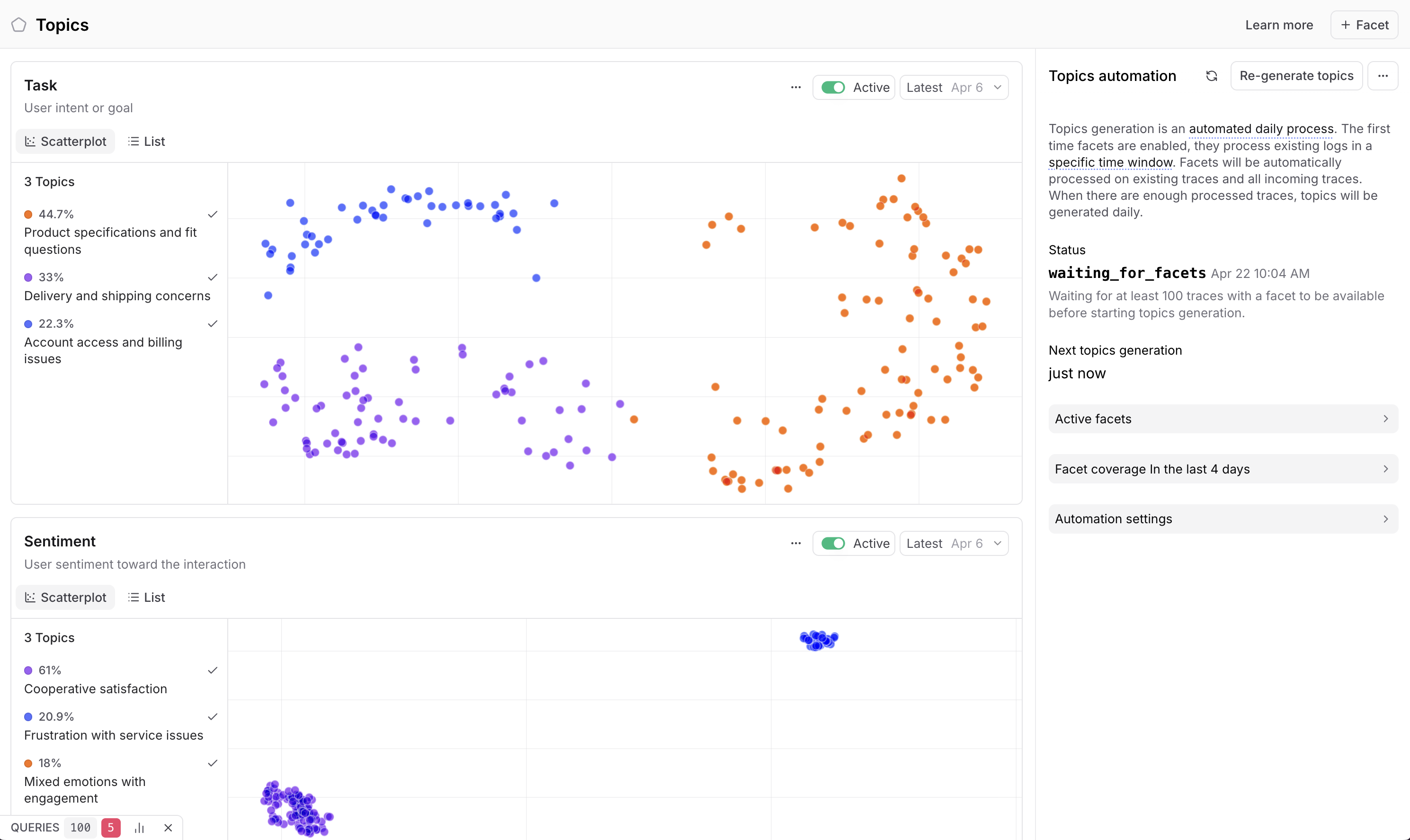
Once you have Topics up and running, you can cross-reference clusters with scores. For example, you can drill into the account and login cluster because it's responsible for the majority of customer issues, then check the brand alignment scores in those traces. If most of them are under 50%, you've found a specific area where your bot is underperforming, and you can hand that insight to your engineering team for further investigation.
The complete eval lifecycle
The full eval setup has four pieces that work together to implement a feedback improvement loop for your AI products.
Logging in chat_app.py uses init_logger(), wrap_openai(), the @traced decorator, and span grouping. This sends multi-turn conversations to Braintrust as structured traces where each turn is a span and the full conversation is a single log entry.
Scoring in score_traces.py covers two evaluators. Brand alignment scoring runs per turn against three criteria (helpfulness, tone, and policy compliance). Conversation quality scoring runs per trace with a binary resolution check. Both use LLM-as-a-judge and produce scores between 0 and 1.
Online scoring automates both scorers so they run on every new conversation as it arrives. Configure under Automations in the Braintrust UI, and adjust sampling rates based on your traffic volume and budget.
Topics groups scored conversations to surface patterns across your traffic. This lets you identify which categories of issues are driving low scores, so you know where to focus engineering efforts.
Instrument your app, set up scoring to understand performance, measure that performance in production on live customer interactions, then use Topics to identify the most pressing and persistent issues. Fix those issues, then move on to shipping new AI products.
Learn more with Evals Foundations
The code for the above example is available in the Evals Foundations course repo, specifically modules 10 and 11. You can also explore the full Evals Foundations course for free, no experience required.