

7 best prompt management tools in 2026 (tested and compared)
- Best overall (editing, versioning, evaluation integration, environment deployment): Braintrust
- Best no-code prompt editor: PromptLayer
- Best for prebuilt evaluators and runtime guardrails: Galileo AI
- Best for open-source prompt management with built-in evaluation: Agenta
- Best for branching and merging prompts: PromptHub
- Best for existing W&B users: W&B Weave
- Best for CLI-based testing and red teaming: Promptfoo
Without a dedicated prompt management system like Braintrust, teams store prompts in code but coordinate changes through Notion docs, Slack threads, or code comments, which creates chaos when an AI feature breaks in production. Engineers spend hours comparing text files to identify changes because no one knows which prompt version is running.
Prompt management tools bring order to this chaos by tracking changes, connecting prompt updates test results, and providing teams with a shared workspace for iteration. Teams using dedicated prompt management tools ship faster and catch regressions before users notice them. In this article, we'll overview leading prompt management tools.
What is prompt management?
Prompt management refers to the systems and practices teams use to version, organize, test, and deploy prompts across different environments. Prompt management treats prompts as configurable assets that can be updated, rolled back, and monitored independently of software releases.
Prompt management platforms help teams track every change to their prompts, control which versions run in different environments, and collaborate without overwriting each other's work. Most platforms include:
- Version control and history: Every prompt change is saved with a unique identifier. Teams can compare versions, see what changed, and revert to previous versions when needed.
- Environment management: Prompts move through separate environments (development, staging, production) before reaching users. This prevents untested changes from affecting live applications.
- Collaborative editing: Product managers, engineers, and subject matter experts work on prompts in a shared interface. Changes are tracked by author and timestamp.
The 7 best prompt management tools in 2026
1. Braintrust
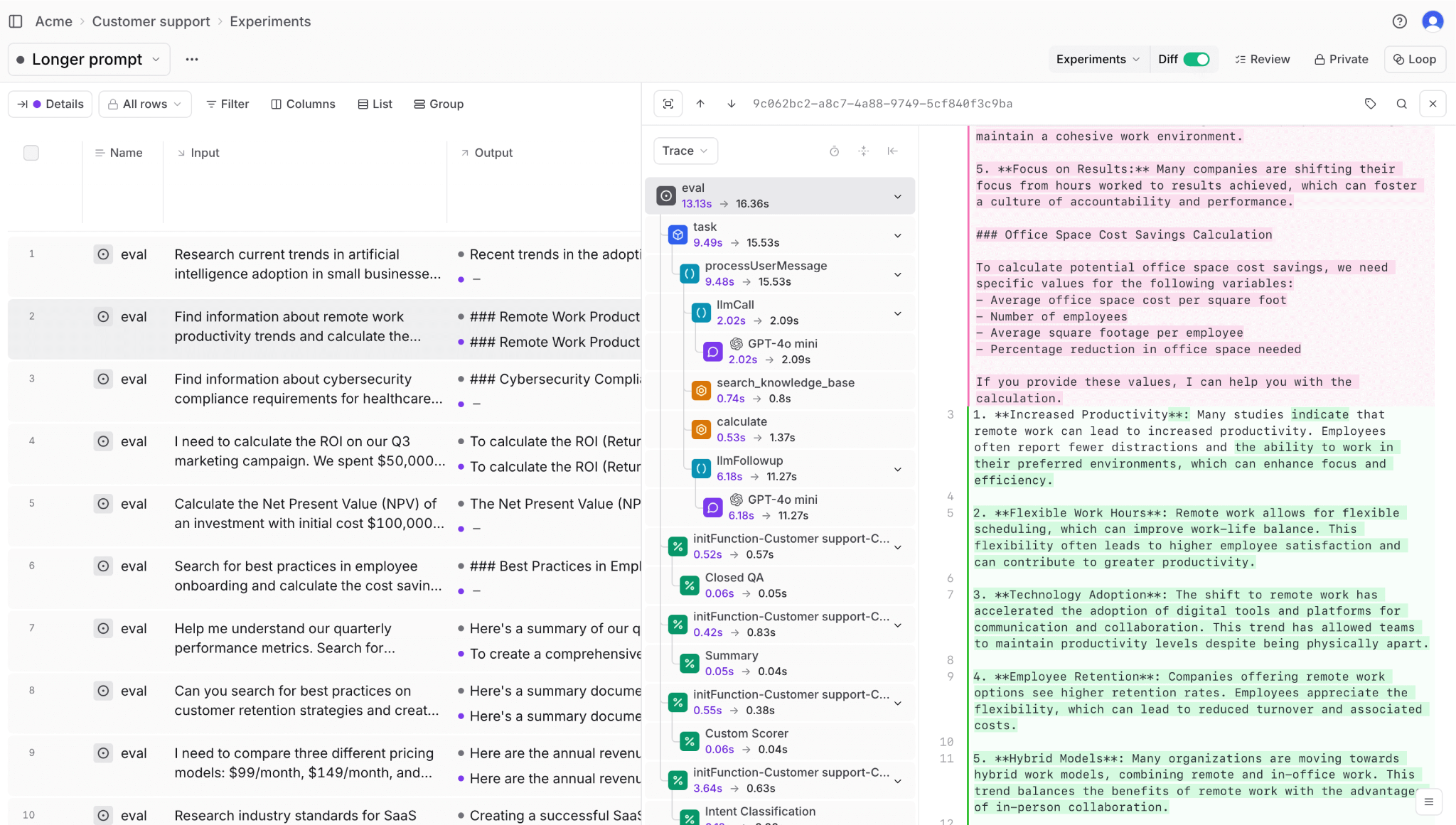
Braintrust lets you version prompts, test them against real data, and deploy them across environments from one platform. Loop, Braintrust's AI co-pilot, enables non-technical teams to iterate on prompts through natural language instructions to automatically generate test datasets, run evaluations, and optimize prompts without writing code.
Braintrust's environment-based deployment separates it from competitors. Braintrust allows setting up separate environments for development, staging, and production. Prompts move through each environment only after passing defined quality gates. A prompt that fails evaluation in staging never reaches production automatically.
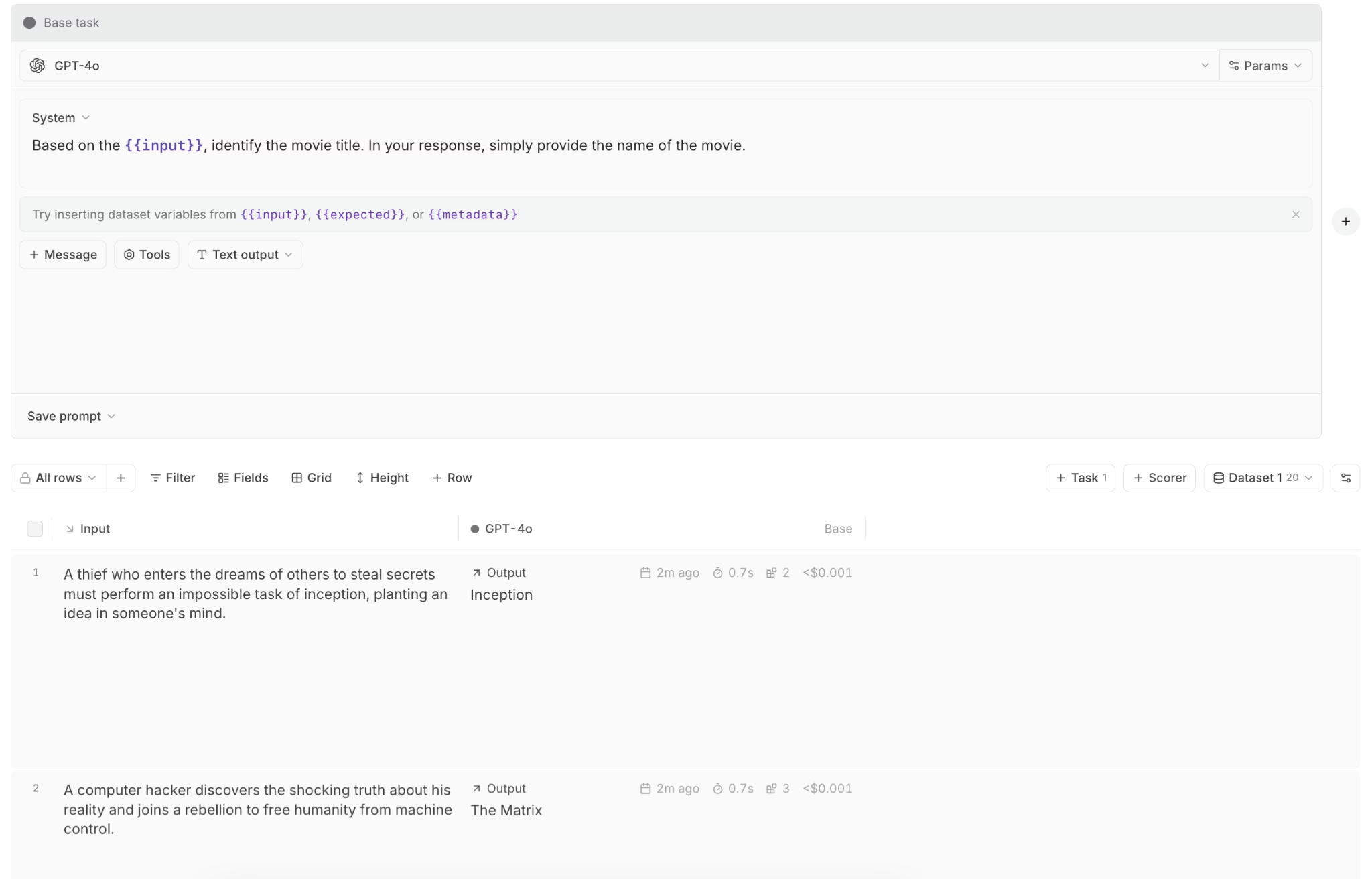
The prompt playground tests prompts on real data, swaps models, and compares outputs side by side. Engineers update prompts directly in the application code using the SDK, while product managers review and refine those same prompts within the playground. Prompt edits sync bidirectionally, so neither workflow blocks the other.
Braintrust's GitHub Action runs evaluations whenever a prompt changes in a pull request. This GitHub integration ensures prompt updates follow the same review and validation process as code changes. Once prompts reach production, Braintrust tracks which version is serving live traffic. If a prompt starts producing lower-quality outputs, the Braintrust dashboard surfaces the quality drop alongside the specific prompt version responsible. Working in the background, Topics classifies every production trace by intent, sentiment, and recurring issue (with custom facets you can define), so a regression from a prompt edit shows up as a pattern across traffic instead of something you have to go hunting for.
Best for
Product teams that need to iterate quickly on prompts with robust evaluations to ensure changes improve accuracy.
Pros
- Loop automates dataset creation, scorer generation, and prompt optimization from natural language instructions
- Playground enables side-by-side model comparison, parameter tuning, and real-time team collaboration in one interface
- Prompt slugs let users configure prompts in the Braintrust app and reference them directly in code
- Production failure automatically becomes a quality check parameter that prevents repeating the same error
- Built-in dataset management links test cases directly to prompt versions for systematic quality tracking
- Prompt variables support complex templating with type validation and auto-complete in the editor
- Export/import functionality enables prompt portability across environments and backup workflows
Cons
- Best results require adopting structured evaluation practices alongside versioning
- Learning curve for teams new to systematic prompt testing and quality measurement
Pricing
Free tier with 1 GB processed data and unlimited users. Pro plan at $249/month. Enterprise pricing available on request.
2. PromptLayer
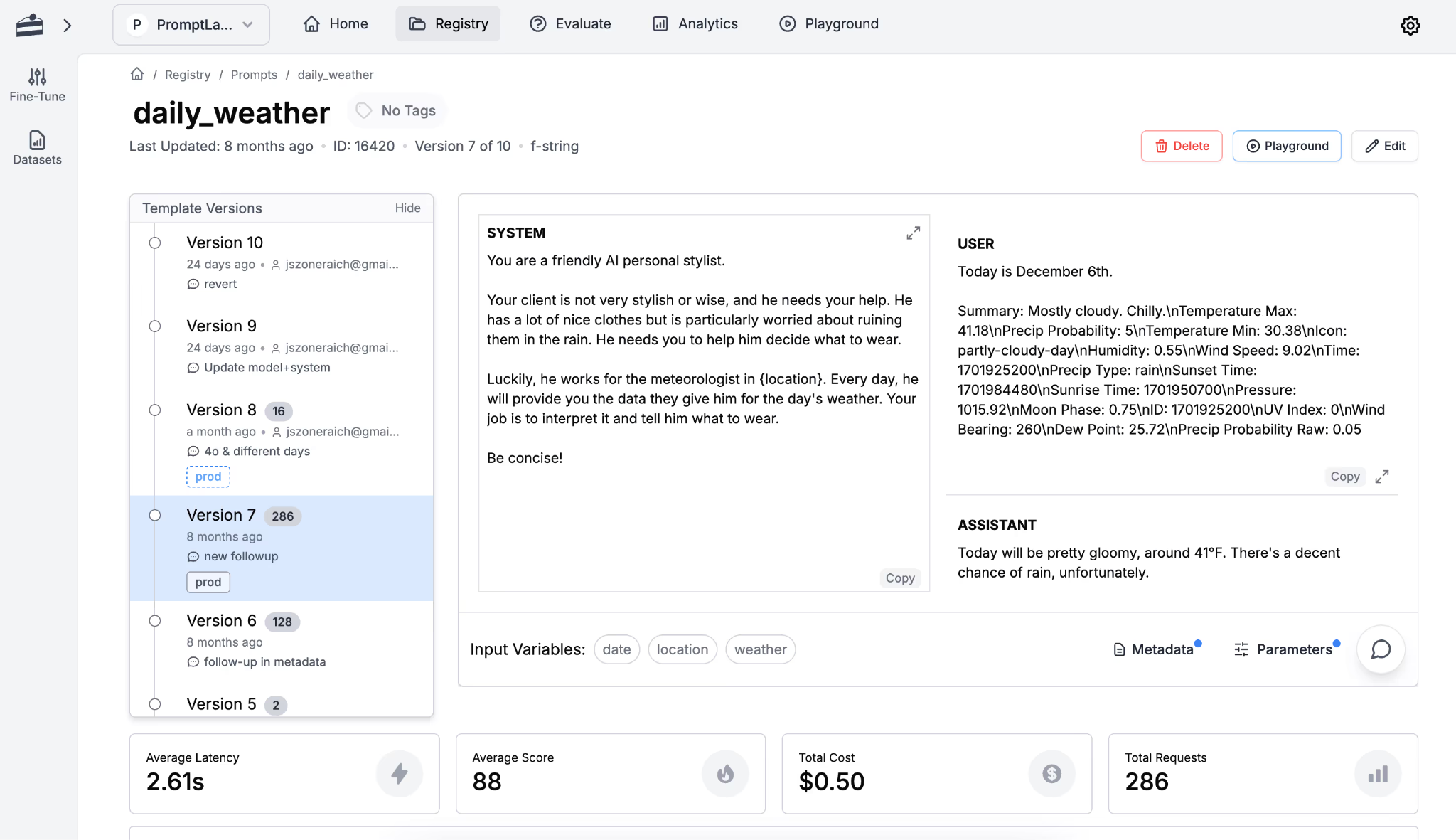
PromptLayer connects your application to LLM providers, logs all requests, and provides a visual workspace for managing prompt versions and deployments. It's built for non-technical teams, allowing anyone to edit prompts, test variations, and push changes live without writing code or waiting on engineering resources.
Best for
When non-technical staff need to update and deploy prompts through a visual interface.
Pros
- Visual editor requires no code for prompt creation and versioning
- Jinja2 and f-string templating for dynamic prompts
- Built-in A/B testing with traffic splitting
- Automatic logging captures all LLM requests with metadata
- One-click model switching across OpenAI, Anthropic, and others
Cons
- CI/CD integration requires manual setup compared to platforms with native pipeline automation
- The evaluation framework is less comprehensive than dedicated testing platforms
- Acts as a proxy layer that may introduce latency for time-sensitive applications
- Limited native support for complex multi-step agent workflow orchestration
Pricing
Free tier with 10 prompts and 2,500 requests/month. Paid plan starts at $49/month. Enterprise pricing with self-hosting available on request.
3. Galileo AI
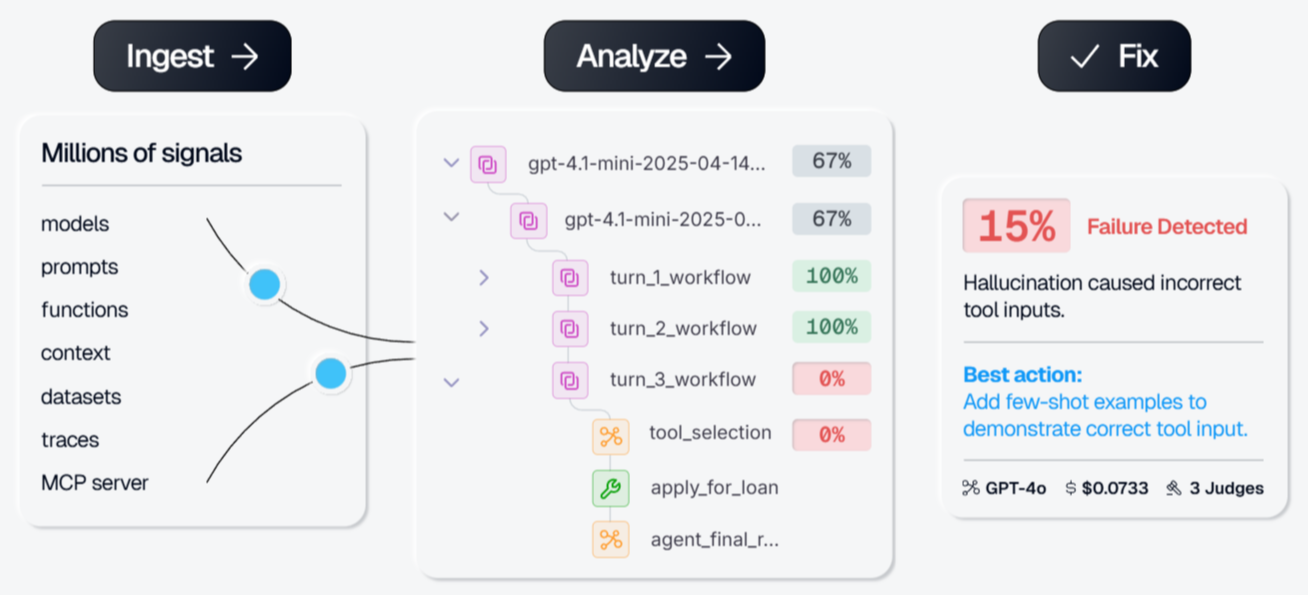
Galileo is a managed, proprietary AI evaluation and observability platform that ships with vendor-maintained evaluators and runtime guardrails out of the box. It includes 20+ built-in metrics such as hallucination detection, Context Adherence, Chunk Attribution, Completeness, and Correctness, scored at low latency by Luna-2, a family of small language models tuned for evaluation. Galileo Insights surfaces failure modes and root causes across eval runs, and Continuous Learning via Human Feedback (CLHF) lets you tune metric behavior with annotated examples. Prompt management is here too, but it sits behind the eval and guardrail focus rather than being a first-class versioning workflow.
Best for
Teams that want vendor-managed evaluators and inline guardrails without building their own, rather than teams whose primary need is collaborative prompt versioning.
Pros
- 20+ vendor-maintained metrics (hallucination detection, Context Adherence, Chunk Attribution, Completeness, Correctness) work out of the box
- Luna-2 evaluation models deliver low-latency inline scoring without a heavyweight LLM
- Galileo Insights detects failure modes and runs root-cause analysis across eval runs
- Runtime guardrails intercept unsafe or off-policy outputs before users see them
- Integrates with CrewAI, LangGraph, OpenAI Agents SDK, LlamaIndex, Strands, and OpenTelemetry
Cons
- Prompt management and versioning are limited and secondary to the eval and guardrail focus, making it weak for collaborative prompt experimentation and shared PM-plus-engineer workflows
- Closed and proprietary, so you can't audit or extend the evaluators yourself
- Galileo Insights is failure-fed: it surfaces failures rather than continuously classifying every production trace by intent, sentiment, and issue
- Runtime guardrails and self-hosting are Enterprise-only, and the free tier is a tiny ~5,000 traces/month
Pricing
Free tier with ~5,000 traces/month. Pro starts around $100/month (~50,000 traces with usage-based overages). Enterprise pricing is custom and required for runtime guardrails and for self-hosting (SaaS, VPC, and on-prem deployment).
4. Agenta
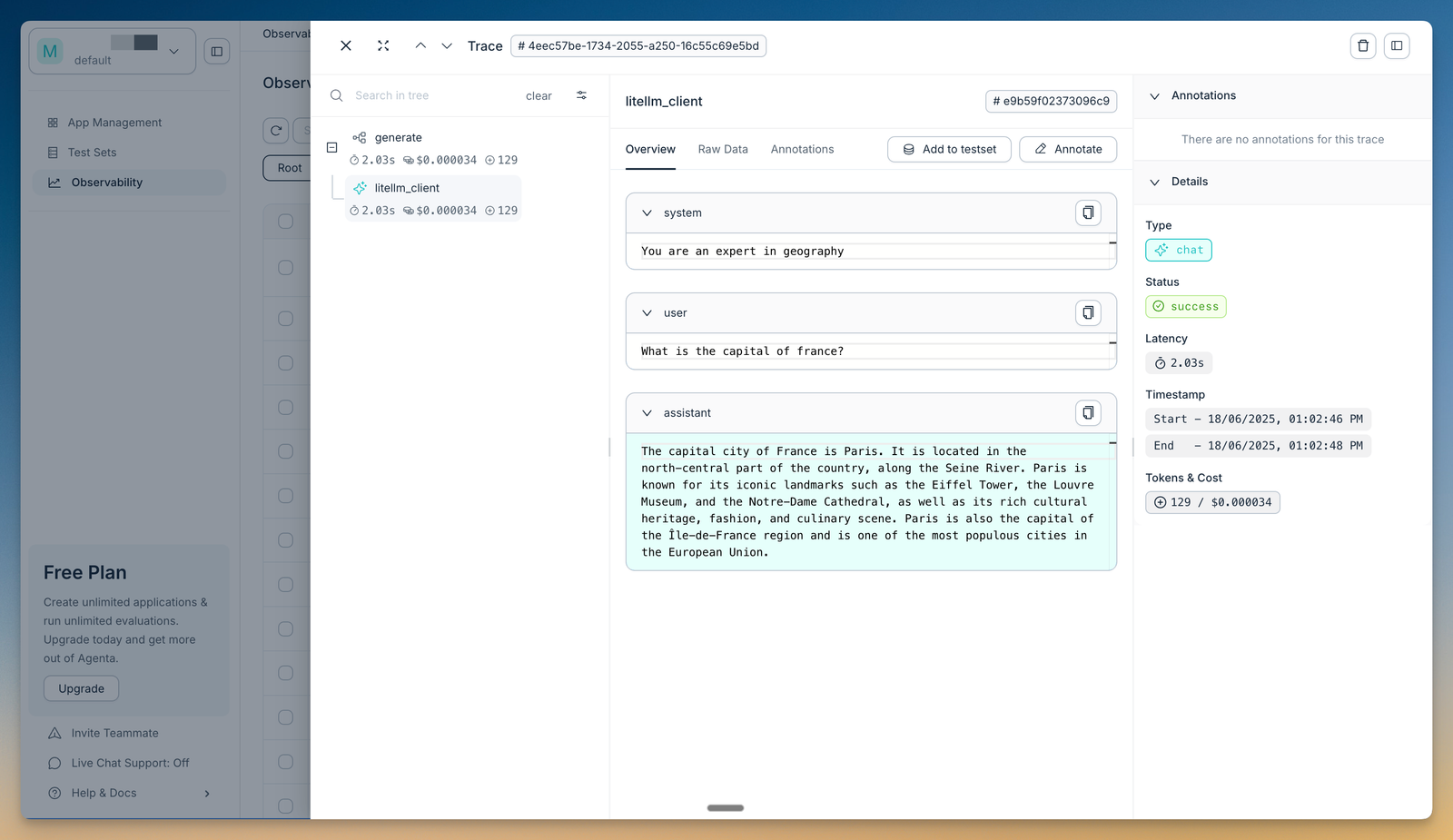
Agenta is an open-source, MIT-licensed platform that combines prompt management, a playground, evaluation, and observability. The playground compares prompts and models side by side and keeps a complete version history, so teams can deploy prompt changes without code modifications. Evaluation covers automated LLM-as-a-judge and custom scorers across the full trace as well as human annotation, and tracing lets you pinpoint where a request failed. The functional features are self-hostable, which suits teams that need to keep prompt data on their own infrastructure.
Best for
Teams that want an open-source, self-hostable platform pairing prompt management with built-in evaluation.
Pros
- Open-source and MIT-licensed, with a self-hostable core and no vendor lock-in
- Playground compares prompts and models side by side with complete version history
- Deploy prompt changes without code modifications
- Automated and human evaluation, with traces you can annotate with team feedback
- Integrates with LangChain, LlamaIndex, and OpenAI
Cons
- Evaluation is capable, but release control and CI/CD gating are less of a focus than on platforms built around merge-blocking checks
- Large-scale production trace workflows are not the primary emphasis
- The free tier caps at 2 seats and 5,000 traces per month
Pricing
Hobby tier is free with 2 seats, 5,000 traces per month, and unlimited prompts. Pro starts at $49/month, Business at $399/month, and Enterprise pricing is custom. Self-hosting the open-source version is free.
5. PromptHub
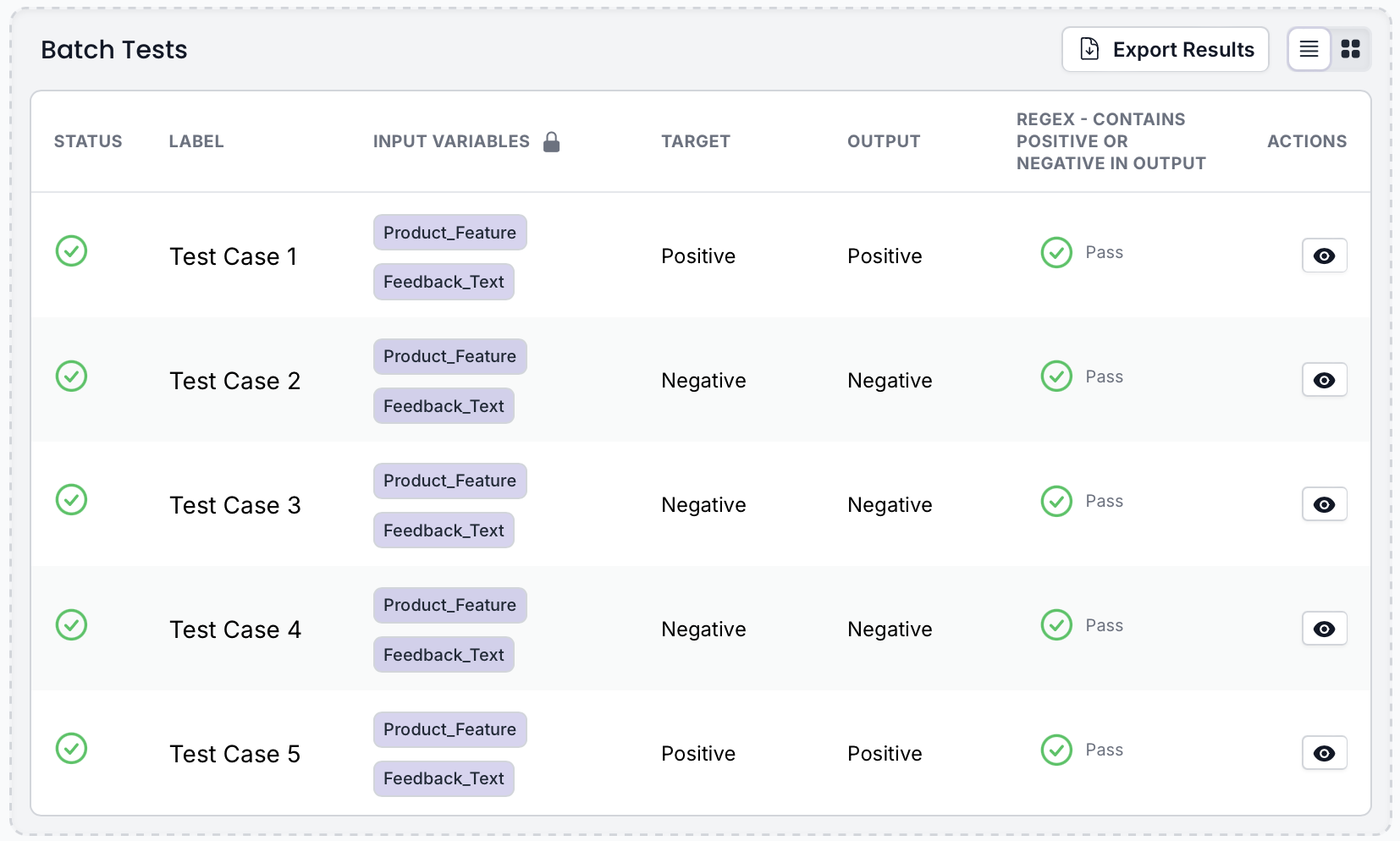
PromptHub provides Git-style version control for prompts, letting teams branch, commit, and merge prompt changes the same way they manage code. PromptHub includes a REST API to retrieve prompts at runtime, CI/CD guardrails that block deployments of low-quality prompts, and prompt chaining for multi-step workflows.
Best for
Organizations that want to manage prompts with Git-style branching, merging, and pull request workflows.
Pros
- Git-based versioning with branching, commits, and merge workflows
- Prompt chaining for multi-step reasoning pipelines
- CI/CD guardrails block secrets, profanity, and regressions before deployment
- REST API retrieves prompts with variable injection
- Community library for discovering and sharing prompts
Cons
- Evaluation features are more basic than dedicated testing platforms
- Versioning is Git-style but lacks deeper production lifecycle controls
- Limited support for environment-based deployment workflows
- Less suitable for teams needing advanced observability or CI-driven checks
Pricing
Free tier with unlimited seats, no private prompts, and limited API access. Paid plans start at $12/month for a single seat ($20/user/month for teams). Enterprise pricing available on request.
6. Weights & Biases (W&B Weave)
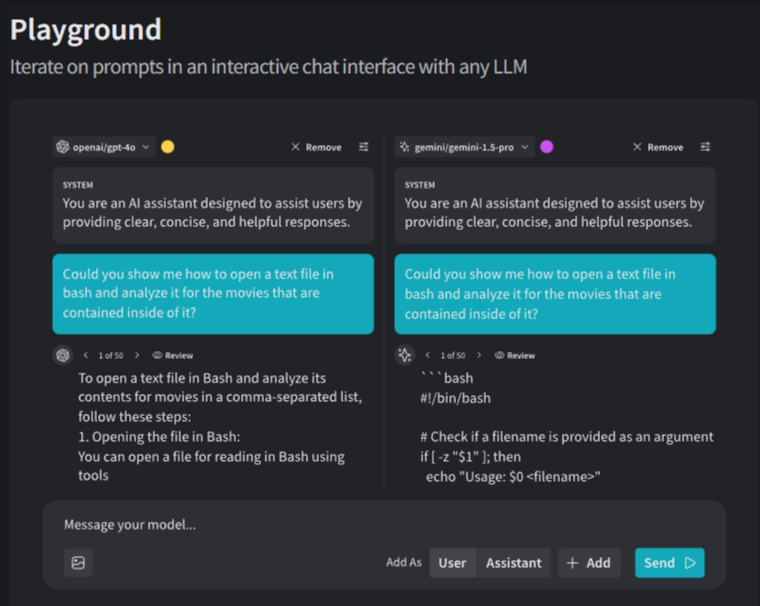
W&B Weave adds prompt management to the Weights & Biases ML experiment platform. You can iterate on prompts in an interactive playground, compare outputs across different models, and track prompt performance through evaluation leaderboards. Weave integrates with your existing W&B setup, so teams already using Weights & Biases for ML experiments can manage prompts without adding another tool.
Best for
Existing Weights & Biases users for ML experiments who want to add prompt management to their existing setup.
Pros
- One-line instrumentation with @weave.op decorator
- Interactive playground for prompt iteration
- Evaluation leaderboards compare prompt/model combinations
- Guardrails detect harmful outputs and prompt attacks
Cons
- Prompt-specific workflows (environment deployment, PM collaboration) are less developed than dedicated tools
- Learning curve if you're unfamiliar with W&B concepts like runs and artifacts
- Production deployment features require custom solutions
Pricing
Free tier with limited seats, storage, and ingestion. Paid plans start at $60 per month. Enterprise pricing available on request.
7. Promptfoo
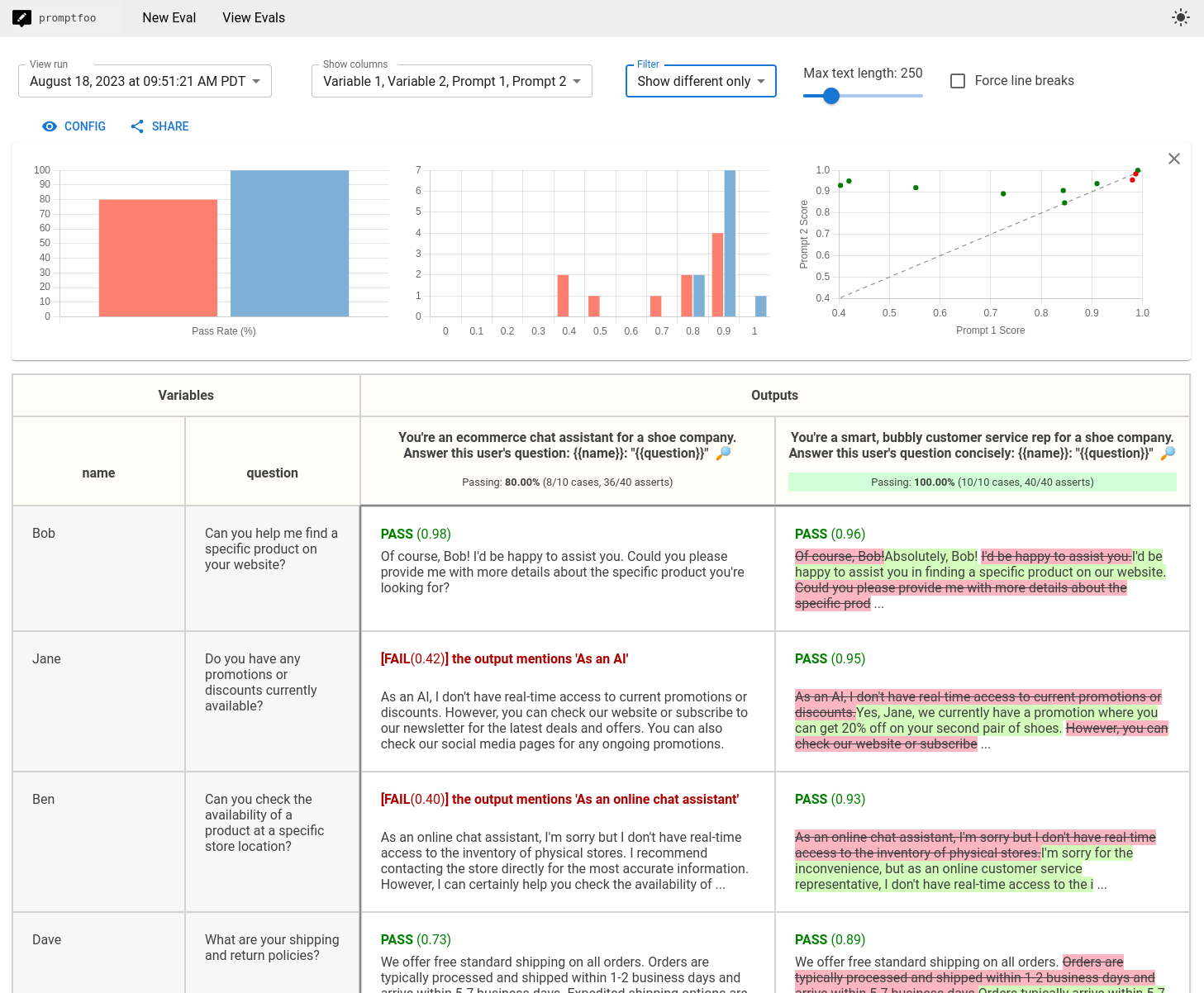
Promptfoo is an open-source command-line tool for evaluating and testing LLM prompts and applications. Prompts and test cases are defined in configuration files such as YAML that live in the code repository, allowing teams to run batch evaluations across different models and prompt variations. Promptfoo also includes built-in security scanning to detect issues like prompt injection, PII exposure, and jailbreak risks.
Best for
Teams that manage prompts through command-line tools and operate in regulated industries where vulnerability scanning is essential.
Pros
- Fully open-source with no feature restrictions
- Declarative YAML/JSON configs version in Git
- Built-in red teaming: PII leaks, prompt injections, jailbreaks, toxic outputs
- Native CI/CD integration across major platforms
Cons
- Requires technical expertise: YAML configs, CLI, JavaScript/Python for advanced use
- No pre-built test scenarios require teams to create all test cases manually
- Self-hosting requires infrastructure management
Pricing
Free tier with unlimited open-source use and up to 10k red-team probes per month. Enterprise pricing is customized based on team size and needs.
Best prompt management tools compared
| Tool | Starting Price | Best For | Notable Strength |
|---|---|---|---|
| Braintrust | Free (Pro: $249/month) | Teams running prompts in production who care about output quality and user experience | Evaluation-first prompt management with environment deployment, Loop for no-code prompt optimization, CI checks, and production monitoring |
| PromptLayer | Free (Pro: $49/month) | Non-technical teams editing and deploying prompts | No-code visual editor with A/B testing and model switching |
| Galileo AI | Free ~5k traces (Pro: ~$100/month) | Teams wanting vendor-managed evaluators and runtime guardrails | 20+ built-in metrics with Luna-2 scoring and runtime guardrails (Enterprise-only) |
| Agenta | Free (Pro: from $49/month) | Open-source prompt management with built-in evaluation | Self-hostable playground, prompt management, and evaluation in one MIT-licensed platform |
| PromptHub | Free (Paid from $12/month) | Teams that want Git-style prompt workflows | Branching, merging, and CI guardrails for prompts |
| W&B Weave | Free (Paid from $60/month) | Existing Weights & Biases users | Extends ML experiment tracking to LLM prompts |
| Promptfoo | Free open source (Custom enterprise pricing) | CLI-driven teams in regulated environments | Batch testing and red-team security scanning |
Protect user experience with every prompt change. Start free with Braintrust.
Why Braintrust is the best prompt management tool
Most prompt management tools focus on versioning. They store prompts, track edits, and allow rollbacks when something breaks. That helps teams see what changed, but it does not show whether those changes improved results.
Braintrust connects versioning directly to quality measurement. Loop enables product teams to iterate on prompts through natural language, automatically generating test datasets and running evaluations. Every prompt update is evaluated against real test data, so teams can see whether output quality improves or degrades before changes reach users. Once deployed, Braintrust monitors live traffic and surfaces quality drops as they happen. Versioning, testing, and production monitoring all live in one system, making it easy to trace any issue back to the exact prompt change that caused it.
This level of control prevents revenue loss and compliance violations when AI quality directly affects customer trust. Version history alone cannot trace production failures back to specific prompt changes that caused them.
Teams at Notion, Stripe, Zapier, and Vercel use Braintrust to manage prompts in production. Notion went from catching 3 issues per day to 30 after adopting Braintrust and shipping changes with more confidence.
Start with Braintrust's free tier to see how it can help your team ship prompt changes safely and protect user experience before issues reach production.
Prompt management FAQs
What is prompt management?
Prompt management is the practice of treating prompts as production assets. It includes versioning, testing, and controlled deployment so teams can track changes, validate quality, and understand how prompts behave in real applications before and after release.
How do I choose the right prompt management tool?
Start with your workflow needs. If measuring prompt quality through evaluation is critical, choose a platform that ties versioning directly to testing, such as Braintrust. If non-technical teams need to edit prompts independently, no-code tools like PromptLayer are a good fit. Teams that want vendor-managed evaluators and inline runtime guardrails out of the box may consider Galileo AI, though its prompt management is secondary, so read our guide on Galileo AI vs. Braintrust before committing. Teams with strict data residency or CLI-driven workflows may prefer open-source options such as Promptfoo.
Which products help me optimize prompts with AI?
Braintrust's AI assistant, Loop, automatically optimizes prompts. Loop generates test datasets, runs evaluations, and iterates on prompts based on natural language instructions, enabling product teams to improve prompt quality without manual testing. Loop's conversational approach to optimization is unique in combining dataset generation, evaluation, and iteration in one AI-powered workflow.
What are the best alternatives to PromptLayer?
Braintrust is a strong alternative for teams that need testing and quality validation in addition to collaboration. PromptLayer works well for no-code prompt editing, but its evaluation capabilities are more limited. Braintrust offers similar collaboration features while adding environment-based deployment, automated evaluation, and production monitoring, making it suitable for teams that need testing, deployment controls, and production monitoring alongside collaboration features.