

Developers building AI features must choose a model for every new use case. Picking the model that scored highest on a benchmark or reusing the model selected in a previous project often leads to uneven results, because benchmarks measure performance on standardized datasets rather than the inputs your product will receive.
Braintrust supports structured model testing before a model reaches production by running multiple models on the same real inputs, automatically scoring each output, and comparing models based on measurable results rather than preference. This guide walks through the exact workflow for generating a reproducible, scored comparison of AI models.
Why developers test AI models before shipping
Published model benchmarks show how a model performs on predefined evaluation datasets designed to measure general capabilities, but do not show how that model handles real inputs, required output format, or the edge cases users generate in production. Three factors usually determine whether a model fits a specific use case:
Output quality: The most visible factor, but it is also the hardest to evaluate without automated scoring because two responses can appear reasonable at first glance, while one contains factual errors.
Cost: Varies widely across providers. Two models may produce similar output quality for a summarization task while differing significantly in cost per token.
Latency: Directly affects user experience, and higher-quality models often run slower.
Model providers also regularly update models, and behavioral changes are not always announced, so a configuration that scored well six months ago may behave differently today, and earlier results cannot be assumed to hold indefinitely. Running a consistent evaluation suite on a schedule allows teams to detect regressions early and address them before users encounter degraded responses.
How to test AI models with Braintrust
Model testing works best when results are organized in a test matrix. Each row represents a model, each column represents a prompt variant, and each cell records the score produced when the model runs on the same dataset. Running the same dataset across multiple models and prompts makes it easy to compare output quality, cost, and latency.
| AI model | Prompt A | Prompt B |
|---|---|---|
| GPT-4o | Score | Score |
| Claude Sonnet 4 | Score | Score |
| Gemini 2.5 Flash | Score | Score |
The steps below show how to build and evaluate a model testing matrix using Braintrust.
Step 1: Define your dataset
A dataset is the fixed set of inputs you test every model against, and using the same dataset across runs is what makes comparisons reliable. When each run uses different test cases, score differences can arise from input changes rather than model behavior, preventing direct comparison even if each individual run looks fine.
Real user data produces the most useful test cases. For a support bot, pulling 50 to 100 real customer questions from an existing support queue gives a more accurate signal than generic examples, because generic inputs are usually cleaner and more predictable than real user queries. Cleaner inputs often inflate eval scores and hide failures that only show up once real traffic reaches production.
Braintrust versions datasets inside your project so every experiment can be pinned to the exact dataset version used during testing. Each entry holds an input field for the query or document, an optional expected field for the ideal output, and a metadata field for any context you want to filter on in the results view. When labeled ground truth is unavailable, Braintrust's LLM-as-a-judge scorers evaluate output quality without needing a reference answer.
Datasets can be uploaded as CSV or JSON directly from the Braintrust UI under the Datasets tab, and every change is versioned automatically, so experiments remain comparable over time. As evaluation volume grows across the full AI workflow, Brainstore keeps review workflows responsive because it is designed for high-scale AI workloads, making search and filtering fast even at large scale.
Step 2: Manage your prompts
Testing models without versioned prompts makes results hard to reproduce. If the prompt changes between runs, a score difference could be due to the prompt rather than the model.
Braintrust treats prompts as versioned objects inside your project. Every edit creates a new version, experiments can be pinned to a specific version ID, and older versions can be restored without losing history. Prompts use Mustache templating to inject variable inputs at runtime without changing the prompt text. Example prompt:
"You are a support agent. Respond clearly and accurately using product documentation.

Question: {{input}}"
Creating prompt variants in Braintrust is simple. Author each variant with a distinct name and slug, and Braintrust tracks every subsequent change to it. When comparing models, the prompt should stay constant across runs. Changing both the model and the prompt in the same run makes it impossible to attribute a score change to either factor.
Step 3: Choose your models
Comparing models across providers often adds overhead because each provider has its own API keys, SDK setup, and request formats. Braintrust's gateway reduces that overhead by providing a unified API to access models from OpenAI, Anthropic, Google, AWS, and other providers through a single API key. Provider keys are added once in the Braintrust organization settings, and models can be referenced by name in an eval without additional setup.
import braintrust as bt

result = bt.llm.complete(
    model="gpt-4o",
    prompt="Summarize: {{input}}",
    variables={"input": "Text here..."},
)
For early comparisons, choose models that reflect the tradeoffs the application may need to make in production. Include at least one higher-quality model, one lower-cost model, and one speed-optimized model, then run all of them against the same dataset and the same prompt version. Running the same inputs across that set produces a decision based on measured output quality, cost, and latency.
Switching from one provider's model to another in Braintrust only requires changing a model identifier. The gateway normalizes the request format across providers, so the task code and scorer configuration do not need to change when the model changes.
Step 4: Run your eval
The Eval() function is the core building block for running an evaluation in Braintrust. It takes your dataset, runs each input through your model, automatically scores the outputs, and stores the results as a named experiment. Braintrust provides ready-to-use scorers through the autoevals library. The Factuality scorer is an LLM-as-a-judge scorer that checks whether the model's output is factually consistent with the expected answer, returning a score between 0 and 1. The Levenshtein scorer measures string similarity for structured output tasks, and ClosedQA evaluates question-answering quality.
Custom scoring is also supported when built-in scorers do not fit the task:
def contains_keywords(output, expected_keywords):
    return all(k in output for k in expected_keywords)
To compare multiple models, create a separate Eval() block for each model, using the same dataset and scorer. Setting a metadata tag for model and prompt version in each eval block makes those values available as filter dimensions in the Braintrust UI, so results across experiments can be isolated and compared without manually cross-referencing runs.
Step 5: Run your experiment
Braintrust gives three ways to run an eval, depending on the context.
From the command line, running npx braintrust eval eval.ts creates a named experiment in the project and prints a score summary in the terminal. The --watch flag automatically re-runs the eval whenever the file is saved, which speeds up prompt iteration during active development.
From the Braintrust UI, navigating to Evaluations, then Experiments, then clicking New Experiment allows you to select a prompt, dataset, and scorer, and run the experiment without writing code. This path is useful for non-engineers on a team who need to test a prompt change independently.
In CI/CD, the braintrustdata/eval-action integrates evals directly into a pull request pipeline via a GitHub Action that runs on every PR. It automatically posts a score summary as a comment, so prompt or model changes that cause score regressions are visible before the PR merges, without requiring anyone to run the eval suite manually.
Step 6: Read and compare your results
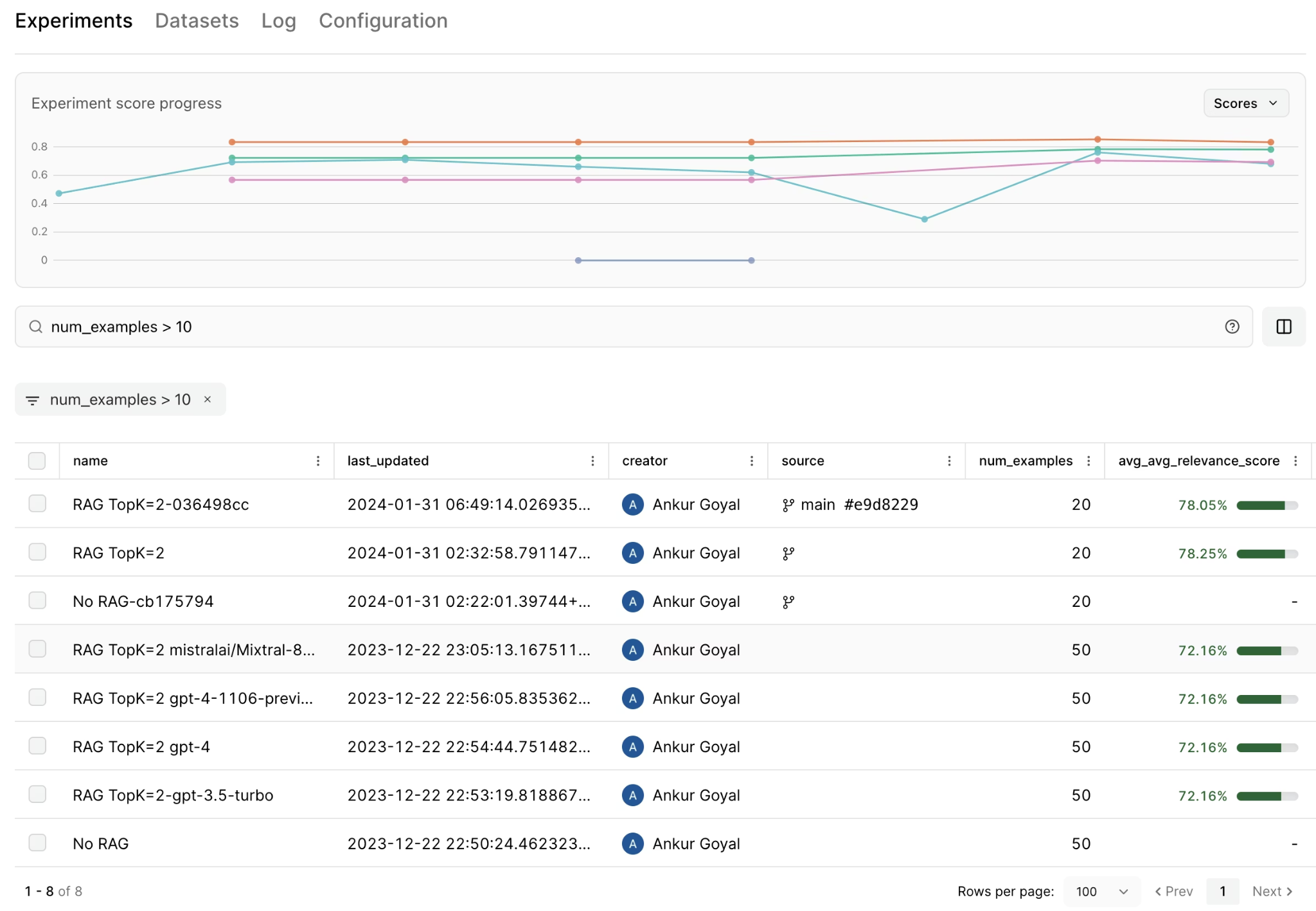
Each eval run creates a named, immutable experiment in Braintrust. The experiments list shows average scores, latency, and estimated cost for each run at a glance, and clicking into any experiment reveals individual row results, making it clear which inputs each model handled well and which caused failures.
The compare experiments view places two experiments side by side, with score improvements in green and regressions in red. Selecting two experiments in this view shows precisely where each model outperformed the other, rather than collapsing everything into an aggregate score that hides per-input behavior.
Three patterns to look for when reading results:
- If one model scores significantly higher on Factuality but at 2x the latency, that is a quality-to-speed tradeoff to weigh against the production SLA.
- Shared failure patterns across all models in the comparison usually point to the prompt or the dataset rather than to any specific model.
- The same subset of poorly-answered inputs appears across multiple models, suggesting those inputs share something in common worth investigating.
When scores differ by two or three percentage points, cost and latency become the deciding factors rather than accuracy alone.
Once failure patterns are identified, the next step is iteration. Braintrust's Playground is designed specifically to iterate on failure patterns as they emerge. In the Playground, you can test different models and prompt variants without writing code. This also allows product managers and other non-engineering team members to iterate on prompts and compare outputs without relying on engineering support.
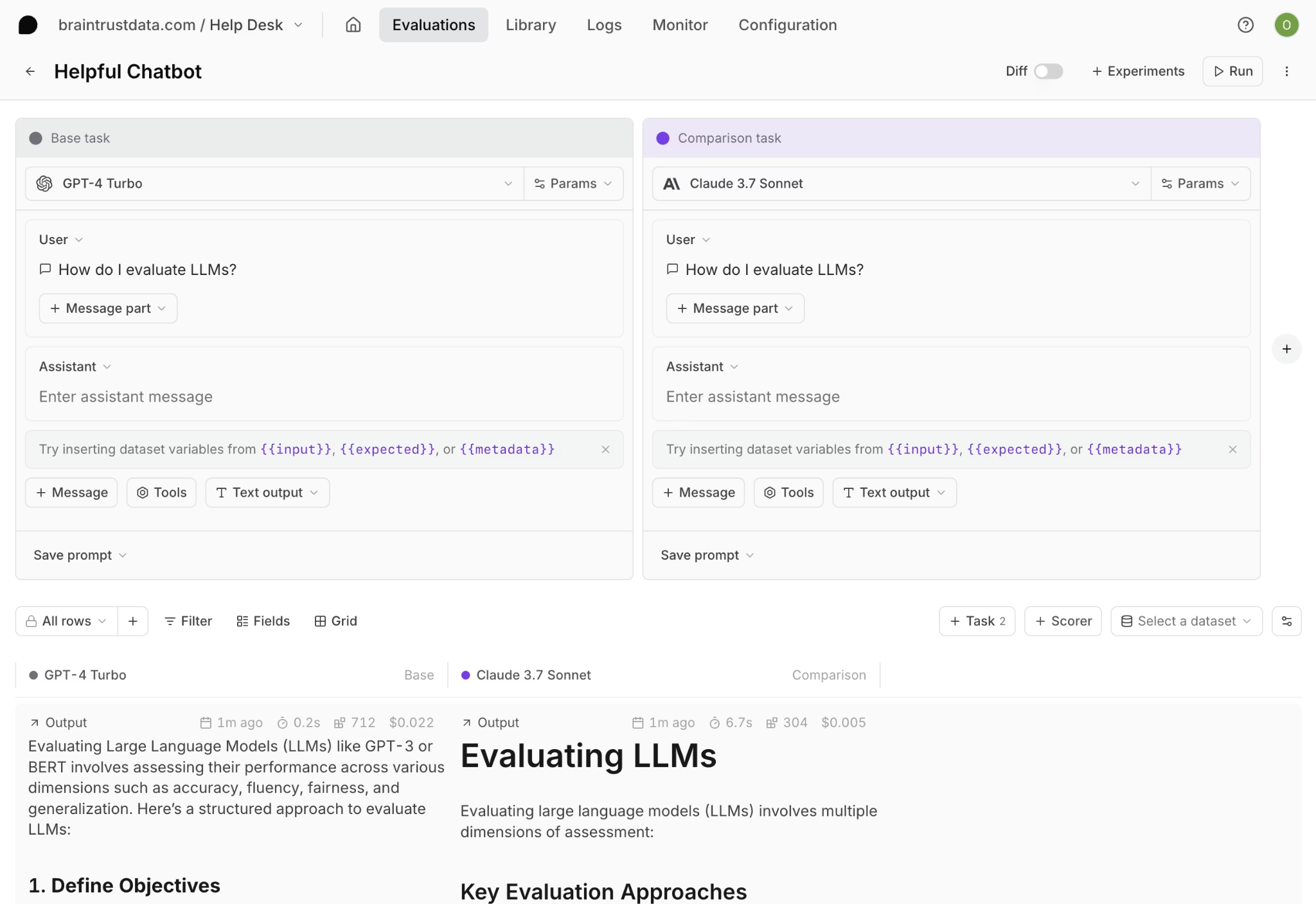
You can create a base task with your prompt and starting model, then add comparison tasks for additional models. Linking a dataset runs every model and prompt combination across all inputs simultaneously and displays the outputs in a grid. Diff view highlights exactly where responses diverge across models, which makes prompt weaknesses or model-specific behavior easier to diagnose before running a full Eval() experiment.
Loop, Braintrust's AI assistant, helps analyze experiment results faster. Instead of manually reviewing hundreds of rows, you can query production traces and evaluation runs in natural language, generate evaluation cases from real traffic, and create custom scorers directly from plain-language instructions.
Run your first scored model comparison with Braintrust's free tier.
Test AI models systematically with Braintrust
Model selection is an ongoing process because models update, prompts change, and user queries evolve, which can shift which configuration performs best. Without a repeatable way to retest after model or prompt updates, teams often fall back on gut instinct instead of evidence.
Braintrust supports the end-to-end AI model testing workflow by keeping datasets, prompt versions, scored experiments, and model comparisons in one place, so every model decision remains traceable. Months later, the experiment record shows why the team chose one model over another for a specific use case, and the same experiment can be re-run to check whether the decision still holds.
Start with Braintrust's free tier and run your first scored model comparison today.
How to test AI models FAQs
How do you test AI models?
Testing AI models starts with building a fixed dataset of real inputs, then running each model against that dataset with the same prompt and scoring each output automatically. Keeping the dataset and prompt constant across runs ensures score differences reflect model behavior rather than input or prompt changes. Braintrust supports the full AI model testing workflow by combining dataset versioning, prompt management, multi-provider model access through the gateway, and experiment comparison in a single UI.
What is an LLM-as-a-judge scorer?
An LLM-as-a-judge scorer uses a language model to evaluate the quality of another model's output. Instead of checking the output against a fixed expected answer, the scoring model reads the input, the output, and, optionally, a reference document, then assigns a quality score between 0 and 1.
The Factuality scorer in Braintrust's autoevals library applies LLM-as-a-judge scoring to check whether an output is consistent with the expected answer and includes a written rationale with the result. When teams do not have labeled ground truth, Braintrust still supports LLM-as-a-judge scoring by running judge prompts as part of the experiment, storing scorer configuration with the results, and keeping scores comparable across model and prompt changes.
Which is the best tool to test AI models?
Braintrust is a strong option for teams testing AI models in production contexts because it keeps the full testing workflow in one place. Braintrust combines dataset management, prompt versioning, multi-provider gateway access, the autoevals scoring library, and an experiment comparison UI in a single platform. When teams run testing across separate tools for prompts, evaluation, and model routing, results often end up split across systems with inconsistent formats and incomplete version tracking. With Braintrust, every experiment is versioned and reproducible, so model decisions can be referenced and re-run when models update or behavior drifts.
How do I start testing AI models?
The fastest starting point is to sign up for Braintrust's free tier, create a project, and open the Playground, where you can compare outputs across models without writing code. Paste your prompt into a base task, add two or three models as comparison tasks, and link a small dataset of 20 to 50 real inputs so the Playground runs the same inputs across every model side by side. Adding the Factuality scorer from autoevals automatically scores each output, and a full Eval() run on the complete dataset turns the comparison into a permanent, referenceable experiment.