Sandboxed agent evals with Harbor
An agent that edits files, installs a dependency, and runs a build leaves its result on disk. To score it you run the tests and check what changed, which takes a clean container per attempt.
Harbor is a Python framework for specifying sandboxed agent tasks, from the team behind terminal-bench. It runs each task in an isolated Docker container. A task holds three files: an environment definition, an instruction for the agent, and a verifier that inspects the container once the agent stops. Harbor runs the agent, records what the verifier reports, and writes everything to a job directory.
A job directory is per-run and local to the machine that ran it. Comparing this week's numbers against last week's requires keeping every folder around. Anyone else who wants to see a result needs that directory zipped up and sent to them.
Harbor now has a native Braintrust plugin. Add it to a run and each job syncs to a project you can compare across runs and share with anyone, without moving a folder.
How it works
Each synced job produces:
- A managed dataset built from the task cases in the job
- An experiment row per trial, carrying the agent's output alongside the expected answer
- Scores converted from the verifier rewards, so a normalized
rewardbecomes a score field you can chart and filter - The agent trajectory, when trace collection is on, in Harbor's ATIF format, showing the tool calls and model turns that led to the result
The plugin also writes a braintrust-sync.json manifest into the job directory, recording what it synced.
You can then open a failing trial and read the trajectory behind its score, down to the tool call where the agent went wrong.
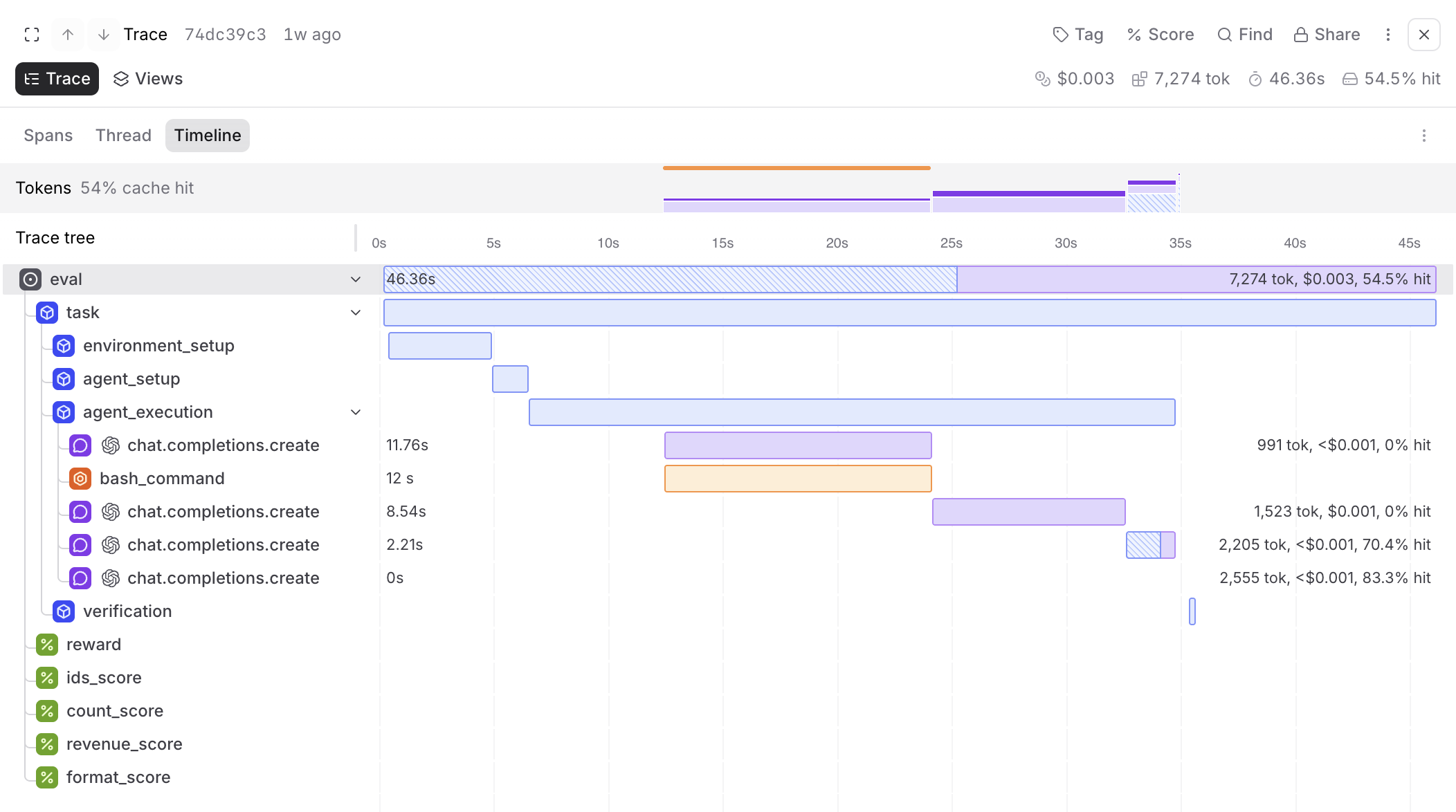
Container setup, the agent's turns, and the verifier run sit under one eval span, in the same timeline as the scores they produced. Each verifier reward becomes its own score field, so you can chart it across a job.
Running a job
The plugin is discovered through Harbor's braintrust entry point, so a run needs one flag and a project name:
uv run harbor run \
  --path task \
  --agent terminus-2 \
  --model openai/gpt-4.1-mini \
  --job-name braintrust-harbor-example \
  --plugin braintrust \
  --plugin-kwarg project_name=example-harbor
Plugin options also read from HARBOR_BRAINTRUST_* environment variables. Setting HARBOR_BRAINTRUST_PROJECT=example-harbor drops the --plugin-kwarg argument from the command.
Your Braintrust API key stays in the host process. The plugin never passes it into the task container, so agent code running in the sandbox cannot read it.
Syncing a job that already ran
You can sync a job that already ran, without paying for the agent and verifier a second time:
import asyncio
from pathlib import Path
from braintrust.integrations.harbor import backfill_job

asyncio.run(backfill_job(Path("jobs/my-eval"), project_name="my-project"))
Backfill reuses the same dataset, experiment, and span identities as a live sync. Run it against a job you already synced and it reconciles the existing rows instead of adding duplicates, so it is safe to rerun while you settle on a project layout.
Getting started
The Harbor integration docs cover configuration and trace collection. A runnable example with one arithmetic task finishes in about a minute and shows what the synced dataset, experiment, and trace look like.
Sign up to sync your job, or book a demo.