Best AI conversation analytics tools (2026): classify agent traffic at scale
When agent conversations exist only as raw traces, repeated user requests, negative experiences, and recurring failures can remain hidden until they affect releases. Product and engineering groups may review scattered examples, but isolated examples do not show which patterns are increasing across production traffic.
AI conversation analytics reads every conversation, labels the user's task, sentiment, and issues, and groups similar conversations into trends. Those trends help teams prioritize problems affecting real users and turn repeated failures into evaluation cases before the next release.
This guide compares five AI conversation analytics tools across classification depth, trend discovery, evaluation handoff, and scale economics. Braintrust leads with Topics, its conversation analytics feature for classifying production conversations and turning recurring patterns into evaluation datasets and online scorers.
What AI conversation analytics means
AI conversation analytics is the practice of classifying and grouping every conversation an AI agent has with users, then surfacing trends across production traffic. The goal is to understand recurring tasks, sentiment, and failure patterns across the full set of conversations, including categories that product and engineering groups did not know to tag in advance.
A typical agent analytics stack has three layers:
Observability: Captures individual requests and shows latency, token counts, tool calls, errors, and trace structure.
Product analytics: Measures predefined events, such as completed checkouts, feature usage, account actions, or conversion steps.
Conversation analytics: Reads the content of each exchange, labels what happened, and groups similar conversations so recurring patterns appear across real user traffic.
The labels usually answer three questions: what the user came to do, how the interaction felt, and what went wrong. Once every conversation carries those labels, a product lead can measure which use cases dominate traffic, while an engineer can open the exact slice where a tool call, retrieval step, or answer pattern keeps failing.
Conversation analytics turns production conversations into a structured view of user behavior and agent quality. The result is clearer prioritization because repeated patterns become visible across all traffic.
What to look for in an AI conversation analytics platform
Use the criteria below to compare how each platform classifies conversations, surfaces trends, and connects analytics to evaluation workflows.
Automatic classification of every answer: The platform should label each conversation without requiring teams to write classifiers first. Full-coverage classification helps surface categories that were not predefined.
Multi-dimensional facets: A single conversation should support multiple labels at once, such as task, sentiment, and issue type. Multiple facets make the same exchange useful for product analysis, quality review, and debugging.
Custom dimensions: Teams should be able to define product-specific facets, such as churn risk, compliance risk, or feature-request type. Fixed taxonomies rarely cover every signal a product team needs to track.
Cross-facet filtering: Useful analysis often comes from combinations, such as negative sentiment within a single task category. The platform should allow teams to filter by facets without having to manually compare separate charts.
Trend-to-conversation drill-down: After a trend appears, teams need to open the conversations behind the trend and read specific examples. A trend is easier to trust when the underlying conversations are easy to sample.
Workflow integration: A discovered pattern should become an evaluation dataset, scorer, or review queue without a separate pipeline. Conversation analytics is most useful when trends feed the release and quality process.
Scale economics: Pricing should support full-coverage analysis at production volume. If costs rise too quickly with spans, traces, or seats, teams may sample traffic and miss the failures that recur most.
The 5 best AI conversation analytics tools in 2026
1. Braintrust
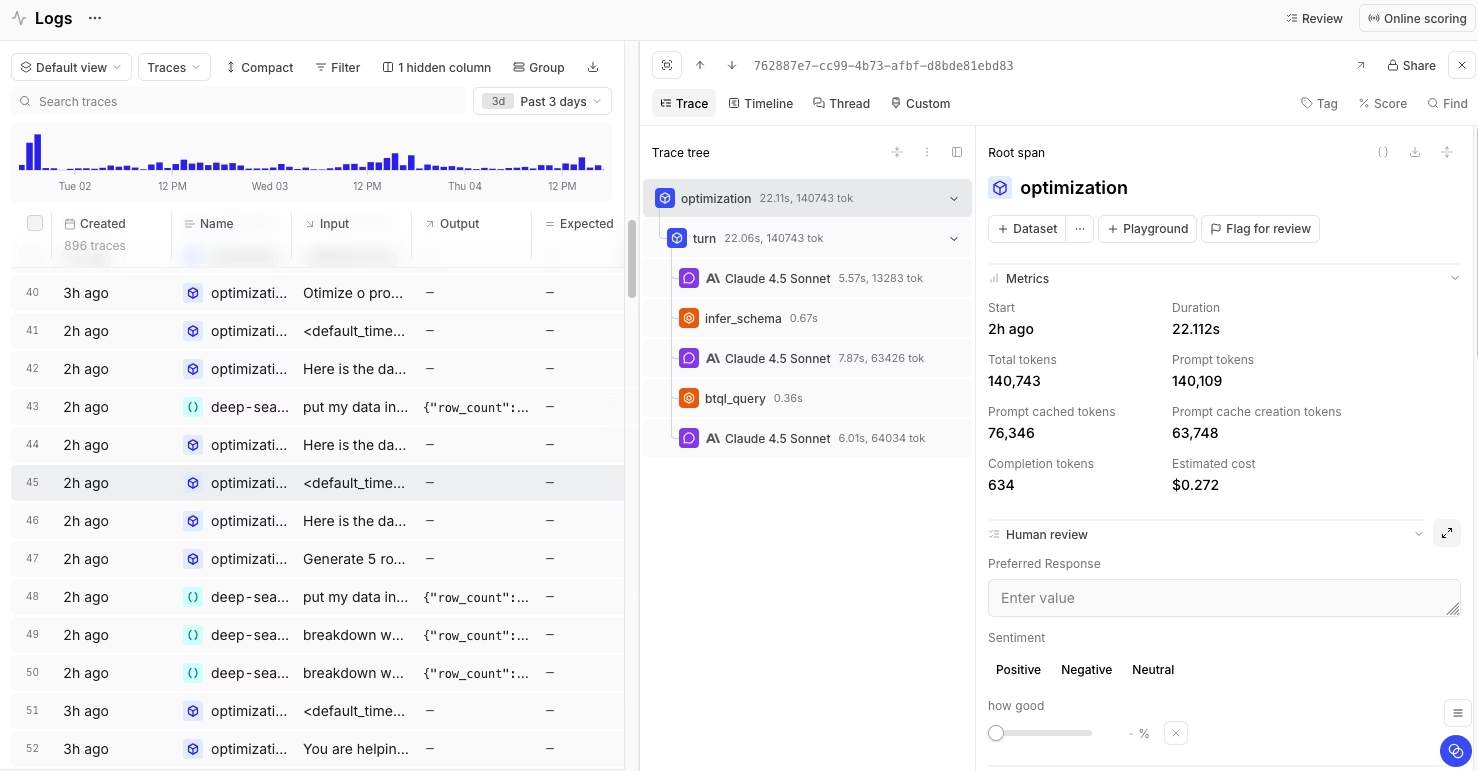
Best for: Teams at production conversation volume that need automatic classification and a direct way to turn recurring agent patterns into evaluation datasets, online scorers, and review queues.
Braintrust is an AI observability and evaluation platform for teams building production AI products. For conversation analytics, Braintrust's main advantage is Topics, which reads production traces, summarizes each conversation, and groups similar conversations into named trends. Topics classify agent traffic by Task, Sentiment, and Issues without requiring teams to write classifiers or maintain a separate clustering pipeline.
How Topics works
Topics run on Braintrust logs. Each trace is formatted into readable text from messages, tool calls, and nested spans, then summarized through classification facets. Once enough summaries exist, Braintrust groups similar summaries into topics and writes the final labels back into the Logs table. Teams can filter by topic, query classification using SQL, open source conversations, and promote selected traces to evaluation datasets.
For multi-turn agents, trace structure affects the quality of the labels. Conversations with nested spans, tool calls, retrieval steps, and session-level context give Topics a clearer view of what the user asked, how the agent responded, and where the interaction failed.
Built-in and custom facets
Topics ships with three built-in facets:
Task: Identifies the user's goal, such as creating a dataset, asking about pricing, or debugging an API error.
Sentiment: Captures the tone of the exchange, such as positive, neutral, negative, or frustrated.
Issues: Flags agent problems, such as failed tool calls, incomplete answers, or confident but incorrect responses.
Teams can combine facets to answer more specific questions. A product lead can filter pricing conversations with negative sentiment, while an engineer can inspect clusters of issues tied to a single tool call or workflow. Custom facets add product-specific dimensions, such as churn risk, compliance risk, feature requests, customer segment, or integration area.
Turning Topics into evaluation coverage
Braintrust connects Topics to evaluation work. A team can filter Logs by classification, for example, classifications.Task.label = "Checkout Flow", inspect the conversations behind the trend, and add selected traces to a versioned evaluation dataset. Repeated patterns can also become online scorers that run on production logs, so new conversations with the same failure pattern are flagged automatically.
Loop adds a natural-language layer to log analysis. Team members can ask questions about recent traffic, generate SQL filters, find similar traces, create datasets from log patterns, and generate scorers from identified issues without writing queries by hand. When a pattern requires human judgment, Braintrust can assign classified logs for human review and annotation, helping teams validate automated scoring and curate better test cases.
After a trend becomes an evaluation dataset, teams can use Playgrounds and experiments to test prompt, model, or workflow changes against the same examples. Custom trace views help reviewers inspect complex agent traces without reading raw JSON, making Topics findings easier for product, engineering, and domain experts to review.
Pros
- Automatic classification across tasks, sentiment, and issues.
- Custom facets for product-specific dimensions such as churn risk, compliance risk, customer segment, feature requests, or integration area.
- Topic labels appear in Logs, where teams can filter, query with SQL, and inspect the source conversations.
- Loop can generate SQL filters, find similar traces, create datasets from log patterns, and generate scorers from identified issues.
- Filtered traces can be promoted into versioned evaluation datasets.
- Online scorers can flag recurring production issues as new logs arrive.
- Human review and annotation workflows help teams validate patterns and improve the quality of evaluation data.
- Custom trace views help reviewers inspect complex agent traces without having to read raw JSON.
- Playgrounds and experiments let teams test fixes against datasets created from production trends.
- Braintrust supports tracing through SDKs, OpenTelemetry, and framework integrations.
- The free tier includes Topics credits.
Cons
- Topic quality depends on trace structure, so flat traces may need better instrumentation before classifications become useful.
- Clustering requires at least 100 facet summaries before topics are generated.
- Custom facets require Pro or Enterprise.
Pricing: Free includes 1 GB processed data, 10k scores, and unlimited users. Pro is $249/month and includes 5 GB processed data and 50k scores. Enterprise is custom pricing, with options for self-hosting or hybrid deployment and dedicated support. See pricing details.
2. Galileo
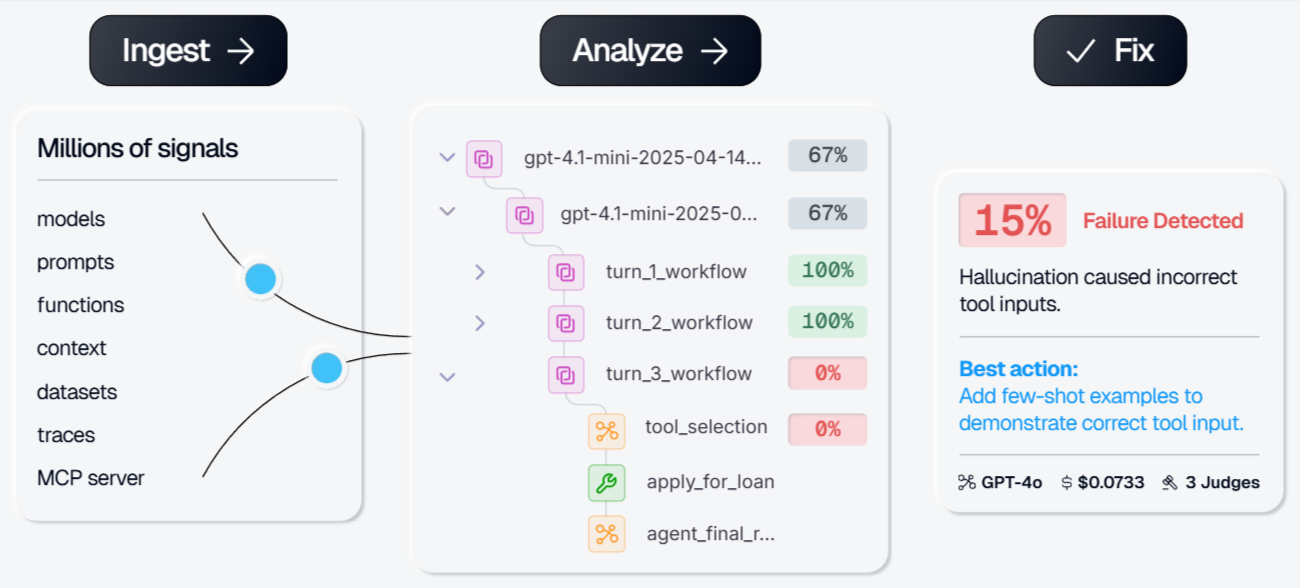
Best for: Teams that need low-latency production scoring and runtime guardrails for GenAI and agent applications.
Galileo is an AI evaluation, observability, and runtime protection tool for GenAI applications. Its Luna-2 evaluator models score production traffic at low latency, and Galileo Protect supports checks for prompt injection, PII leakage, unsafe responses, and other runtime risks. Galileo fits teams that prioritize live protection and per-request scoring, while discovery of conversation trends depends on configured metrics, trace review, and operator-led analysis.
Pros
- Luna-2 models make per-request scoring affordable at high traffic volumes.
- Galileo Protect can block harmful inputs or outputs before users see them.
- Pre-built metrics cover RAG, agents, safety, and quality checks.
Cons
- Trend discovery is operator-driven rather than automatic classification of every answer.
- Real-time guardrails require the Enterprise tier.
Pricing: Free tier with 5,000 traces/month. Paid plan starts at $100/month. Custom enterprise pricing.
3. HoneyHive
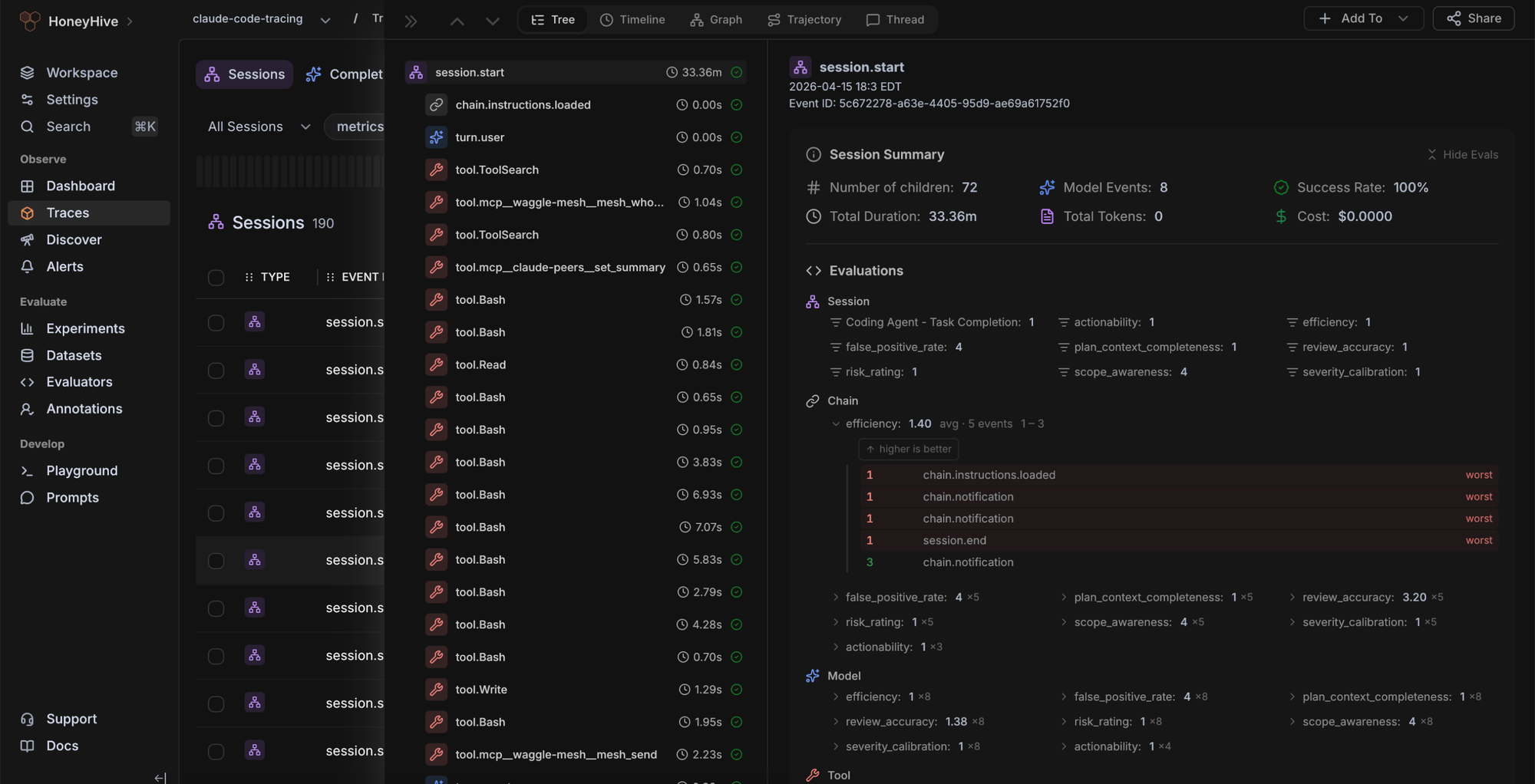
Best for: Teams running multi-step agents that want OpenTelemetry-based tracing, evaluations, and pattern analysis close to their agent traces.
HoneyHive is an AI observability and evaluation tool for agent development. It supports distributed tracing, agent graphs, threads, dashboards, alerts, online evaluation, dataset curation, annotation queues, and prompt workflows. HoneyHive fits teams that want to trace and evaluate agent behavior, while conversation classification depends on grouping, filters, dashboards, Discover, and configured evaluation workflows.
Pros
- OpenTelemetry support fits teams using standard telemetry pipelines.
- Online evaluation can run on live traces with sampling.
- Alerts, drift detection, dataset curation, and annotation queues support agent review workflows.
Cons
- Conversation classification is less structured than a built-in task, sentiment, and issue taxonomy.
- The free Developer plan is limited to one workspace.
Pricing: Free tier available with a single workspace, up to 5 users, and 10K events per month. Custom enterprise pricing.
4. Datadog LLM Observability
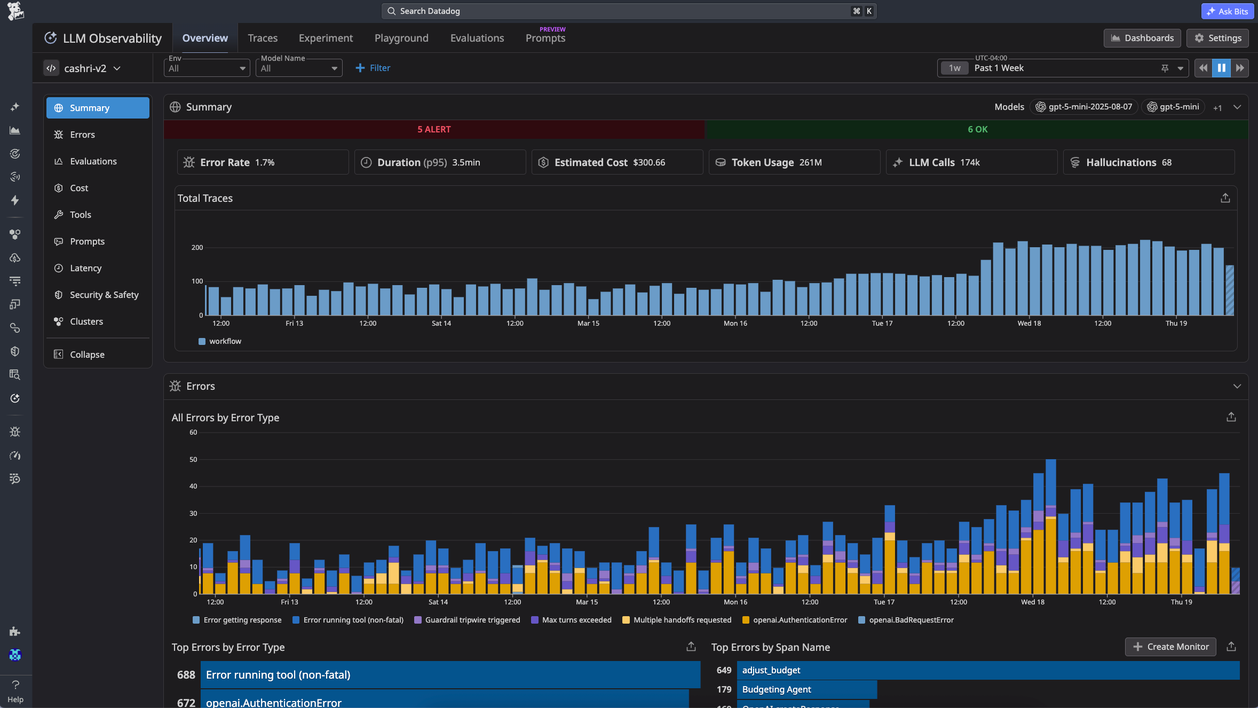
Best for: Teams already using Datadog that want LLM traces, token and cost monitoring, and AI application visibility inside their existing monitoring stack.
Datadog LLM Observability extends Datadog's monitoring stack to AI workloads. It captures LLM traces, token usage, estimated cost, model activity, prompts, evaluations, and related application signals, and it connects AI traces with logs, APM, and infrastructure metrics. Datadog is well-suited to organizations that want AI monitoring within an existing Datadog deployment, whereas conversation analytics requires dashboards, tags, filters, or manual analysis.
Pros
- LLM traces can sit alongside APM, logs, and infrastructure metrics.
- Token and cost dashboards help engineering and finance review model usage.
- Sensitive Data Scanner is included with LLM Observability allocations.
Cons
- No automatic task, sentiment, or issue classification.
- Span-based pricing can rise quickly for agents that generate many spans per request.
Pricing: Free tier with 40K LLM spans per month. LLM Observability Pro starts at $160/month for 100K LLM spans on an annual commitment, with $200/month month-to-month and $240/month on-demand.
5. Langfuse
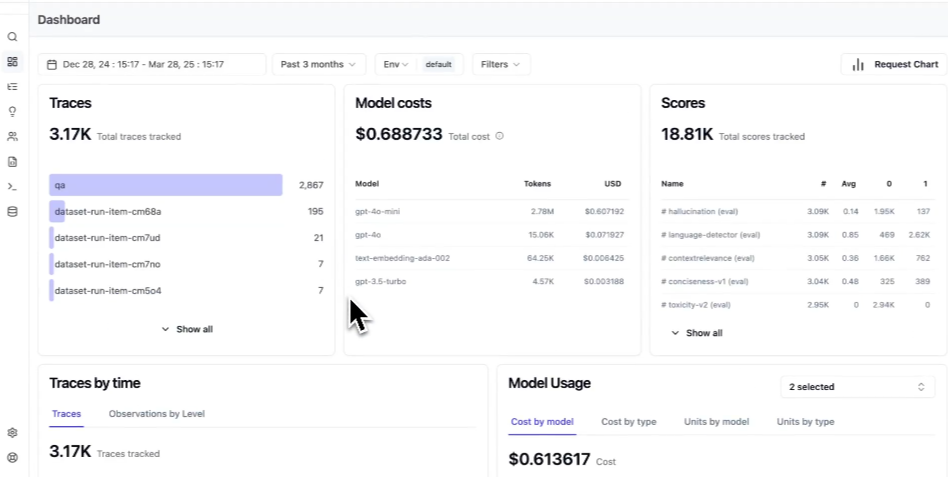
Best for: Self-hosted or cost-sensitive teams that want open-source LLM observability and are comfortable building their own conversation classification pipeline.
Langfuse is an open-source LLM observability tool that includes tracing, agent graphs, session and user tracking, token and cost tracking, prompt management, evaluations, datasets, scores, and SQL-based analysis. Langfuse fits teams with data-control requirements, self-hosting requirements, or an open-source mandate. For conversation analytics, teams need to build and maintain their own embedding, clustering, labeling, and trend-review process on top of the trace data.
Pros
- Open-source core supports self-hosted deployments.
- SQL access supports custom analysis across trace data.
- Langfuse Cloud includes tracing, prompt management, evaluations, datasets, and scores across paid tiers.
Cons
- Automatic conversation classification is not built in.
- Self-hosting requires infrastructure management, maintenance, and internal ownership of the analytics pipeline.
Pricing: Free self-hosting and a free cloud plan with 50K units per month. Paid plan starts at $29 per month.
Quick comparison: best AI conversation analytics tools (2026)
| Capability | Braintrust | Galileo | HoneyHive | Datadog LLM Observability | Langfuse |
|---|---|---|---|---|---|
| Automatic conversation classification | Topics classify every conversation across Task, Sentiment, and Issues | Operator-driven trend exploration, no per-conversation classification by default | Tagging and evaluation-driven classification, fewer simultaneous lenses | Tag- and dashboard-driven, no per-conversation classification by default | Requires custom classification logic |
| Multi-facet analysis | Built-in Task, Sentiment, and Issues, plus custom facets | Metric-led analysis tied to Galileo evaluators | Limited to user-defined dimensions | Dependent on tags and dashboards | Depends on user-defined tagging and scoring |
| Custom dimensions | Custom facets for domain-specific signals | Custom logic available through evaluator configuration | Custom tags and annotations | Custom tags and facets | Custom tags, scores, and SQL views |
| Combined filtering | Filter Logs by topic, facet, scores, metadata, and SQL | Filter inside Galileo evaluation and monitoring views | Filter sessions, traces, and annotations | Filter via tags, dashboards, and queries | Filter via UI and SQL on trace data |
| Source-conversation drill-down | Source conversations stay connected to each classified pattern | Distributed tracing, graphs, and timelines | Trajectory traces with annotations | Full request traces across prompts, retrieval, tool calls, and responses | Trace, session, and agent graph review |
| Product-specific classification | Custom facets support domain-specific signals | Custom evals and judges can capture specific risks | Custom schemas, filters, and evaluations support product-specific analysis | Custom tags, dashboards, and evaluations support product-specific analysis | Metadata, scores, SQL, and dashboards support custom analysis |
| Evaluation handoff | Topics feed datasets, scorers, experiments, and release gates | Online and offline evals tied to Galileo metrics | Online evaluation and dataset workflows | Eval workflows are not the primary focus | LLM-as-a-judge, datasets, and experiments |
| OpenTelemetry support | OTEL-based tracing supported across stacks | OTEL integrations available | OpenTelemetry-native instrumentation | OTEL ingestion through Datadog Agent | OpenTelemetry-native |
| Self-hosting | Enterprise self-hosting and hybrid deployment | Enterprise deployment options | Managed offering with enterprise options | SaaS only for LLM Observability | Free self-hosting available |
| Free plan | 1 GB processed data, 10k scores, unlimited users | 5,000 traces/month | Single workspace, up to 5 users, 10K events/month | 40K LLM spans/month | Free cloud plan with 50K units, free self-hosting |
| Starting paid price | $249/month (Pro) | $100/month | Custom | From $160/month for 100K spans (annual); $200/month month-to-month; $240/month on-demand | $29/month |
Bring trend discovery to every agent conversation with Braintrust. Start free today →
Choosing the right AI conversation analytics tool
Start with the level of classification your team needs and how directly analytics should connect to evaluation. Monitoring-focused tools can help inspect traces, costs, and runtime behavior, while a conversation analytics layer should classify production traffic and turn recurring patterns into test coverage.
Braintrust: Braintrust is the strongest fit when conversation trends need to be turned into evaluation assets. Topics classifies production conversations by task, sentiment, and issue, then lets teams filter logs, inspect source conversations, and turn repeated patterns into datasets, online scorers, and review queues.
Galileo: Galileo is well-suited to teams that prioritize low-latency scoring and runtime protection for live traffic. Its guardrail workflows cover risks such as prompt injection, PII leakage, and unsafe outputs, while broader discovery of conversation trends depends on configured metrics, Signals, and trace review.
HoneyHive: HoneyHive fits agent-heavy teams that want OpenTelemetry-based tracing, agent behavior analysis, and evaluation workflows close to their traces. Its grouping and review features support agent investigation, although structured task, sentiment, and issue classification require more setup.
Datadog LLM Observability: Datadog is a good fit for organizations already using Datadog for APM, logs, infrastructure metrics, and cost monitoring. It is strongest when AI traces need to sit inside an existing monitoring stack, with conversation analysis handled through traces, patterns, dashboards, tags, and evaluations.
Langfuse: Langfuse fits teams that want open-source observability, self-hosting, SQL access, and full control over trace data. It gives teams the raw material for custom analysis, while conversation clustering, labeling, and trend workflows need to be built and maintained internally.
For teams that want conversation analytics to support production quality decisions without building a classifier pipeline, Braintrust with Topics is the best option.
Why Braintrust leads on conversation analytics
Conversation analytics is valuable when discovered patterns change how teams evaluate and release AI systems. Trace dashboards can show individual failures, but production AI groups still need a disciplined way to classify traffic, prioritize recurring issues, and turn those findings into evaluation coverage. Braintrust handles that full workflow by connecting Topics with Logs, datasets, online scoring, human review, experiments, and release checks.
The advantage goes beyond trend discovery: Braintrust turns production conversation patterns into enforceable quality signals, so repeated failures can become regression tests, scorer rules, review queues, and release requirements. Product, engineering, and domain experts can work from the same classified traffic without depending on a custom analytics pipeline or an engineering-only review process.
Teams including Notion, Stripe, Vercel, Zapier, Airtable, and Instacart use Braintrust for production AI evaluation and observability. Start free with Braintrust to classify agent traffic, find recurring conversation patterns, and turn production trends into evaluation coverage before the next release.
FAQs about AI conversation analytics
How is AI conversation analytics different from LLM observability?
LLM observability captures what happened during a single request, including latency, token counts, model calls, tool calls, errors, and trace structure. AI conversation analytics analyzes production conversations to classify user tasks, sentiment, and recurring issues, so teams can see patterns across traffic rather than reviewing isolated traces. Braintrust supports both workflows by pairing tracing with Topics, which turns production logs into grouped trends that can feed evaluation work.
How is Braintrust Topics different from Galileo, Datadog, or Langfuse?
Galileo, Datadog, and Langfuse support observability workflows such as tracing, monitoring, dashboards, scoring, or SQL analysis. Braintrust Topics adds automatic conversation classification to production logs by labeling conversations with task, sentiment, and issue, then grouping similar conversations into named topics. The classifications appear in Logs, where teams can filter, query with SQL, inspect source conversations, and create evaluation datasets from recurring patterns.
Can I run conversation analytics on top of my existing tracing setup?
Many teams can keep their existing tracing setup and send logs into a dedicated analytics and evaluation workflow. Braintrust ingests traces via its SDKs, OpenTelemetry, and supported integrations, so production conversations can be classified by Topics once instrumentation is in place. The practical goal is to add automatic trend discovery without rebuilding the entire observability stack.
Do I need to write my own classifiers to get conversation trends?
With most observability tools, teams still need to define labels, write classifiers, or build an embedding and clustering pipeline before broad conversation trends appear. Braintrust Topics handles classification automatically across tasks, sentiment, and issues, while custom facets allow teams to add product-specific labels such as churn risk, compliance risk, feature requests, or integration area. Teams can start from built-in conversation labels, then refine the taxonomy as production traffic reveals new patterns.
Does conversation analytics work with self-hosted deployments?
Self-hosting support depends on the vendor and deployment tier. Langfuse is self-hostable, while Galileo and HoneyHive offer self-hosted or private deployment options for enterprise requirements. Braintrust supports self-hosted deployment for Topics on data plane v2.x or later, with account-team approval and Zero Data Retention applied on the Braintrust side. Teams using self-hosted Braintrust should confirm the v2.x setup requirements before enabling Topics.
How quickly does Braintrust Topics produce useful trends?
Topics start processing logs after they are enabled, and existing logs can be backfilled, so projects do not need to wait for new traffic only. Braintrust begins clustering once at least 100 facet summaries have been collected, then regenerates topics on a daily cadence. Teams can also trigger an immediate run with bt topics poke, which helps validate setup or refresh classifications after new traffic arrives.