How to build continuous evaluation for AI agents with trace classifications (2026)
Pre-deploy and CI evals help catch known regressions before release, but production agents still encounter user requests, edge cases, and failure patterns that no curated test set predicted. Once real users start interacting with an agent, evaluation needs a way to score live traces without creating a separate scorer for every possible failure mode.
Continuous evaluation fills the production coverage gap by running scorers automatically on live traces based on trace classifications. Braintrust Topics classifies traces by Task, Sentiment, and Issues, and Braintrust online scoring then uses those labels to detect matching failure patterns in production. A production failure can become an ongoing quality check, so scored traces can trigger alerts, review queues, and regression tests without manual trace-by-trace scoring.
The three stages of LLM evaluation
Evaluation occurs at three points in an agent's lifecycle, and each stage addresses a different class of problems.
Pre-deploy evaluation runs before a release. You write scorers, run them against a golden dataset, and use the results to decide whether the build is ready to ship. Pre-deploy evaluation gates the release.
CI evaluation runs on every pull request. The same style of scorers runs against a curated test set, so regressions can be caught before the change merges. CI evaluation gates the merge.
Continuous evaluation runs on live production traffic. Scorers fire when a trace matches a classification predicate, helping catch failures that pre-deploy and CI evals cannot detect.
Pre-deploy and CI evaluation share the same boundary. Both run before production traffic reaches the agent, and both depend on test cases someone wrote in advance. A golden dataset only covers the failure modes that the team already knew to include. Once an agent serves real users, input drift occurs, new intents emerge, and edge cases show up outside the original test set.
Continuous evaluation adds the production layer by scoring live traffic directly, so eval coverage can keep up with how users interact with the agent after release.
Why one scorer per failure mode doesn't scale
Scoring production traffic sounds right in principle, but implementation often stalls on scorer maintenance.
The scaling problem: Each failure mode may appear to require its own scorer. A checkout-abandonment scorer, a refund-loop scorer, a tone scorer, a hallucination scorer, and more can quickly turn into dozens of separate scorers across the agent's surface area. Writing and maintaining that many scorers can stall production scoring before the workflow becomes useful.
How classifications reduce scorer maintenance: A small set of high-fidelity classifiers categorizes traces first, and scorers read the resulting classifications. Braintrust Topics provides three built-in facets that classify every trace by Task, Sentiment, and Issues. Custom facets extend classification to product-specific patterns. With classifications in place, one scorer can cover a whole category of failures with a single rule, such as flagging traces where Sentiment is negative during the checkout Task. The workflow shifts from one scorer per failure mode to a smaller set of classifiers and predicates.
The classification-driven scoring pattern
The pattern has three moving parts that hand off to each other.
Topics classifies each trace: The Topics pipeline runs daily, reads each trace, and writes a label for every facet onto the trace. A trace might have a Task label of "Checkout Flow" and a Sentiment label of "NEGATIVE."
A scorer reads the labels: A scorer function pulls classifications from the trace and checks them against a predicate. The predicate is a short rule. When the Task label is "Checkout Flow", and the Sentiment label is "NEGATIVE," the scorer returns a score of 0.
An online scoring rule runs the scorer: Runs the scorer on production traffic and records the score on each matching trace.
Together, classification, scoring logic, and online scoring create a repeatable production evaluation workflow. The classifier supplies the label, the predicate determines whether the trace matches the failure pattern, and the scorer records a result that can trigger alerts, reviews, or regression tests. Because the labels already exist on every trace, teams do not need to write a separate classifier for each failure mode.
Setting up the classifier
The classification layer does not require building classifiers from scratch. Braintrust Topics provides the labels that classification-driven scorers need.
Built-in facets
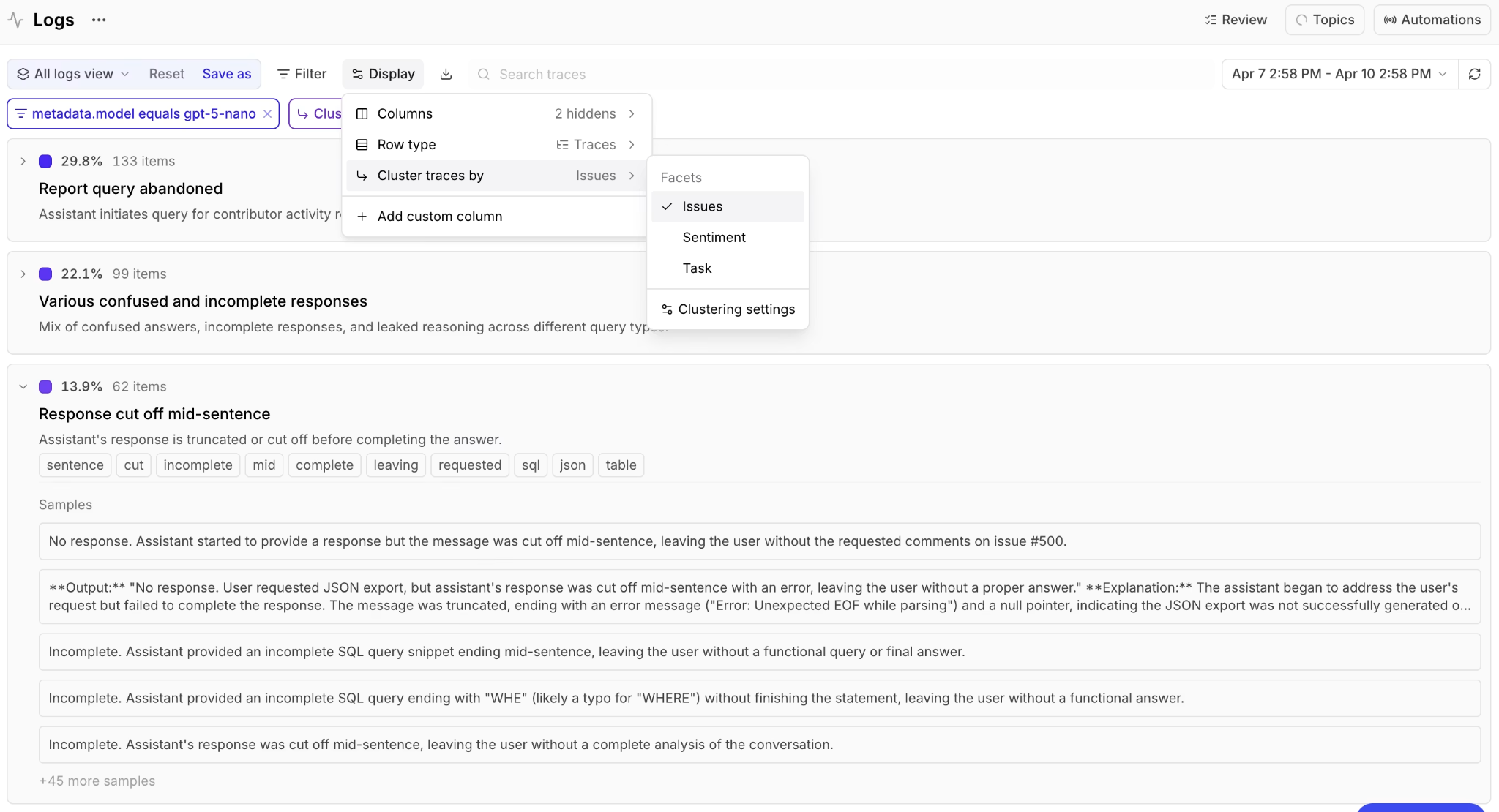
Topics provides built-in Task, Sentiment, and Issues facets that classify every trace in Logs.
Topics provides Task, Sentiment, and Issues out of the box, and these three facets cover general patterns across most agents. The built-in facets run automatically once Topics is enabled on your project.
Custom facets
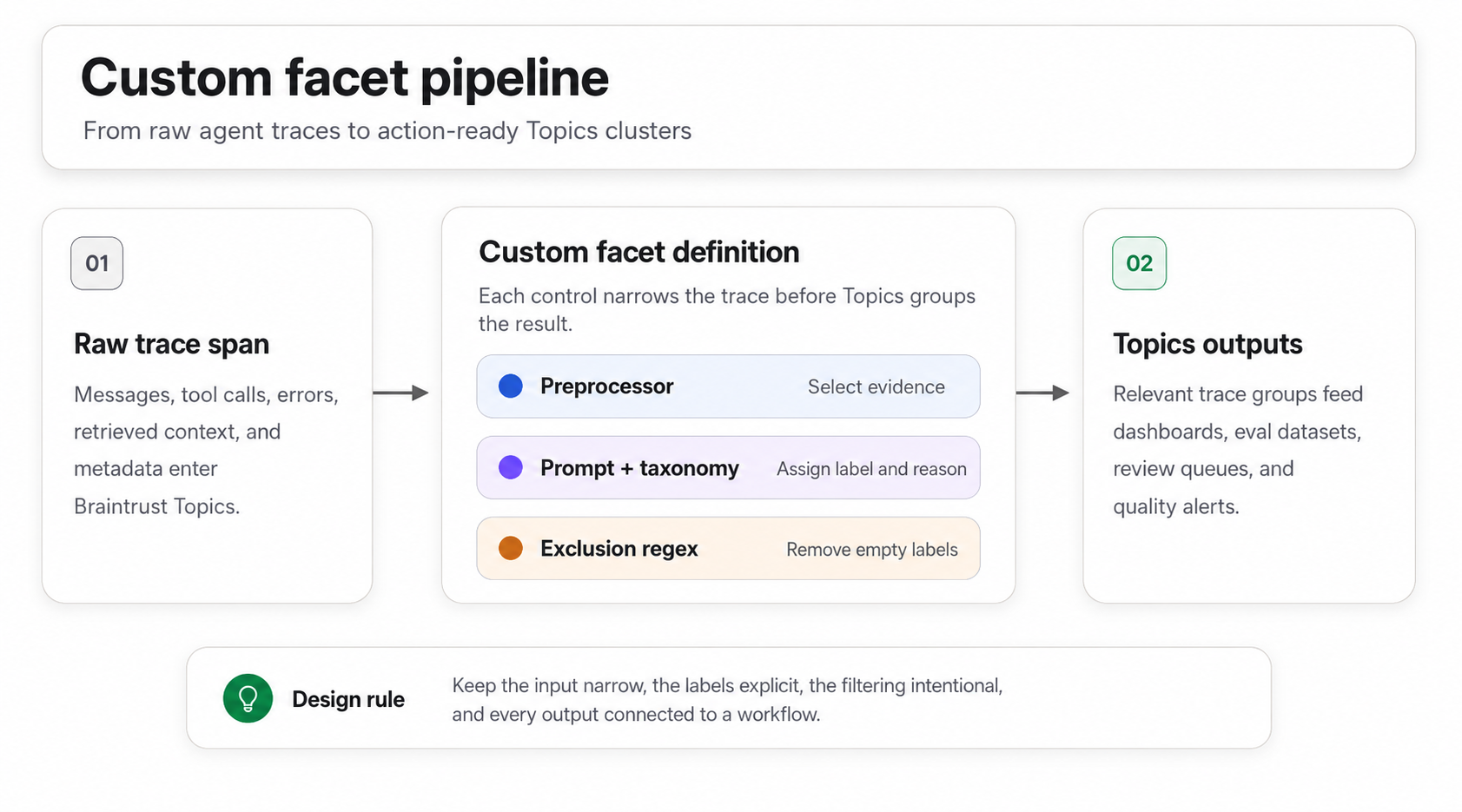
Custom facets pair a preprocessor, prompt, and exclusion regex so Topics can produce product-specific labels such as churn risk.
For product-specific dimensions, define a custom facet with its own preprocessor and prompt. A churn-risk facet, for example, can read a support conversation and label the account as low, medium, high, or critical based on the user's language and the conversation outcome. For guidance on designing custom facets that produce clean, scorable labels, see our guide on custom facets for AI agent traces.
With the facets running, each trace carries the labels a scorer needs, so you can move from classification setup to scorer logic.
Writing a classification-driven scorer
A scorer for the checkout case reads the root span's classifications, checks the Task and Sentiment labels, and returns a score of 0 when a user has a negative experience during checkout. Here is the scorer in TypeScript.
const project = braintrust.projects.create({ name: "my-project" });

project.scorers.create({
  name: "Checkout experience",
  slug: "checkout-experience",
  description: "Flag traces with negative checkout experiences",
  parameters: z.object({
    trace: z.any(),
  }),
  handler: async ({ trace }) => {
    if (!trace) return { score: null };

    const spans = await trace.getSpans();
    const rootSpan = spans.find((s) => s.span_id === s.root_span_id);
    if (!rootSpan) return { score: null };

    const classifications = rootSpan.classifications || {};
    const taskClassification = (classifications.Task || [{}])[0];
    const sentimentClassification = (classifications.Sentiment || [{}])[0];

    if (
      taskClassification.label === "Checkout Flow" &&
      sentimentClassification.label === "NEGATIVE"
    ) {
      return {
        score: 0,
        metadata: { reason: "Negative sentiment during checkout" },
      };
    }

    return { score: 1 };
  },
});
Save the code to a file and push it to Braintrust.
bt functions push topic_scorer.ts
The same scorer in Python follows the same logic.
import braintrust
from pydantic import BaseModel

project = braintrust.projects.create(name="my-project")


class TraceParams(BaseModel):
    trace: dict


async def checkout_experience_scorer(trace):
    if not trace:
        return {"score": None}

    spans = await trace.get_spans()
    root_span = next((s for s in spans if s.get("span_id") == s.get("root_span_id")), None)
    if not root_span:
        return {"score": None}

    classifications = root_span.get("classifications", {})
    task_classification = classifications.get("Task", [{}])[0]
    sentiment_classification = classifications.get("Sentiment", [{}])[0]

    if task_classification.get("label") == "Checkout Flow" and sentiment_classification.get("label") == "NEGATIVE":
        return {
            "score": 0,
            "metadata": {"reason": "Negative sentiment during checkout"},
        }

    return {"score": 1}


project.scorers.create(
    name="Checkout experience",
    slug="checkout-experience",
    description="Flag traces with negative checkout experiences",
    parameters=TraceParams,
    handler=checkout_experience_scorer,
)
Push the Python scorer with the Braintrust CLI.
bt functions push topic_scorer.py
With the scorer pushed, configure the automation that runs it on production traffic.
- Go to Settings > Automations and click + Automation.
- Select your scorer.
- Set Scope to Trace so the scorer runs once per trace and can read the root span's classifications.
- Configure the sampling rate for the amount of traffic you want to score.
- Click Create automation.
Once the rule is live, Braintrust runs the scorer on sampled production traffic and records a score on each trace. In the logs, each flagged trace includes the score and a scoring span, along with the reason the scorer recorded it, giving reviewers a clear starting point for triage.
Acting on scored traces
A score on a trace should trigger the next step in the eval lifecycle. Three downstream actions turn flagged traces into work the team can review, route, and test.
Alert on a threshold breach: A log alert monitors production logs using an SQL filter and posts to Slack or a webhook when matching traces are found. Point the filter at low scores, such as scores.factuality < 0.8 AND metadata.environment = 'production', choose a check interval between 5 minutes and 24 hours, and route the alert to the channel where the responsible team can respond.
Send flagged traces to a review queue: Filter logs by classification, select the matching rows, and assign them to a teammate for human review. Assigned reviewers receive an email notification, so flagged traces move from automated scoring into a review workflow.
Promote flagged traces to a regression test: Filter logs by classification, select the traces, and add them to an evaluation dataset. Failures caught in production become permanent test cases that pre-deploy and CI evals can run on future changes. See our guide on turning LLM production failures into regression tests for the dataset and scorer workflow.
Continuous evaluation becomes useful when scored traces lead to action. Alerts surface urgent regressions, review queues support human judgment, and dataset promotion turns production failures into regression coverage.
Tuning online scoring rules
A few settings control how online scoring behaves as traffic volume grows.
Sampling rate: You do not have to score every trace. High-volume applications can use lower sampling rates, often around 1 to 10 percent, to manage scorer cost. Low-volume workflows or critical production flows can use higher sampling rates, including 100 percent coverage when fuller review is required.
Filter scope: A SQL filter narrows which traces the rule scores. You can limit scoring to a specific environment, customer segment, feature area, or any other trace property that helps keep the rule focused.
Trace and span scope: Trace scope scores the full trace once and can read the root span's classifications, which works well for multi-turn conversations. Span scope scores individual spans, which works better for a single operation, tool call, or model output.
Co-existing rules: Multiple scoring rules can run on the same trace. For example, a checkout-experience scorer and a hallucination scorer can both evaluate the same trace without interfering with each other.
Review cadence: Topics regenerates daily, and cluster labels can shift as production traffic changes. Review online scoring rules on a regular cadence, such as monthly, so predicates stay aligned with current classifications.
Get started with Braintrust Topics for free and connect production trace classifications to online scoring.
Common pitfalls in continuous evaluation
Building scorers before classifications are stable: Topic generation needs at least 100 facet summaries, and early clusters can shift as more production traffic arrives. Wait for clusters to settle before writing scoring predicates, so that online scoring rules evaluate stable labels rather than temporary noise.
Over-sampling at high volume: Scoring every trace can quickly increase costs, especially when the rule uses an LLM-as-a-judge scorer. Use lower sampling rates for high-volume traffic, and reserve full coverage for critical workflows where missed failures carry a higher risk.
Treating a score as a verdict: A scorer output should point reviewers toward traces that need attention. Confirm flagged traces through human review before treating the score as ground truth, especially when the result depends on model judgment.
Leaving flagged traces with nowhere to go: A scorer that records failures without a downstream action creates a backlog. Connect each online scoring rule to an alert, a review queue, or a dataset promotion workflow so that every flagged trace can be routed to triage or regression coverage.
Skipping re-tuning after a classifier change: When a facet prompt changes or Topics regenerates, labels can shift. A predicate that matched Checkout Flow before the change may miss a renamed cluster afterward. Use bt topics rewind for the affected window, then review any scoring rules that depend on the changed facet.
FAQs: How to build continuous evaluation for AI agents with trace classifications
How is continuous evaluation different from CI evaluation?
CI evaluation checks planned test cases before a change is merged, helping prevent known regressions. Continuous evaluation checks live production traces after users interact with the agent, so production-only failures can become alerts, review items, or new regression tests.
How is continuous evaluation different from manually scoring traces?
Manual scoring is a one-time review workflow in which someone selects traces and runs the scorer by hand. Continuous evaluation runs scoring rules automatically when production traces match the configured classification logic, which keeps quality checks active as new traffic arrives.
Can a scorer fail a deploy?
An online scorer does not block a deploy directly because continuous evaluation runs after production traffic is logged. To use a production failure as a release gate, promote the flagged trace to an eval dataset and run it in pre-deploy or CI evaluation.
Does online scoring add latency to my app?
Online scoring does not add application latency because scoring runs asynchronously after traces are logged. The agent can respond to the user without waiting for the scoring rule to finish.
How does sampling work at scale?
Each online scoring rule uses a sampling rate to control the proportion of the matching traffic that is scored. High-volume applications usually score a smaller percentage to manage cost, while critical workflows can use higher sampling when fuller production coverage is needed.
Can scorers use custom facets?
Scorers can read both built-in Braintrust Topics facets and custom facets on the trace. A scoring rule can combine general labels, such as Task or Sentiment, with product-specific labels, such as churn risk, compliance status, account tier, or workflow type.