LLM production failures often look like successful responses in standard observability tools. A hallucinated citation, a missed retrieval, an invalid tool argument, or a format violation may not trigger an exception, even if the user-facing answer is wrong. The durable fix is to treat production traces as the source of truth for regression evals.
In Braintrust, engineering teams can capture the failed trace, label the failure mode, promote the span into a regression dataset, write a scorer for the recurring pattern, and run the same scorer in CI and on live traffic. Each diagnosed hallucination, retrieval miss, tool-call error, instruction-follow failure, or schema violation becomes a test that protects future releases.
Start free with Braintrust to turn production failures into regression tests before the same failure mode reaches another release.
Why LLM production failures keep recurring
LLM production failures often pass through observability systems as successful requests because the application still returns a fluent response, normal latency, and no service-level exception. A RAG answer can cite an unsupported source, an agent can call the right tool with the wrong argument, or a model can ignore a required JSON format while the surrounding system reports a completed request.
The recurrence problem starts when incident review and eval coverage stay disconnected. Production traces contain the real inputs, outputs, tool calls, retrieved context, prompt versions, model versions, and runtime metadata behind failed behavior. Eval suites often rely on older curated examples, so production failures get patched in application code and never enter the test suite as reusable cases. The same failure mode can reappear later through a different user input, a prompt change, a model swap, a retrieval update, or an agent workflow change.
Regression testing for LLM systems should start from diagnosed production traces. Each confirmed failure should become a dataset row with a failure-mode label, run against a scorer built for the pattern, and stay active in CI and live scoring. Turning incident traces into regression evals gives engineering teams a durable way to catch repeated hallucinations, retrieval misses, tool-call errors, and format violations before future releases.
Production failure to regression test workflow
Turning an LLM production failure into regression coverage requires five steps that preserve the original failure, make the root cause searchable, and convert the recurring pattern into a test that runs before and after deployment. The implementation can differ across RAG applications, agentic systems, and structured-output pipelines, but the workflow should keep enough production context to reproduce the failure and evaluate future changes against the same behavior.
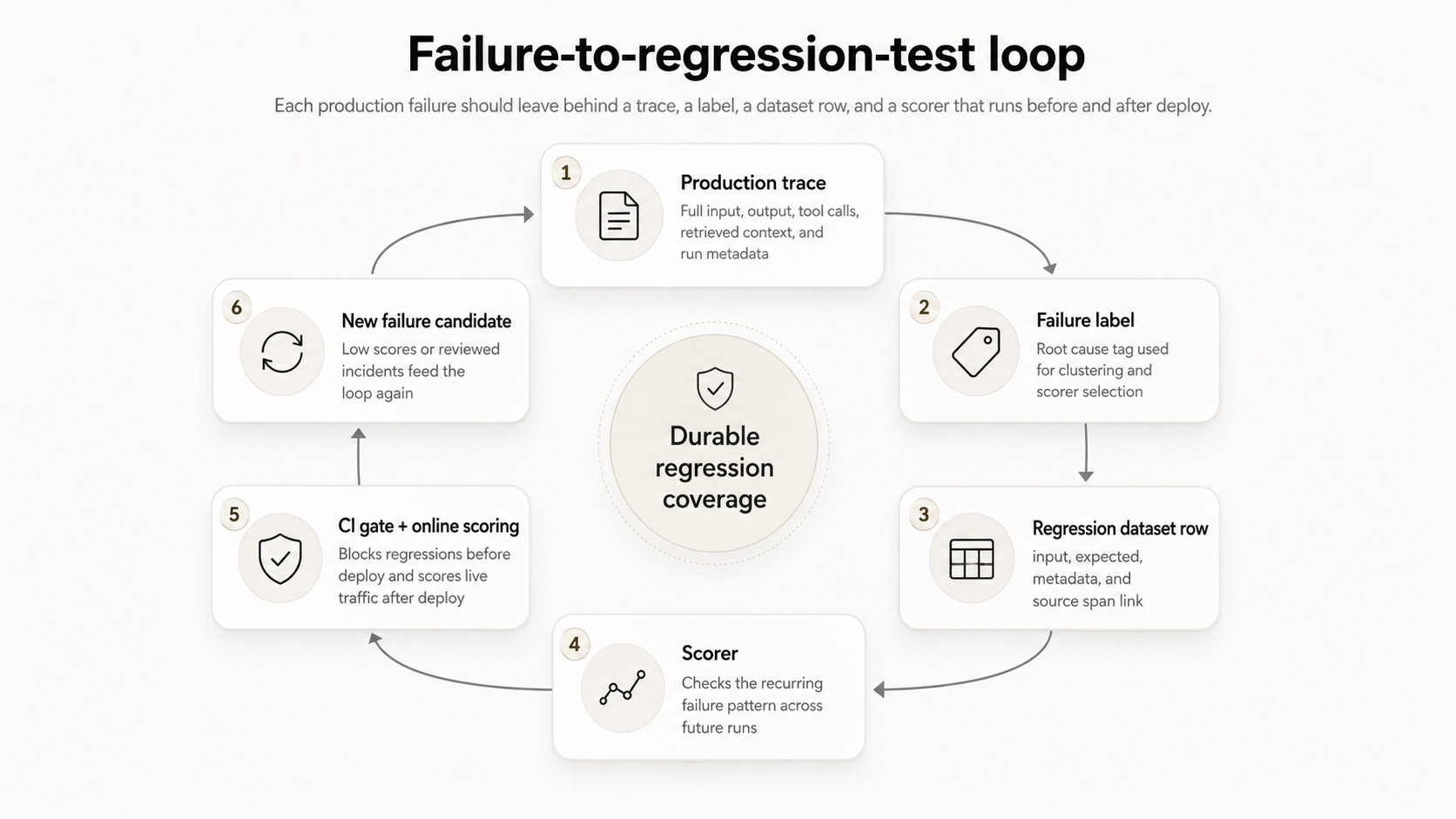
Each diagnosed production failure should produce a trace, a label, a dataset row, and a scorer that runs before and after deployment.
Capture the failed trace: When a failure is identified through user feedback, a low online score, or an internal review, capture the full production trace. The trace should include the original input, model output, intermediate tool calls, retrieved context, and runtime metadata needed to reproduce the run.
Diagnose the failure mode: Review the trace and identify the failed behavior. The model may have fabricated a claim, missed the right retrieval chunk, selected the wrong tool argument, ignored an instruction, or returned an output shape that downstream code cannot parse. Add a failure-mode label so that related traces can be clustered and evaluated using the appropriate scorer.
Promote the trace into a regression dataset: Convert the reviewed trace into a versioned eval dataset row. The dataset record should preserve the input, the expected behavior when a gold answer exists, and metadata such as the failure label, source span ID, timestamp, prompt version, and model version.
Write a scorer for the recurring pattern: Build a scorer that checks for failure patterns across future outputs for the same dataset row. The scorer should evaluate the behavior behind the failure, such as unsupported claims, invalid tool arguments, missing fields, or response format violations.
Gate releases on the scorer: Run the scorer against the regression dataset in CI and configure a threshold to block releases. Register the same scorer as an online scoring rule so production traffic continues to surface the same failure mode when a new model, prompt, retrieval index, or agent workflow introduces the pattern again.
Capture and classify failed LLM production traces
A failed trace is useful for regression testing only when it contains enough context to reproduce the behavior later. The trace should include the original user input, the model response, every intermediate tool call with arguments and results, retrieved context chunks for RAG systems, and runtime metadata such as the prompt version, model version, system prompt, and feature flags. Without those fields, engineering teams can see that a response failed, but they cannot reliably determine whether the failure resulted from a prompt change, a model swap, a retrieval update, or an agent workflow change.
After capturing the trace, classify the failure mode so the same pattern can be clustered, reviewed, and scored. The label should describe the failed behavior, because the later-written scorer needs to test the pattern across future outputs.
Hallucination: The model produced a confident claim that the available source data does not support. This failure mode is common in RAG systems, citation-heavy applications, and support agents that answer from internal knowledge bases.
Retrieval miss: The right source exists in the knowledge base, but the retriever did not surface it or ranked it too low for the model to use. Retrieval misses often look like hallucinations in the final answer, so the trace needs to show the retrieved chunks and their order.
Tool argument error: The agent chose the right tool but passed the wrong argument, used the wrong format, or omitted a required field. The trace should preserve the tool name, argument payload, tool result, and any downstream error or unexpected output.
Instruction-follow failure: The response ignored a system or user constraint. Common examples include returning prose when the prompt required JSON, exposing information the instruction blocked, or skipping a required output field.
Format violation: The response structure does not match the schema or ordering expected by downstream code. These failures include invalid JSON, missing fields, wrong data types, and malformed citation formats.
Once the trace has a reliable failure-mode label, the trace can move toward dataset promotion. High-confidence failures can be promoted automatically when validation logic, online scoring, or user feedback identifies the pattern. Ambiguous outputs, high-stakes decisions, and borderline quality issues should go through human review before the trace becomes a permanent regression case.
Turn production traces into regression datasets with Braintrust
A production trace becomes useful for regression testing when it is saved as a dataset record containing the original input, the expected behavior when available, and metadata that preserves the failure mode, source span, timestamp, and review status.
Use Braintrust to create regression dataset records from automatically detected failures, reviewed traces in Logs, or specific production spans pulled with BTQL. Each option fits a different review workflow, but the dataset shape stays consistent across all three.
For complete setup details, see the guide to creating datasets. The dataset guide covers SDK inserts, trace promotion from Logs, production log sources, user feedback, and generated datasets.
Loop, Braintrust's AI assistant, can also speed up triage of early failures. Use Loop from Logs to ask natural-language questions about traces, identify recurring patterns, generate SQL filters, find similar traces, create datasets from log patterns, and generate scorer drafts from identified issues.
Insert detected failures with the dataset SDK
When the application detects a failure through validation logic, an online score, or user feedback, use initDataset() and dataset.insert() to add the failed example to the regression dataset from code.
async function main() {
  // Initialize dataset (creates it if it doesn't exist)
  const dataset = initDataset("My App", { dataset: "Customer Support" });

  // Insert records with input, expected output, and metadata
  dataset.insert({
    input: { question: "How do I reset my password?" },
    expected: { answer: "Click 'Forgot Password' on the login page." },
    metadata: { category: "authentication", difficulty: "easy" },
  });

  dataset.insert({
    input: { question: "What's your refund policy?" },
    expected: { answer: "Full refunds within 30 days of purchase." },
    metadata: { category: "billing", difficulty: "easy" },
  });

  dataset.insert({
    input: { question: "How do I integrate your API with NextJS?" },
    expected: { answer: "Install the SDK and use our React hooks." },
    metadata: { category: "technical", difficulty: "medium" },
  });

  // Flush to ensure all records are saved
  await dataset.flush();
  console.log("Dataset created with 3 records");
}

main();
For regression testing, adapt the same record shape to the production failure. The input field should reproduce the original request. The expected field should capture the desired behavior when a gold answer exists. The metadata field should preserve the failure label, model version, prompt version, source span ID, and review status.
Promote reviewed traces from Logs
Some failures need human review before the trace becomes a permanent regression case. Manual promotion works best when the failure category is still being defined, when no scorer exists for the failure mode, or when the output needs domain judgment.
Add traces to a dataset in the Braintrust UI:
- Go to Logs.
- Select the traces you want to add.
- Select + Dataset and then the dataset you want to add to.
Manual review keeps noisy cases, one-off failures, and ambiguous outputs out of the regression suite. Once the same failure mode appears across distinct inputs or users, promote a single representative trace and store the related span IDs in metadata for traceability.
For a deeper review workflow, see the guide to adding human feedback. The review workflow supports production trace review, dataset row review, structured labels, comments, tags, and review queues.
Backfill a production span with BTQL
When an incident review identifies a specific production span, fetch it with BTQL and insert it into the regression dataset. The origin field links the dataset row to the source span and adds a Log button to the Origin column.
async function backfillSpan() {
  const projectId = "<your-project-id>";
  const spanId = "<span-id-from-logs>";

  // Fetch the span from project logs
  const btqlResponse = await fetch("https://api.braintrust.dev/btql", {
    method: "POST",
    headers: {
      Authorization: `Bearer ${process.env.BRAINTRUST_API_KEY}`,
      "Content-Type": "application/json",
    },
    body: JSON.stringify({
      query: `SELECT id, input, output FROM project_logs('${projectId}') WHERE span_id = '${spanId}' LIMIT 1`,
    }),
  });

  const { data } = await btqlResponse.json();
  const span = data[0];

  // Insert into the dataset, mapping span fields to dataset row format
  const dataset = initDataset("My App", { dataset: "Customer Support" });
  const datasetId = await dataset.id;

  await fetch(`https://api.braintrust.dev/v1/dataset/${datasetId}/insert`, {
    method: "POST",
    headers: {
      Authorization: `Bearer ${process.env.BRAINTRUST_API_KEY}`,
      "Content-Type": "application/json",
    },
    body: JSON.stringify({
      events: [
        {
          input: span.input,
          // span.output is the raw output from your app — extract the relevant
          // value for your use case (e.g. span.output[0].message.content for
          // OpenAI chat completions)
          expected: span.output,
          origin: {
            object_type: "project_logs",
            object_id: projectId,
            // span.id is the row UUID from the SELECT above — what the Log button expects.
            id: span.id,
          },
        },
      ],
    }),
  });
}

backfillSpan();
Before promoting traces in bulk, group failures by signature so the dataset captures recurring patterns. A small number of representative traces per failure mode is usually enough to test the behavior without slowing down every eval run.
Write scorers for recurring LLM failure modes
A regression dataset needs a scorer that can catch the same failure pattern in future runs. The scorer should evaluate the underlying behavior that led to the failure, such as unsupported claims, invalid tool arguments, missing fields, or output format violations.
Use Braintrust scorers to measure the quality of AI output in experiments and production. Autoevals cover common evaluation tasks, LLM-as-a-judge scorers handle natural-language judgments, and custom code scorers handle deterministic checks in code. For the complete scorer workflow, see the guide to writing scorers.
Use LLM-as-a-judge scorers for semantic failures
Use an LLM-as-a-judge scorer when a reviewer would need to read the output to decide whether the model response passed. Faithfulness, helpfulness, answer completeness, tone, and instruction-following usually require semantic judgment.
const project = braintrust.projects.create({ name: "my-project" });

project.scorers.create({
  name: "Helpfulness scorer",
  slug: "helpfulness-scorer",
  description: "Evaluate helpfulness of response",
  messages: [
    {
      role: "user",
      content:
        'Rate the helpfulness of this response: {{output}}\n\nReturn "A" for very helpful, "B" for somewhat helpful, "C" for not helpful.',
    },
  ],
  model: "gpt-5-mini",
  useCot: true,
  choiceScores: {
    A: 1,
    B: 0.5,
    C: 0,
  },
  metadata: {
    __pass_threshold: 0.7,
  },
});
For a hallucination regression, adapt the prompt so the judge compares the model output with the retrieved context and scores groundedness. The __pass_threshold value marks scores below the threshold as failing.
Use custom code scorers for deterministic failures
Use a custom code scorer when the failure can be checked with a clear rule. Schema violations, missing fields, invalid tool arguments, exact-bad outputs, and malformed citations are well-suited to deterministic scoring.
const project = braintrust.projects.create({ name: "my-project" });

project.scorers.create({
  name: "Equality scorer",
  slug: "equality-scorer",
  description: "Check if output equals expected",
  parameters: z.object({
    output: z.string(),
    expected: z.string(),
  }),
  handler: async ({ output, expected }) => {
    const matches = output === expected;
    return {
      score: matches ? 1 : 0,
      metadata: { exact_match: matches },
    };
  },
  metadata: {
    __pass_threshold: 0.5,
  },
});
Replace the equality check with the deterministic condition that matches the failure mode: validate output against a schema for JSON regressions, inspect the selected tool and arguments for tool-call regressions, or parse and compare citation IDs against retrieved context for citation regressions.
For production use, version scorer definitions, test scorer behavior in a Braintrust Playground, and calibrate judge-based scorers against reviewed examples before using the scorer as a release gate. Use the Playground to test the scorer prompt, judge model, and pass threshold against known failures and acceptable outputs, then save the run as an experiment so future scorer changes have an immutable comparison point. When the scorer prompt or judge model changes, rerun the calibration set to separate application regressions from scorer drift.
Run regression evals in CI/CD
A regression test protects releases by running the dataset and scorer on every pull request. Use braintrustdata/eval-action to run evals in GitHub Actions and post evaluation results back to the pull request.
name: Run evaluations

on:
  pull_request:
    branches: [main]

jobs:
  evaluate:
    runs-on: ubuntu-latest
    steps:
      - uses: actions/checkout@v3
      - name: Set up Node.js
        uses: actions/setup-node@v3
        with:
          node-version: "18"
      - name: Install dependencies
        run: npm install
      - name: Run Evals
        uses: braintrustdata/eval-action@v1
        with:
          api_key: ${{ secrets.BRAINTRUST_API_KEY }}
          runtime: node
Set thresholds based on the scorer's purpose. A schema-validity scorer may need a perfect score because malformed output can break downstream code. An LLM-as-a-judge scorer needs calibration because judge scores can vary across runs. Score a reviewed sample first, compare scorer results with human labels, and set the threshold at a level that catches the failure pattern without blocking valid changes.
When a new scorer fails an existing eval run, investigate the failing case before changing the threshold. The scorer may have exposed a bug the previous eval suite missed. Keep the threshold when the scorer is calibrated correctly, fix the system, and rerun the eval. Change the scorer only when reviewed examples show false positives or false negatives.
For the full CI setup, see the guide on creating experiments, which covers bt eval, BRAINTRUST_API_KEY, GitHub Actions, and local evaluation runs.
Connect CI evals with production scoring
Production failures become easier to control when the same dataset and scorer workflow supports pull-request evaluation and live scoring. Braintrust lets teams promote production traces into datasets, define scorers, run evals in CI, and score production logs through online scoring rules. The Braintrust workflow connects production failure review, regression testing, and release gating in a single evaluation system.
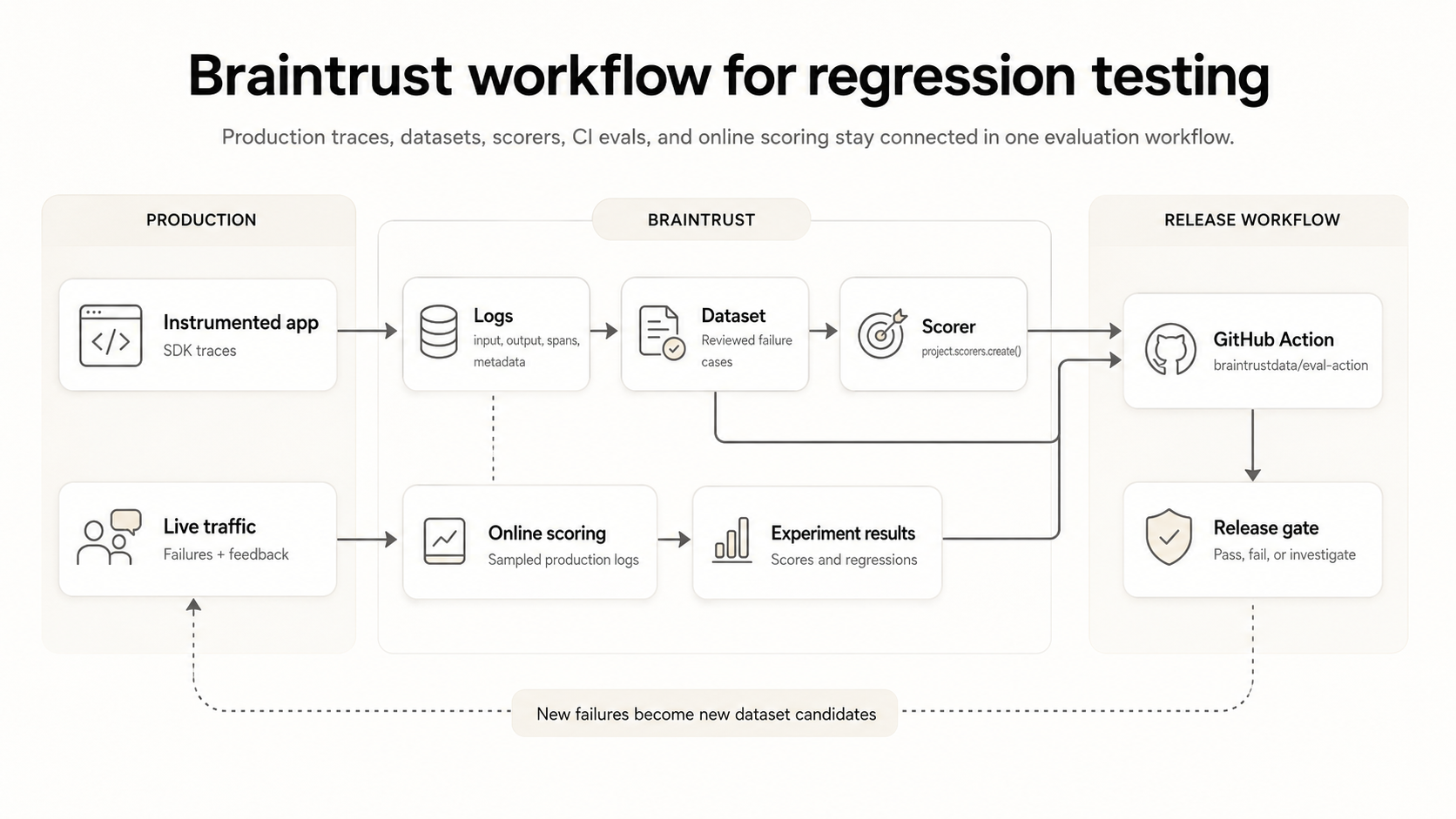
Braintrust integrates production traces, regression datasets, scorers, CI evals, and online scoring into a single evaluation workflow.
For the live scoring setup, see the guide on scoring production traces. Online scoring applies scorers to production logs, supports sampling, and helps validate experiment results against real interactions.
To set up the full workflow, instrument the application, promote reviewed production failures into a dataset, add the scorer that captures the failure pattern, and run the eval suite on the next pull request. For the instrumentation step, start with Braintrust's application instrumentation guide, which covers trace capture for LLM calls, application logic, metadata, token usage, errors, and data for evaluation datasets.
Start free with Braintrust to turn production failures into regression tests, gate releases in CI, and keep the same scorers running on live traffic. The free Starter plan includes 1 GB of processed data, 10K scores, and unlimited users, projects, datasets, playgrounds, and experiments.
Common pitfalls when turning production failures into regression tests
Overfitting evals to individual traces: A regression dataset can become too narrow when every production failure is added as a separate permanent test case without clustering. The eval suite may pass because the system learned the exact historical examples, while a near-duplicate failure still slips through on a new input. Group traces by failure mode, keep one representative case per cluster, and store the related span IDs in metadata so reviewers can trace the cluster back to the original production evidence.
Letting judge-based scorers drift: LLM-as-a-judge scorers depend on both the judge prompt and the judge model. When either one changes without versioning, score changes become difficult to interpret because the application, scorer prompt, and judge model may all influence the result. Pin the judge model version, store the scorer prompt template in source control, and revalidate the scorer against human-labeled examples before using the updated scorer as a release gate.
Losing track of application prompt versions: Changes to application prompts can make regression results harder to debug when the prompt version is not tied to the production trace or eval result. Store production prompts as versioned Braintrust prompts and use environment tags for deployment stages such as development, staging, and production. When a regression appears, the eval result can be traced back to the prompt version that produced the failing behavior.
Ignoring successful production traces: A regression dataset that only contains failures can miss regressions in previously successful behavior. Sample a small number of high-quality production traces into the dataset alongside failure cases so the eval suite checks whether fixes preserve behavior that already worked. Positive examples help identify cases where changing a prompt, model, retrieval index, or agent workflow solves one failure mode but weakens another.
Keeping human review manual at scale: Manual review works for a small number of failed traces, but review queues become difficult to manage as production volume grows. Add the failure-mode label to the span schema so that online scoring can automatically route traces into categories, and then send only ambiguous, high-stakes, or borderline examples to human reviewers. The result is a review process that scales with production traffic while keeping expert judgment focused on cases that need it.
FAQs: Turn LLM production failures into regression tests
What is the difference between a regression eval and a CI eval?
A CI eval is any evaluation that runs as part of continuous integration. A regression eval is an evaluation built from past production failures, using dataset rows that preserve the original production input, failure context, and, when available, expected behavior. A regression eval can run in CI, but the defining feature is the dataset source. In Braintrust, regression evals can run through the same eval suite, braintrustdata/eval-action, and scorer pool used for broader CI evaluation.
How do I write a regression test when I do not have a gold answer for the production input?
Many production inputs lack a single correct answer, especially in open-ended generation and agent workflows. When no gold answer exists, leave Braintrust's expected field empty and encode the violated constraint in the scorer. For a hallucination case, score the faithfulness of the retrieved context; for a tool-call case, check whether the agent selected the right tool and passed valid arguments. In these cases, the scorer defines the pass condition for the production-derived test case.
How often should I refresh the regression dataset from production traces?
Refresh the regression dataset as part of incident triage and failure review, since it should grow as new production failure patterns emerge. In Braintrust, reviewed production traces can be promoted to datasets as failures are diagnosed, keeping regression coverage aligned with real user behavior. Running the suite on a regular cadence can still help catch drift across prompts, models, retrieval indexes, and agent workflows.
Should every production failure become a regression test?
Regression datasets work best when they capture recurring failure patterns, so not every production failure requires a permanent test case. Single-occurrence failures can stay labeled in Logs until the same failure mode appears across distinct users or inputs. Once the pattern recurs, add a representative trace to the regression dataset and retain the related span IDs in Braintrust metadata for traceability.
How do I keep the scorer from false-positiving and blocking valid deploys?
Calibrate the scorer on human-labeled examples before using it as a release gate. For an LLM-as-a-judge scorer, score a representative set of production examples, have reviewers label the same set, and compare scorer results with human judgment. Set the deploy threshold below the measured agreement level to account for judge variance, then run the scorer in shadow mode before making it a blocking CI check.
Can I migrate my existing offline eval dataset to use production traces as inputs?
Keep the existing scorers when the evaluation criteria still apply, and then add production-trace-derived rows to reflect real user behavior. Production traces usually expose edge cases that synthetic fixtures miss, including long-tail inputs, tool-call sequences, retrieval behavior, and prompt-version effects. In Braintrust, promoted traces can sit in the same dataset and run through the same scorer workflow as existing eval cases, allowing teams to expand coverage without rebuilding the eval stack.