

Upload CSV/JSON
The fastest way to create a dataset is uploading a CSV or JSON file:- Go to Datasets.
- If there are existing datasets, click Dataset. Otherwise, click Upload CSV/JSON.
- Drag and drop your file in the Upload dataset dialog.
-
Columns automatically map to the
inputfield. Drag and drop them into different categories as needed:- Input: Fields used as inputs for your task.
- Expected: Ground truth or ideal outputs for scoring.
- Metadata: Additional context for filtering and grouping.
- Tags: Labels for organizing and filtering individual records. When you categorize columns as tags, they’re automatically added to your project’s tag configuration. These are per-record tags, distinct from dataset-level tags that organize datasets in the list.
- Do not import: Exclude columns from the dataset.
- Click Import.
If your data includes an
id field, duplicate rows will be deduplicated, with only the last occurrence of each ID kept.Create via SDK
Create datasets programmatically and populate them with records. The approach varies by language:- TypeScript/Python: Use the high-level
initDataset()/init_dataset()method which automatically creates datasets and provides simpleinsert()operations. - Go/Ruby: Use lower-level API methods that require initializing an API client and explicitly managing dataset creation and record insertion.
Create via CLI
Use thebt datasets create CLI command to create datasets directly from the terminal. Accepts JSONL files, stdin, or inline JSON rows.
Rows that omit an
id field get auto-generated stable IDs. Accepted top-level record fields are id, input, expected, metadata, tags, and origin.Promote traces from logs
You can add a trace to a dataset by mapping fields from a production log span into dataset row format. The span’sinput maps to the dataset row’s input, and the span’s output typically becomes the row’s expected value. This is useful when you see a notably good or bad response in production and want to capture it as a test case. You can add traces to datasets with the Braintrust UI or programmatically with the Braintrust API.
- UI
- API
Add traces to a dataset using the Braintrust UI:
- Go to Logs or Review.
- Select the traces you want to add.
- Click Add to > Add to dataset, then choose the dataset. From a single span, the submenu item is labeled Add this span to dataset.
input holds a pointer to the logged trace. The Input field shows the trace using the read-only Reference view type, displaying its metrics, input, and output inline. The row’s actions include Open trace and Copy root span. For details on the row shape, see Dataset structure.This option is available for project logs, including the Log spans view on the Review page. If you select several spans from the same trace, Braintrust creates one row for the trace rather than one row per span. To get one row per span, insert the spans with the SDK instead.Add multiple traces as a groupWhen you select two or more traces from project logs, the option changes to Add group to dataset. The row’s input holds references to all selected traces. The row renders each referenced trace in a collapsible view. The option is disabled when the selection exceeds 64 traces.Curate from topics
Topic classifications turn logs into structured signals you can filter by, such as task type, sentiment, or error category. Filter logs by classification, then promote the matching traces to a dataset for targeted evaluation. See Build datasets from topics for the full workflow.Curate from user feedback
User feedback from production provides valuable test cases that reflect real user interactions. Use feedback to create datasets from highly-rated examples or problematic cases. See Capture user feedback for implementation details on logging feedback programmatically. To build datasets from feedback:- Filter logs by feedback scores using the search field:
scores.user_rating > 0.8(SQL) orfilter: scores.user_rating > 0.8(BTQL) for highly-rated examplesmetadata.thumbs_up = falsefor negative feedbackcomment IS NOT NULL and scores.correctness < 0.5for low-scoring feedback with comments
- Select the traces you want to include.
- Select Add to dataset.
- Choose an existing dataset or create a new one.
Generate with Loop
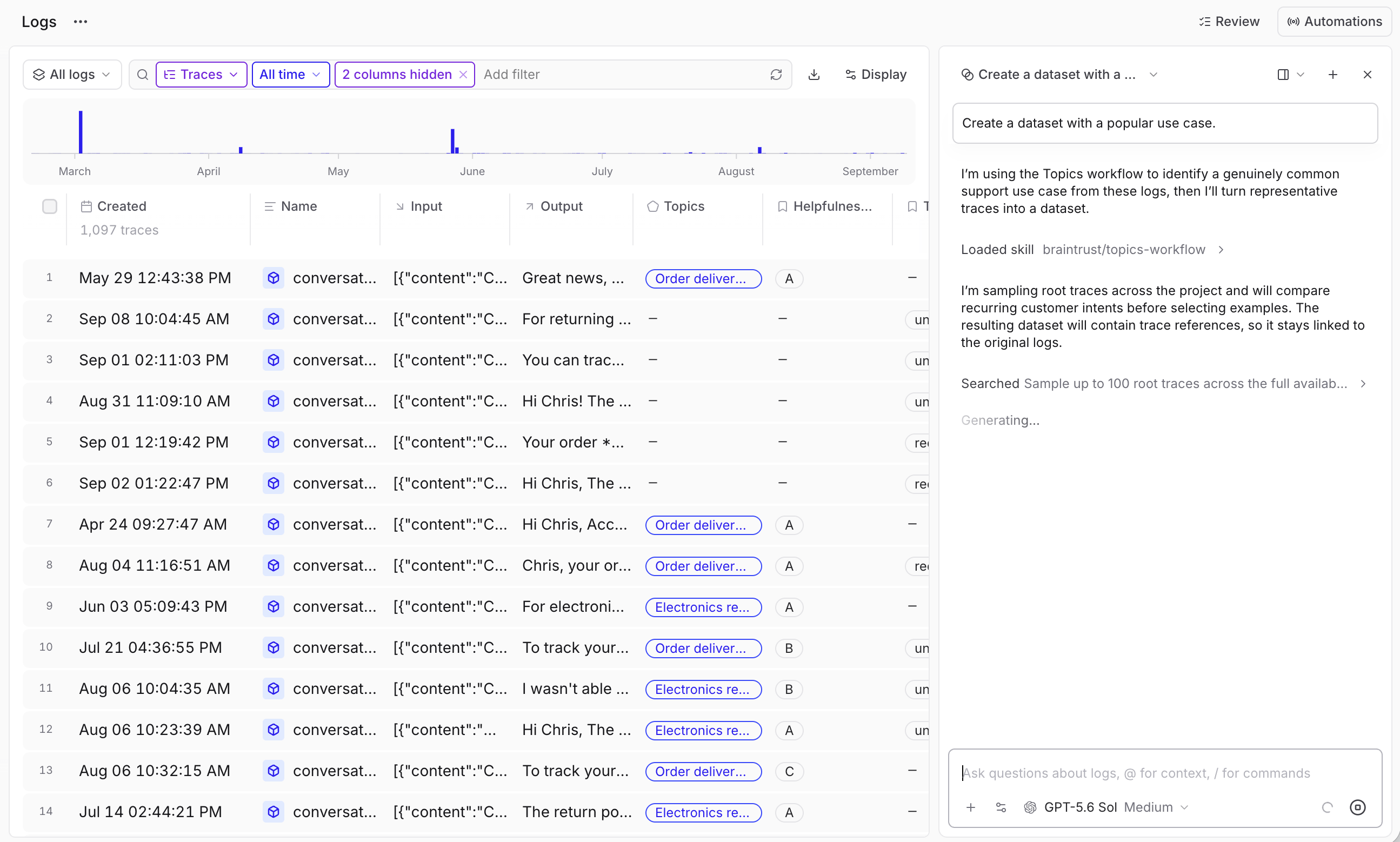
Ask Loop to create a dataset based on your logs or specific criteria. Example queries:- “Generate a dataset from the highest-scoring examples in this experiment”
- “Create a dataset with the most common inputs in the logs”
Log from production
Track user feedback from your application:Multimodal datasets
You can store and process images and other file types in your datasets. There are several ways to use files in Braintrust:- Image URLs - Keep datasets lightweight by referencing external images. Best for large images and fastest to sync.
- Base64 - Encode images directly in records. Self-contained but inflates dataset size.
- Attachments (easiest to manage) - Store files directly in Braintrust.
- External attachments - Reference files in your own object stores.
Next steps
- Manage datasets — tag, snapshot, validate, and edit records.
- Use in evaluations with
Eval(). - Track performance across experiments.