

- Find what broke: Sort by regressions to surface the test cases most affected by your change, then use diff mode to see exactly what the model output differently.
- Assess overall impact: Switch to an aggregate layout to see whether a run improved overall across all test cases.
- Share results: Export the Summary table as a PDF to report findings to stakeholders.
Experiment comparisons require trace-level rows. Select the row type chip ( Traces by default) in the toolbar and choose Traces to enable comparison mode.
Compare across all experiments
To compare every experiment in a project without opening a comparison, use the Summary table layout on the experiments list:- Go to Experiments.
- Select the layout chip ( List by default) in the toolbar.
- Choose Summary table.
- Select Display > Group by and choose a field. The columns show group values, and each row aggregates across the experiments in that group.
- Select the aggregation in a row’s header to change it. Scores support avg, max, and min. Metrics support sum, avg, min, and max.
Open a comparison
To start comparing experiments:- Go to Experiments.
- Select the checkboxes next to the experiments you want to compare.
- Click Compare in the toolbar.
Set a baseline
The baseline is the experiment your current experiment is compared against. Setting a persistent baseline means you don’t have to reselect it each time you open the experiment, and ensures consistent comparisons in CI. To set the baseline for an experiment:- Open the experiment you want to set as the baseline.
- In the Comparisons selector in the sidebar, hover over the experiment you want to set as the baseline.
- Click Set as baseline. It will be auto-selected whenever you open that experiment. To unset the baseline, click Clear baseline.
Set a comparison key
Braintrust matches test cases across experiments using theinput field by default. Test cases with identical inputs are treated as the same example. If your experiments share a consistent input structure, no configuration is needed.
If your input includes fields that vary between runs (such as timestamps or session IDs), configure a custom comparison key to match on the fields that matter:
- Go to Settings > Advanced.
- Under Comparison key, enter a SQL expression.
- Click Save.
input.user_query instead of the entire input object if other fields vary between runs. You can match on multiple fields using an array: [input.query, metadata.category].
Sort by regressions
Sorting by regressions puts the most affected test cases at the top, so you can immediately see what your change broke without scanning every row:- To reorder columns by regression count, select Display > Columns > Order by regressions.
- To filter to only rows that regressed or improved, click the score value in a column header and select X regressions or X improvements.
Use diff mode
Sorting tells you that a test case regressed — diff mode tells you why. Enable the Diff toggle in the table header to switch the table into diff mode. Each test case expands to show a sub-row per experiment, so you can compare outputs, scores, and metadata inline without opening individual rows. Use the sub-mode selector next to the toggle to choose how differences are highlighted:- Base -> Comparison — Show additions and removals relative to the primary (base) experiment, so you can see what the comparison experiment introduced.
- Comparison -> Base — Show additions and removals relative to the comparison experiment.
- Expected -> Output — Diff output against expected within a single experiment (only available when the experiment has an
expectedfield).
Timeline, Thread, and custom views are disabled in diff mode.
Pairwise scoring
When you compare two experiments in diff mode, a Pairwise card lets you record which experiment produced the better output for each row. Use it to capture head-to-head human preferences without configuring a separate scoring function.- Compare two experiments and turn on diff mode, then open a row to view its trace. The Pairwise card is active only while you compare two experiments in diff mode with differences to review.
- In the Pairwise card, answer Which experiment is better? for the current row by selecting the Base or Comparison experiment. Select the same choice again to clear it.
- Optionally, expand Comment (optional) to record why you preferred that output.
To compare the two outputs side by side, enable Show side-by-side diffs in the Diff control.
View pairwise results
After pairwise judgments are recorded, Braintrust surfaces them as a Pairwise score on the comparison, alongside your computed scores.- In the List layout, a Pairwise column marks which experiment won each row, and its column header shows the aggregate across all judged rows.
- In the Summary and Summary table layouts (see Assess overall impact), the Pairwise score reports the same aggregate.
- Average: how often the base experiment was preferred, as a percent.
- Wins / Losses: the win and loss counts.
- Count: the number of rows judged.
Assess overall impact
When comparing experiments, switch to an aggregate layout to see overall impact rather than scanning row by row. Select the layout chip ( List by default) in the toolbar:-
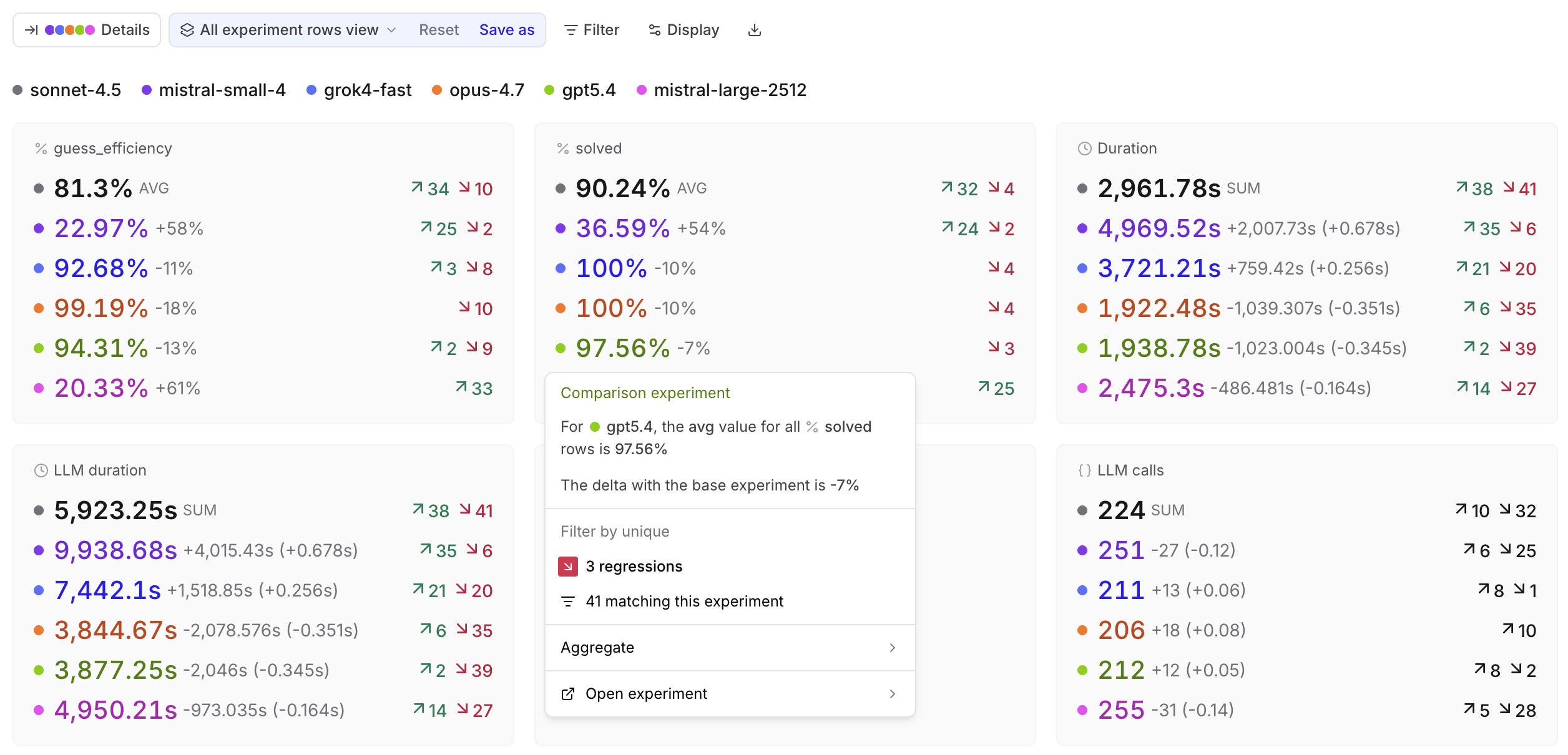
Summary: Score and metric cards showing aggregate values per experiment.
Click any card to open a menu with the aggregate value, delta vs. base, filters for improvements, regressions, or matching rows, and an aggregation selector. Comparison cards also link to the comparison experiment at the matching rows.
-
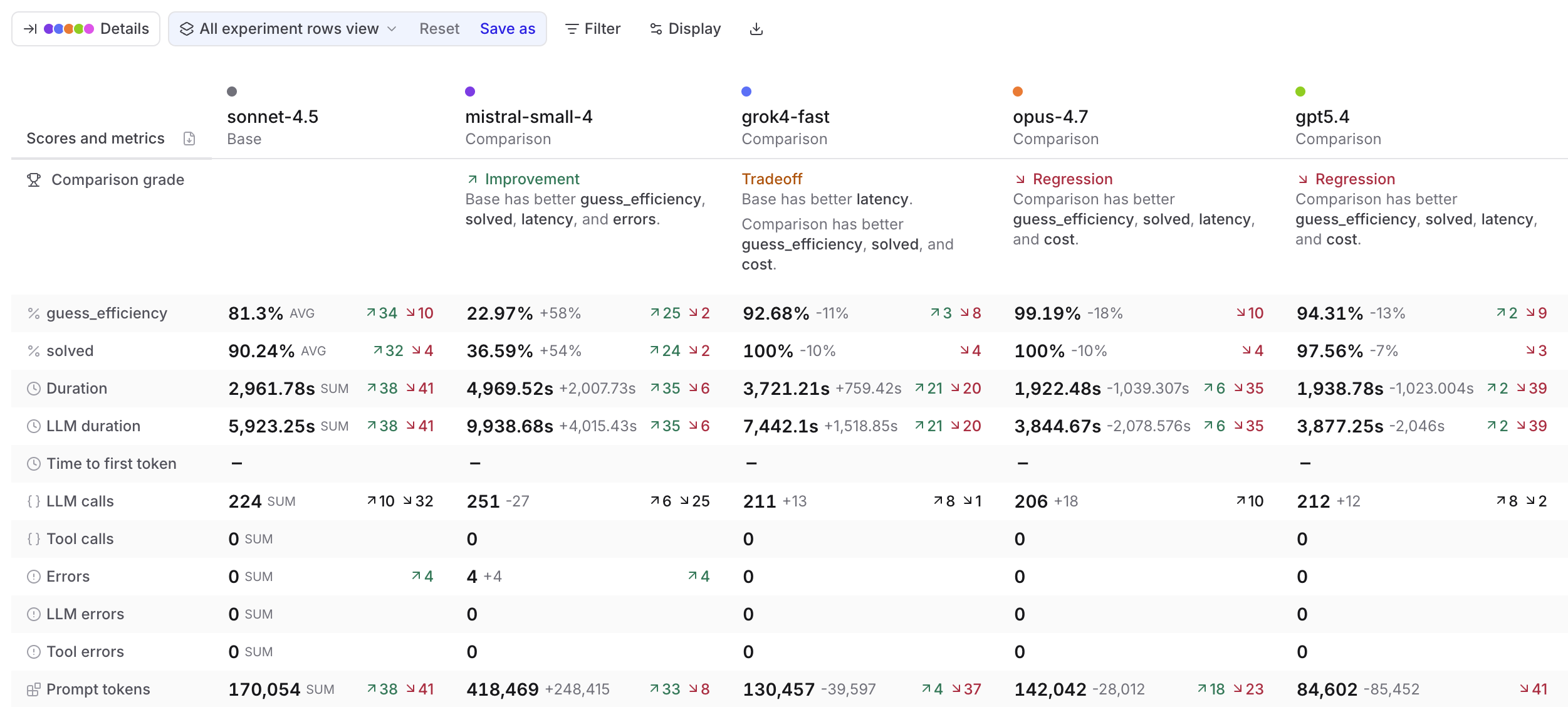
Summary table: Scores and metrics as rows with base and comparison experiments as columns.
The Comparison grade row tells you whether each experiment is an Improvement, Regression, Tradeoff, or Tie versus the base. The grade considers scores and metrics across four categories: latency, cost, errors, and load.
Click any cell to open the same details menu as in the Summary layout.
-
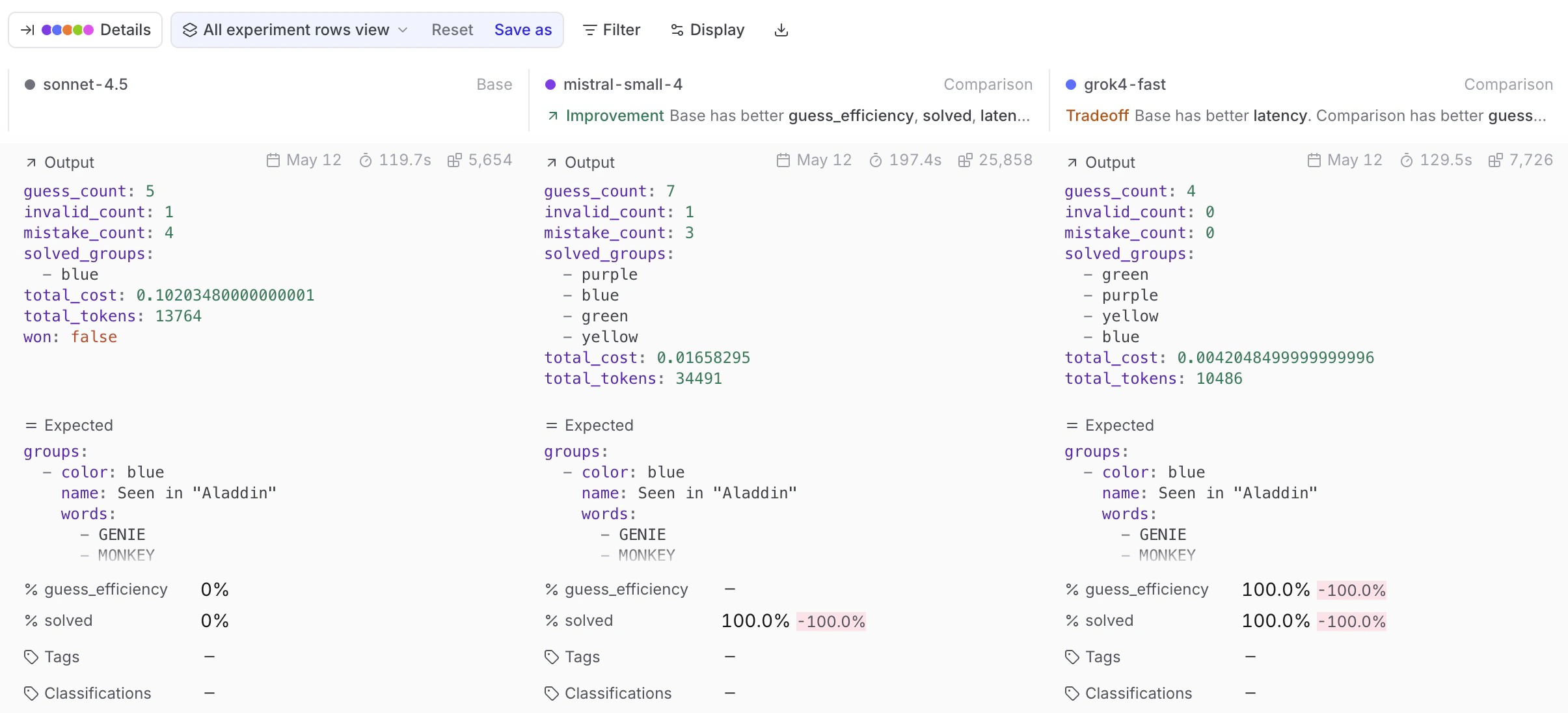
Grid: View fields for each test case as a stacked card. Use Display > Fields to select which fields to show.
Each comparison experiment’s column header shows a comparison grade (Improvement, Regression, Tradeoff, or Tie) relative to the base, using the same grading described under Summary table.
Share results
Braintrust gives you several options depending on who you’re sharing with and what they need to do with the results.- Download as CSV or JSON — for further analysis, importing into another tool, or sharing raw data. Click Download in the toolbar and choose a format. Capped at 1,000 rows in the UI. Use the API for larger exports.
- Share a link — Give teammates or stakeholders direct access to the experiment in Braintrust. Use the Share button in the top right to toggle between public and private visibility and copy the URL. Your collaborators must be members of your organization to view the experiment. You can invite users from the settings page.
- Download as PDF — Export a formatted summary for a doc, presentation, or for people without Braintrust access. Switch to Summary table layout and click the Download as PDF icon in the table header. The print view includes the org and project name as a header.
Compare trials
When you run multiple trials (repeated evaluations of the same input), grouping by input collapses all trials for the same input into a single expandable group. The group header shows aggregate stats; expand it to see individual trial rows. This makes it easy to spot inputs where the model behaves inconsistently — instability that a single-run comparison would miss. To group by input, select Display > Group by > Input. This option is only available when the experiment was run with trials.
Compare programmatically
Use the SDK to compare experiments in scripts or CI pipelines, and access score deltas programmatically.Use the SDK
PassbaseExperiment / base_experiment (or baseExperimentId / base_experiment_id) when initializing an experiment to compare against a specific baseline. The summarize() method returns per-score improvements, regressions, and diffs:
Use in CI/CD
Run evals in CI:terminate_on_failure to true to fail the build when an eval errors.
To select a baseline dynamically by git branch and dataset, use BTQL to find the most recent matching experiment. Always combine branch filtering with dataset_id to avoid comparing experiments run against different datasets:
Next steps
- Interpret results — detailed guide to the experiments table
- Use Loop — query experiment data with natural language
- Hill climbing — use prior outputs as baselines for iterative improvement
- Model and provider comparison — compare many experiments using metadata grouping and charts
- Write scorers to measure what matters
- Run evaluations in CI/CD