Braintrust Topics includes built-in facets for Task, Sentiment, and Issues, which classify general patterns across AI agent traces. Custom facets extend Topics with domain-specific classifications, such as churn risk, citation quality, tool reliability, and feature-request volume, when the built-in facets are too broad for recurring review questions.
This guide explains when to create a custom facet, how to design stable label sets, how preprocessors, prompts, and exclusion regex work together, and how to improve a facet after launch. It also includes worked examples for support, coding, research, multilingual chatbots, and sales or PLG agents.
When built-in facets aren't enough
Task, Sentiment, and Issues cover the general layer of AI agent behavior: what the user wanted, how the user sounded, and where the agent response or workflow showed problems. Those built-in facets are useful for the first review of production traces, but product teams often need dimensions tied to their own application, customers, tools, and roadmap decisions.
A custom facet is worth creating when recurring reviews need a label that the built-in facets cannot capture at the right level of detail.
The Task cluster is dominated by "Other" or generic catch-alls. If a large share of traces lands in a vague bucket like "Customer service request" or "Code question," the Task facet fails to separate the categories your team works on. A refund agent and a billing-question agent may both get labeled as "Customer service," even though those surfaces have different prompts, quality criteria, and escalation workflows.
You keep writing the same SQL filter to find a slice of traces. Production teams often build manual filters for recurring slices, such as "tool X failed," "user mentioned cancellation," or "session ended without resolution." When the same filter appears in weekly reviews, the filter is a strong candidate for a custom facet. Turning the recurring filter into a facet allows the slice to participate in cluster analysis, dashboards, online scoring, and review workflows without requiring a repeated SQL query.
A roadmap or quality decision needs a dimension the built-in facets don't capture. Sentiment can show that a user was frustrated, but Sentiment will not classify whether the user is a churn risk. Issues can show that a tool call failed, but Issues will not separate failures by tool or show how often each tool fails. When PMs or quality reviewers need product-specific granularity, a custom facet can turn recurring trace patterns into a weekly number the team can act on.
What makes a custom facet good
Facet quality usually breaks at the label-design stage. A prompt can only apply the taxonomy it receives, so broad or overlapping labels will still produce noisy clusters even when the prompt is written clearly. The best custom facets are narrow enough to classify consistently and specific enough to support a concrete review, eval, alert, or product workflow.
Scoped to one dimension. A useful facet answers one specific question. "Quality" is too broad because one label space has to cover tone, factual accuracy, and outcome. "Refund disposition" is narrower because the facet classifies one decision with a fixed set of outcomes that can be reviewed and scored.
Mutually exclusive labels. Each trace should have one best label. If "Frustrated" and "Angry" can both describe the same conversation, the model may split similar traces across labels on different runs. Severity tiers such as LOW, MEDIUM, HIGH, and CRITICAL create clearer boundaries and make the resulting distributions easier to trust.
Stable across reruns. The same trace should receive the same label when the facet runs again. Stability depends on a preprocessor that sends the same input each time and a prompt that clearly defines label boundaries so the model can classify based on evidence in the trace. When a facet's labels change between runs on the same trace, the output reflects classifier variance and cannot support reliable product decisions.
Tied to a workflow. Every label should point to a concrete next step. In a refund-disposition facet, GRANTED can route to a satisfaction eval, DENIED can route to a policy-clarity eval, ESCALATED can route to human review, and N/A can be filtered out. A label with no downstream use adds noise to Topics without improving review or release decisions.
A facet named "Quality" with GOOD, OKAY, and BAD labels may look reasonable in the Topics UI, but the labels are broad, overlapping, and hard to connect to follow-up work. A facet named "Refund disposition" with GRANTED, DENIED, ESCALATED, and N/A labels is easier to operate because each label answers one question and routes to a distinct workflow.
The three components of a custom facet
A custom facet has three components: a preprocessor, a prompt, and an optional exclusion regex.
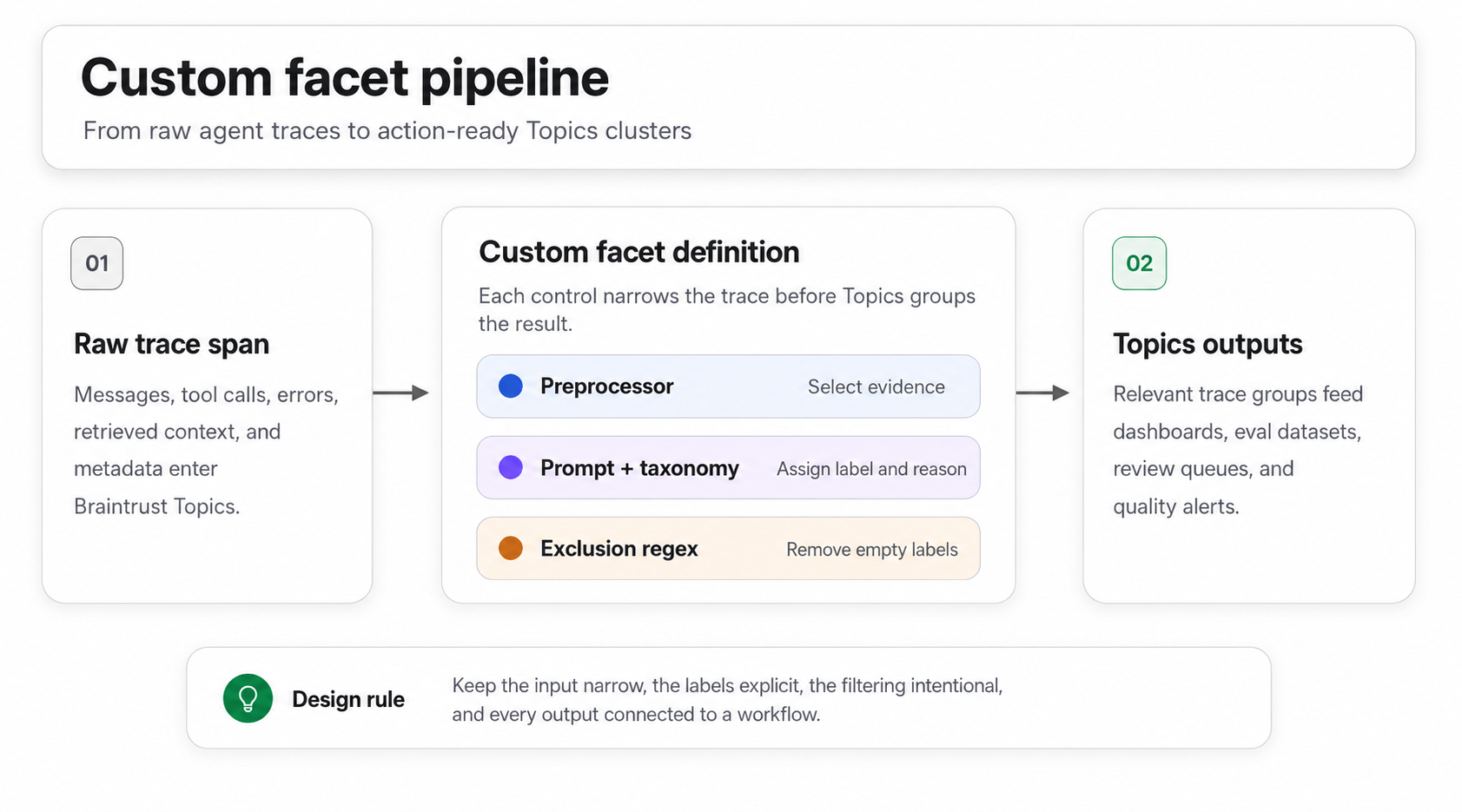
Custom facets convert raw traces into labeled Topics clusters that support reviews, evals, dashboards, and alerts.
Preprocessor transforms each trace span before the prompt reads it. The default Thread preprocessor formats the trace as a conversation, which works when the label depends on user and assistant turns. A custom JavaScript preprocessor can narrow the input to user messages, errors, tool calls, metadata, or another trace slice when the full conversation adds noise.
Prompt defines what to extract, which labels are valid, and how the output should be formatted. A label followed by a short justification works best because Topics can cluster concise, consistent summaries more reliably than long explanations.
Exclusion regex is an optional case-insensitive pattern that removes facet outputs from topic generation. The common pattern is to exclude outputs such as ^NONE or ^N/A, so empty classifications do not create noisy clusters.
The components work in sequence. The preprocessor controls the evidence available to the classifier, the prompt turns that evidence into a label, and the regex decides whether the output should reach clustering. Weakness in any component carries forward into the Topics output.
Preprocessor design
The preprocessor controls what evidence reaches the classifier. If the input does not contain the signal needed for the facet label, prompt changes cannot recover the missing context. If the input contains too much unrelated context, the classifier has to sort through noise before it can apply the label taxonomy.
A custom preprocessor is a JavaScript function named handler that receives input, output, error, metadata, and span_attributes for a span, and returns the message array Topics passes to the facet prompt.
User-messages only
The user-messages-only pattern works for facets such as user intent, request type, sentiment toward the product, feature requests, language and register, and pricing question detection. Filtering out assistant turns and tool calls keeps the input focused on what the user wrote, so the classifier does not have to separate user intent from the agent's confirmations, formatting, or tool-use scaffolding.
function handler({
  input,
}: {
  input: any;
  output: any;
  error: any;
  metadata: Record<string, any>;
  span_attributes: { name?: string; type?: string };
}): any {
  const messages = Array.isArray(input) ? input : (input?.messages ?? []);
  return messages.filter((m: { role: string }) => m.role === "user");
}
Errors and context
The errors-and-context pattern works for facets about failure modes, including tool reliability, retry storms, and abandoned sessions. The preprocessor inspects the span, identifies errors raised or tools that returned a failure, and emits a message array describing the failure window. Successful spans can return an empty array, which keeps clean traces out of the clustering pass.
For error-focused facets, filtering to the failure window keeps the classifier from spending most of its work on successful traces. The prompt can then classify the type of failure, the affected tool, or the resolution outcome using a smaller, cleaner input.
Custom metadata projection
Custom metadata projection works for facets such as user segment, environment, model version, plan tier, or other dimensions stored in trace metadata. The preprocessor pulls the relevant metadata fields, formats them as readable text, and can append a short conversation summary when the label needs both metadata and conversational context.
Metadata projection is useful for facets such as "Quality by plan tier" or "Latency complaints by model version" because the classification depends on fields that may not appear in the message content. Passing the relevant metadata directly makes the classifier more consistent on the segment axis.
Across all three patterns, the rule is the same: send the narrowest trace slice that contains the evidence required for the facet label.
Five custom facet examples by domain
The examples below show how facet design changes by agent type. Use the prompts as starting points, then replace the tool names and actions with the taxonomy your product team can review consistently.
1. Customer support agent: Churn risk
A churn-risk facet classifies support conversations by risk level using frustration signals, cancellation language, competitor mentions, and resolution status.
Preprocessor: Use the default Thread preprocessor, as classification depends on both user signals and the agent's resolution attempts.
Labels: LOW_RISK, MEDIUM_RISK, HIGH_RISK, and CRITICAL.
Prompt:
Based on this conversation, assess the churn risk for this customer.

Consider:
- Frustration level and language used
- Whether the issue was resolved satisfactorily
- Mentions of competitors, alternatives, or cancellation
- Overall satisfaction signals
- Severity and recurrence of issues

Classify as:
- LOW_RISK: Satisfied customer, issue resolved, positive interaction
- MEDIUM_RISK: Some frustration, but the issue was handled and no major churn signal appeared
- HIGH_RISK: Frustrated customer, unresolved issue, or clear dissatisfaction
- CRITICAL: Explicit cancellation language, competitor-switching language, or strong negative language

Respond with the label followed by a colon and the key risk indicators in one sentence.

Examples:
- "LOW_RISK: User thanked the agent and confirmed their billing question was answered."
- "HIGH_RISK: User expressed frustration about repeated API errors and said the issue was unacceptable."
- "CRITICAL: User stated they are considering switching to a competitor if the issue continues."
Action: Filter HIGH_RISK and CRITICAL traces for CS review, build a retention eval dataset from the CRITICAL slice, and track the weekly count of CRITICAL traces as an early churn signal.
2. Coding agent: Tool reliability
A tool-reliability facet identifies which tool was called in a coding-agent trace and whether the call succeeded. Coding agents often call tools for file reads, search, edits, shell commands, linting, tests, and formatting, so per-tool failure labels can show where prompts, schemas, or execution logic need attention.
Preprocessor: Use the errors-and-context pattern. Walk the span, find tool-call activity, capture each tool name with its success or failure state, and emit messages that describe the tool outcome. The Thread preprocessor can work when tool-call details are visible in the transcript, but a custom preprocessor keeps the input focused on tool outcomes.
Labels: Use <TOOL_NAME>_SUCCESS and <TOOL_NAME>_FAILURE for each tool in the agent's toolset, plus NO_TOOL_USED for traces where no tool was called. For example: FILE_READ_SUCCESS, FILE_READ_FAILURE, SHELL_EXEC_SUCCESS, and SHELL_EXEC_FAILURE.
Prompt: Replace the tool list with the actual tools your agent calls before using this prompt in production.
Based on this trace, identify which tool was called and whether the call succeeded.

Consider:
- Whether a tool-call span exists in the trace
- The name of the tool that was called
- Whether the tool returned a successful result or an error
- Error messages, exception traces, or non-zero exit codes in the tool output
- Cases where no tool was called

Use these tool names exactly: FILE_READ, FILE_WRITE, SHELL_EXEC, SEARCH, LINT, TEST, FORMAT, GREP.

Classify as:
- <TOOL_NAME>_SUCCESS: The named tool was called and returned a successful result
- <TOOL_NAME>_FAILURE: The named tool was called and returned an error, exception, or non-zero exit code
- NO_TOOL_USED: The agent did not call any tool in this trace

If a trace contains multiple tool calls, label the trace by the first tool that failed. If every call succeeded, label the trace by the most recent successful call.

Respond with the label followed by a colon and the key indicator in one sentence.

Examples:
- "FILE_READ_SUCCESS: The agent read package.json and the call returned file contents without error."
- "SHELL_EXEC_FAILURE: The npm install command exited with code 1 and reported a missing peer dependency."
- "NO_TOOL_USED: The agent answered the user's question from context without calling any tool."
Action: Aggregate FAILURE labels by tool, compute per-tool failure rates, and build eval datasets from the failure slices. Monitor the tools with the highest failure share during weekly quality review.
3. Research and summary agent: Source citation quality
A citation-quality facet evaluates how the agent handled source attribution in the final answer. The label space separates cited answers, unsupported or fabricated attribution, skipped attribution, and cases where citation is not needed.
Preprocessor: Use Thread only when both the retrieved sources and the final answer appear in the conversation transcript. For most research agents, a custom preprocessor is safer because the classifier needs the retrieved chunks, search results, API responses, and the final answer as a single structured input.
Labels: CITED, FABRICATED, SKIPPED, and N/A.
Prompt:
Based on the retrieved evidence and final answer in this trace, assess the quality of source attribution.

Consider:
- Whether the trace contains retrieved sources, document chunks, search results, or API responses
- The load-bearing factual claims in the agent's final answer
- Whether each factual claim ties back to a source the agent retrieved during the trace
- Whether the agent cited a source that does not appear in the retrieved set
- Whether the agent skipped attribution on a task that required sources
- Whether the task required source attribution

Classify as:
- CITED: Every load-bearing claim in the answer ties back to a source the agent retrieved
- FABRICATED: At least one claim cites a source that does not appear in the retrieved set, or the answer makes a factual assertion with no supporting source
- SKIPPED: The agent gave a factual answer without attribution on a task that required sources
- N/A: The task did not require source attribution

Respond with the label followed by a colon and the key indicator in one sentence.

Examples:
- "CITED: Every statistic in the answer maps to one of the three reports the agent retrieved earlier in the trace."
- "FABRICATED: The agent cited a 2023 OECD report that does not appear anywhere in the retrieved documents."
- "SKIPPED: The agent answered a question about EU privacy law without citing any source, even though sources were available in the retrieved context."
- "N/A: The user asked the agent to brainstorm names for a coffee shop."
Action: Use the FABRICATED slice to build or refine a hallucination scorer and create an eval dataset for citation quality. Track the FABRICATED share by topic over time, and create a log alert when the share crosses a threshold your team sets.
4. Multilingual chatbot: Language and register
A language-and-register facet assigns one composite label to the user's input, such as es-formal or fr-casual. The composite label keeps the output easier to review than separate language and register facets when the product team needs both signals together.
Preprocessor: Use user messages only because the facet labels how the user wrote. Assistant turns can add noise when the agent replies in a configured language or tone.
Labels: Use a flat label set with the format <lang>-formal and <lang>-casual for each supported language, plus mixed for code-switched conversations and n/a for traces without enough user text to judge. For example: en-formal, en-casual, es-formal, es-casual, fr-formal, fr-casual, mixed, and n/a.
Prompt:
Based on the user messages in this conversation, identify the dominant language and register.

Consider:
- The language of the user's messages using ISO 639-1 codes
- Greeting style
- Pronoun and verb form in languages that mark formality
- Use of contractions, slang, emoji, or all-lowercase typing
- Whether the user switched languages within the conversation

Use these language codes exactly: en, es, fr, de, pt, it, ja, zh, ko, ar, hi.

Classify as:
- <lang>-formal: The user wrote primarily in the named language using formal register markers
- <lang>-casual: The user wrote primarily in the named language using casual register markers
- mixed: The user switched between two or more languages within the conversation
- n/a: The user messages were too short, empty, or non-linguistic to judge

Respond with the label followed by a colon and the key indicator in one sentence.

Examples:
- "en-formal: The user opened with 'Good afternoon' and used full sentences with no contractions."
- "es-casual: The user used 'tú' and opened with a casual greeting."
- "ja-formal: The user wrote in keigo throughout, ending sentences with desu and masu forms."
- "mixed: The user opened in English and switched to Spanish in the third message."
- "n/a: The user sent only an error code and a question mark."
Action: Compare quality by language and register in Topics, review mixed conversations for prompt-template issues, and use the clusters to decide where localized prompts or eval datasets need more coverage.
5. Sales and PLG agent: Feature request type
A feature-request facet detects when users describe an unmet need, a product gap, a bug, an improvement request, or an integration request. Product teams can use those labels to review recurring demand from production conversations.
Preprocessor: Use user messages only because the classification depends on what the user asked for, not how the agent responded.
Labels: NEW_CAPABILITY, IMPROVEMENT, BUG, INTEGRATION, and N/A.
Prompt:
Based on the user messages in this conversation, identify whether the user described an unmet need or a problem with current product behavior, then classify the type of ask.

Consider:
- Whether the user described something the product does not currently do
- Whether the user described an existing feature that should behave differently
- Whether the user reported unexpected current product behavior
- Whether the user asked for a connection to another product, API, or data source
- Whether the conversation contains any feature-request signal

Classify as:
- NEW_CAPABILITY: The user described a feature, surface, or workflow the product does not have yet
- IMPROVEMENT: The user described an existing feature and asked for different behavior, options, defaults, or UI
- BUG: The user described unexpected current behavior
- INTEGRATION: The user asked for a connection to a specific third-party product, API, or data source
- N/A: The conversation contained no feature-request signal

If a conversation contains more than one type of ask, label the conversation by the most prominent one.

Respond with the label followed by a colon and the key indicator in one sentence.

Examples:
- "NEW_CAPABILITY: The user asked whether the dashboard could export to PowerPoint, which is not currently supported."
- "IMPROVEMENT: The user wants the date filter to default to the last 30 days."
- "BUG: The user reported that saved filters disappear after refreshing the page."
- "INTEGRATION: The user asked whether the product can sync with HubSpot."
- "N/A: The user asked how to reset their password."
Action: Export NEW_CAPABILITY and INTEGRATION traces to the PM team weekly, sorted by topic volume. Send IMPROVEMENT traces to the team that owns the affected feature, and route BUG traces into production issue triage.
Start building custom facets in Braintrust →
Iterating on a facet
A custom facet should be reviewed after it runs on real production traces. The first prompt and preprocessor can capture the main taxonomy, but edge cases usually appear once Braintrust Topics starts clustering real summaries.
Write the first version. Define the preprocessor, prompt, and exclusion regex in the + Facet panel. Keep the first version focused on the labels needed for review, and avoid adding edge-case labels before sample traces show a real need.
Test on selected traces. Open a real trace in the side panel and use Test with selected trace to preview the preprocessor output and the full facet result before creating or saving the facet. The test step checks whether the classifier receives the right evidence and returns the expected label format.
Review sample summaries. After Topics processes the facet, review summaries from each cluster. Compare the generated labels with how a reviewer would classify the same traces, and look for patterns such as missing labels, inconsistent boundaries, or too many N/A outputs.
Adjust the definition. Refine the prompt, add examples, narrow or widen the preprocessor input, or tune the exclusion regex based on the review. Make one type of change at a time when possible, so the next run shows which adjustment improved the output.
Reprocess existing traces carefully. Save with Apply to existing traces enabled so the updated facet processes logs that have not yet been classified. For prompt or taxonomy changes that require recomputation on already-processed logs, use the CLI rewind command.
Rewind the affected window. Run bt topics rewind 7d or another time window to replay historical traces through the updated Topics pipeline. The rewind command recomputes facet summaries and classifications for matching traces on the next executor pass.
Return to the Topics page after the rewind completes and confirm that the cluster distribution matches the taxonomy your team expects. Schedule the first review one week after launch, then keep the facet only if the labels support recurring review, eval, dashboard, or alert workflows.
Common pitfalls
Most weak custom facets fail because the classifier receives an unclear taxonomy, noisy input, inconsistent output instructions, or no follow-up review. The mistakes below are easier to fix when they are caught before the facet becomes part of a recurring workflow.
Overlapping labels. If two labels can apply to the same trace, the classifier may split similar traces across different labels on different runs. Merge labels such as "frustrated" and "angry" into one category, or use severity tiers such as LOW, MEDIUM, HIGH, and CRITICAL to make the boundary explicit.
Prompts that produce essays. Open-ended prompts produce long explanations that are difficult to cluster consistently. Require a fixed output format, such as a label followed by a one-sentence justification, and include a few example outputs so the classifier returns the same shape across traces.
Oversized preprocessor input. Extra context can dilute the facet's signal. If a facet only needs user messages, sending the full conversation makes the classifier account for assistant confirmations, formatting, and tool-use scaffolding before judging user intent. Start with the narrowest trace slice that contains the required evidence, then widen the input only when test results show missing context.
Mistuned exclusion regex. A narrow regex can allow empty outputs such as NONE or N/A into clustering, which creates noisy low-value clusters. An overbroad regex can remove valid outputs as well as empty classifications. After testing or rewinding the facet, review both the dropped traces and the clusters with empty-looking summaries, then adjust the regex based on what should stay in Topics.
No second iteration. The first version of a facet will usually miss edge cases once it runs on production traces. Schedule a follow-up review one week after launch, inspect the clusters with real examples, and ship a v2 before treating the facet as reliable.
FAQs: How to design custom facets for AI agent traces (2026)
Do custom facets cost more than built-in facets?
Topics is available on all plans, including Starter. Built-in Task, Sentiment, and Issues facets and custom facets are not gated by plan tier. Both run inside the same Topics automation. Topics is metered separately from processed data and scores: each plan includes a monthly Topics credit ($10/month on Starter, $100/month on Pro, custom on Enterprise), and on-demand overage rates apply once the credit is used up. Adding more custom facets increases Topics token usage on each run, which counts toward the same credit. See Plans and limits for the current rates.
How is this different from tags in LangSmith or Langfuse?
Tags in LangSmith and Langfuse are labels attached to traces or observations, allowing teams to organize, filter, and group existing trace data. They work well when the application already knows what value to attach at runtime, such as environment, release, workflow, customer segment, or feature area.
Custom facets in Braintrust Topics are generated after the trace is logged. A preprocessor selects the trace evidence, and a prompt classifies the trace using the taxonomy you define. That makes custom facets better suited to labels that must be inferred from conversation content or agent behavior, such as churn risk, citation quality, unresolved issues, or feature-request type.
What model runs facet summarization?
Facet summarization uses the model selected in the Topics automation's Advanced settings. The default option is brain-facet-latest, with brain-facet-2 and brain-facet-1 available as alternatives. Braintrust serves the Topics models, including facet summarization, embedding, and cluster naming models, through its built-in model system.
How do I reprocess historical traces after changing a custom facet?
Use Apply to existing traces when the updated facet should process logs that have not already been classified. For prompt, taxonomy, or preprocessor changes that require existing classifications to be recomputed, use bt topics rewind 7d or another time window from the CLI.
The rewind command replays the selected historical window through the Topics pipeline and recomputes facet summaries and classifications for matching traces on the next executor pass. After the rewind completes, review the Topics clusters again to confirm the updated facet produces the expected distribution.