Production AI agents create more traces than teams can review manually. Important patterns, such as repeated user intents, negative interactions, unresolved issues, and silent failures, often go unnoticed unless someone already knows what to filter for.
Braintrust Topics gives teams a scalable way to review production traces by automatically classifying logs by user intent, sentiment, and issues, then grouping similar traces into clusters that teams can inspect and act on. The result is a faster way to find recurring problems, build evaluation datasets from real production traffic, and decide which patterns deserve review or scoring.
This guide explains what Topics is, why AI teams need conversation analytics, how Topics works, what the built-in facets capture, and where Topics fits in the Braintrust evaluation workflow.
Who Topics are for
Production trace review breaks down once an agent generates thousands of logs a week. Manual review only covers small samples, and dashboards only surface metrics someone already decided to track.
An AI engineer may ship a new agent version on Monday and have 50,000 production traces by Friday. Somewhere in that volume are the traces that show whether the new prompt fixed last week's regression, but reading every trace is not practical, and sampling a small batch can miss long-tail failures.
Product managers often want to know what users actually ask the agent. Support screenshots, NPS comments, and anecdotal feedback show individual examples, but they do not indicate which use cases dominate production traffic or which requests lead to the most negative interactions.
A platform lead may investigate a quality complaint from a key account and find that no scorer was watching for the reported failure mode. Without a classification layer, the only options are to open logs one by one or write a narrow filter after the problem has already surfaced.
Braintrust Topics gives teams a way to inspect production traffic at aggregate scale. Instead of relying on manual trace review or pre-defined dashboards, teams can see recurring intents, sentiment patterns, and agent issues across the traces Braintrust already captures.
How Braintrust Topics works
Topics runs a daily pipeline that classifies raw logs across four stages.
Preprocessing: Each trace is formatted into readable text, including messages, tool calls, and nested spans. Trace structure affects output quality because the facet-summary model performs best when logs capture conversational or session context using nested spans. Flat traces with little semantic structure usually need better instrumentation or a custom preprocessor.
Facet summarization: For each facet, an LLM reads the preprocessed trace and writes a short summary of what happened through that lens. Braintrust serves the facet-summary models under the brain-facet-* family. Each automation can choose between brain-facet-latest (the recommended default), brain-facet-2, and brain-facet-1 from the Topics advanced settings.
Clustering: Once at least 100 facet summaries have been collected, Braintrust uses a brain-embedding-* model to convert each summary into a vector, then groups similar summaries into topics. A brain-agent-* model reads a sample of summaries from each cluster and generates a short label such as "Refund requests" or "API authentication errors."
Classification: Each trace is matched to its closest topic for each facet. The classification appears in the Logs table, where teams can filter, query with SQL, and build evaluation datasets from selected traces.
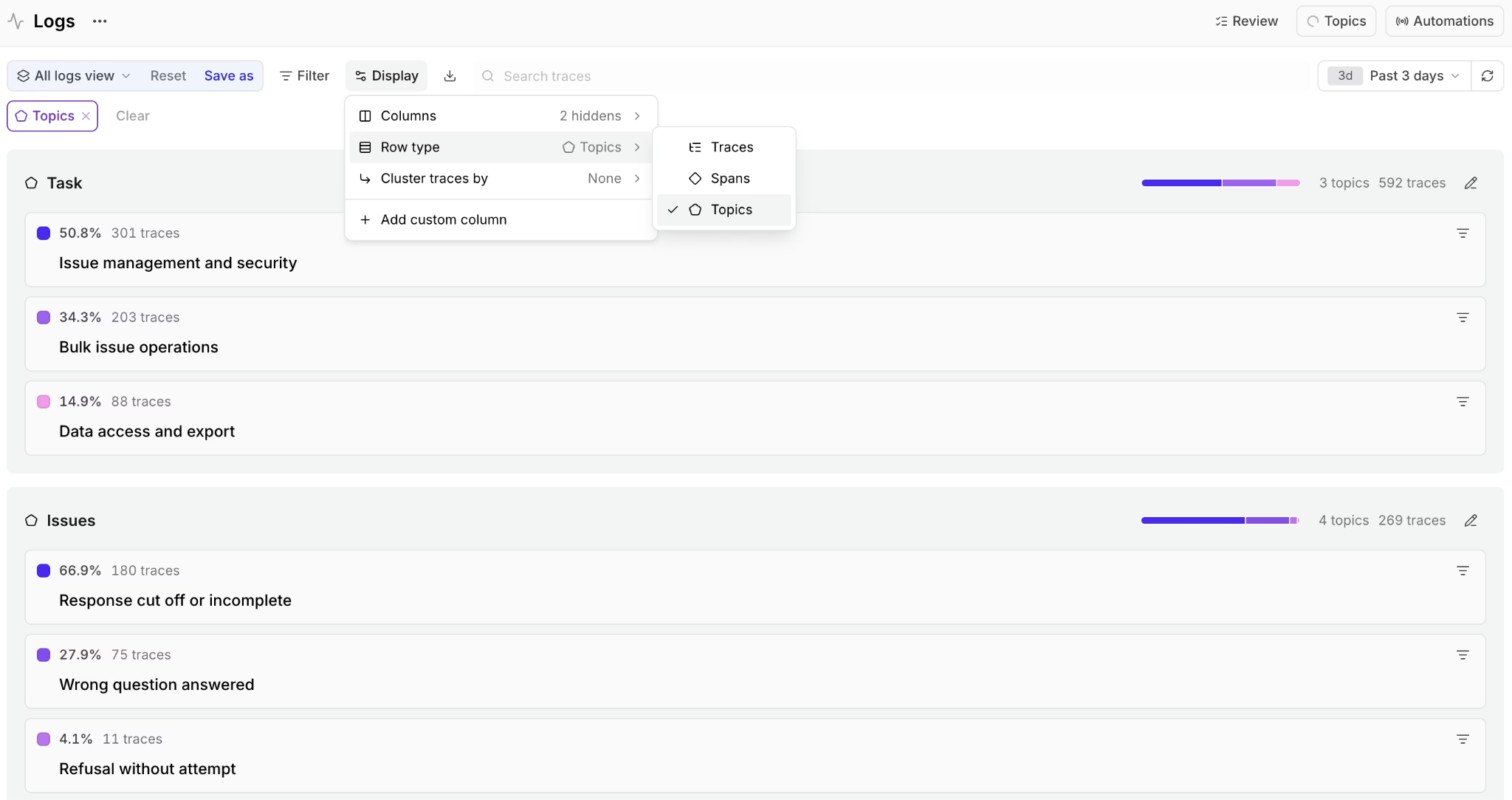
Topics classifications appear directly in Logs, so teams can filter production traces by recurring tasks, sentiment patterns, and agent issues.
The pipeline runs on three cadences:
- Existing logs can be backfilled with facet summaries when Topics is enabled.
- New logs are processed continuously as they arrive.
- Topics regenerate from collected facet summaries once per day, and teams can trigger a run from the UI or with the
bt topics pokeCLI command.
The three built-in facets in Topics
Enabling Topics adds three built-in classification lenses to each trace in the project: Task, Sentiment, and Issues.
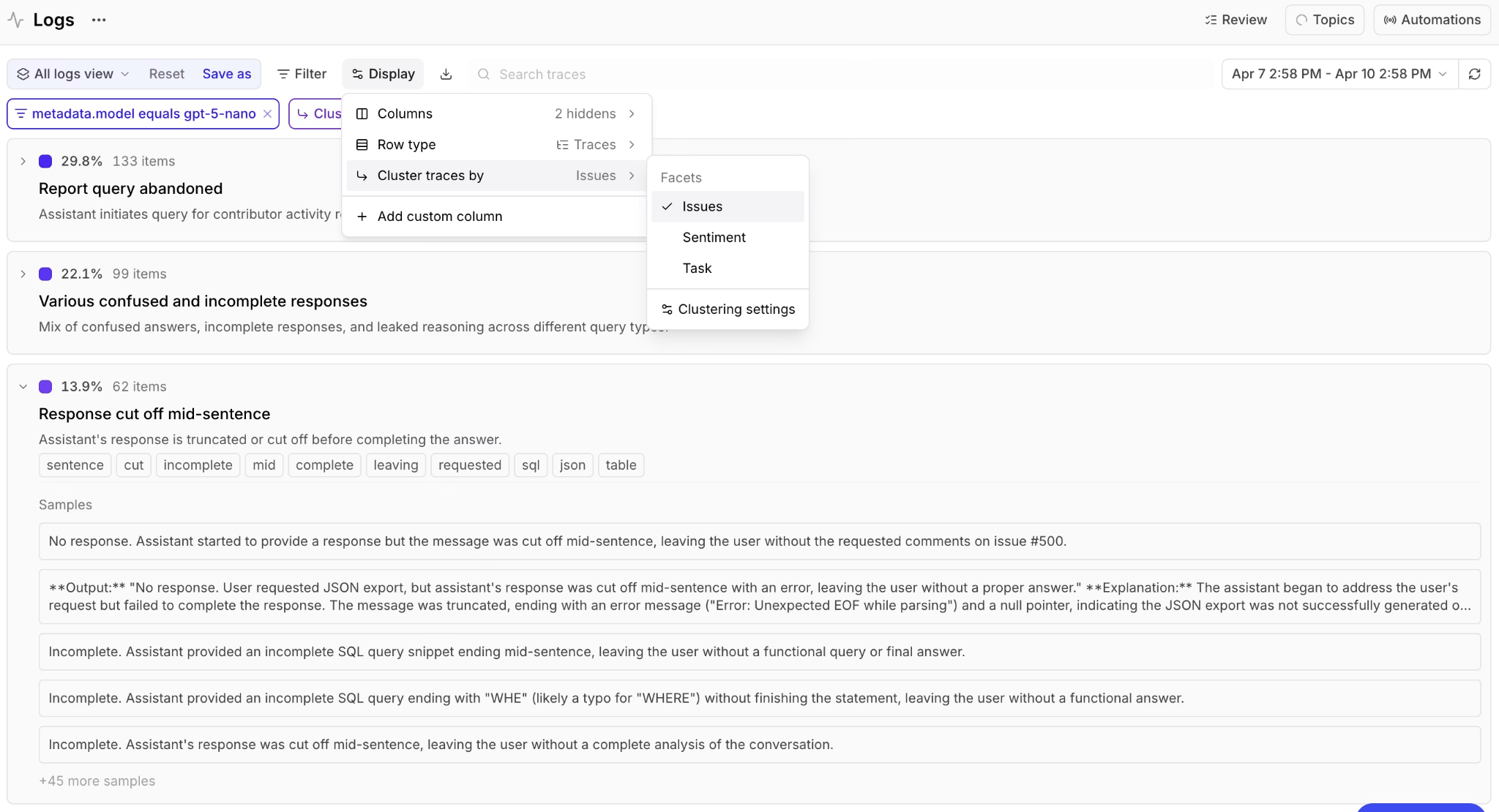
Built-in facets appear in Logs, allowing teams to inspect and filter traces by recurring tasks, sentiment patterns, and agent issues.
Task: The Task facet extracts the user's intent or goal from each trace. Example labels include "Creating a dataset," "Debugging an API error," and "Reviewing checkout flow." After a project has enough Task classifications, the distribution shows which agent use cases appear most often in production traffic. Product managers can size recurring requests by frequency, and engineers can inspect the traffic slices tied to specific tasks.
Sentiment: The Sentiment facet captures the emotional tone of the interaction. Labels can include POSITIVE, NEGATIVE, FRUSTRATED, and NEUTRAL. Sentiment helps teams find conversations where the user experience is poor even when no explicit thumbs-down event or CSAT survey exists. When negative sentiment appears inside a specific Task cluster, the pairing can point reviewers to the workflow that needs closer inspection.
Issues: The Issues facet identifies problems in the agent's behavior or response. Example labels include "Tool call failed," "Incomplete answer," and "Confident but incorrect response." Issues supports quality review by surfacing recurring failure modes, including small clusters that may not have an existing scorer.
The built-in facets become more useful when reviewers combine them. A pricing-related Task filtered for NEGATIVE sentiment returns the unhappy pricing conversations from the selected window, while a tool-call failure inside an order-status Task surfaces where the tool layer broke.
Custom facets extend Topics when the built-in facets are too broad for a product-specific question. A SaaS team might add a churn-risk facet for LOW, MEDIUM, HIGH, or CRITICAL classifications, while a fintech team might add a compliance flag for conversations involving regulated topics. Custom facets appear alongside the built-in facets on the Topics page.
Four ways to use Braintrust Topics
Classifications become useful once the team acts on them. Topics powers four workflows that previously took manual trace review.
Build evaluation datasets from production traffic. Filter Logs by a classification, such as classifications.Task.label = "Dataset creation", select the matching traces, and promote them into a dataset. Error-investigation tasks can become eval cases for error handling, negative-sentiment conversations turn into response-quality tests, and pricing-question tasks feed pricing-explanation eval inputs.
Discover failure modes before they reach customer escalations. The Issues facet can surface recurring problems that no scorer was watching for, such as empty parser output, incomplete answers, or failed tool calls. The Topics page ranks clusters by share, the scatterplot view makes outlier groups easier to inspect, and each cluster links back to the underlying traces.
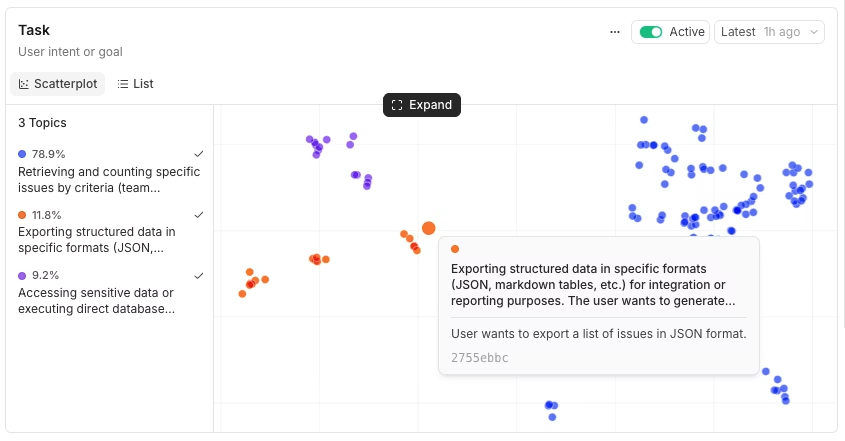
Topics scatterplots group similar trace patterns, allowing reviewers to inspect high-volume clusters and outliers.
Mine production traffic for product roadmap signals. Task and Sentiment together give PMs an aggregate view of what users ask for and where interactions break down. A custom facet, such as "Feature request," can classify conversations that mention missing capabilities, integrations, or product improvements, giving the roadmap process a structured input from real production traffic.
Automate scorers from observed patterns. Once a classification pattern repeatedly identifies a problem, the same logic can become an online scorer. For example, a checkout-experience scorer can return a failing score when Task equals "Checkout Flow" and Sentiment equals "NEGATIVE." After the scorer is pushed with bt functions push and added to an online automation rule, the check runs continuously on new traces.
Where Topics fits in Braintrust
Topics sits inside Braintrust's observability surface, where production trace classifications can feed evaluation workflows. Topics adds the classification layer Braintrust's trace, evaluation, and scoring workflows previously lacked.
Tracing comes first. Because Topics analyzes traces, teams still need to instrument the application with the Braintrust SDK or an OpenTelemetry exporter. Trace structure shapes output quality. Conversations represented as nested spans with messages, tool calls, and metadata produce useful facet summaries. Flat traces or traces without semantic structure produce weaker results, in which case writing a custom preprocessor for the facet is often the fix.
Evaluations still gate releases. Release evaluation still happens by running a candidate prompt against a curated dataset and comparing scores before deployment. Topics does not replace pre-deployment evals or experiments. It changes where some dataset examples come from, since production-derived datasets can be built from filtered classifications rather than synthetic cases that engineers would otherwise write by hand.
Scorers encode the team's judgment. Topics surfaces recurring patterns, and teams decide which patterns deserve an automated rule. Once that decision is made, a scorer can convert a classification combination into an online check that runs on every new trace.
Getting started with Braintrust Topics
Topics is available across plans, including the free Starter tier. Usage is metered separately from processed data and scores: each plan includes a monthly Topics credit ($10/month on Starter, $100/month on Pro, custom on Enterprise), and on-demand overage rates apply once the credit is used up. Self-hosted deployments can enable Topics on data plane v2.x or later. See Plans and limits for the current rates.
Prerequisites. Tracing should already be enabled in the project. Topics works best when traces include conversation or session structure, nested spans, messages, tool calls, and metadata. Flat traces with limited semantic context usually need better instrumentation or a custom preprocessor before topic quality becomes useful.
Enable Topics. Open the Topics page inside a Braintrust project, choose whether to apply Topics to existing traces or only to new traces, and click Enable topics. The backfill option provides the project data for classification on day one, while new traces continue to be processed as they arrive. Only approximately the most recent 500 logs are backfilled on enable, so traces outside that window will not have classifications without a rewind.
Track the first run. Each facet writes summaries in the background. Topic generation begins after at least 100 facet summaries have been collected, and the pipeline regenerates topics once per day. The Topics status panel shows the current pipeline stage, facet coverage, and any processing errors.
Refresh classifications as needed. Teams can trigger topic generation in the UI with Re-generate topics or in the CLI with bt topics poke. After changing a facet prompt, automation filter, or processing window, bt topics rewind can replay historical traces so existing logs pick up updated classifications.
FAQs on Braintrust Topics
How is Braintrust Topics different from Galileo, LangSmith, or Datadog?
Galileo, LangSmith, and Datadog support LLM observability workflows, including tracing, monitoring, metrics, and dashboards. Braintrust Topics focuses on automatic trace classification inside Braintrust. It classifies logs by Task, Sentiment, and Issues, groups similar summaries into topics, and writes classifications back to logs for filtering, dataset building, and scoring. Topics is useful when teams need aggregate production patterns in addition to trace-level inspection.
How does Topics handle model calls and data?
Topics uses Braintrust-served models for facet summarization, embeddings, and cluster naming. The model families are brain-facet-*, brain-embedding-*, and brain-agent-*. Braintrust serves these models on Baseten, which is included in the Braintrust DPA as a subprocessor. Self-hosted deployments call the same Braintrust-hosted endpoints with Zero Data Retention, and Topics requires built-in models to be enabled in the organization.
Does Topics work with self-hosted Braintrust?
Topics works with self-hosted Braintrust on data plane v2.x or later. Self-hosted deployments use outbound calls to Braintrust-hosted Topics model endpoints, with Zero Data Retention applied on the Braintrust side. Teams running self-hosted Braintrust should review the v2.x setup requirements before enabling Topics.
What happens to PII in classified traces?
Facet summarization reads trace content to generate summaries, so any PII logged inside the original trace can be visible to the summarization model. For PII-sensitive workloads, teams should scrub sensitive fields before logging or use a custom preprocessor that filters regulated content before the trace reaches the summarization step.
What is the difference between built-in facets and custom facets?
Built-in facets ship with Topics and cover general patterns across Task, Sentiment, and Issues. Custom facets let teams define domain-specific extractors with a preprocessor, a prompt, and an optional exclusion regex, so Topics can classify product-specific signals that built-in facets do not capture. Both run inside the same Topics automation and count toward the same Topics credit on each run.
How often do classifications regenerate?
Topics runs on a daily cycle. New logs are processed continuously as they arrive, and topics regenerate from collected facet summaries once per day after enough summaries are available. Teams can trigger an immediate run with Re-generate topics in the UI or bt topics poke in the CLI. After changing a custom facet or automation filter, bt topics rewind replays a historical window so existing traces pick up updated classifications.