

TL;DR
Teams tracking LLM costs in production now evaluate cost visibility alongside optimization and quality control because token spend often hides inside long prompts, retries, agent loops, and tool calls. This guide compares five tools that help engineering teams attribute LLM spend to specific workflow steps, test cheaper prompts or models, and validate cost-saving changes before release. Braintrust is the strongest option for teams that want production LLM cost tracking, prompt and model experimentation on logged traces, and eval-based quality checks on a single platform.
Why production LLM cost tracking requires trace-level visibility
LLM bills grow when token spend is concentrated in a small number of expensive calls. Long contexts, retries, agent tool loops, and reasoning models can multiply per-request costs by 10x before the increase appears on the monthly invoice. Aggregate dashboards show the total bill, but they do not identify the prompt, feature, workflow step, or model choice responsible for the increase.
Effective LLM cost tracking needs request-level detail across three layers. Token counts and estimated cost should be attached to each LLM call, span-level tracing should capture tool calls and retrieval steps, and tag-based grouping should break down spend by user, feature, model, or environment. Many tools capture basic LLM call data; fewer clearly expose tool-call and retrieval costs; and only a smaller group connects cost findings to prompt, model, and release decisions.
5 best LLM cost tracking tools in 2026
1. Braintrust
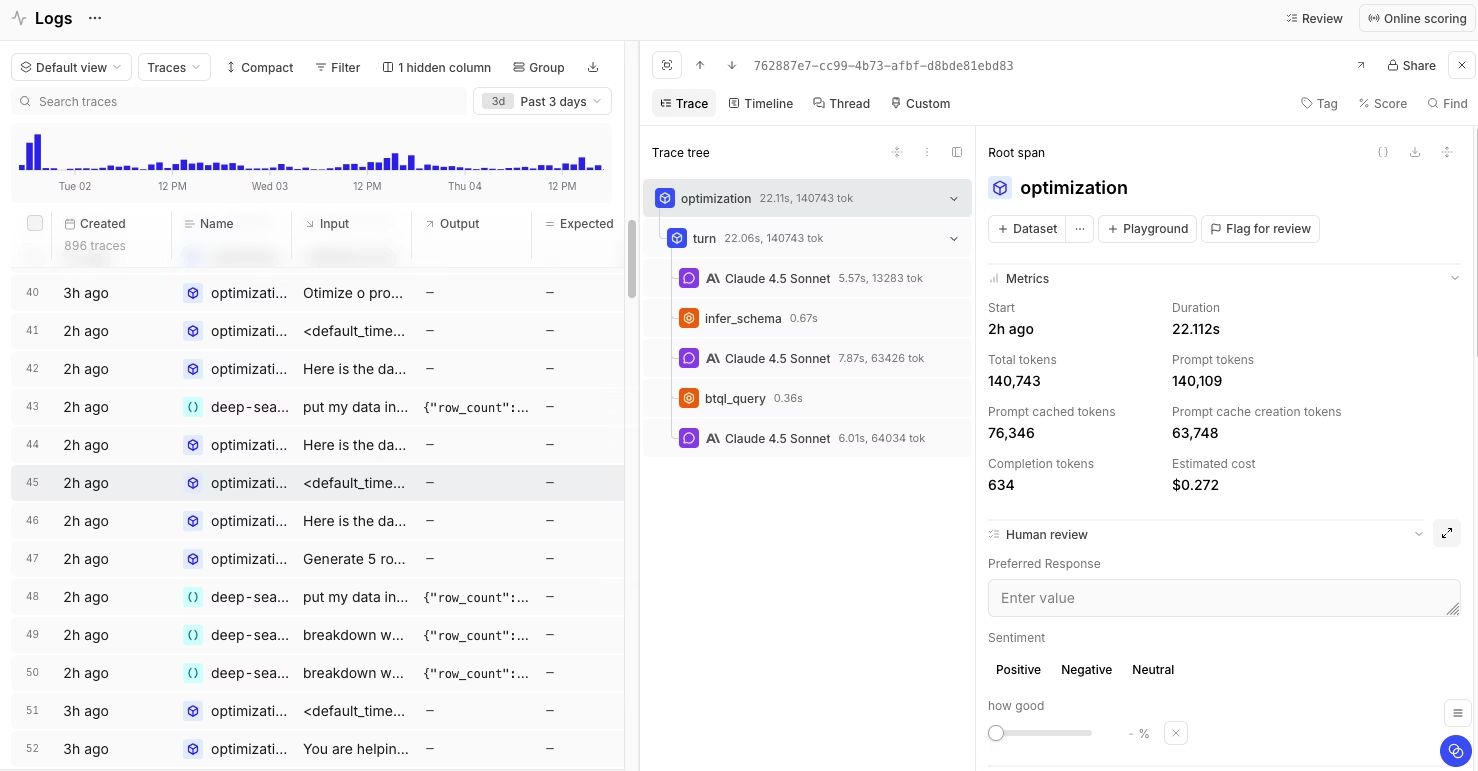
Best for: Engineering and product teams that want LLM cost tracking, prompt and model experimentation, and evals in one place.
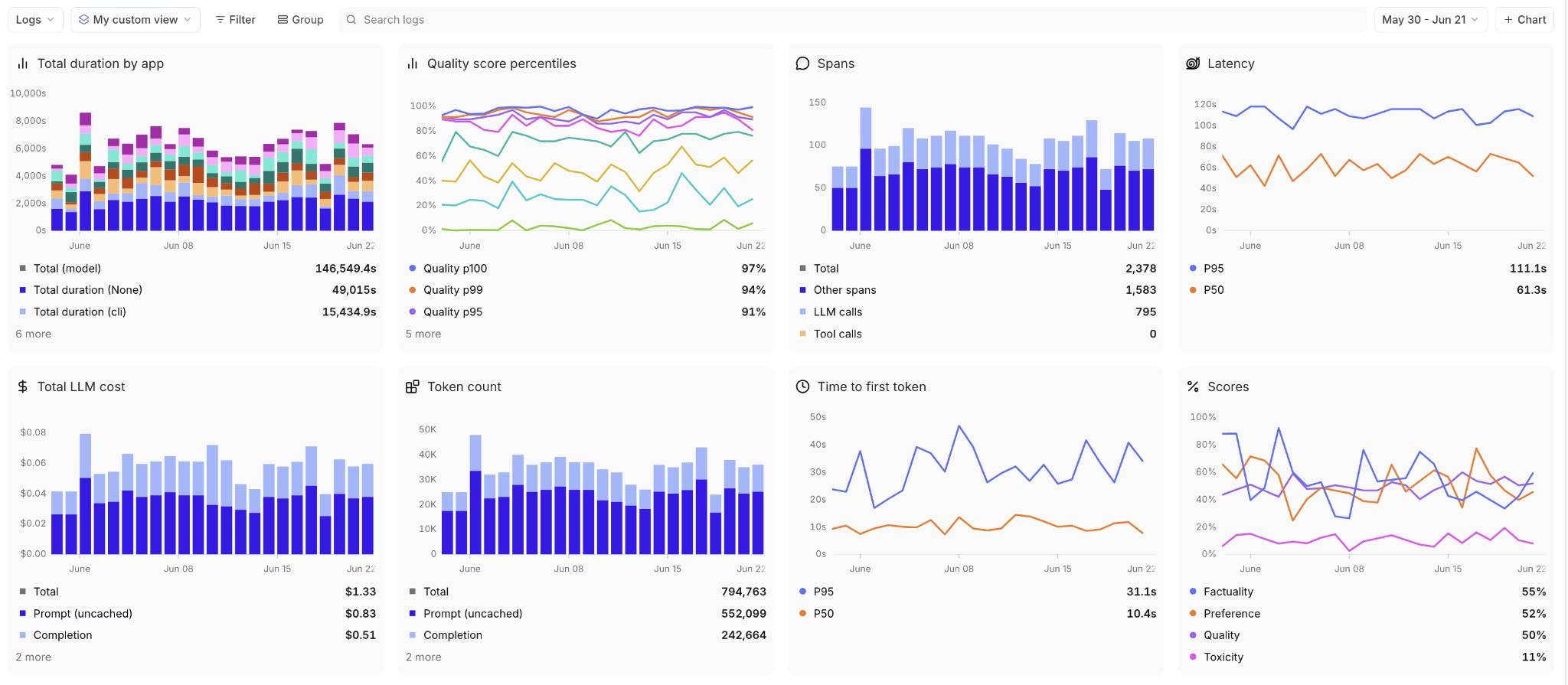
Braintrust is the strongest fit for teams that want to move from LLM cost visibility to cost reduction within a single workflow. Braintrust traces capture every LLM call, retrieval step, and tool invocation that lands as a span with input tokens, output tokens, latency, and estimated cost attached, so the trace tree shows exactly which step inside a multi-step workflow increased cost. Custom tags then break the same data down by user, feature, model, or environment, surfacing patterns aggregate dashboards hide, including agent retries against failing functions or oversized context pulled across repeated calls. Topics works the same data in the background, clustering logged traffic by intent, sentiment, and recurring issues, so you can see which kinds of requests concentrate spend without reviewing traces by hand.
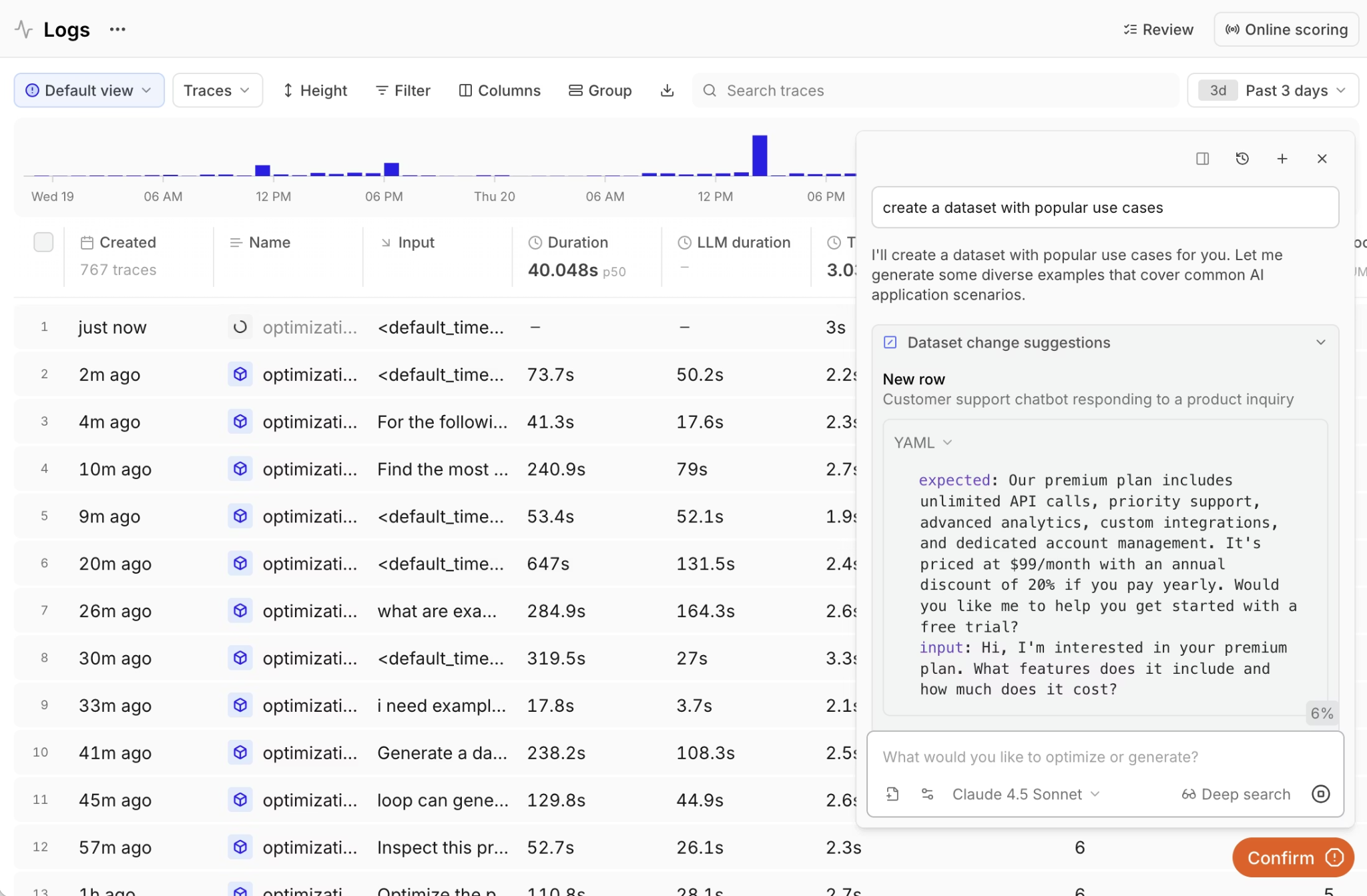
Visibility on its own does not lower the bill. Braintrust extends the workflow into prompt and model changes that actually reduce spend. Playground loads any expensive production trace and runs alternative prompts and models against it, returning scored, side-by-side results using actual production requests. Loop, the built-in AI assistant, analyzes failure patterns and automatically proposes prompt revisions, scorers, and dataset rows, all through natural language, so finding a cheaper variant becomes a guided iteration rather than a manual rewrite.
Cost reductions are only safe if quality holds, so Braintrust runs evals on the same traces that surfaced the cost. The native GitHub Action runs evals on every pull request and blocks merges that drop quality below a defined threshold, turning every cost-driven prompt change into a measurable release gate. For teams running coding agents, the Braintrust CLI exposes the same workflow from the terminal, with bt sql querying the most expensive traces, bt eval --watch re-running evals as the agent edits prompts, and the agent diagnosing and shipping fixes in a single session.
Brainstore, Braintrust's database optimized for AI workloads, handles trace queries roughly 80x faster than traditional databases, so filtering across millions of spans for the costliest traces stays interactive. Notion's AI team reported going from triaging 3 issues per day to 30 after adopting Braintrust, a 10x improvement they attributed to systematic evaluation replacing manual review.
Pros
- End-to-end cost visibility: Token and cost data on every span, including LLM calls, retrieval steps, and individual tool invocations.
- Custom tag grouping: Slice spend by user, feature, model, environment, or any custom dimension that teams define.
- Multi-step trace visualization: Full execution paths through agent workflows show which step drove the cost.
- Prompt and model experimentation: Playground tests cheaper prompts and smaller models against real production traces with scored output.
- Loop AI assistant: Generates prompt revisions, scorers, and dataset rows from production failures automatically.
- AI Gateway: Routes LLM calls through Braintrust to capture logs, enable caching, and implement provider fallbacks with a base URL change.
- CI quality gates: GitHub Action runs evals on every pull request and blocks merges that drop accuracy below a defined threshold.
- CLI for agent-driven workflows:
bt sql,bt eval, andbt eval --watchlet coding agents query expensive traces, propose fixes, and re-run evals from the terminal. - Webhook alerts: Cost threshold, quality drop, and performance alerts integrate with Slack, PagerDuty, or custom systems.
- Asynchronous logging: Non-blocking logging maintains application performance at high volumes without adding latency to user requests.
- Brainstore performance: Trace queries return in seconds across millions of spans, roughly 80x faster than traditional databases on AI workloads.
- Native framework support: Direct integrations with OpenTelemetry, Vercel AI SDK, OpenAI Agents SDK, LangChain, LangGraph, Google ADK, and more.
Cons
- Focused on LLM workloads, with limited coverage of general infrastructure monitoring.
- Self-hosting is reserved for the Enterprise tier.
Pricing
Braintrust's pricing is usage-based with no per-seat charges. The Starter plan is free and includes 1 GB of processed data, 10K scores, and unlimited users. Paid plans start at $249/month, with custom enterprise pricing available. See pricing details.
2. Datadog
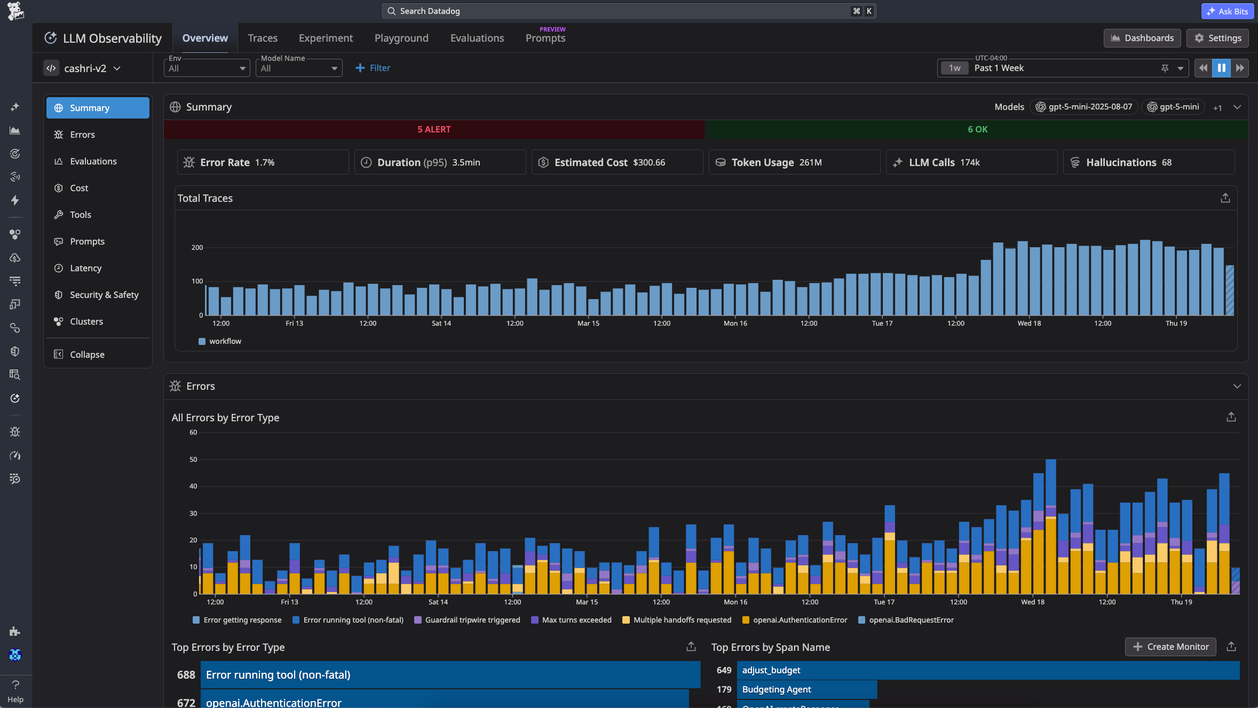
Best for: Teams already running Datadog who want LLM cost data inside an existing observability stack.
Datadog LLM Observability adds token usage and estimated cost per request to the dashboards teams already use for APM and infrastructure monitoring. The SDK auto-instruments OpenAI, Anthropic, AWS Bedrock, and LangChain calls, and cost facets in the Trace Explorer correlate LLM spend with application performance data. Cloud Cost Management can pull real OpenAI invoices alongside Datadog's estimates, giving teams invoice data and request-level estimates in one view.
Pros
- Auto-instrumentation across OpenAI, Anthropic, AWS Bedrock, and LangChain.
- Estimated cost per request from token counts and provider pricing tables.
- Cloud Cost Management integration pulls real OpenAI invoice data.
- LLM traces correlate with APM and infrastructure metrics in one view.
Cons
- Per-LLM-span billing layers on per-host APM costs and scales aggressively at high volume.
- Prompt and model experimentation against production traces is shallow.
Pricing
Free tier with 40K LLM spans per month. Paid plan starts at $240 per month for 100K LLM spans.
3. Galileo AI: Vendor-managed evaluations for teams who don't want to build their own
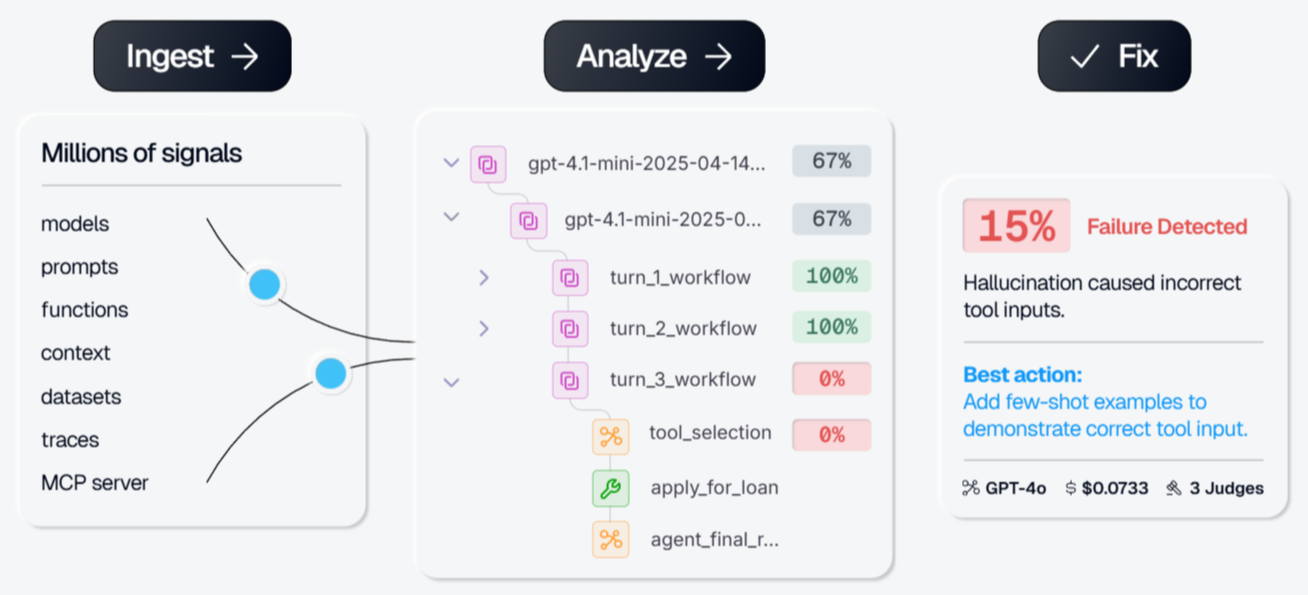
Best for: Teams that want a managed, proprietary evaluation and observability platform with prebuilt metrics rather than tooling they assemble themselves.
Galileo is a managed, proprietary AI evaluation and observability platform. Its tracing captures token usage across LLM, tool, and retrieval spans, so you can see spend next to quality signals, but cost attribution is a side effect of observability here rather than a dedicated focus. The platform ships with more than 20 vendor-maintained metrics, including hallucination detection, Context Adherence, Chunk Attribution, Completeness, and Correctness, and its Luna-2 evaluation models score traces inline at low latency. Galileo Insights detects failure modes and runs root-cause analysis across eval runs automatically.
Pros
- More than 20 vendor-maintained built-in metrics, so you can start evaluating without writing custom scorers.
- Luna-2 small evaluation models for low-latency inline scoring.
- Galileo Insights surfaces failure modes and root causes automatically across eval runs.
- Continuous Learning via Human Feedback (CLHF) tunes metric behavior from annotated examples.
- Integrations with CrewAI, LangGraph, OpenAI Agents SDK, LlamaIndex, Strands, and OpenTelemetry.
Cons
- Cost tracking is a side effect of observability, so it is lighter than dedicated cost-attribution tooling for mixed stacks.
- The platform is closed and proprietary, so you cannot extend or self-host it the way you can with an open tool.
- Runtime guardrails and self-hosting are both Enterprise-only.
- Prompt and model experimentation is limited, with no built-in playground for side-by-side comparison or automated prompt optimization.
- Merge-blocking release control generally requires custom workflow design.
Pricing
Free tier with ~5,000 traces/month. Pro starts at ~$100/month for ~50,000 traces with usage-based overages. Enterprise pricing is custom and required for runtime guardrails and self-hosting.
4. Weights & Biases Weave
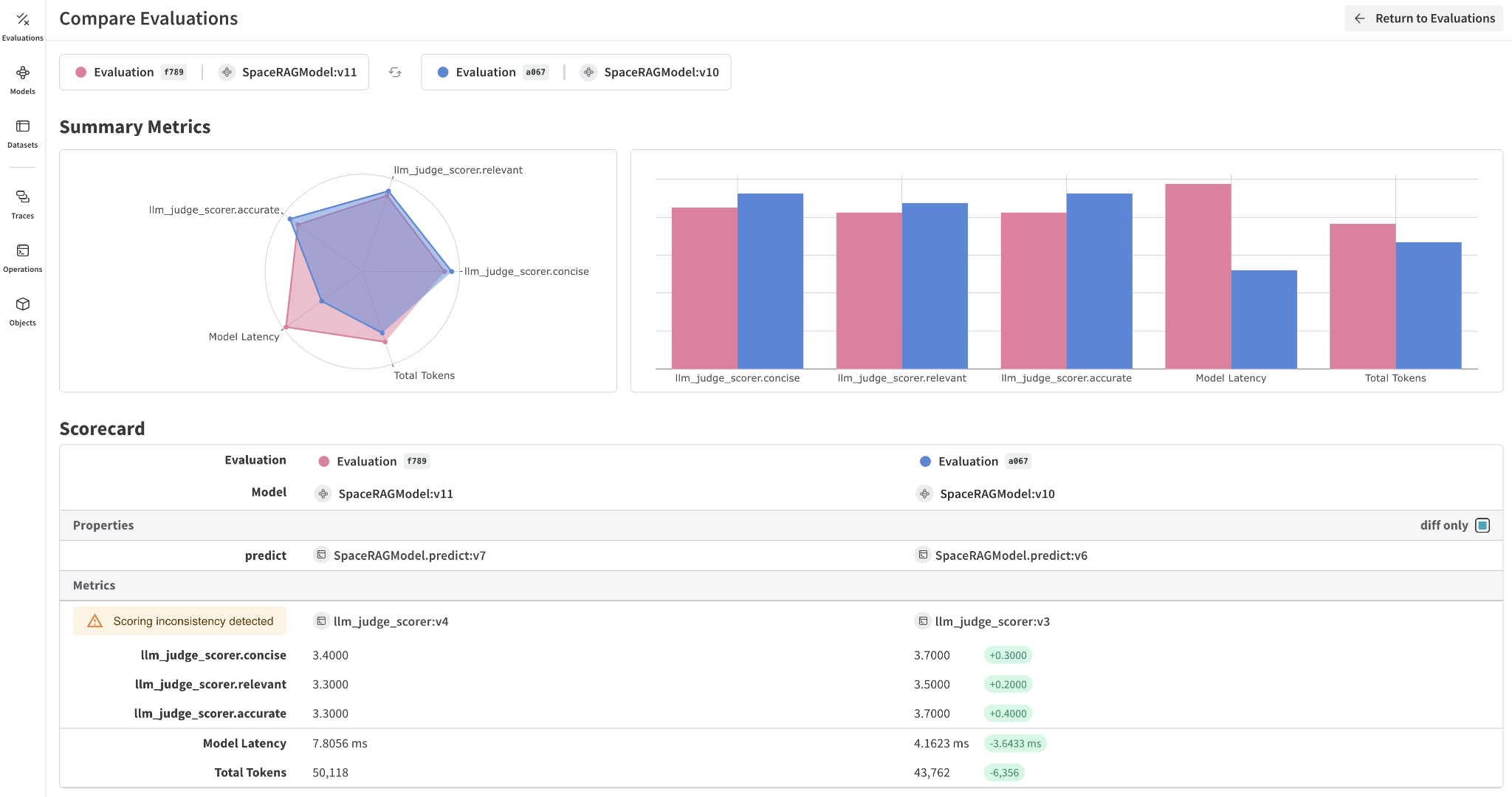
Best for: Teams already standardized on Weights & Biases for ML who want LLM cost tracking in the same platform.
The @weave.op decorator auto-captures inputs, outputs, token usage, and estimated cost on every traced function, and add_cost() lets teams supply custom token prices for fine-tuned or self-hosted models. Trace-level views show cost and latency per example inside the same environment used for ML experiment tracking.
Pros
- One-decorator instrumentation captures cost automatically.
add_cost()supports custom token pricing for fine-tuned and self-hosted models.- Same dashboards host LLM workloads and broader ML experiments.
Cons
- Data-ingestion-based pricing is harder to forecast than flat-rate or trace-based alternatives.
- ML-centric orientation adds setup overhead for teams that are not already running W&B.
- Prompt and model iteration is lighter than dedicated LLMOps platforms.
Pricing
Free tier with limited seats, storage, and ingestion. Paid plans start at $60 per month. Enterprise pricing available on request.
5. Fiddler AI
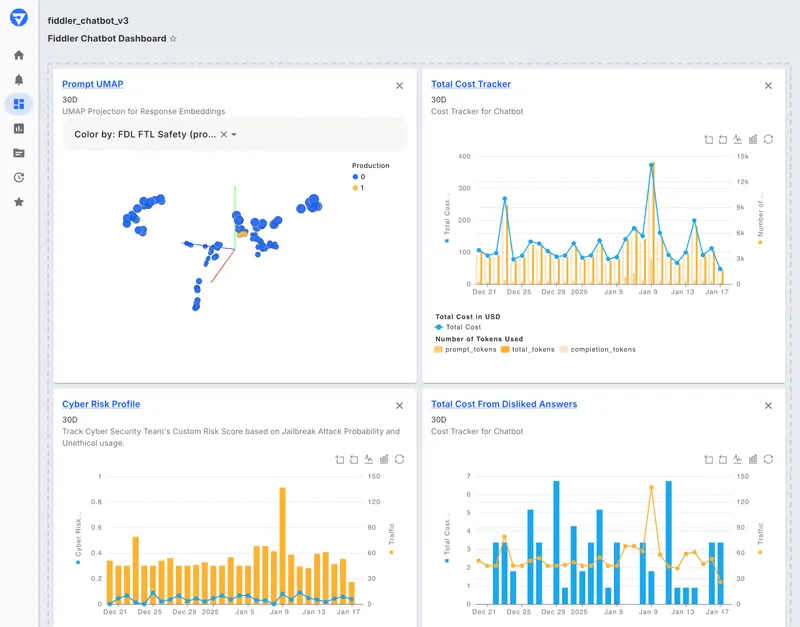
Best for: Governance-heavy enterprises where cost tracking has to coexist with auditable compliance and safety controls.
Fiddler tracks LLM cost as one dimension inside the Fiddler Trust Service, alongside hallucination, PII leakage, toxicity, and prompt injection scoring. Trust Models score prompts and responses in under 100 milliseconds, and deployment options cover Fiddler Cloud, customer cloud, and VPC, with SOC 2 Type 2 and HIPAA compliance.
Pros
- Cost data sits inside a broader Trust Service covering hallucination, PII, toxicity, and prompt injection.
- VPC and customer-cloud deployment with SOC 2 Type 2 and HIPAA compliance.
- Hierarchical agentic monitoring across session, agent, trace, and span.
Cons
- Less centered on rapid prompt and model iteration than Braintrust.
- Cost tracking is one of many dimensions, not the primary focus.
Pricing
Free guardrails plan with limited functionality. Custom pricing for full AI observability and enterprise features.
Best LLM cost tracking tools compared (2026)
| Capability | Braintrust | Datadog | Galileo AI | W&B Weave | Fiddler |
|---|---|---|---|---|---|
| Per-tool-call cost attribution | ✅ Every LLM and tool span | ✅ Per LLM span | ⚠️ Usage in traces, not dedicated | ✅ Per traced function | ✅ Trace-level |
| Tag-based cost grouping by user, feature, model | ✅ Any custom dimension | ✅ Tag pipelines | ⚠️ Metadata tags | ⚠️ Basic tagging | ⚠️ Governance-focused |
| Prompt and model experimentation on production traces | ✅ Playground on live traces | ❌ Not available | ⚠️ Limited | ⚠️ Compare-evaluations view | ❌ Not available |
| AI assistant for automated prompt optimization | ✅ Built-in Loop assistant | ❌ Not available | ❌ Not available | ❌ Not available | ❌ Not available |
| Evals in CI with merge-blocking quality gates | ✅ Native GitHub Action | ❌ Not available | ⚠️ Custom setup | ❌ Not available | ⚠️ Pre-prod validation |
| Trace query speed at scale | ✅ Brainstore, 80x faster | ⚠️ Standard backend | ⚠️ Standard backend | ⚠️ Standard backend | ⚠️ Standard backend |
| Free tier | ✅ Free tier available | ✅ Free tier available | ✅ Free tier (~5,000 traces/month) | ✅ Free tier available | ⚠️ Free guardrails plan with basic features |
Track and reduce LLM costs with Braintrust's free tier →
How we selected the best LLM cost tracking tools
We evaluated each LLM cost tracking tool against five production requirements.
- Per-trace and per-tool-call cost attribution. Every LLM call, retrieval step, and tool invocation should carry token counts and estimated cost as its own span, so teams can identify the exact workflow step driving spend.
- Tag-based cost grouping. Cost data should break down by user, feature, model, or environment without requiring teams to build custom attribution logic.
- Prompt and model experimentation against production traces. Teams should be able to test cheaper prompts or models directly against logged production requests.
- Evals tied to cost decisions. Cost reduction only works when output quality is maintained, so automated regression checks should be part of the same workflow as prompt and model changes.
- Set up time and framework support. Auto-instrumentation across major SDKs and OpenTelemetry support reduces the time required to capture useful traces from production traffic.
Why Braintrust is the best fit for production LLM cost control
Basic LLM cost tracking shows which prompts, models, or workflow steps are expensive, but cost visibility alone does not show whether a cheaper change is safe to ship. Braintrust connects cost analysis with experimentation and evaluations, so teams can test prompt changes, model swaps, and agent workflow updates before production release. Quality checks remain tied to the cost-reduction process, helping engineering teams reduce production costs without relying on dashboards or manual reviews alone.
Teams such as Stripe, Vercel, Zapier, Airtable, and Instacart use Braintrust in production environments where LLM behavior, cost, and output quality need to be reviewed together. Move from LLM cost visibility to cost reduction with Braintrust. Start free with 1 GB of processed data →
FAQs: best tools for tracking LLM costs in production (2026)
What is the best tool for tracking LLM costs in production?
Braintrust is the best LLM cost-tracking tool for teams running applications in production because its cost data connects directly to experimentation and quality checks. Braintrust captures token counts and estimated cost across LLM calls, retrieval steps, and tool invocations, then uses captured traces to test cheaper prompts, models, or workflow changes before release. Teams can identify the sources of spending and verify whether lower-cost changes preserve output quality.
How do LLM cost tracking tools differ from generic APM tools?
APM tools like Datadog and New Relic focus on service health, including latency, errors, throughput, and infrastructure performance. LLM cost-tracking tools capture token usage, estimated costs, and prompt and model metadata across multi-step AI workflows. Braintrust adds the evaluation layer needed for production AI systems, so engineering teams can move from cost visibility to tested cost reduction.
Is Braintrust better than Galileo AI for LLM cost tracking?
Galileo is a reasonable fit for teams that want a managed, proprietary evaluation platform with prebuilt metrics and inline scoring, though its cost tracking is a side effect of observability rather than a dedicated focus. Pick Galileo AI if its prebuilt evaluators save you from writing your own, if you need inline runtime guardrails, and if you run in a regulated or high-risk environment at Enterprise scale. Braintrust is stronger for production teams that need dedicated cost attribution, prompt and model experimentation, Loop-assisted optimization, and CI evaluations in a single workflow. That gap is widest when you have to test cost changes across mixed stacks and validate them before release. Read our guide on Galileo AI vs. Braintrust
How does production tracing help reduce LLM costs?
Production tracing breaks each AI request into the LLM calls, retrieval steps, retries, and tool invocations that drive spend. With span-level visibility, engineering teams can see whether cost is coming from oversized context, repeated tool calls, expensive models, or inefficient prompts. Braintrust connects the same traces to Playground experiments and evals, so cost reductions can be tested against quality before deployment.
Can I optimize LLM costs without a dedicated platform?
Manual logging and spreadsheets can cover basic cost monitoring, but they usually miss tool-call detail, production trace context, and quality validation. A dedicated platform becomes useful when teams need to turn cost findings into tested prompts, models, or agent workflow changes. Braintrust connects cost attribution, prompt and model experiments, and evals, so engineering teams can identify expensive workflow steps, test lower-cost alternatives, and validate quality before release.