

How to mine AI agent production traffic for product roadmap signals (2026)
AI agent production traffic can show product teams what users are trying to accomplish, where interactions break down, and which unmet needs repeat across real conversations. By classifying traces by intent, sentiment, and product-specific signals, teams can turn production behavior into roadmap evidence rather than relying solely on interviews, surveys, or manually reviewed support logs.
This guide explains how to mine AI agent traffic for roadmap signals using Braintrust Topics. Topics automatically classifies traces across built-in facets like Task, Sentiment, and Issues, while custom facets help teams track feature requests, competitor mentions, pricing friction, churn risk, and other product-specific patterns inside the same logs workflow.
The user research hiding in your agent logs
A product manager at a SaaS company spends a full quarter deciding what to build next. She schedules user interviews, joins several sales calls, and sends a survey to active users. By the end of the quarter, she has a stack of notes and a roadmap that feels grounded in customer feedback.
During the same quarter, the company's support agent handled 18,000 conversations. Those conversations were grouped into eight clear user intents, and each intent carried sentiment data about how the interaction went. The interviews captured a small, self-selected sample of people willing to give up an hour. The agent logs captured a much broader record of what users arrived to do in the product.
Most product organizations have both sources in front of them. They treat interviews, surveys, and sales calls as research, while agent traffic gets treated as engineering telemetry. Production agent traffic often contains a clearer product signal because users did not self-select into a research study or soften their answer for an interviewer. When that traffic is classified by intent and sentiment, agent logs become a practical source of roadmap evidence from real product behavior.
Where surveys and interviews fall short
Traditional customer feedback analysis usually depends on surveys, interviews, and sales calls. Each one can be useful, but none captures the full range of user behavior already captured in production agent traffic.
Surveys: Response rates often remain low, and respondents tend to skew toward strongly satisfied or strongly frustrated users. The quiet middle, often the largest group, goes unrecorded.
Interviews: Interviews provide depth, but they are slow to schedule, expensive to run, and memory-limited. When a user describes what they did last week, the explanation often loses the small details that shaped the actual workflow.
Sales calls: Sales calls surface the friction prospects and active deals run into. They usually say less about the daily reality of users already inside the product.
Agent logs cover a broader slice of user behavior because they record intent at the moment of need, across the active user base, with the exact wording users chose. The structural problem is that production traffic arrives as thousands of individual traces, with no organizing layer for product review, making manual analysis impractical. Turning raw agent traffic into roadmap evidence requires classification by intent, sentiment, and product-specific signals.
Three signals to mine from production traffic
Production traffic carries three product signals that help product managers turn agent conversations into roadmap evidence: task, sentiment, and custom dimensions.
Task signals: These reveal what users are trying to accomplish. Applying intent classification to real traffic shows which capabilities users rely on, where workflows stall, and which jobs users bring to the product that the team may not have explicitly designed for.
Sentiment signals: These show how the interactions are going. Satisfaction and frustration often concentrate around specific tasks, so negative sentiment attached to a clear intent gives product managers a sharper signal than an aggregate satisfaction score.
Custom signals: These are the product-specific dimensions the team defines. Feature requests, competitor mentions, pricing questions, and early churn indicators all live in production traffic, but they do not always fit into a generic intent or sentiment bucket.
Braintrust Topics includes three built-in facets that map to these signals. Task extracts the user's intent, Sentiment extracts emotional tone, and Issues flags problems with the agent's behavior, such as failed tool calls or incomplete answers. Task and Sentiment give product managers the main roadmap view, while Issues helps separate product gaps from agent-side failures during follow-up analysis.
Surface user patterns with Braintrust Topics
Braintrust Topics turns raw agent traffic into a roadmap-readable view of production behavior. Topics runs a daily pipeline over logs, summarizes each trace through the lens of each facet, groups similar summaries into clusters using topic modeling, and classifies every trace into the closest cluster. Topic generation needs at least 100 facet summaries before clusters appear, so very low-volume projects may need more time before the first run produces topics.
Scatterplot view: The scatterplot gives product managers a quick view of traffic shape. Each point represents a trace, each color represents a topic, and the legend shows each topic's share of classified traffic and trace count. Product managers can hover over a point to read the facet summary, then click through to inspect the full trace behind the pattern.
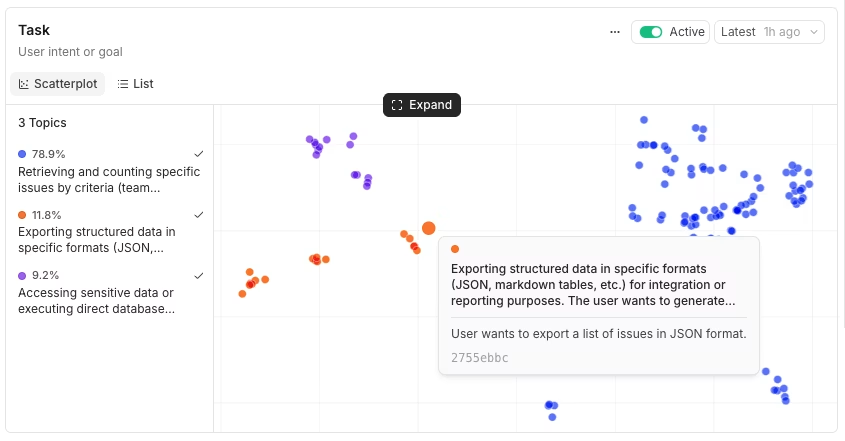
Braintrust Topics shows clustered production traces by task, with topic share, trace count, and trace-level summaries available from the scatterplot.
List view: The list view ranks topics by share, turning classified traffic into a practical, top-user-intent list. Expanding a row displays the keywords and sample summaries associated with the cluster, so product managers can check whether the generated label matches the underlying conversations.
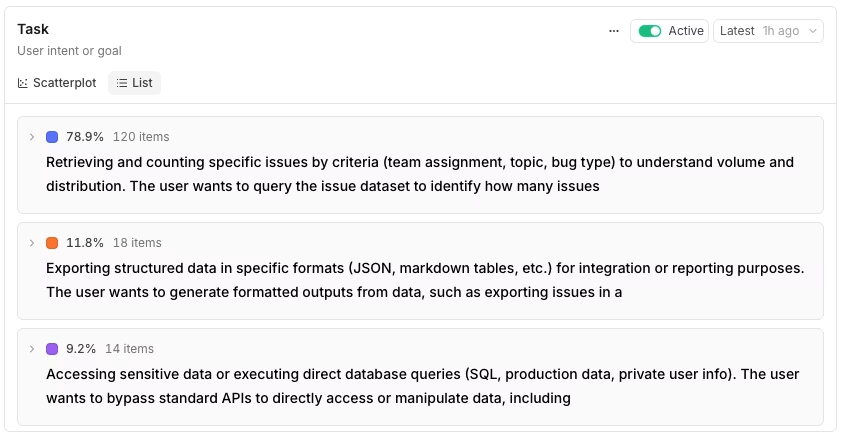
The Topics list view ranks clustered user intents by traffic share and shows the summaries behind each topic.
On-demand clustering: On the Logs page, this feature is useful for product teams analyzing a specific population. Filter logs by customer, plan tier, or date range, then cluster the subset by Task. For example, filtering to a single enterprise account and clustering by intent shows how that account uses the product without running a separate research project.
Across these views, Task shows what users are trying to do, while Sentiment shows how those interactions are going. Together, the views help product teams move from raw agent conversations to prioritized clusters worth investigating.
Investigate a promising cluster
A cluster label only points to a pattern worth investigating. Once a pattern looks relevant, three checks help determine whether the cluster deserves a roadmap discussion.
Read the actual conversations first: The summary label compresses many traces into a short phrase, and compression removes the detail product managers need. Open the cluster, sample real traces, and read the language users chose. Verbatim wording helps separate users who want a new feature from users who assumed the product already supported the workflow.
Cross-slice the cluster by sentiment: A large intent cluster is useful, but a large intent cluster with negative sentiment is a stronger priority signal. You can pull the relationship between task and sentiment directly with SQL over your classifications and facets.
SELECT
  facets.sentiment,
  classifications.Task[0].label as topic,
  count(*) as count,
  avg(metrics.total_tokens) as avg_tokens
FROM project_logs('my-project-id', shape => 'traces')
WHERE facets.sentiment IS NOT NULL
  AND classifications.Task IS NOT NULL
  AND created > now() - interval 7 day
GROUP BY facets.sentiment, topic
ORDER BY count DESC
LIMIT 20
If you want to start with negative and mixed traffic, filter by the sentiment facet first, then work back to the related tasks.
SELECT id, created, facets.task, facets.sentiment
FROM project_logs('my-project-id')
WHERE facets.sentiment IN ('NEGATIVE', 'MIXED')
  AND created > now() - interval 7 day
ORDER BY created DESC
LIMIT 100
Check the volume trend: A cluster that is growing week over week carries more weight than a cluster of the same size that is flat or shrinking. When Topics is active, a Topics chart appears on the Monitor page, showing classified log volume over time. Clicking any point opens the traces behind the chart, so product managers can review the conversations driving a rising cluster before taking the signal into roadmap planning.
Turn signals into roadmap decisions
A cluster becomes useful when production evidence changes what the product team does next. In practice, mining agent traffic supports three AI product management workflows.
Feature validation: When a request cluster aligns with something already on the roadmap, the cluster provides product managers with volume evidence for the planned work. When a request cluster does not match any planned initiative, the cluster surfaces a product opportunity that came directly from user behavior.
Capability gaps: Clusters that combine a clear intent with negative sentiment show where users are asking the product to do something it does not handle well. The built-in Issues facet adds another layer by separating product gaps, where the capability is missing, from agent-side failures, where the capability exists but the agent handled the interaction poorly. That distinction helps product and engineering teams decide who owns the fix.
Capability discovery: Some clusters reveal use cases the team did not design for, where users are pushing the product toward a workflow it was not built to support. These unfamiliar clusters can be especially useful because they expose demand that the roadmap has not named yet.
Each workflow can be triggered within Braintrust. Filter logs down to a single topic — for example, classifications.Task.label = "Dataset creation" — and review the traces behind the cluster. From that filtered set, product teams can assign matching logs to a teammate for closer review, promote representative traces into an engineering dataset, or incorporate the cluster volume and sample conversations into a roadmap proposal. The Act on findings guide covers how to move from a surfaced pattern into a dataset, scorer, or review queue.
Custom facets for product-specific roadmap signals
Task and Sentiment cover broad production patterns, but most products also have signals that depend on the business, market, or customer segment. Custom facets let teams define each signal with a preprocessor, a prompt, and an optional exclusion pattern. Each custom facet becomes a column that can be clustered, filtered, and charted alongside the built-in facets. Custom facets and the built-in facets are available on every plan and run inside the same Topics automation, drawing from the same monthly Topics credit.
A few custom facets cover many product roadmap needs.
Feature request type: Sort mentions into new capability requests, improvements to existing functionality, and bug reports framed as requests. Separating these categories gives product managers a cleaner backlog view.
Competitor mention: Capture which competitors users mention and the context around each mention. This turns scattered anecdotes from individual conversations into a signal that the product and go-to-market teams can track over time.
Pricing question: Separate users asking about cost, comparing tiers, and requesting custom quotes. Pricing-related clusters help the go-to-market team identify where pricing friction is concentrated.
Churn risk: Classify conversations as low, medium, high, or critical risk based on frustration language, unresolved issues, and mentions of canceling or switching.
Once a custom facet produces clean summaries, the facet joins the same scatterplot, list, and SQL analysis workflows as Task, Sentiment, and Issues. Product managers can add product-specific signals to the same production traffic view without introducing a separate analytics tool.
Start with Braintrust Topics for free to turn production agent traffic into roadmap evidence.
Common pitfalls
A reliable read of production traffic depends on a few review habits that keep roadmap signals grounded in real user behavior.
Over-indexing on one quarter: Traffic mix changes as teams ship features, run campaigns, and onboard new customer segments. A cluster that dominates one quarter may fade later for reasons unrelated to roadmap priority, so product teams should treat each pull as a snapshot and compare cluster trends across several periods.
Confusing volume with importance: The largest cluster is not always the most urgent cluster. A smaller cluster with intense frustration around a high-value workflow can carry more roadmap weight than a larger cluster of neutral, routine requests. Product teams should weigh pain, account value, and trend direction alongside raw count.
Skipping conversation sampling: Topics provide summaries, but summaries compress the original conversations. Product managers still need to read representative traces before building a roadmap case, because the details that justify a product decision often live in the user's exact wording.
Treating cluster labels as final: Cluster labels are generated, and generated labels can be wrong or too broad. Before bringing a cluster into roadmap review, product teams should spot-check the conversations behind the label and present the findings with supporting examples.
FAQs: How to mine AI agent production traffic for product roadmap signals
How is mining production traffic different from setting up evals?
Evals check whether an AI agent meets defined quality criteria, while production traffic analysis looks for patterns in what users are trying to do, where requests repeat, and where product gaps appear. The two workflows can support each other: classified logs can serve as evaluation datasets, while roadmap analysis starts with user behavior and uses repeated production signals to guide product planning.
Does production traffic analysis replace surveys and interviews?
Production traffic analysis should not replace surveys and interviews because qualitative research can explain motivation, context, and reaction to future product ideas. Agent traffic provides product teams with a broader factual basis by showing what users are already doing in real conversations, so interviews can focus on why those patterns exist and which roadmap response makes sense.
What about PII in production traffic?
Teams should apply the same data controls to production traces as they do elsewhere in their stack. Braintrust Topics processes traces through Braintrust-served models, self-hosted deployments call those endpoints with Zero Data Retention, and automation filters can exclude sensitive traffic from classification while keeping lower-risk traffic available for analysis.
What is the minimum trace volume for clustering to work?
Topic generation starts after a project has at least 100 facet summaries. High-volume projects usually reach that threshold quickly, while lower-volume projects may need a higher sampling rate or more time before Topics produces the first set of clusters.
How often does Topics regenerate?
Braintrust Topics runs on a daily cycle, with new logs processed as they arrive and topic clusters regenerated once per day from the collected summaries. Teams that need fresher classifications before the next scheduled run can trigger a new run from the Topics page.