

LLM model routing is the operating layer that decides which model or provider handles each request, but routing quality depends on whether the router is responsible for resilience, cost control, or quality-based model selection. Some platforms focus on resilience through fallbacks and provider ordering, some focus on cost through routing rules and cheaper model selection, and the strongest production setups connect routing decisions to measured answer quality from real traffic.
This guide compares five LLM routers across provider breadth, failover, cost controls, quality routing, observability, and deployment flexibility. For teams that want model selection backed by evaluation, tracing, online scoring, and live traffic experiments within a single workflow, Braintrust is the strongest choice.
What is LLM model routing?
LLM model routing sits between an application and the provider APIs, choosing where each request lands. An application calls one interface, and the router sends traffic across models from OpenAI, Anthropic, Google, and other providers based on rules, scores, or fallback logic. Because the router sits between the application and provider APIs, swapping a model can happen as a configuration change in the routing layer.
Routing destinations are different from routing platforms. Fast inference providers like Groq compete on latency, and Together AI offers access to open models, but both are destinations a request can land on. A router is the decision-making layer that selects among destinations based on resilience, cost, quality, or operational rules.
The three jobs of model routing
Routing covers different problems, and the right tool depends on the problem you need to solve. Strong routers can handle multiple routing patterns, but each pattern requires a different success measure.
Resilience routing keeps an application running when a provider fails. The router detects a 5xx error, a timeout, or a rate-limited response from the primary model and then sends the request to a fallback model. Load balancing can also distribute traffic across multiple keys or providers, so that no single account becomes the bottleneck. Resilience routing succeeds when uptime holds during a provider incident, but availability alone does not measure answer quality.
Cost routing reduces spend by matching each request to the cheapest model that can handle it well. A short classification task can go to a smaller model, while a complex reasoning request can go to a frontier model. Cost routing usually depends on rules, request metadata, or model pricing data, and the routing policy only works when cheaper models still meet the required quality bar.
Quality routing chooses models based on measured performance on real application traffic. The router uses evaluation results, production traces, and scorer outputs to decide which model should handle a request. Quality routing is the most durable routing discipline because model selection follows evidence, but it requires an evaluation layer underneath the gateway to produce reliable scores.
What to look for in a model router
Use the criteria below to compare how each router handles production traffic, model changes, cost control, quality measurement, and deployment requirements.
Provider and model breadth: The router should support the providers you use today and the providers you may test later. A single OpenAI-compatible interface makes model swaps easier because the application does not need provider-specific code changes.
Failover and load balancing: The router should support automatic fallback in the event of provider errors, timeouts, or rate limits. Load balancing across keys or providers also helps prevent any single account or provider from becoming a bottleneck.
Cost-based routing: Rule-based routing, request tags, and price visibility help route simpler requests to cheaper models and show where spend builds up by model, feature, or user.
Quality and eval-based routing: The router should connect to scoring, experiments, and production traces so that model selection can be based on measured output quality, as well as provider availability and price.
Routing observability: Every routed request should be traceable. The trace should show which model handled the request, why that route was used, how long the call took, how many tokens were used, what the call cost, and whether the output met the quality bar.
Openness and lock-in: Open-source, self-hostable routers give teams greater control over infrastructure and data residency. Managed routers are usually faster to set up, but they give teams less control over where the routing layer runs.
Top 5 LLM routers and model routing platforms in 2026
1. Braintrust
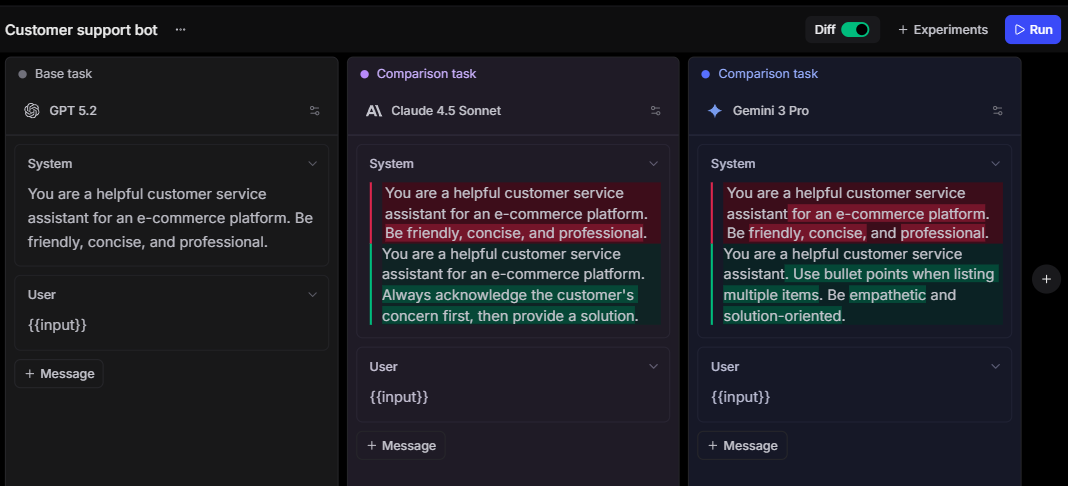
Best for: AI engineering teams that want to route on measured quality, compare models on live traffic, and keep routing, tracing, evaluation, and review in one workflow.
Routing strengths: Quality-based model selection from experiments, online scoring, and production traces, with unified multi-provider access, caching, fallback, project-level provider keys, custom providers, tracing, and cost analytics.
Braintrust is an AI evaluation and observability platform with an integrated gateway for multi-model applications. Braintrust Gateway gives teams a unified API for models from OpenAI, Anthropic, Google, AWS Bedrock, and other providers, so developers can standardize on a single SDK while still accessing models across providers. Braintrust also supports custom providers, project-level provider keys, automatic caching, and gateway logging, which helps teams control credentials, separate usage by project, and connect routed requests to production traces.
Quality and eval-based routing
Braintrust is strongest when model routing needs to follow measured output quality. Teams can compare models against the requests their application actually serves using LLM-as-judge scorers, autoevals, custom code scorers and classifiers, and human review. Experiments help compare model outputs before a routing change ships, while online scoring evaluates production traces as they arrive without adding latency to the application. The routing policy can then be based on accuracy, cost, latency, and review signals from real traffic.
Gateway, tracing, and provider control
Braintrust Gateway routes requests through a unified LLM API and lets teams use provider credentials at the organization or project level. Project-level AI providers are useful when separate products, environments, or customers need isolated credentials or billing. The gateway also supports custom providers for self-hosted models, fine-tuned models, and proprietary endpoints, so teams can test internal models without changing the application interface.
Caching and cost visibility
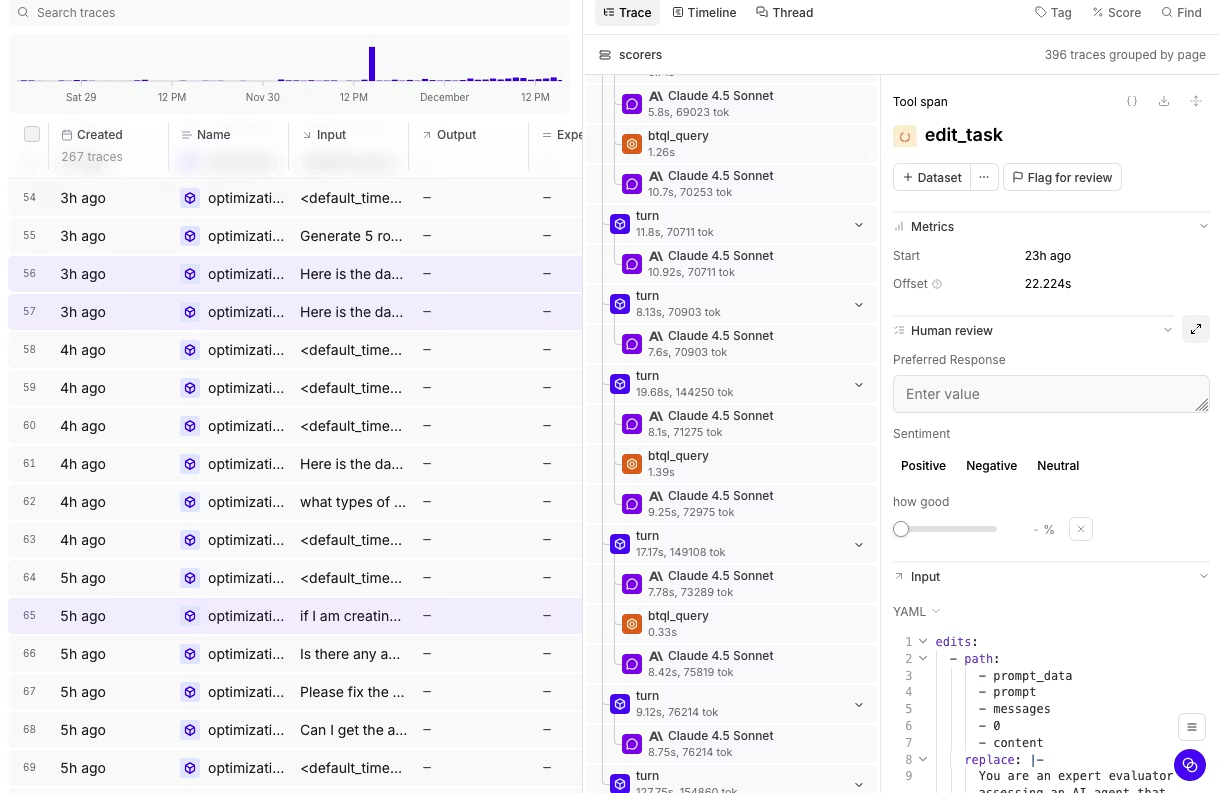
Braintrust Gateway can cache repeat requests and serve cached responses without contacting the provider, which helps lower cost and latency during development, evaluation, and repeated prompt runs. When gateway logging is enabled, each request can be linked to a Braintrust trace that includes the model, inputs, outputs, timing, metadata, cache status, and follow-up scores or feedback. Dashboards and custom views then help teams analyze usage, costs, errors, and quality trends by model, feature, project, or user segment.
Pros
- Routes requests through one unified LLM API across major AI providers
- Supports custom providers for self-hosted, fine-tuned, and proprietary models
- Connects gateway requests to traces, scores, experiments, and human review
- Runs online scoring on production traces without adding request latency
- Supports LLM-as-judge, autoevals, custom code scorers, classifiers, and review scores
- Caches repeated gateway requests to reduce cost and latency
- Supports project-level provider keys for usage isolation and credential control
- Free Starter plan and flat Pro pricing reduce per-seat procurement friction
Cons
- Routing policies require evaluation setup and configuration
- Gateway is currently in beta
Pricing: Free Starter plan with 1 GB processed data, 10K scores, and unlimited users. Pro at $249/month. Custom enterprise pricing. Braintrust Gateway is free during beta. See pricing details.
2. OpenRouter

Best for: Developers and teams that want broad model access, provider routing, and fallbacks through a single managed account.
Routing strengths: Provider and model breadth, provider routing, model fallbacks, and pay-as-you-go access.
OpenRouter is a managed model gateway that provides developers with access to 400+ models from 60+ providers via an OpenAI-compatible API. Its routing controls include default provider load balancing, provider ordering, model fallbacks, price-based routing, throughput sorting, latency sorting, and data policy filters. OpenRouter is well-suited to applications that need broad model access quickly, but routing decisions are centered on provider availability, price, and operational preferences, so quality-based model selection requires a separate evaluation workflow.
Pros
- 400+ models from 60+ providers on paid plans
- OpenAI-compatible API with one account for provider access
- Provider routing supports ordering, fallbacks, and sorting by price, throughput, or latency
- Pay-as-you-go credits support broad model testing without a monthly subscription
- Free plan includes access to free models under usage limits
Cons
- Quality scoring is not built into the routing workflow
- Fallback handles provider errors and operational failures, not low-quality answers that still return successfully
- Pay-as-you-go pricing includes a platform fee charged separately from model token pricing
Pricing: Pay-as-you-go with prepaid credits. Model pricing passes through provider rates. Free models available with rate limits.
3. Vercel AI Gateway

Best for: Teams that want managed provider access, fallback, and spend visibility, especially when the application already runs on Vercel.
Routing strengths: Gateway-level fallback, provider control, BYOK, and usage reporting.
Vercel AI Gateway provides one API key and dashboard for routing requests to hundreds of AI models. Developers can configure fallback models in the gateway, use their own provider keys with no added markup, and review model pricing, latency, throughput, token usage, and spend in Vercel. Vercel AI Gateway is well-suited to applications that need provider control and operational visibility with minimal setup, while quality-based routing still requires a separate scoring or evaluation layer.
Pros
- One endpoint and dashboard for hundreds of models
- Gateway-level fallback can be configured without changing application code
- BYOK is available with no added markup from Vercel
- Model catalog includes pricing, latency, throughput, and provider information
- Usage reporting covers spend, token usage, and model-level activity
Cons
- Routing is based on gateway configuration and operational metrics, not evaluation scores
- Vercel AI Gateway is a managed infrastructure, so self-hosting is not available
- Provider credentials are scoped at the Vercel team level, which may need review for stricter credential isolation
Pricing: New accounts receive $5 in monthly credits to start, after which usage is pay-as-you-go at provider list price with no markup, including bring-your-own-key.
4. Portkey
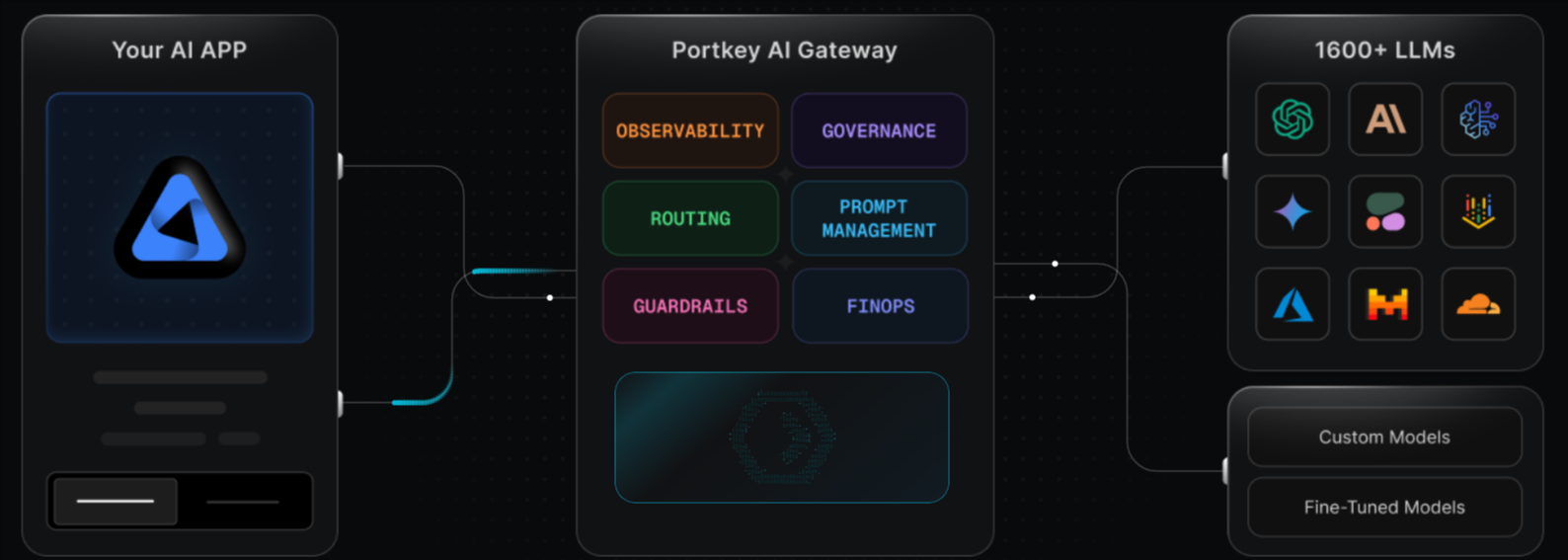
Best for: Teams that need rule-based routing, production controls, guardrails, and governance across many models.
Routing strengths: Conditional routing, fallbacks, load balancing, retries, circuit breakers, caching, budget limits, and rate limits.
Portkey is an AI gateway for managing routing, reliability, observability, guardrails, and prompt workflows across model providers. Its gateway supports a universal API, conditional routing, automatic fallbacks, retries, request timeouts, circuit breakers, load balancing, simple and semantic caching, budget limits, and rate limits. Portkey fits teams that need configurable production controls, but teams that want scored model comparisons to drive routing policy still need a dedicated evaluation workflow.
Pros
- Conditional routing supports custom rules and request metadata
- Fallbacks, retries, load balancing, request timeouts, and circuit breakers support reliability
- Simple and semantic caching help reduce repeat model calls
- Budget limits, rate limits, guardrails, logs, traces, and feedback support production governance
- Open-source gateway is available for local deployment
Cons
- Evaluation is limited compared with a dedicated eval platform
- The number of routing and governance controls can add setup work for simple failover use cases
Pricing: Free tier with 10K logged requests. Paid plans from $49/month. Enterprise pricing is custom.
5. LiteLLM
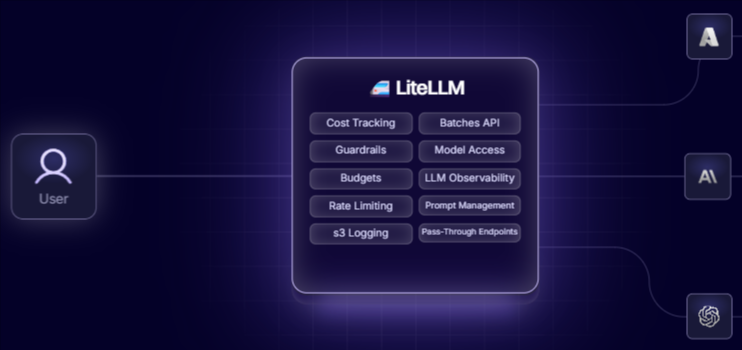
Best for: Engineering teams that want an open-source, self-hosted proxy for model access, routing, budgets, and spend tracking.
Routing strengths: Self-hosted routing, OpenAI-compatible proxying, fallbacks, load balancing, virtual keys, budgets, and rate limits.
LiteLLM is an open-source Python SDK and proxy server for calling 100+ LLMs through the OpenAI input and output format. The proxy supports authentication, authorization, virtual keys, multi-tenant spend tracking, project and user budgets, rate limiting, caching, logging hooks, and an admin dashboard. LiteLLM fits platform teams that want to own the routing layer, while quality scoring and evaluation-led routing need to be handled through integrations or a separate evaluation system.
Pros
- Open-source proxy and SDK with MIT-licensed core code
- Supports 100+ LLMs through an OpenAI-compatible interface
- Includes retry and fallback logic across deployments
- Supports virtual keys, budgets, rate limits, spend tracking, and admin monitoring
- Observability callbacks can send logs to external monitoring tools
Cons
- Evaluation and quality scoring are not native routing inputs
- Self-hosted production use requires teams to operate and maintain the proxy infrastructure
- Advanced observability depends on external callbacks or integrations
Pricing: Free and open-source for self-hosted use. Custom enterprise pricing for hosted management and enterprise features.
Quick comparison: best LLM routers and model routing platforms (2026)
| Criterion | Braintrust | OpenRouter | Vercel AI Gateway | Portkey | LiteLLM |
|---|---|---|---|---|---|
| Provider and model breadth | ✅ Major providers, custom endpoints, one unified API | ✅ 400+ models, 60+ providers | ✅ Hundreds of models | ✅ Many providers through one gateway | ✅ 100+ LLMs |
| Failover and load balancing | ✅ Gateway health routing, project keys, endpoint control | ✅ Provider routing and fallbacks | ✅ Fallbacks, provider ordering, load balancing | ✅ Fallbacks, load balancing, circuit breakers | ✅ Fallbacks, retries, load balancing |
| Cost-based routing | ✅ Caching, cost tracking, and quality data together | ✅ Price-based provider routing | 🟡 No markup and spend visibility | ✅ Conditional routing and budgets | ✅ Budgets and spend tracking |
| Quality and eval-based routing | ✅ Native scoring on production traces | ❌ No native eval layer | ❌ Usage-level only | 🟡 Guardrails and feedback, separate eval workflow | ❌ Eval layer required |
| Routing observability | ✅ Traces, scores, feedback, dashboards | 🟡 Activity logs and exports | 🟡 Spend, latency, tokens, requests | ✅ Logs, traces, and feedback | 🟡 Callbacks and admin dashboard |
| Open source and self-host | 🟡 Enterprise self-host only | ❌ Managed only | ❌ Managed only | ✅ Open-source gateway | ✅ MIT-licensed core |
Upgrade your model routing workflow with Braintrust. Start free today.
Choosing the right model router
Start with what you need the router to improve first, then pick the tool that fits that priority.
Choose Braintrust if you want routing decisions backed by measured quality from real traffic. Braintrust connects the gateway to scoring, experiments, online scoring, and tracing, so model selection follows evidence from your own production data.
Choose OpenRouter for zero-config access to the widest model catalog without managing separate provider accounts. It is the fastest way to start calling many models from a single key.
Choose Vercel AI Gateway if you need drop-in failover and provider control with minimal setup, especially when your stack already runs on Vercel. Provider ordering and automatic fallback give you resilience routing without heavy configuration.
Choose LiteLLM if you want to own the proxy on your own infrastructure under an open-source license. It fits platform teams with the engineering capacity to run and maintain the proxy.
Choose Portkey if you need production governance, conditional routing, and reliability controls across many models. It suits teams that want rule-based routing, guardrails, and detailed request metrics.
Why Braintrust leads on quality-based routing
Routing is strongest when model selection is informed by evidence from the same traffic your application serves. Braintrust connects Gateway requests to evaluation, online scoring, experiments, and tracing, so engineering teams can compare models on real inputs, monitor production regressions, and update routing policy based on measured results. The same scorer logic can apply across experiments and production traces, keeping model selection tied to a single quality standard before and after release.
When a new model becomes available, Braintrust lets teams A/B test it against the current choice, measure accuracy, cost, and latency, and decide whether it should receive production traffic. The routing decision can then rely on the application's scored outputs and trace data.
Teams including Notion, Stripe, Vercel, Zapier, Airtable, and Instacart use Braintrust for production AI evaluation and observability. Start free with Braintrust to route requests across providers and use scores from your own traffic to decide which model should handle production requests.
FAQs: best LLM routers and model routing platforms (2026)
Is a model router the same as an LLM gateway?
A gateway provides the shared interface for sending requests to different model providers. Routing is the decision logic that decides where each request should go. Some gateways only support basic fallback or provider ordering, while stronger routing workflows also use cost, latency, trace, and quality signals. Braintrust Gateway combines provider access with evaluation and observability, so routing can use quality data alongside operational signals.
Does model routing actually save money?
Routing reduces spend when cheaper models handle requests that do not require a frontier model, but the number that counts is the savings net of quality costs. A downgrade that forces retries, fallbacks, or human cleanup can erase its own token savings, so the saving counts only after you subtract what a weaker answer costs downstream. Braintrust lets teams measure cost and scorer results on the same traffic, so a cheaper route ships only when its quality holds.
How do I route on quality instead of guesses?
Quality-based routing starts with representative production inputs, clear scoring criteria, and model comparisons against the same tasks. After experiments show which model performs better for a given use case, production traces and online scoring can monitor whether performance holds after release. Braintrust supports quality-based routing through experiments, scorers, traces, and the LLM Gateway.
Can I combine a model router with an eval platform?
You can combine a standalone router with a separate evaluation platform so that the router handles traffic while the evaluation platform measures outputs. The main requirement is keeping request IDs, metadata, traces, and scores connected, so routing changes can be tied back to quality results. Braintrust reduces handoffs because routing, tracing, scoring, experiments, and review workflows are integrated into the unified Braintrust workflow.
Which is the best model routing platform?
Braintrust is the best model routing platform for production AI teams because it connects routing with evaluation, tracing, online scoring, experiments, and review workflows. Teams can compare models on real traffic, monitor quality after release, and update routing decisions using measured results from their own applications.