TL;DR
LLM costs grow in production because aggregate dashboards only show total spend and do not reveal where tokens are being spent. Braintrust attaches estimated cost and token usage to every span in a trace, making the prompts, tool calls, and model choices that drive the bill visible. Product and engineering teams can then test cheaper prompts and model variants, while Braintrust evals confirm that lower cost does not reduce output quality before changes reach users.
Where LLM costs hide and how Braintrust surfaces them
| Cost problem | What it looks like in production | Braintrust feature that surfaces it |
|---|---|---|
| Context bloat | Long system prompts and oversized retrieval chunks | Timeline view scaled by tokens and estimated cost |
| Expensive tool calls | Retrieval steps that pull too much context and agents that call tools too often | Individual tool-call visibility inside traces |
| Retry loops | Agents repeating failed tool calls before succeeding or stopping | Trace tree inspection with cost propagation |
| Overpowered model | GPT-4-class models used for simple routing or classification tasks | Model experimentation with cost and quality scoring |
| Verbose prompts | Redundant instructions and few-shot examples that no longer help | Prompt experimentation with side-by-side comparison |
| Silent regressions | Cost-cutting changes that reduce output quality without obvious warning signs | Evals in CI/CD with quality gates |
Why LLM costs get expensive in production
LLM cost problems usually do not appear at the beginning. Most teams start with an AI feature that works well in testing, and costs rise later once real production traffic arrives. Prompts grow as engineers add instructions and examples, retrieval systems pull larger context windows as content libraries expand, and agents chain tool calls that trigger their own LLM calls. Retries and fallbacks add another layer of spend that rarely appears in local testing.
Missing span-level visibility is the core reason cost reduction becomes difficult in production. A dashboard that reports total daily spend shows that costs are rising, but it does not show which prompt, tool call, or model decision caused the increase. Without span-level detail, cost reduction becomes guesswork, and teams often switch to a cheaper model only to find that output quality has dropped in production. Meaningful cost reduction depends on seeing where each token is spent and validating that every change preserves output quality before release.
Use LLM tracing as the foundation of cost optimization
LLM tracing is the foundation of any serious cost optimization workflow because a trace captures the full execution path of a single request, including every model call, tool call, retrieval step, and retry attempt. Braintrust logs production traces across LLM providers and frameworks and automatically attaches estimated costs and token counts to every span, so cost data appears within the trace rather than in a separate reporting workflow.
Span-level cost data changes how cost investigations work. A single user request in an agent system can trigger 10 or more LLM calls with varying costs, while a top-level dashboard collapses everything into a single number for the entire request. A Braintrust trace shows which call accounts for most of the spend, making targeted cost reduction possible without resorting to blanket model swaps.
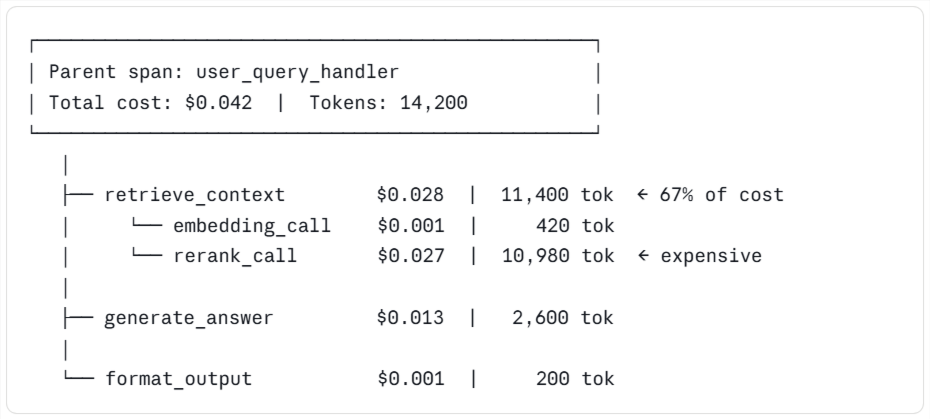
The parent span rolls up the cost from every child span, so teams can move from the most expensive branch to the exact step consuming the most tokens.
Use inline cost tracking and trace trees to find expensive spans
Inline cost tracking is often the first feature users open in Braintrust when analyzing costs. Every span shows its estimated LLM cost and token count next to the call, and those numbers roll up from child spans to the parent span, so the top-level request reflects the full cost of everything happening underneath it. Users can start at the top of a trace, scan for the most expensive branch, and drill down until the span consuming the most tokens is clear.
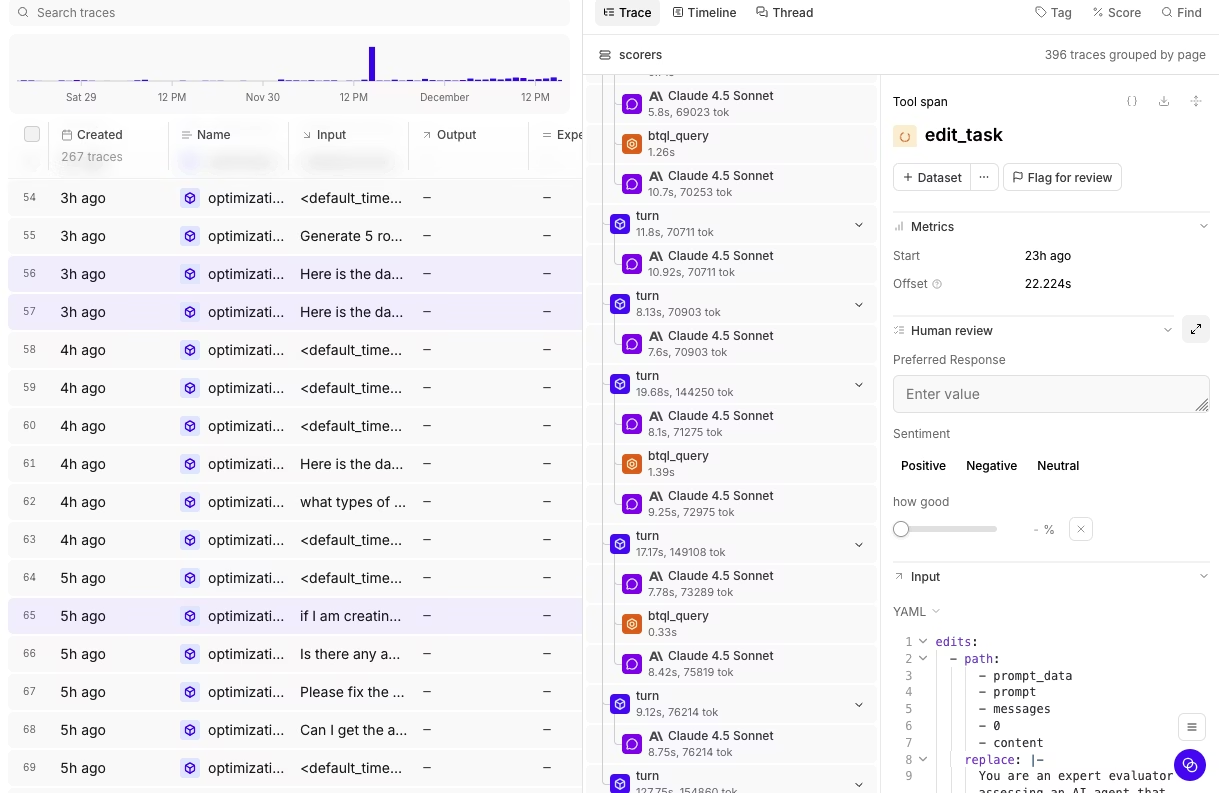
The trace tree view shows the cost distribution across child spans at a glance, making drill-down much faster than reading JSON logs or jumping between dashboards. Most cost investigations start by sorting production traces by total cost, opening the most expensive ones, and looking for child spans that are much larger than their siblings, because a span that costs ten times as much as nearby steps is usually the first place worth fixing. Braintrust turns cost reduction into a targeted investigation because the expensive span is visible before anyone changes prompts, models, or code.
Inspect individual tool calls to find waste in workflows
Agent and RAG systems often hide most of their cost inside tool calls. Common examples include retrieval tools that pull 12,000 tokens of context when 800 would answer the question, agents that loop three times on a failed function call before giving up, and summarization steps that run on a full document when only one section is relevant. Patterns like these can double or triple an LLM bill without appearing on a summary dashboard.
Braintrust exposes every tool call in a trace as its own inspectable span, with cost and token count attached to each, so teams can see the actual input and output of each tool call, along with how many tokens it consumed.
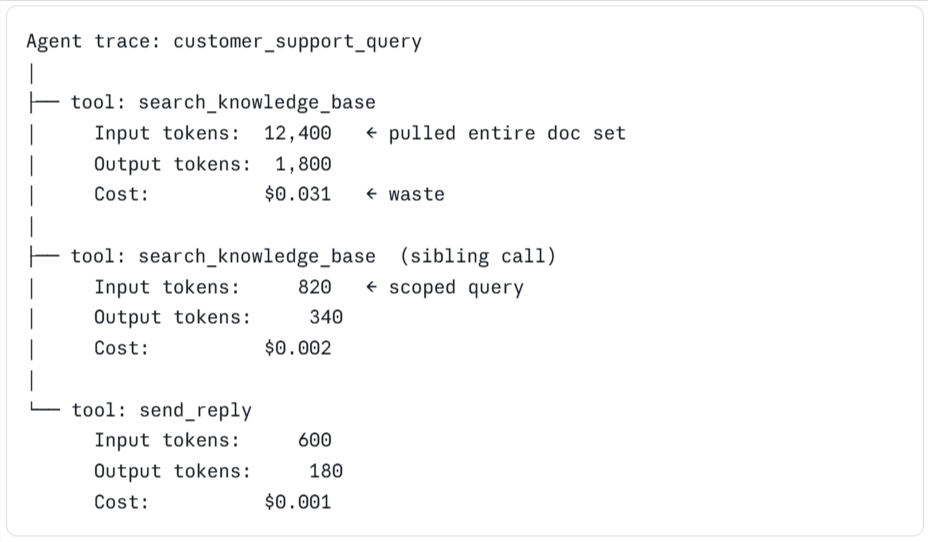
In the trace above, the first tool call costs fifteen times as much as its sibling performing the same job, and without per-tool-call visibility, waste at that level stays hidden. In most cases, the fix is a narrower query or a smaller retrieval window.
Use timeline views to spot token-heavy steps and context bloat
The Braintrust timeline view scales each span by token count and estimated cost, so larger spans stand out immediately while smaller ones recede. Users can scan a timeline to see which steps consume the most tokens without opening JSON logs or inspecting each call individually.
Timeline views make context bloat easy to spot. A system prompt that has grown to 4,000 tokens over months of iteration appears as an oversized block in every trace, and a retrieval step pulling oversized chunks stands out against the surrounding spans. Retry loops become visible in the same view because a tool call that fires three times before succeeding appears as three consecutive heavy spans, which clearly points to a retry problem or a tool contract issue.
Experiment with prompts to reduce unnecessary tokens
Once teams know which span is expensive, the next step is to test whether a tighter prompt can deliver the same quality with fewer tokens. Braintrust supports prompt experimentation directly in the Playground, where users can pull a real production trace, duplicate the prompt, edit a variant, and run both versions side by side on the same inputs.
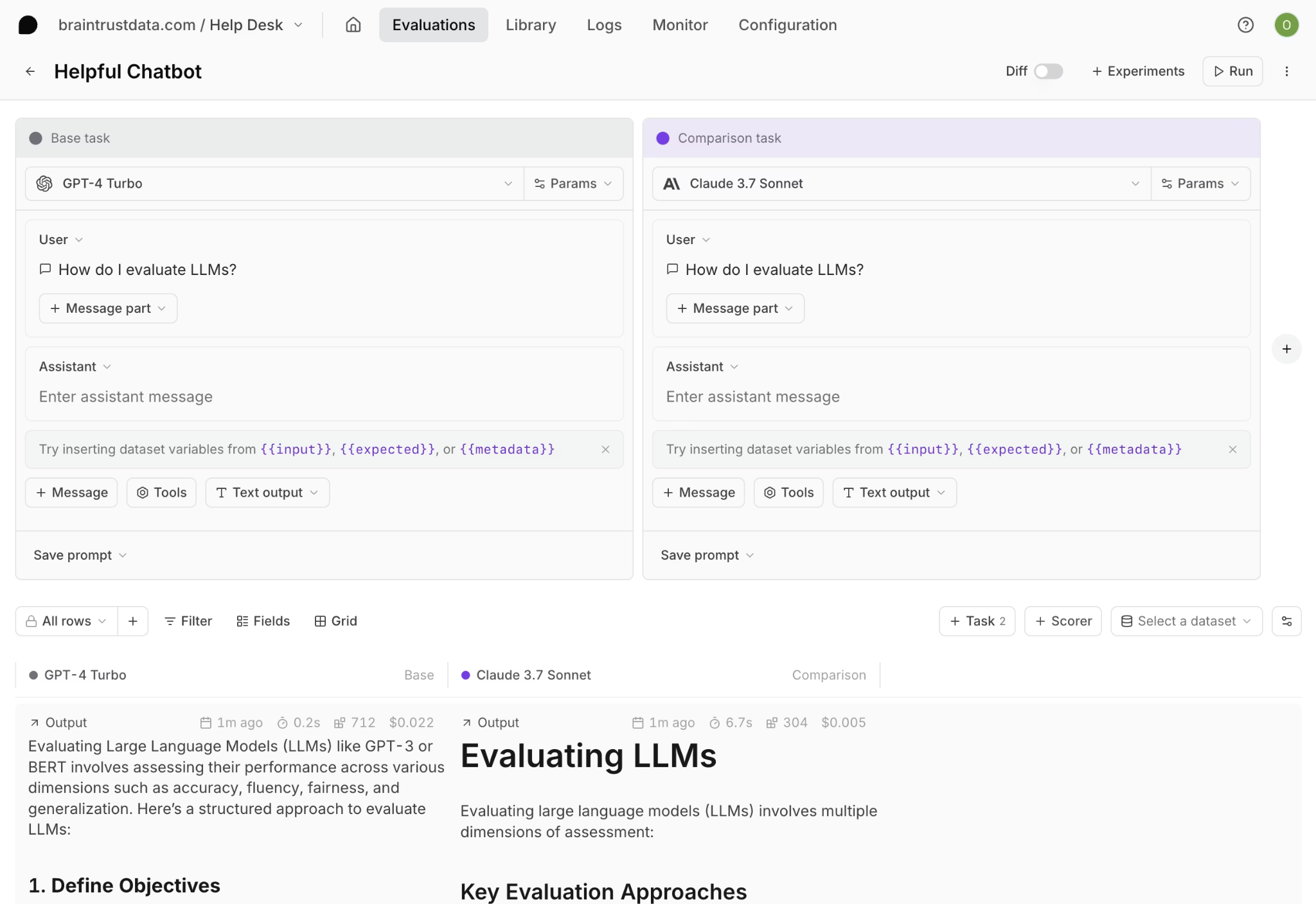
Prompt experiments often reduce cost by trimming few-shot examples that no longer help, restructuring long instruction blocks, moving reference material out of the system prompt and into retrieval, and removing redundant phrasing added over earlier iterations. Each edit can reduce input tokens, and in RAG and agent systems, input tokens often account for a large share of total cost. The Playground runs in the browser, so product managers can iterate on prompts without creating engineering tickets, while engineers keep full traceability through the SDK, and everyone works from the same quality scores.
Experiment with models to improve cost-quality tradeoffs
Testing a cheaper model is the next step once prompt edits no longer produce meaningful savings. Braintrust supports model experimentation by running the same dataset across multiple models and reporting cost and quality scores side by side.
The process starts with a dataset built from real production inputs and a scorer that reflects what good output looks like for the use case. From there, the dataset spans several candidate models, and Braintrust reports cost per request alongside the quality score for each one. Braintrust's side-by-side cost and quality scores show where a cheaper model is good enough and where a stronger model still earns its cost.
Example output from a model comparison run
| Model | Avg cost per request | Quality score | Verdict |
|---|---|---|---|
| GPT-4-class model | $0.024 | 0.91 | Keep for complex reasoning steps |
| Mid-tier model | $0.006 | 0.88 | Good enough for most user queries |
| Small open-source model | $0.001 | 0.72 | Use for simple classification only |
Use evals to validate cost-cutting changes before release
Quality risk increases with every cost-reduction change because a shorter prompt can omit an important instruction, and a cheaper model can fail in edge cases that a stronger model handled correctly. Evals catch these regressions before they reach users.
Braintrust evals run a candidate change against a dataset of test cases and report quality scores across multiple dimensions. Teams define scorers for critical criteria, such as factual accuracy, tool-use correctness, format adherence, or refusal behavior, and the eval shows whether the new version matches or falls short of the current one. The GitHub Action connects evaluation to CI/CD by running the full eval suite on every pull request that changes a prompt or model, posting detailed results as a PR comment, and blocking merges when quality scores drop below a defined threshold.
Cost-saving changes ship with the same release discipline as code changes, with an automated quality gate in front of them, removing guesswork from cost reduction and giving teams confidence that savings are not coming at the cost of output quality.
Turn production findings into an ongoing optimization loop
LLM cost optimization does not end after one round of prompt edits or model changes, because traffic shifts, prompts grow, new features add new spans, and a workflow that looks efficient today can become expensive a few months later. Braintrust supports continuous cost optimization by turning production findings into reusable evaluation cases that stay in the release process.
The production-to-test-case workflow sits at the center of the ongoing optimization process. When a costly or broken trace appears in production, Braintrust can convert that trace into a permanent eval case with one click. Over time, the eval suite becomes a record of the cost and quality issues already addressed, and every future prompt or model change runs against that record before release.
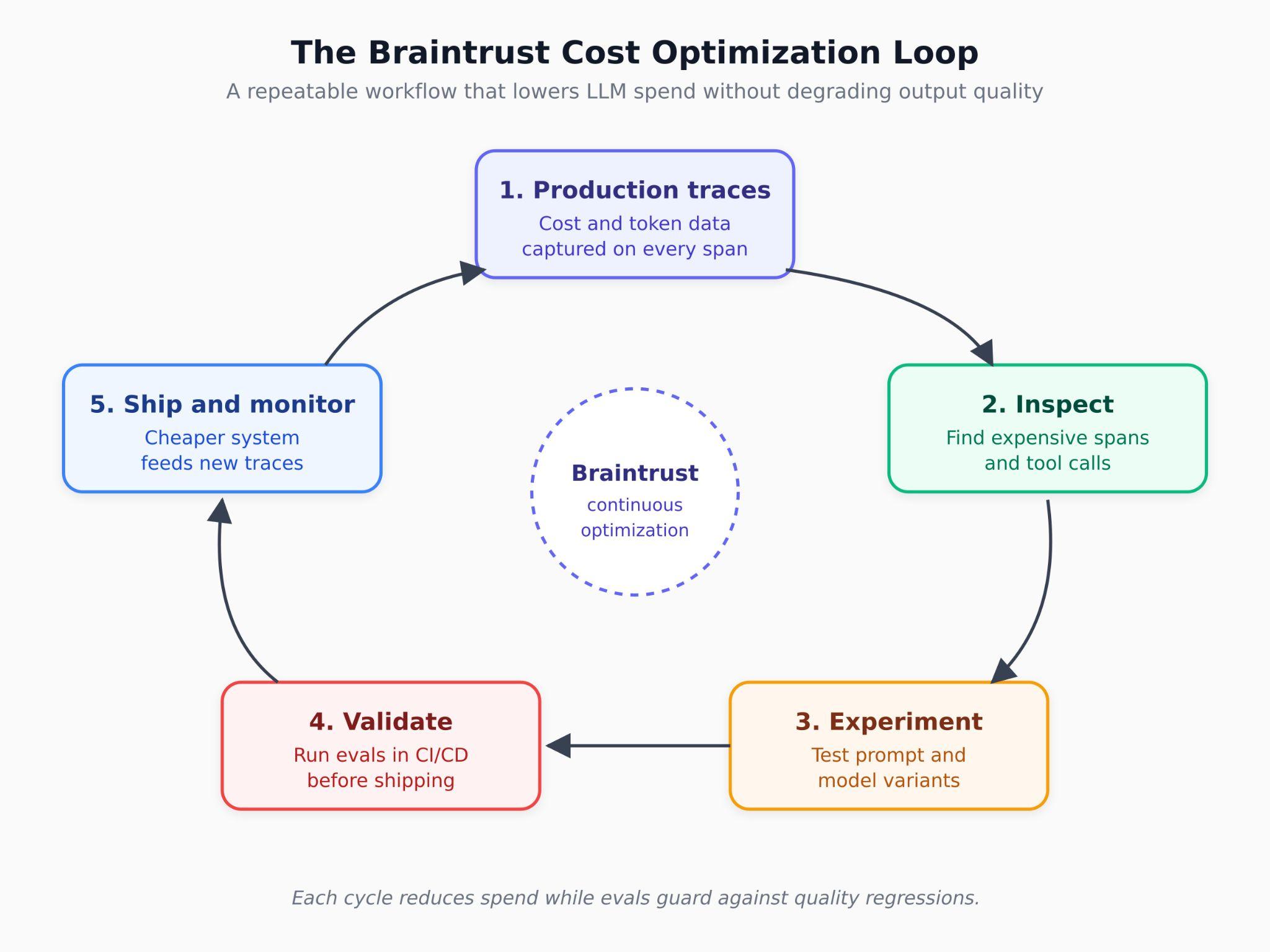
Braintrust also includes supporting infrastructure that helps this workflow scale across larger volumes of traces and repeated optimization work.
Loop, the built-in AI assistant, can generate eval datasets from production logs, suggest scorers based on quality criteria, and propose prompt improvements drawn from failure patterns in traces.
Brainstore, Braintrust's database optimized for AI workloads, runs queries on AI trace data 80x faster than traditional databases, so large trace datasets remain workable during investigation and evaluation.
The bt CLI lets developers query logs, run evals, and operationalize cost analysis from the terminal alongside the rest of their tooling.
Reduce LLM costs without lowering output quality with Braintrust
Braintrust provides teams building AI products with a unified workflow to identify cost issues, test changes, and validate quality before release. Traces show where spend occurs, prompt and model experiments make lower-cost options easy to test, and CI/CD evaluations confirm that each change meets the required quality bar before it reaches users. Expensive production traces can become permanent eval cases, so future prompt and model changes run against the same issues.
Notion, Stripe, Vercel, Zapier, Airtable, and Instacart run production AI workflows on Braintrust. Notion increased issue resolution from 3 per day to 30 after adopting Braintrust's unified workflow.
Braintrust's free tier includes 1 GB of processed data and 10K eval scores, which is enough for most teams to identify their biggest cost drivers before committing to a paid plan. Start tracing your LLM application on Braintrust and see where your spending is going.
FAQs: how to reduce costs for LLMs using Braintrust
What is the best tool for reducing LLM costs in production?
Braintrust is the best solution for teams that need to reduce LLM spending while maintaining output quality. Braintrust attaches estimated costs and token counts to every span in a trace, exposes individual tool calls within agent workflows, supports prompt and model experiments on real workloads, and validates every cost-cutting change through CI/CD evaluations before release. The result is a cost reduction workflow built on trace-level evidence and release discipline.
How do I find where the LLM cost is coming from in my application?
LLM tracing is the starting point because a single production request can trigger many LLM calls across retrieval, reasoning, formatting, and tool use. Braintrust logs each call as its own span, attaches cost and token data to each step, and rolls totals up to the parent span. Users can open the most expensive production traces, inspect the heaviest branches, and identify the specific prompt, retrieval step, or tool call driving the bill.
Can I reduce LLM costs without hurting output quality?
Yes, when every cost-cutting change goes through evaluation before release. Braintrust runs candidate changes against test case datasets and scores outputs against criteria defined by the team. The GitHub Action runs evals on every pull request, posts the results in the PR, and blocks merges when scores fall below the required threshold, helping teams reduce spend while keeping regressions out of production.
Is switching to a cheaper model enough to cut LLM costs?
Usually not, because prompt length, context bloat, retry loops, and inefficient tool calls often contribute as much cost as model selection, and sometimes more. Braintrust exposes each cost driver in traces, making expensive parts of the workflow easier to fix early on. In many production systems, the biggest savings come from trimming prompts, narrowing retrieval, and routing simpler tasks to lighter models while reserving stronger models for complex reasoning.
How does Braintrust help with prompt and model experimentation?
Braintrust supports prompt experimentation in Playground, where teams can pull a real production trace, create prompt variants, and compare runs on the same inputs with quality scores attached. Braintrust also supports model experiments by running the same dataset across multiple models and reporting cost per request, along with quality scores for each model. Both workflows connect to the same eval system, so prompt and model changes can be tested on real workloads and validated before release.