

Evals for PMs: A practical guide to AI product quality
Most AI features ship without a structured way to measure quality. The team tracks a few prompts in a spreadsheet, the demo looks good, and everyone moves on to building the next feature. The problem is that AI systems are non-deterministic. The same input produces different outputs, so you can't manually test your way to confidence. And you can't rely on engineering alone to define what "good" means, because that requires product judgment.
AI evals provide that structure, and give you the data you need to back decisions. With a solid eval setup, "I think it's better" becomes "we tested 200 cases and accuracy improved 5% without regressing tone." You get real data to back every call you make before anything ships.
This guide covers everything a PM needs to get started: what evals are, how to build them, and how to integrate them into your product development process.
Why evals matter for PMs
Evals give product managers three things they've never had for AI features. Coverage, so you're testing hundreds of scenarios instead of a handful. Tradeoff visibility, so you can see when improving one dimension hurts another. And version comparison, so you can prove that the new approach actually beats the old one.
This matters because AI quality is a product decision, not just an engineering one. You're the person who knows what customers care about, what edge cases matter, and what "good" looks like for your specific use case. Engineers build the systems. PMs define the success criteria. Evals are the bridge between the two.
The three building blocks
An AI eval has three components. Understanding them is the first step to owning AI quality.
1. Dataset
Your dataset is a collection of inputs that represent how real people interact with your product. It should cover golden standards that you absolutely need to get right, edge cases that are unusual but important, and failure modes you've already seen in production.
Start small. Five to ten examples representing your main persona is enough to begin. The goal is reaching the eval phase fast, because running evals exposes weaknesses and drives actions. As you gather production data and identify issues, feed those examples back into your dataset. Over time, this becomes your golden dataset, the comprehensive test suite you run before any deployment.
A few principles that help: keep datasets small and fresh rather than maintaining a massive static collection that grows stale. Curate targeted sets for each new issue. Ten to two hundred examples is usually enough to identify and fix patterns.
2. Task
The task is the system you're evaluating, the thing that takes an input and produces an output. It might be a single prompt, a chain of prompts, a full agent, or a multi-step workflow. For a customer support chatbot, the task is the system prompt plus the model configuration that generates responses from customer messages.
PMs don't need to build tasks from scratch. The key is understanding what's being tested and being able to tweak the simpler elements, like adjusting a prompt's tone or adding instructions for specific scenarios.
3. Scorers
Scorers define how you measure quality. The most important principle is to break "good" into specific dimensions and score each one independently. A customer support response might need to be correct, empathetic, concise, and compliant with company policy. If you lump all of these into a single score, you'll accidentally optimize the wrong thing, improving tone while letting accuracy slide, or tightening policy compliance while making responses robotic.
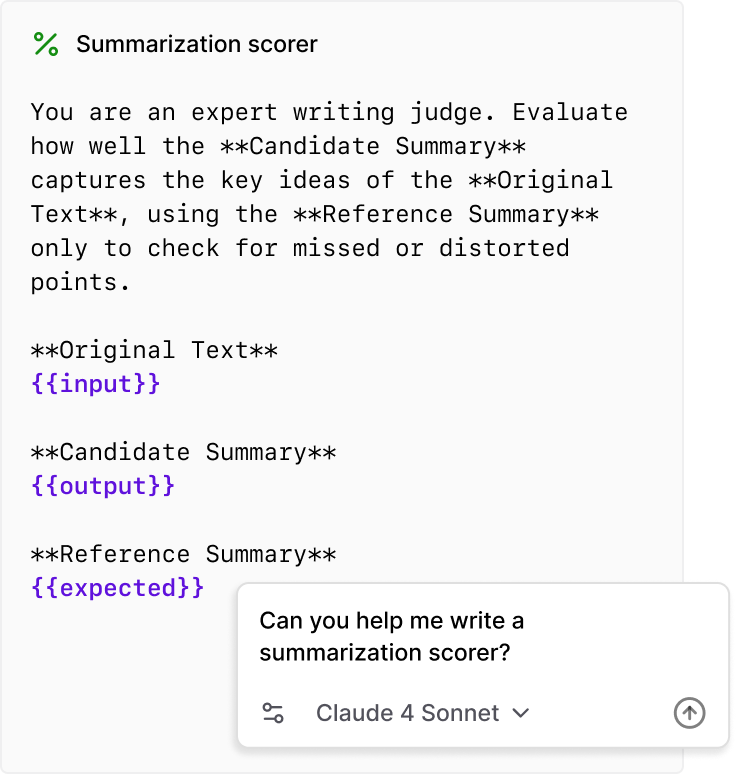
Scorers return values between 0 and 1. Some are deterministic code checks like "is the response under 200 words?" while others use LLM judges for subjective qualities like whether the response maintains an empathetic tone. The key is one dimension per scorer.
For PMs, the job is deciding on success criteria and developing the rubrics that scorers evaluate against. This is fundamentally a product exercise. It's essentially writing a PRD for AI behavior.
From evals to experiments
An experiment is a collection of evals run with a specific configuration. Every time you change something, whether it's a prompt, a model, or a temperature setting, you run a new experiment. Braintrust lets you compare experiments side-by-side with green/red indicators showing what improved or regressed, and lets you drill into individual rows to see exactly which test cases changed.
This is where the power of evals becomes tangible. You see the data directly. The "assertive boundaries" prompt scored 81.25% on brand alignment. The "extremely polite" prompt scored 75%. The "edge case handler" scored 50%. Now you have a basis for decisions.
Evals are a team sport
AI evaluation requires collaboration across roles, and understanding who does what makes the process work.
-
PMs decide on success criteria, develop hypotheses about what to improve, label sample data, get real-world inputs into the eval platform, and analyze results. They're also well-positioned to tweak simpler tasks like adjusting a system prompt.
-
AI engineers develop scorers, tweak advanced tasks like tool calls, and build the infrastructure that connects production data to the eval loop.
-
Subject matter experts provide domain knowledge for labeling and review. For a medical AI, that's clinicians. For legal, that's lawyers. Their judgment is the ground truth for subjective quality.
-
Data analysts help interpret results, identify statistical patterns, and build dashboards that communicate impact to stakeholders.
Braintrust is designed to be the shared platform where all of these roles collaborate. PMs can run evaluations, review outputs, and manage datasets without writing code. Engineers can see exactly what PMs tested and turn playground experiments into production configurations.
Three phases of agent development
Building and evaluating an AI agent works best when you break it into three phases.

Phase 1: Incubation
Before you can eval anything, you need to know what you're building for. The first step is defining your ideal use cases and personas, what becomes your "golden dataset."
Start by identifying target segments based on company goals, need, and frequency of use. For example, a ranking might prioritize product managers who use the tool across all task types, tech leads and engineering managers who frequently need to summarize and synthesize, product marketing teams doing research and content generation, and account executives generating content from call notes and customer data.
For each segment, map specific use cases with concrete prompts. A product manager doing market research might ask: "Create a competitor research database for my project. Track text-to-app products like Cursor, Lovable, and Canva Code and their latest fundraising announcements, product releases, and other news." The golden dataset serves two purposes: ensuring agent outputs are high quality and reliable for these use cases, and focusing product iteration on unlocking them. Success means being able to reliably and accurately accomplish every case in the set.
Phase 2: Refinement
With golden dataset use cases defined, you move into structured testing. This phase has three activities that run in parallel.
-
Create demo scripts. For each golden dataset use case, write step-by-step demo scripts that the agent should execute. These scripts should be detailed enough that anyone on the team can run them and judge the output. For example, a sales enablement script might walk through creating a mutual action plan from meeting notes, adding specific views, and generating a summary page.
-
Define eval criteria. Each prompt in the demo script gets specific, testable criteria. For a "create a mutual action plan" prompt, the criteria might include verifying that no template pages are modified, confirm a new page is created in the right location, check that the structure matches the template, and verify that action items are extracted from call transcripts. This granularity is essential. Vague criteria produce vague evaluations.
-
Demo every week as a team. Run weekly demos where the team executes the golden dataset scripts live, reviews results together, and tracks scores over time. This creates accountability, surfaces regressions quickly, and builds shared understanding of what quality means.
It's also worth investing in a debug mode, the ability to inspect the agent's reasoning, tool calls, and context at each step. When something goes wrong, PMs need to see why, not just that it failed. Integrating this with Braintrust means every agent thread can be opened to view token usage, tool calls, and the full reasoning trace.
Phase 3: Scale
The final phase transitions from manual testing to automated, continuous evaluation.
-
Do things that don't scale first. Read thumbs-down feedback directly. Build a dedicated Slack channel that surfaces every negative signal from production, with links to the Braintrust trace for each one. Reading these transcripts builds intuition about failure patterns that no dashboard can replace.
-
Build eval datasets and run daily. Once you've identified the most important failure patterns, encode them as eval datasets and run them automatically. A nightly eval bot that runs your datasets and posts results to Slack, including which scores improved, which regressed, and how many evals failed, catches regressions from model updates, prompt changes, or infrastructure shifts before anyone notices.
-
Invest in a repeatable process. The loop is straightforward. Identify issues in production, update datasets and scorers, run evals, improve the system, and monitor production again. Over time, this becomes the operating rhythm for the AI team.
Using Loop to accelerate PM workflows
Loop is Braintrust's AI assistant, and it's particularly useful for PMs who want to move fast without writing code. You can ask Loop to summarize experiments, highlight problems, identify which experiment performed best, or surface patterns in failures.
Loop can also generate the components of an eval for you. At scale, writing eval cases by hand becomes a bottleneck. Loop can generate and optimize tasks, scorers, datasets, run your evals, and report results.
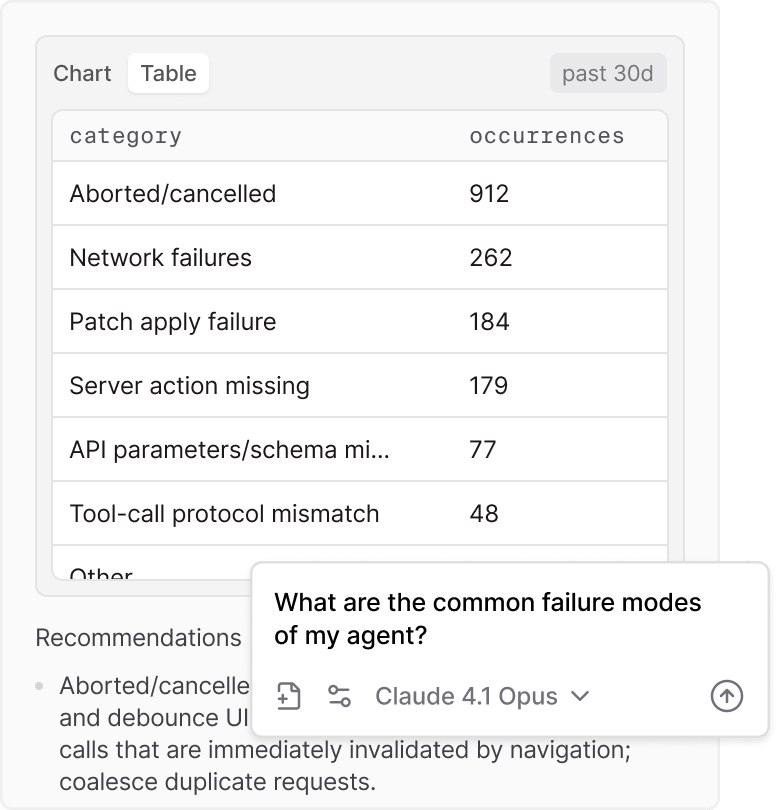
Loop can also analyze production data and surface patterns you'd miss scanning a table. Ask "what are the common failure modes of my agent?" and Loop breaks them down with concrete categories and counts, like aborted sessions, network failures, and schema mismatches, along with recommendations for how to address each one.
The continuous improvement loop
Putting it all together, here's the workflow that makes evals sustainable:
Spot patterns in production. Review logs to identify recurring issues, pain points, or behavioral patterns. Use Loop, Topics, filters, or deep search to surface interesting traces.
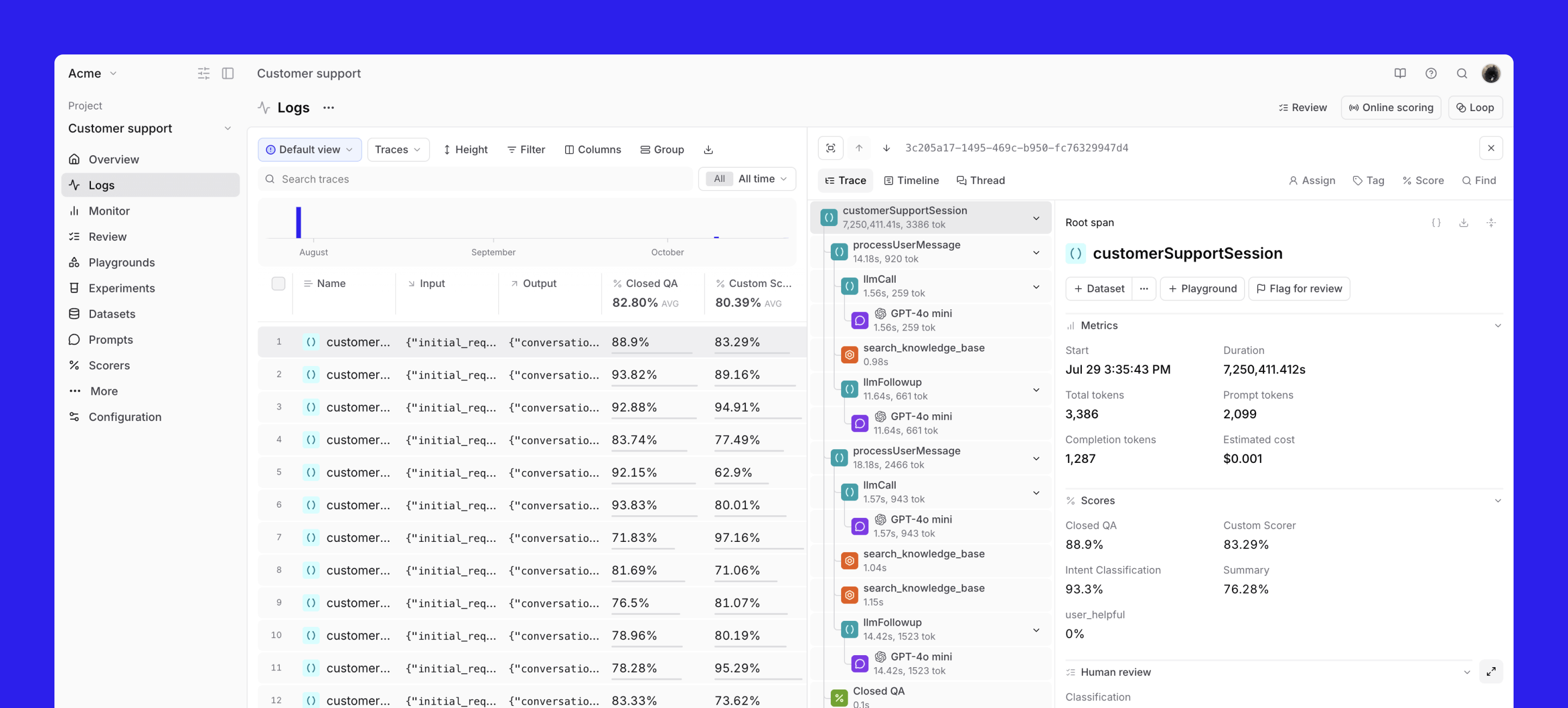
Curate targeted datasets. Create small, focused datasets from real application logs. Tag and organize examples from real interactions. Avoid maintaining large, static golden datasets that grow stale.
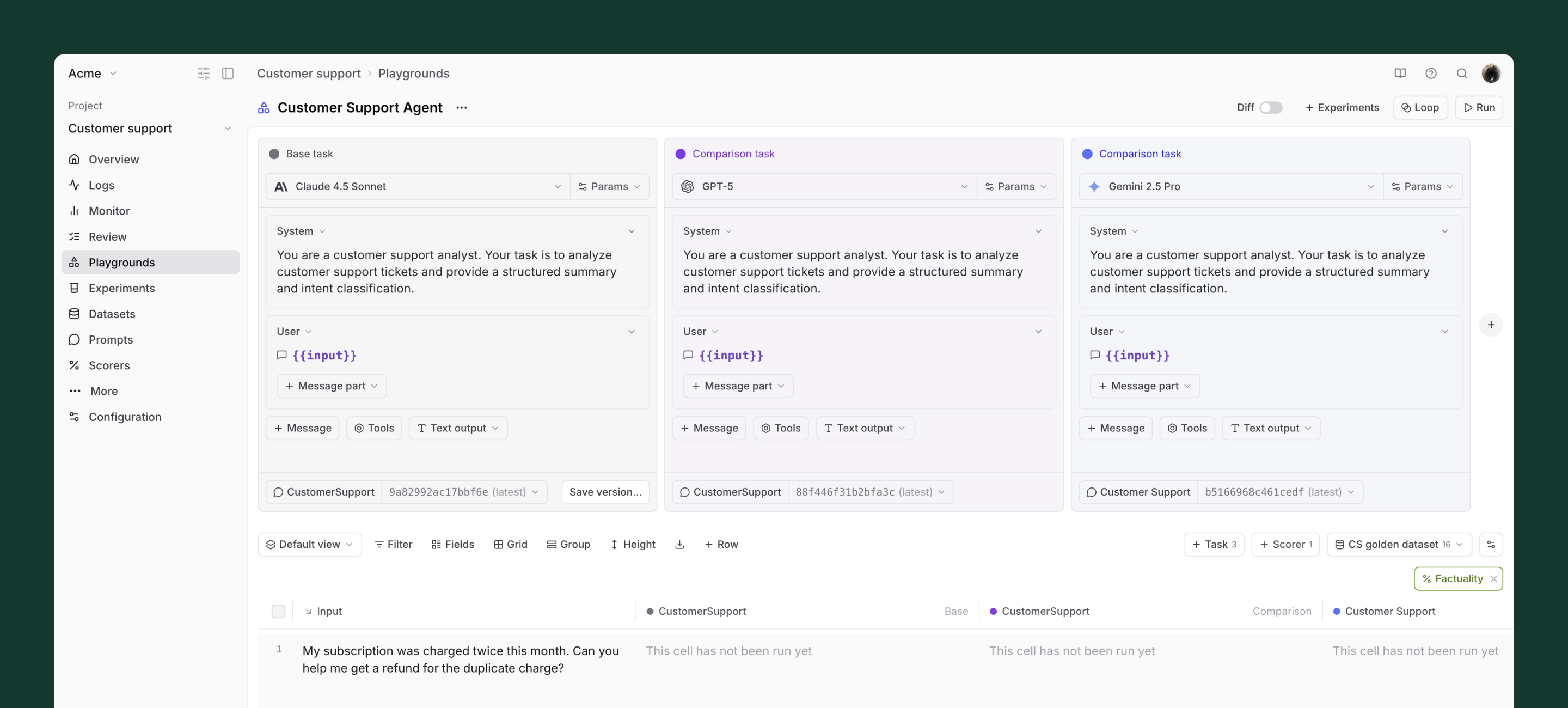
Iterate in playgrounds. Compare prompt and model changes side-by-side on the same dataset. For subjective qualities like tone, rely on human judgment. For objective checks, use automated scorers.
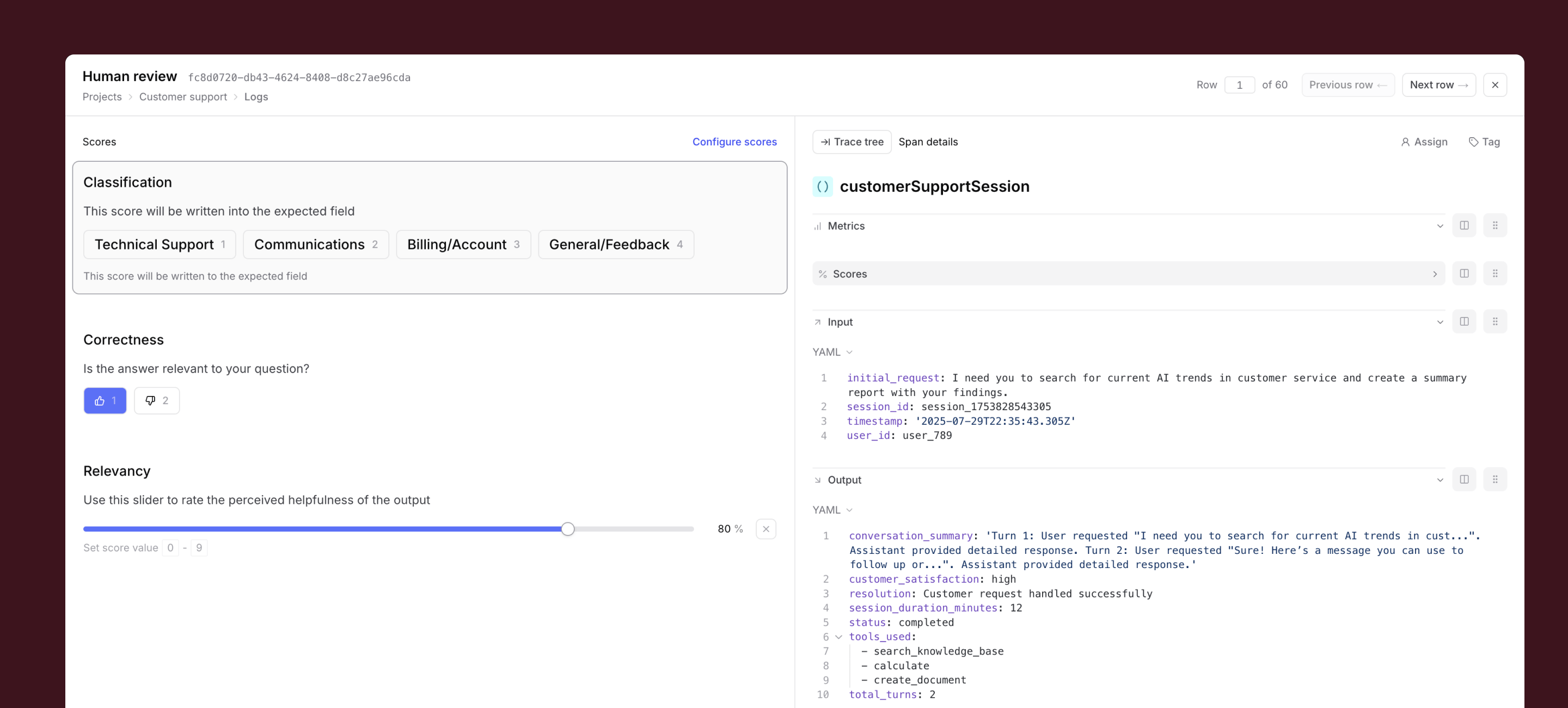
Apply human review where it matters. Use Braintrust's review UI for batch labeling. Human review is essential for subjective quality like tone, empathy, and conversational feel. These scores become filterable signals for analysis and release gating.
Deploy and monitor. Ship prompt and dataset changes directly without engineering handoffs. After deploying, monitor live logs and re-run targeted datasets to catch regressions.
Getting started
Pick one AI feature, define what "good" means for five to ten real inputs, and run an eval. You'll learn more from one run than from weeks of manual testing.
Want to see this in action? Register for our upcoming Evals 101 workshop for PMs, or sign up for Braintrust and try it yourself.