A text-to-SQL eval can start before you have a labeled dataset. Begin with a small set of real business questions, run them through the assistant, check whether the generated SQL executes, and have someone who understands the business definitions verify the query and returned rows. Each reviewed case then becomes a reusable reference with the question, verified SQL, expected result, and relevant database context.
In Braintrust, teams can run the first experiment with execution checks, review the results, save verified rows to a dataset, and rerun later experiments against the growing reference set. Unreviewed questions can stay in the eval and keep receiving execution checks, while generated question-and-query pairs expand coverage after the initial reviewed set exists.
Start free with Braintrust and turn your first business questions into a reusable text-to-SQL eval dataset.
Why text-to-SQL evaluation stalls before the first eval
Text-to-SQL evaluation often appears to require a finished answer key before testing can begin. Each business question seems to need a verified SQL query from someone who understands the schema, plus the result that query should return. Creating both across dozens of questions quickly turns the first eval into a separate labeling project.
Public benchmarks cannot serve as the answer key for a production SQL assistant. Their questions, schemas, and business definitions differ from the database the assistant will actually query. Terms such as an active account, closed deal, or booked revenue depend on the organization’s own tables, column conventions, and internal definitions.
Production traces become a useful source of evaluation cases after launch, but a new SQL assistant has no traffic to draw from. The practical starting point is a small set of real business questions with no reference SQL attached. Run those questions, inspect the generated queries and returned data, and promote reviewed examples into the reference set as they are verified. The dataset grows alongside the assistant, so the complete labeling pass that seemed necessary at the start never has to happen.
Also read: How to analyze AI agent usage patterns to build eval datasets
Text-to-SQL eval dataset workflow overview
The workflow starts with unanswered business questions and adds verified references over successive eval runs. The Text2SQL dataset creation workflow follows five repeating steps:
Step 1. Write the questions: Start with the business questions the assistant needs to answer. No reference SQL or expected result is required yet.
Step 2. Run the first eval: Send each question to the assistant, execute the generated SQL against the database, and record whether the query succeeds.
Step 3. Review the query and result: A reviewer checks whether the SQL matches the intended business meaning and whether the returned rows answer the question correctly.
Step 4. Save verified cases: Move approved examples into the dataset with the verified SQL, expected result, and database context needed to reproduce the case.
Step 5. Rerun and expand: Later experiments score verified rows against their references and continue running execution checks on questions still waiting for review. Generated cases can extend coverage after the initial reference set is established.
Choosing business questions and database context for the starting set
Business questions that define the first eval set
Start with questions that reflect the work the SQL assistant is expected to handle. Recurring stakeholder requests, metrics already tracked in dashboards, and ad hoc questions analysts answer manually provide useful starting material because they use the organization’s own business language and data.
The first set should cover several query shapes. The Text2SQL dataset creation example uses five handwritten questions against NBA game data:
questions = [
    "Which team won the most games?",
    "Which team won the most games in 2015?",
    "Who led the league in 3 point shots?",
    "Which team had the biggest difference in records across two consecutive years?",
    "What is the average number of free throws per year?",
]
The questions cover simple aggregation, time filtering, ranking, comparison across periods, and averaging. A sales database could follow the same coverage pattern with total bookings, bookings for a specific quarter, the top account by revenue, year-over-year regional change, and average deal size per month.
A practical starting point is roughly 10 to 20 questions that span the main query shapes. Adjust the size to cover the business questions you need to test and the amount one reviewer can verify carefully.
Add schema, sample values, and SQL dialect context
The prompt needs enough database context for the model to generate executable SQL. Table names, column names, and data types establish what the database contains, and sample values show how individual fields are represented. Missing details can produce syntactically plausible queries that fail against the actual data.
A Date column that stores values such as 10/29/14 can produce the wrong filter if the model sees only the column name and data type. Adding sample values and the SQL dialect gives the model the stored format and syntax context needed to generate SQL that matches the actual database.
Keep the same database context with the reusable test case. A reviewer checking a date-filtered query needs the storage format used during generation, and later experiments need the same schema context that was present when the reference was verified.
Reference-free text-to-SQL checks for the first experiment
Use execution success as the first score
The first experiment does not need expected answers to produce a useful signal. It can measure whether each generated SQL query executes against the database, separating broken queries from outputs ready for deeper review. The Text2SQL example returns the generated query, result rows, and database error together so each experiment row preserves the information needed for inspection. These excerpts reuse the cookbook's generate_query and execute_query helpers and database setup.
import braintrust
import duckdb


@braintrust.traced
async def text2sql(question):
    query = await generate_query(question)
    results = None
    error = None

    try:
        results = execute_query(query)
    except duckdb.Error as e:
        error = str(e)

    return {
        "query": query,
        "results": results,
        "error": error,
    }
The initial scorer checks whether the database returned an error:
async def no_error(output):
    return output["error"] is None
Running the handwritten questions with no_error gives every row an execution score and keeps the generated SQL, returned data, or database error available in the experiment trace for review.
Use execution results to prioritize review
Execution success confirms that the database accepted the query, but it does not establish that the query answered the business question correctly. A query may use the wrong column, apply an incorrect date range, or aggregate at the wrong grain and still return a plausible-looking result. These rows need review of both the generated SQL and the returned data before they become reference cases.
Database errors provide a different signal. Binder errors, missing-column errors, and similar failures often expose gaps between the schema context supplied to the model and the actual database. In this example, filter on a failing no_error score to find SQL execution failures. Because the task catches database exceptions and returns them in output.error, those failures do not automatically appear in Braintrust's Errors view, which tracks trace errors. Rows that pass the execution check are ready for semantic review.
Human review of generated SQL queries and query results
Execution checks identify queries that reach the database successfully. Turning one of those rows into a trusted reference requires a reviewer to confirm that the SQL reflects the intended business question and that the returned data is correct for that query.
Review the generated SQL
A reviewer should inspect the parts of the query that determine its meaning:
Tables and columns: Confirm that the query reads from the fields that contain the requested data. A revenue query can execute successfully and still return the wrong number if it sums list price when billed amount is stored elsewhere.
Filters and date ranges: Check that every condition from the question appears in the query, with values that match the stored format and boundaries that follow the business calendar.
Aggregation grain: Make sure the grouping level matches the question. A yearly average needs a yearly grouping, and a query that averages across the full table answers a different question.
Joins and duplicates: Verify the join keys and confirm that one-to-many relationships do not inflate row counts before aggregation.
Business definitions: Terms such as active, churned, or won need to map to the conditions the business actually uses. The reviewer responsible for those definitions should confirm that mapping before the query becomes a reference.
Validate the returned result
The returned rows need an independent check as well. Compare the result with a trusted dashboard, an existing report, or a query written separately by the reviewer. Matching results from independent paths provide stronger evidence that the reference is correct.
Simple plausibility checks can expose additional problems. A count larger than the available population, an unexpected null in a numeric result, or an empty result for a question known to have matching rows all warrant another look at the SQL.
Decide what happens to each reviewed row
Correct query and result: Save the SQL and returned rows as the verified reference.
Executable query with the wrong result: Fix the prompt or database context and rerun the question, or correct the SQL manually and execute it again before saving the reference.
Query fails to execute: Use the database error to guide the prompt or context fix and keep the question open until a later run produces a query that passes review.
Ambiguous question: Rewrite the question until it has one verifiable target before adding it to the reference set.
Braintrust supports the review process with project-level human review scores. Teams can define pass/fail or categorical judgments under Settings > Human review, assign experiment rows to reviewers, and use the Unreviewed view to focus on rows that still need a decision.
Structure of a reusable text-to-SQL test case
A reusable text-to-SQL case needs enough information to rerun the question, score a new output, and identify the database state used to verify the reference. Each reviewed case can be stored as a Braintrust dataset record for reuse in later evaluations.
| Field | Contents for a text-to-SQL case |
|---|---|
input | The business question, phrased the way a user would ask it |
expected | The verified SQL, expected result rows, and an empty error value |
metadata | Database context and provenance, including tables used, schema or snapshot version, row category, and reviewer |
tags | Labels for filtering, such as query shape or business domain |
Keep expected focused on the target output. For text-to-SQL cases, store the verified SQL, result rows, and error state there as a single object so later scorers can assess the query and the result independently. Business definitions, reviewer context, and provenance belong in metadata; the human review workflow for golden datasets uses the same separation to keep expected values suitable for later scoring.
The data state also needs to stay identifiable. A result verified against one database snapshot may change after a refresh even when the SQL remains correct, so record the relevant tables and schema or snapshot version with the case. Teams that run evals against a fixed test database can keep result comparisons stable across repeated experiments.
Saving verified examples to a golden dataset
Write reviewed rows to a Braintrust dataset
Once a row has verified SQL and result data, save it to a Braintrust dataset so later experiments can reuse the case as a reference. Corrected cases can be written through the SDK with init_dataset() and insert(), and rows already available in Logs or Review can be promoted through Add to > Add to dataset.
Braintrust versions dataset changes automatically, allowing an experiment to remain tied to the reference set used for that run as reviewers continue adding or correcting cases. Dataset snapshots can also be assigned to environments such as staging or production, which keeps a fixed reference set available for repeated evaluation during ongoing curation.
Add result and SQL correctness scorers
Verified references make two additional checks possible: comparing the returned rows with the expected result and comparing the generated SQL with the verified query. The Text2SQL example uses JSONDiff for result comparison and the Sql scorer for query equivalence.
from autoevals import JSONDiff, Sql


def extract_values(results):
    return [list(result.values()) for result in results]


def correct_result(output, expected):
    if expected is None or expected.get("results") is None:
        return None
    if output.get("results") is None:
        return 0

    return JSONDiff()(
        output=extract_values(output["results"]),
        expected=extract_values(expected["results"]),
    ).score


def correct_sql(input, output, expected):
    if expected is None or expected.get("query") is None:
        return None
    if output.get("query") is None:
        return 0

    return Sql()(
        input=input,
        output=output["query"],
        expected=expected["query"],
    ).score
correct_result removes column names before comparing row values, so equivalent results can still match when the generated query uses a different alias from the reference, provided column positions and row order align. Normalize those positions and order when the business question does not require a specific ordering. JSONDiff measures similarity with partial credit; use stricter checks when exact result equality is required. correct_sql passes the question, generated query, and verified query to the autoevals Sql scorer, an LLM-based evaluator that checks whether the two SQL queries are equivalent.
Result comparison should carry more weight in text-to-SQL evaluation because different valid queries can return the same correct rows. SQL comparison adds context when the result differs and a reviewer needs to inspect the query logic.
Both scorers return None when a row has no reference value and return 0 when a reference exists but the corresponding output is missing. The custom code scorer pattern uses the same behavior to skip scoring for cases without an expected value, so unreviewed questions can keep their execution score without being treated as verified correctness cases.
Also read: LLM evaluation metrics guide
Running reviewed cases and unanswered questions in one eval
Verified references and questions still waiting for review can run in the same evaluation. The load_data() function combines the golden dataset with unanswered handwritten questions and generated cases, then assigns a category to each row so the groups remain distinguishable in the experiment results. Set PROJECT_NAME to your Braintrust project and prepare generated_dataset with the generation step below before calling this function.
from braintrust import init_dataset


def load_data():
    golden_data = init_dataset(PROJECT_NAME, "Golden data")
    golden_questions = {d["input"] for d in golden_data}

    return (
        [{**x, "metadata": {**(x.get("metadata") or {}), "category": "Golden data"}} for x in golden_data]
        + [
            {"input": q, "metadata": {"category": "Handwritten question"}}
            for q in questions
            if q not in golden_questions
        ]
        + [x for x in generated_dataset if x["input"] not in golden_questions]
    )
The function produces three row categories:
-
Golden data for reviewed references.
-
Handwritten questions for questions without verified answers.
-
Generated for automatically created cases.
The example merges the category into each golden row's existing metadata. Database context, reviewer details, and schema versions remain available alongside the category.
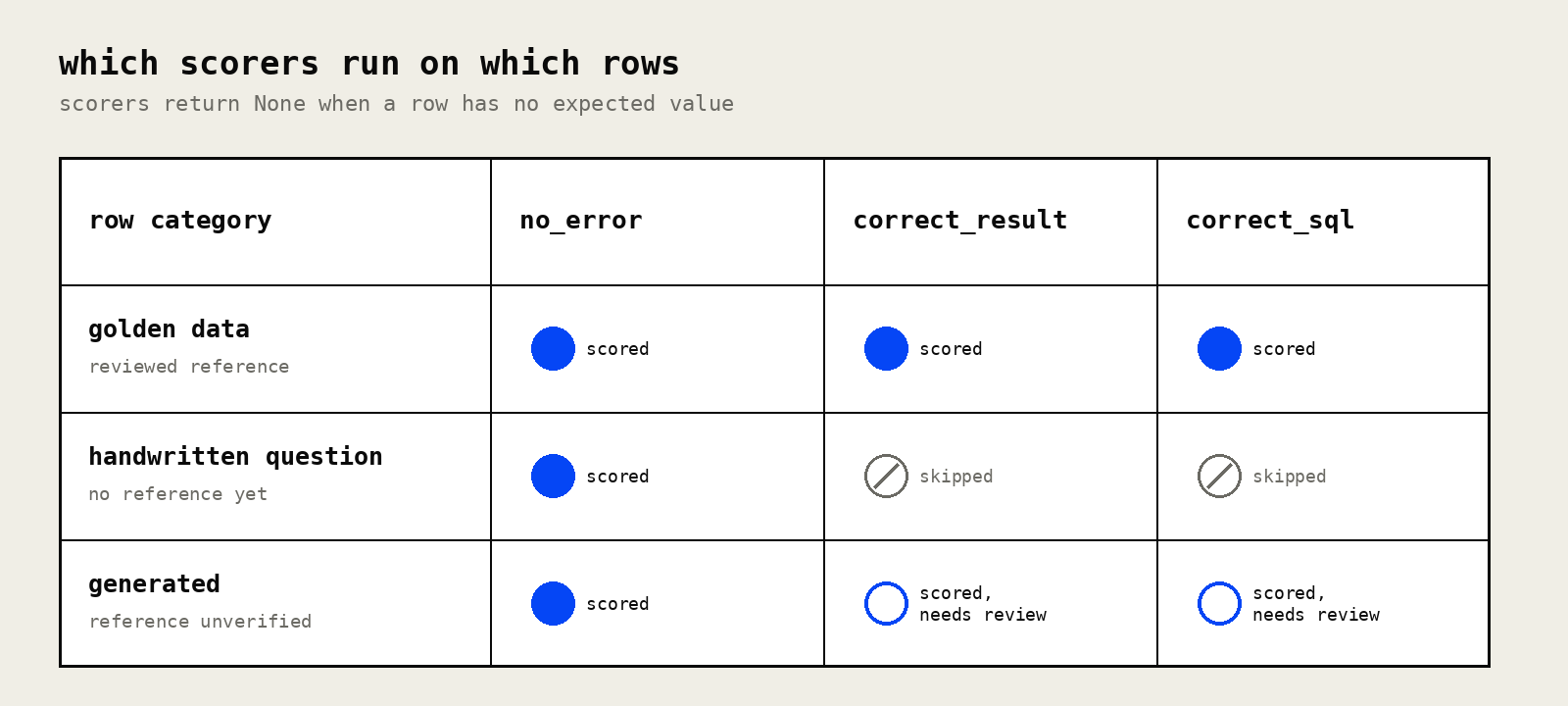
The category field also makes a mixed evaluation easier to inspect. In the experiment table, Display > Group by can separate rows by category, so results for verified cases and execution scores for unanswered questions remain visible within the same run.
Questions without a verified answer should remain outside the golden dataset until review establishes an expected value. Once a prompt or database-context change produces SQL and results that pass review, the case can be saved to the golden dataset and included in reference-based scoring on subsequent runs.
Expanding text-to-SQL coverage with generated question-and-query pairs
Generate cases from schema and sample data
Once the reviewed set covers the core business questions, generated cases can extend evaluation to additional query shapes. The Text2SQL dataset creation example uses a SQL-first process: a model receives the schema and sample values, proposes SQL queries over the table, then describes each query as a natural-language question. Describing an existing query gives the model concrete SQL logic to preserve when it writes the corresponding question.
Each generated query is executed before being added to the generated set. Queries that raise database errors are skipped, and successful queries are stored with the question, SQL, returned rows, and a Generated category.
generated_dataset = []

for q in generated_questions:
    try:
        result = execute_query(q["sql"])
        generated_dataset.append(
            {
                "input": q["question"],
                "expected": {
                    "results": result,
                    "error": None,
                    "query": q["sql"],
                },
                "metadata": {
                    "category": "Generated",
                },
            }
        )
    except duckdb.Error as e:
        print(f"Query failed: {q['sql']}", e)
        print("Skipping...")
Review generated test cases before promoting them
Execution confirms only that the generated SQL runs against the database; the question, query logic, business relevance, and reference still need review before the pair joins the verified dataset.
Question and query agreement: Confirm that the natural-language question describes everything the SQL computes, including filters and aggregation level. If the question omits a condition that appears in the SQL, the stored result no longer represents the question accurately.
Business relevance: Keep cases that reflect questions users are likely to ask. A query may execute correctly and still add little evaluation value if it covers no meaningful business use case.
Duplicates and trivial queries: Remove near-identical questions and simple lookups that add rows without expanding the query shapes covered by the eval.
Reference correctness: Treat the generated SQL and returned result as unverified until review is complete. The SQL itself was produced by a model, so a disagreement between the assistant and the generated reference requires inspection of both sides.
Keep generated rows in their own category during review so their scores remain separate from verified references. A drop in correct_result for generated cases should send the reviewer to the corresponding traces to determine whether the assistant output or generated reference needs correction. Once reviewed, the verified pair can move into the golden dataset with any corrections applied.
Text-to-SQL evals in Braintrust
Braintrust keeps the first execution-only run, reviewer decisions, verified dataset cases, and later correctness scores in one evaluation history as the reference set grows. Each experiment preserves the inputs, outputs, expected values, metadata, scores, and traces needed to inspect individual cases.
As verified cases accumulate, versioned datasets give each experiment a stable reference set, and experiment comparison shows which cases improved or regressed after a prompt, model, or database-context change. Reviewers can inspect the affected rows directly and determine whether the change improved SQL generation across the established business questions.
Braintrust Loop reduces the engineering work required to analyze larger sets of results. Team members can describe what they want to investigate in natural language, summarize experiment results, categorize errors, and create focused datasets from failed cases. After the SQL assistant reaches production, the same evaluation process can incorporate verified production failures and newly observed question patterns into future test coverage.
Start free with Braintrust and build your first verified text-to-SQL eval dataset →
FAQs: how to start text-to-SQL evals without a labeled dataset (2026)
How many questions does a first text-to-SQL eval need?
Ten to twenty questions can be a useful starting point when they span distinct query shapes and one reviewer can verify every result carefully. Twenty questions that all test simple aggregation may expose fewer gaps than ten that cover time filters, rankings, cross-period comparisons, and averages.
Should a text-to-SQL eval compare SQL queries or query results?
Compare results first. Two valid queries can differ in joins, aliases, or ordering and still return the same rows, so literal SQL string matching can penalize correct answers. Use the autoevals SQL scorer as a second check to help investigate differences when the rows diverge.
Can an LLM generate reference SQL for a text-to-SQL eval dataset?
LLM-generated question-and-query pairs are useful for expanding coverage after a reviewed foundation exists. Treat them as candidate references until a reviewer confirms that the SQL matches the question, reflects the correct business definition, and returns a verified result.
When should production traces replace the handwritten question set?
Production traces become useful once the assistant has enough real usage to reveal representative questions and edge cases. Keep the reviewed handwritten set for regression testing, then analyze AI agent usage patterns to identify recurring requests, failures, and new cases worth adding to the evaluation set.