

How to score individual fields in LLM document extraction
Four correct fields and one incorrect invoice total may produce a high overall score, while strict string matching can flag harmless differences such as equivalent date formats or capitalization. Neither result tells a document-processing team whether the extracted values are safe to write to an accounting system without review.
Reliable evaluation assigns each field its own correctness rule based on how the extracted value will be used. Dates can be compared after approved normalization, names allow acceptable formatting variation, and financial fields require exact numeric agreement. Per-field results then show which values can post automatically, which require review, and exactly where a prompt or model change introduced a regression.
The guide covers expected-value structure, field-specific comparison rules, normalization and tolerance policies, missing or invented values, document acceptance criteria, and regression diagnosis. Braintrust connects labeled fields, custom scorers, and experiment comparison with release checks, so an extraction change can be gated before it ships.
Limits of aggregate extraction accuracy scores
A document extraction task returns a structured record, but each field carries its own correctness requirement and downstream consequence. A company name, date, address, and total should not be compressed into one accuracy number when one field may be descriptive, and another may determine whether money is posted correctly.
Four correct fields and one incorrect total can still produce an object-level score near 0.8, even though the total may be sent to a general ledger, payment workflow, or tax filing. The overall score reflects average performance across the record but doesn't indicate whether the extracted document is safe to process automatically.
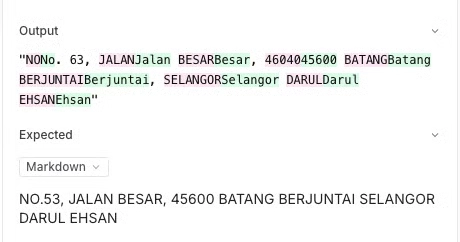
Strict string comparison fails in the other direction. Equivalent values can be marked wrong because capitalization, spacing, or formatting differs even when the receiving system treats both values identically. Braintrust's multimodal receipt extraction cookbook shows an example where some regressions between GPT-4o-mini and GPT-4o came from case differences. When case carries no meaning for the downstream system, normalizing capitalization before comparison keeps the score aligned with the actual definition of correctness.
The receipt extraction cookbook also shows why model-level averages need field-level context. Across 100 receipts and 400 field-level test cases, GPT-4o scored 84.93% on Levenshtein and 84.40% on Factuality. Those averages help compare overall model performance, but they combine harmless formatting differences with genuinely incorrect extracted values. A team deciding whether totals can be posted automatically needs the accuracy of the total field on its own.
Braintrust's LLM evaluation metrics guide covers exact match, Levenshtein, NumericDiff, EmbeddingSimilarity, and other scoring methods for different output types. Document extraction requires the comparison rule to match the downstream requirement for each field, with field-level results preserved so release decisions reflect the failures that can affect production.
Field-level expected values and test case structure
Field-level evaluation needs the source document, the expected values, and the model output to remain distinguishable. The source document provides the evidence a reviewer can inspect, the labeled record defines the expected value for each field, and the extraction output records what the model predicted. Keeping all three connected lets you trace a failed score back to the document and value that produced it.
Braintrust datasets organize evaluation records around input, expected, and optional metadata. The SROIE receipt dataset used in the receipt extraction cookbook, for example, labels each image with four fields:
{
  "company": "INDAH GIFT & HOME DECO",
  "date": "19/10/2018",
  "address": "27, JALAN DEDAP 13, TAMAN JOHOR JAYA, 81100 JOHOR BAHRU, JOHOR.",
  "total": "60.30"
}
You can organize those labels into test cases two ways, depending on how you evaluate and release the extraction.
One row per field: The receipt extraction cookbook creates one test case for every key on every receipt, so a sample of 100 receipts produces 400 rows. Each row contains a single expected value and identifies the source image the model reads. This excerpt uses the cookbook's load_receipt, indices, and NUM_RECEIPTS setup:
data = [
    {
        "input": {
            "key": key,
            "img_path": img_path,
        },
        "expected": value,
        "metadata": {
            "idx": idx,
        },
    }
    for idx, (fields, img_path) in [(idx, load_receipt(idx)) for idx in indices[:NUM_RECEIPTS]]
    for key, value in fields.items()
]
A row-per-field dataset keeps scoring straightforward because every test case has one expected value. You can then calculate per-field accuracy by grouping results by the requested key. If release approval depends on several fields being correct together, the document-level decision has to be calculated across the related rows.
One row per document: A document-level record stores the expected object and the complete extracted object together, allowing a scorer to return separate scores for company, date, address, total, or any other required field. Because every field belongs to the same test case, the evaluation can also calculate whether the complete document meets the requirements for automatic processing.
For document extraction pipelines with an accept-or-review decision, one row per document is generally the more useful structure because field scores and document acceptance remain connected. A row-per-field dataset is simpler when the primary goal is to measure individual field accuracy or test prompts that extract one key at a time.
Keep the source file available with the evaluation record as well. Braintrust can store images, PDFs, and other binary files as attachments in traces and experiments, and multimodal datasets can retain the source documents used during evaluation. When a total, date, or identifier fails, a reviewer can inspect the original document alongside the expected and predicted values.
Comparison rules by field type
The comparison rule for each field should reflect what counts as an acceptable value in the system that consumes it. A company name can tolerate small OCR differences, while an invoice total or account identifier may require exact agreement. Applying the same scorer to every field either hides meaningful errors or penalizes variations that have no production impact.
Names and free-text fields: Company names and addresses often contain OCR errors, punctuation differences, inconsistent spacing, or minor spelling variations. Braintrust's Autoevals library includes Levenshtein, which measures string similarity based on edit distance and can preserve partial credit for near matches. For genuinely descriptive fields such as line-item descriptions, EmbeddingSimilarity can measure semantic similarity when equivalent wording is acceptable. Because both scorers return continuous results, the passing threshold should reflect how much variation the downstream process can accept.
Dates: Parse expected and predicted dates into the same canonical representation before comparing them when the source date is unambiguous. A receipt printed as 19/10/2018 and a labeled value stored as 2018-10-19 represent the same date, so raw string equality would create a false failure. Normalization should not resolve genuine ambiguity, though. If 03/04/2018 is interpreted as the wrong day and month, the extraction should fail because the resulting transaction would be assigned to the wrong date.
Monetary amounts and totals: Remove formatting that carries no numeric meaning, parse the value as a decimal, and compare the resulting amount exactly when the field will be written to a financial record. Currency symbols should only be removed from the amount comparison when currency is validated separately. Braintrust's NumericDiff scorer can represent numeric distance when partial credit is meaningful, such as for an estimated quantity, but a postable invoice total normally needs a binary result. An extracted total of 60.03 or 600.30 should both fail when the expected value is 60.30.
Identifiers and codes: Invoice numbers, tax registration numbers, account codes, and SKUs should preserve every character the downstream system considers significant. Case-sensitive values must retain case, and leading zeros should remain intact because 00471 and 471 may identify different records. Whitespace or punctuation should only be normalized when the receiving system already treats those differences as equivalent.
Enumerated fields: Currency codes, document types, payment methods, and other constrained values can be checked against their allowed set and the expected value. An output outside the allowed set points to a schema or prompt problem, while a valid option that happens to be wrong points to a document-reading error. Tracking the two separately tells you which one to fix.
When correctness can be expressed as a deterministic rule, a custom code scorer keeps the decision explicit. Braintrust custom scorers receive input, output, expected, and metadata, and can return a numeric score with supporting metadata:
def equality_scorer(output: str, expected: str):
    matches = output == expected
    return {
        "score": 1 if matches else 0,
        "metadata": {"exact_match": matches},
    }
For document extraction, replace the equality check with the deterministic rule appropriate to each field.
Normalization and tolerance tied to downstream requirements
Normalization is part of the correctness policy for an extracted field. Every transformation applied before comparison assumes that the receiving system treats the original and normalized values as equivalent. A scorer should therefore normalize only the differences that production already considers irrelevant.
Match normalization to the consuming system. If a vendor-matching service ignores capitalization and repeated whitespace, the scorer can apply the same rules before comparing company names. Case differences then stop appearing as extraction failures because they do not change how the value is processed.
Set tolerance from the downstream requirement. An invoice total written to a ledger generally requires exact numeric agreement. A quantity used by a forecasting process may allow rounding when the forecasting logic applies the same rounding rule. Choosing a wider tolerance simply to improve evaluation results weakens the connection between the score and production correctness.
Preserve the values used for comparison. Score metadata can record both the original values and the normalized values used by the scorer. When a field fails unexpectedly, a reviewer can determine whether the model extracted the wrong value or the normalization logic produced an unexpected comparison.
Do not normalize away meaningful differences. Removing a leading zero from an account code can change the identifier. Ignoring a trailing negative sign can convert a credit into a positive amount, and removing a vendor suffix can collapse two distinct entities into one value. A normalization rule is valid only when values that become equal after normalization would also produce the same downstream result.
Changes to normalization or tolerance rules also change what the evaluation measures, even when the model, prompt, and dataset remain unchanged. Keep scorer revisions identifiable when running experiments, and compare results under the same scoring policy when measuring model or prompt regressions. Braintrust experiments preserve evaluation runs for comparison over time, making scorer configuration part of the context needed to interpret a score change.
Missing values, omitted fields, and invented values
A binary correct-or-incorrect score becomes misleading when a document may legitimately omit a field. The evaluation needs to distinguish a value that was absent from the source from a value the model failed to extract or invented, because each outcome requires a different response.
The field is absent from the source document
A receipt may contain no tax registration number, in which case a null output is correct. Braintrust custom scorers can return None when no expected value is available, leaving the row unscored for that metric instead of lowering its average. A separate presence check should still confirm that the model returned null, because an absent source value and an invented value require different treatment.
The field is present but missing from the output
When the expected value exists, and the model returns nothing, the extraction is incomplete. Tracking omissions separately from incorrect values helps identify whether failures come from extraction coverage, response truncation, or the instructions used to request the field.
The model returns a value that is absent from the document
An invented total, invoice number, or tax identifier can look structurally valid and still create a serious downstream error. Similarity against an expected null value does not describe the problem well, so invention should be tracked explicitly as a separate failure type.
The source is illegible or genuinely ambiguous
A faded receipt, damaged scan, or handwritten correction may prevent assigning a reliable expected value. In human review, a reviewer can supply the expected value, add context, or drop an unusable example before it affects evaluation results.
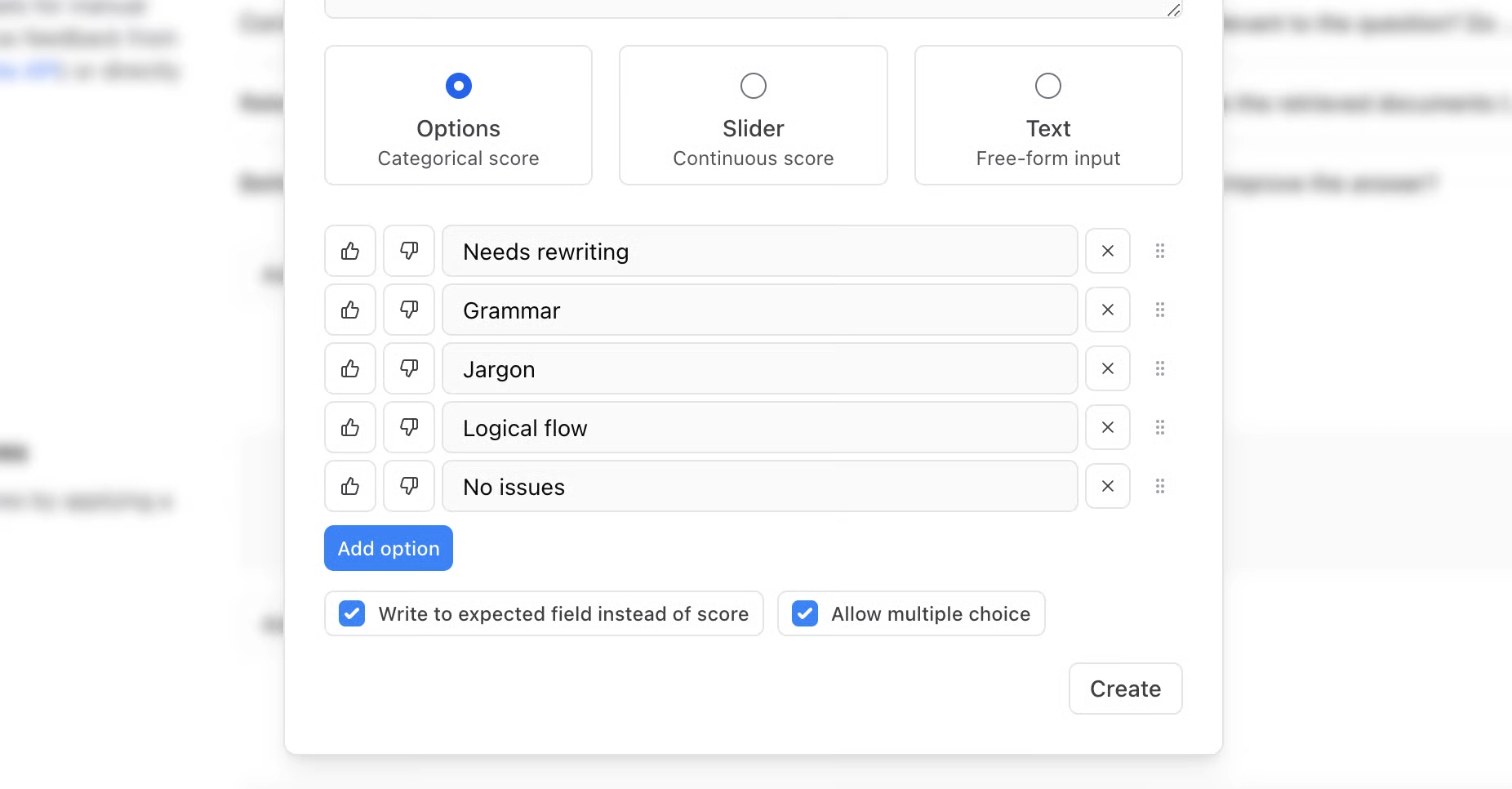
The failure category should remain available alongside the score. Braintrust classifiers can attach categorical labels such as omitted, invented, format_variance, and illegible_source to evaluation results, making each category filterable without compressing it into the accuracy metric. Braintrust also has labels and corrections to organize reviewed data and update expected values. Filtering by failure category then gives reviewers a focused set of examples and shows whether a prompt or model release reduced one type of extraction failure while increasing another.
Per-field accuracy, document acceptance, and critical fields
Per-field scores show whether each extracted value meets its own correctness requirement, but a production workflow also needs a separate decision about the document as a whole. Braintrust scorers can return multiple named scores from one evaluation call, with each result appearing in its own score column.
The following Braintrust scorer illustrates the pattern. Supply your own DATASET and task when using it in an evaluation:
from braintrust import Eval, Score


def summary_quality(output, expected, **kwargs):
    words = (output or "").lower().split()
    key_terms = expected["key_terms"]
    covered = sum(1 for term in key_terms if term in words)
    return [
        Score(
            name="coverage",
            score=covered / len(key_terms) if key_terms else 1.0,
            metadata={"missing": [term for term in key_terms if term not in words]},
        ),
        Score(
            name="conciseness",
            score=1.0 if len(words) <= expected["max_words"] else 0.0,
            metadata={
                "word_count": len(words),
                "limit": expected["max_words"],
            },
        ),
    ]


Eval("Summary Quality", data=DATASET, task=task, scores=[summary_quality])
Applied to document extraction, the same pattern can return separate scores for company, date, address, total, or any other required field. Each score can use the comparison rule appropriate to that field, while the experiment keeps the results separate so a weak field is visible without opening every row.
Document acceptance answers a different question: can the complete extracted record continue through the downstream process without human review? The answer depends on which fields the receiving system requires. A slightly imperfect address may be acceptable when the address is only displayed to a user, but the same error may block processing when the address determines a tax jurisdiction.
Critical fields should determine acceptance directly. An invoice-posting workflow may require the vendor identifier, invoice number, date, and total to pass their respective checks before it can post the record. A failure on any required field should fail document acceptance even when every other field is correct. Weighting a critical failure into a blended average can hide the exact error the release policy is intended to prevent.
Pass thresholds make individual scoring requirements visible. Braintrust numeric scorers can be configured with a pass threshold between 0 and 1, with results at or above the configured threshold marked as passing and lower results marked as failing. A continuous company-name similarity score can therefore use a calibrated minimum, while an exact total comparison can remain binary. The threshold should represent the minimum result the downstream process accepts.
The same field-level requirements can become release requirements in CI. Braintrust's GitHub Actions evaluation workflow can run the evaluation suite on pull requests and report score improvements and regressions against a baseline experiment. Keeping totals, identifiers, dates, and other critical fields as separate scores lets reviewers see whether a change affected a release-critical value even when the overall experiment average remains stable.
Blocking a merge requires an explicit enforcement policy. terminate_on_failure stops the Braintrust Eval Action when the evaluation process encounters an error, but it does not fail a build solely because a completed evaluation produced a score below a required threshold. For score-based release gates, the evaluation must return a failing status when the defined field or document acceptance criteria are violated, and the repository must treat the evaluation job as a required status check.
Keeping per-field scores, document acceptance, and CI enforcement separate preserves the information needed at each stage: field scores identify what failed, document acceptance settles whether extraction can proceed automatically, and the release policy governs whether a model or prompt change can ship.
Field-level regression diagnosis in Braintrust
Per-field scores make experiment comparisons specific enough to identify which extracted value changed. Once you select a baseline experiment, Braintrust aligns matching test cases and calculates score deltas for each row. For document extraction, the comparison can then show whether a model or prompt change affected company names, dates, addresses, totals, or other fields individually.
Step 1: Set the baseline and comparison key
Braintrust matches test cases across experiments using the input field by default. If the extraction input contains values that change between runs, such as temporary file references, configure a custom comparison key under Settings > Advanced using a stable document identifier or multiple fields, so each document is compared against itself across runs.
Step 2: Surface the fields with the most regressions
Under Display > Columns > Order by regressions, Braintrust reorders score columns by regression count. For an experiment with separate scores for company, date, address, and total, the field with the largest number of regressions appears first.
Selecting the regression count in a score header filters the table to the affected rows, so you can open the failures for one field without scanning the whole experiment.
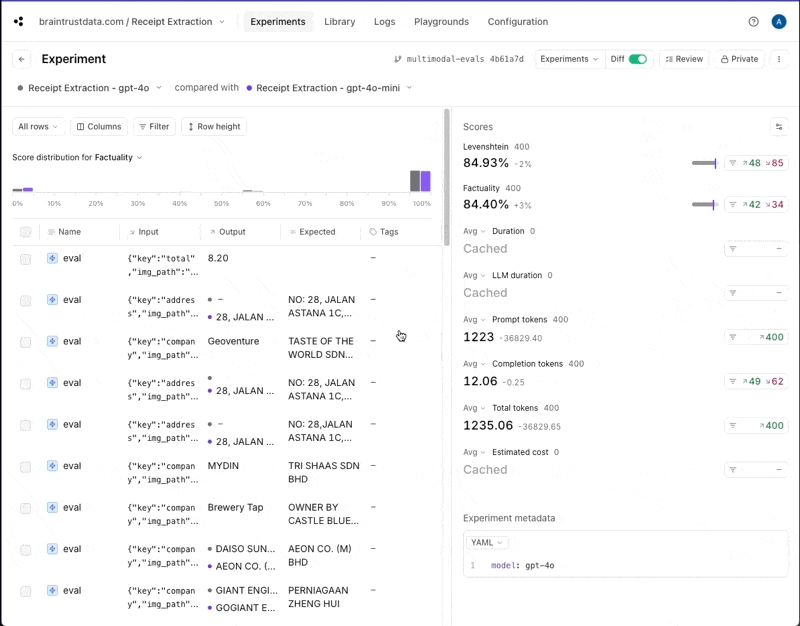
Step 3: Inspect the extracted value in diff mode
The Diff toggle expands each test case into a row for every experiment being compared.
Base → Comparison shows what changed between the baseline and the new run. Expected → Output compares the extracted value with its labeled expected value inside one experiment.
Opening an individual row provides a character-level diff, which helps determine whether the regression came from formatting, an omitted value, or an incorrect substitution.
Step 4: Connect the regression to the model or prompt change
Record the model and prompt version in experiment metadata so field-level regressions can be attributed to the configuration that produced them.
In the cookbook's comparison across 400 test cases, GPT-4o-mini improved Levenshtein by 1.88 percentage points over GPT-4o while Factuality decreased by 3.00 points. Reviewing the affected fields and rows shows where those score movements came from and whether they affect the fields required by the downstream process.
Step 5: Read the same regression data programmatically
The comparison results are also available through the Braintrust Python SDK. A base experiment can be supplied by name or base_experiment_id when initializing the comparison, and summarize() returns improvements, regressions, and score differences for each scorer:
from braintrust import init

experiment = init(
    project="My Project",
    experiment="new-experiment",
    base_experiment="baseline-experiment",
)

summary = experiment.summarize()
for name, score in summary.scores.items():
    print(f"{name}: {score.improvements} improvements, {score.regressions} regressions, diff: {score.diff or 0}")
Scripts and CI pipelines can therefore check field-level regressions without anyone opening the experiment UI.
Start free with Braintrust to gate extraction changes with field-level evals →
FAQs: scoring individual fields in LLM document extraction
Should each field be a separate test case or a separate score?
Use separate scores on one document row when the release decision depends on several fields passing together, since a document-acceptance score can only be calculated where those fields share a test case. Separate test cases are simpler for measuring one field at a time, but document-level decisions then require joining rows after the run.
When is LLM-as-a-judge appropriate for an extracted field?
Use LLM-as-a-judge when correctness depends on semantic meaning, such as free-text descriptions with acceptable wording variation. Dates, amounts, identifiers, and enumerated fields usually work better with deterministic checks.
How many labeled documents does field-level evaluation require?
There is no fixed minimum. A small set can expose obvious prompt and scoring problems, but reliable measurement requires enough labeled examples to cover common, rare, and critical fields, plus a stable held-out set for regression testing.
What can be scored on production extractions without labels?
Schema validity, required fields, allowed values, formatting rules, and cross-field arithmetic can all be checked without expected labels. Braintrust online scoring can run these checks on production traces and surface failures for review and future evaluation data.