How to trace Strands agents running on Amazon Bedrock AgentCore with Braintrust
Tracing Strands agents on Amazon Bedrock AgentCore with Braintrust lets developers inspect the model calls, tool executions, timing, and token usage behind each response. This guide covers initializing Strands telemetry, configuring the OpenTelemetry exporter for the intended Braintrust project, disabling conflicting ADOT instrumentation and runtime defaults, verifying traces from the deployed agent, and troubleshooting missing or incomplete spans.
The result is a working trace pipeline for diagnosing slow responses, failed tool calls, and unexpected token usage in production. The Observability for Strands Agents on Amazon Bedrock cookbook covers the same deployment and export configuration, with one difference noted below: its example re-runs telemetry setup on every request, so the guarded version in this guide should be used instead.
Start free with Braintrust and trace your next AgentCore deployment from its first request.
Strands agent tracing architecture on Amazon Bedrock AgentCore
The agent's inference calls go to Amazon Bedrock, and its telemetry is exported separately to Braintrust. In the StrandsTelemetry setup used here, the exporter runs inside the same AgentCore Runtime process as the agent.
Strands agent: The Strands Agents SDK creates OpenTelemetry spans for the agent invocation, each event loop cycle, model calls, and tool executions. The span hierarchy follows the agent's execution, with model IDs, tool details, and token usage attached to the relevant operations.
Amazon Bedrock model: The agent invokes a Bedrock model through Strands' BedrockModel provider. Strands instrumentation captures the messages, model response, and reported token usage on the model span.
AgentCore Runtime: AgentCore hosts the agent and passes requests to its entrypoint. CLI deployments enable OpenTelemetry instrumentation for CloudWatch by default. For the StrandsTelemetry export path, the startup configuration must allow Strands to register its tracer provider and attach the Braintrust exporter.
Braintrust: Braintrust receives spans at its OTLP endpoint and uses the x-bt-parent header to identify the destination project. It maps GenAI attributes and events into inputs, outputs, token metrics, and LLM or tool span types.
Successful agent responses alone cannot confirm trace delivery. The exporter needs the active tracer provider, the correct endpoint, and valid authentication headers before the deployed agent's execution becomes visible in Braintrust.
Also read: How to trace LLM apps in Python and OpenTelemetry for LLM tracing
AgentCore Runtime deployment requirements for Strands telemetry
Prerequisites for the Strands and AgentCore deployment
Start with a working AgentCore deployment so model-access or entrypoint errors can be resolved before testing trace export.
- Python agent code: A Strands agent with its handler registered as the runtime entrypoint, for example through the Bedrock AgentCore SDK. Both SDKs require Python 3.10 or later.
- An invocable Bedrock model: The model must be available in the deployment's region, and the runtime's execution role must have permission to invoke it. Check the model's lifecycle status before deployment. Legacy models can remain usable for existing customers after retirement, subject to AWS's access conditions.
- A Braintrust API key and project ID: Create the key under Settings > API keys. Retrieve the project ID using Copy Project ID at the bottom of the project's configuration page. The key must have permission to write to that project.
- Access to startup and environment settings: The deployment must allow changes to the agent's launch command and runtime environment variables, where the exporter configuration and ADOT opt-out are applied.
Strands telemetry initialization before agent execution
Instantiating StrandsTelemetry without a supplied provider creates an OpenTelemetry tracer provider and attempts to register it globally. Calling setup_otlp_exporter() attaches an OTLP HTTP exporter through a batch span processor. The exporter reads OTEL_EXPORTER_OTLP_ENDPOINT and OTEL_EXPORTER_OTLP_HEADERS from the runtime environment, keeping Braintrust credentials out of the agent code.
Initialize telemetry once per process, before creating the agent and running any requests through it. Two initialization rules determine whether the exporter receives the agent's spans.
Configure the exporter before execution: Spans that finish before the exporter's processor is attached cannot be exported through it. Setting up telemetry before agent execution ensures the first invocation is captured.
Use the active tracer provider: OpenTelemetry allows the global provider to be set once. A subsequent registration produces the warning Overriding of current TracerProvider is not allowed and leaves the existing provider active. If ADOT registers first, an exporter attached to a newly created Strands provider will not receive spans generated through the global provider.
Recreating StrandsTelemetry for every invocation attempts repeated global registrations and accumulates additional providers, batch span processors, and exporter worker threads, none of which receive the agent's spans.
Deferring setup out of module import is still correct, because the runtime's environment variables must be in place before the exporter reads them. The fix is to defer it and guard it, so the setup body runs once no matter how often the entrypoint calls it:
app = BedrockAgentCoreApp()

_agent = None


def get_agent():
    """Configure telemetry and build the agent once per process."""
    global _agent
    if _agent is None:
        # Deferred to here so the runtime's OTEL_EXPORTER_OTLP_* variables
        # are set before the exporter reads them.
        StrandsTelemetry().setup_otlp_exporter()
        _agent = Agent(
            model=bedrock_model,
            system_prompt=system_prompt,
            tools=[web_search],
        )
    return _agent


@app.entrypoint
def strands_agent_bedrock(payload, context=None):
    agent = get_agent()
    response = agent(payload.get("prompt"))
    return response.message["content"][0]["text"]
The cookbook's initialize_agent() has the deferral but not the guard, so copying it as written produces a provider-registration warning on every request.
Braintrust OpenTelemetry export configuration
OTLP endpoint and authentication headers
Set the OTLP endpoint and authentication headers in the deployed runtime's environment before the Strands exporter initializes.
OTEL_EXPORTER_OTLP_ENDPOINT=https://api.braintrust.dev/otel
OTEL_EXPORTER_OTLP_HEADERS="Authorization=Bearer <Your API Key>, x-bt-parent=project_id:<Your Project ID>"
The Authorization header authenticates the export request, and x-bt-parent identifies the project that receives the spans. Replace both placeholders with the deployment's Braintrust credentials and destination.
Endpoint path: The OTLP HTTP exporter appends /v1/traces to the general endpoint, producing https://api.braintrust.dev/otel/v1/traces. If using OTEL_EXPORTER_OTLP_TRACES_ENDPOINT, supply the complete /otel/v1/traces URL because that variable is used exactly as written.
Data plane region: For Braintrust's EU data plane, use https://api-eu.braintrust.dev/otel. Self-hosted deployments use their data plane's API URL followed by /otel.
Quotation marks: The surrounding quotes in the example belong to shell or .env syntax. When entering the header value directly into runtime environment settings, omit those surrounding quotes. Literal quotes stored in the value can cause header-parsing errors.
Existing OpenTelemetry setup: Applications that already configure a global tracer provider can attach BraintrustSpanProcessor from the braintrust[otel] package to that provider and let Strands use it. The processor reads BRAINTRUST_API_KEY and BRAINTRUST_PARENT from the environment.
Braintrust project attribution with x-bt-parent
The x-bt-parent header accepts project_id:, project_name:, or experiment_id: prefixes. It also accepts an exported Braintrust span slug, which nests the incoming spans under that existing span.
For deployment configuration, project IDs remain stable through renames. SDK code that continues referencing an old project name can create a duplicate project, so use the intended project's ID consistently in runtime settings and deployment pipelines.
API key handling in the deployed runtime
The header value contains the full Braintrust credential. Store it through the deployment's secret-management mechanism and keep it out of source code and application logs.
Permissions: Braintrust API keys inherit their creator's permissions. For service tokens used to ingest traces, grant update permission on project logs. Log writes use merge operations, so Logs Create alone is insufficient. Scoping update to project logs keeps the token's access narrower than update on the entire project would.
Expiration and rotation: Braintrust displays an API key once when it is created and stores a one-way hash. An optional expiration must be set at creation and cannot be changed later. To rotate the credential, create a replacement, update the deployed header value, verify trace delivery, and deactivate the old key.
AgentCore default ADOT observability and third-party export
Default AgentCore observability behavior
Python AgentCore CLI deployments normally enable OpenTelemetry instrumentation for CloudWatch. The generated container startup command uses opentelemetry-instrument, which configures ADOT before the agent module runs. That startup order can prevent a new StrandsTelemetry provider from becoming the active global provider.
Disabling ADOT auto-instrumentation at agent startup
For the StrandsTelemetry export path, start the agent directly through Python, without the opentelemetry-instrument wrapper.
In an AgentCore CLI project, set the runtime's instrumentation.enableOtel value to false in agentcore/agentcore.json. For container deployments, also inspect the Dockerfile's startup command and remove the instrumentation wrapper if it remains. Rebuild and redeploy so the running process uses the updated command.
Deployments using the Python starter toolkit apply the same setting through disable_otel=True in the runtime's configure() call.
Clearing default ADOT settings with DISABLE_ADOT_OBSERVABILITY
Set DISABLE_ADOT_OBSERVABILITY=true in the deployed runtime's environment to clear AgentCore's default ADOT environment variables, which could otherwise interfere with the Braintrust export configuration.
Check any trace-specific variables explicitly set by the deployment as well. OTEL_EXPORTER_OTLP_TRACES_ENDPOINT and OTEL_EXPORTER_OTLP_TRACES_HEADERS take precedence over the general endpoint and header variables. Remove conflicting values or configure them for the intended Braintrust destination before the exporter initializes.
The launch command and environment settings address separate sources of interference.
AgentCore's built-in runtime metrics continue to appear in CloudWatch. With the agent-code exporter configured solely for Braintrust, the model and tool spans used by CloudWatch's generative AI observability view stop arriving there.
Verifying Strands agent traces in Braintrust
Step 1. Run a request with a verifiable answer
Choose a task that uses a configured tool and produces a result you can check independently. For an agent with a calculator tool, ask it to calculate 17 × 23 using the tool. The expected answer is 391.
Send the request through the deployed AgentCore Runtime and save the response. Include a distinctive phrase in the prompt so you can find the invocation in Braintrust.
Step 2. Find the deployed request in Braintrust
Open Logs in the project specified by x-bt-parent. Select Traces, choose a recent time range, and locate the distinctive prompt. Live tail can help you watch for incoming requests.
Allow time for the background exporter to deliver completed spans. Open the matching trace and confirm that its input and final response match the request you sent and the response you received.
Step 3. Follow the model and tool calls
In the Trace tab, select Spans and expand the hierarchy. The agent span captures the invocation, including the prompt, final response, and aggregate usage. Cycle spans divide the execution into individual iterations.
Select each model span to inspect its messages, model ID, request parameters, and reported token usage. Braintrust maps Strands' chat operation to an LLM span. Follow the model's tool request to the corresponding tool span, mapped from execute_tool, and inspect the tool name, call ID, arguments, result, and status.
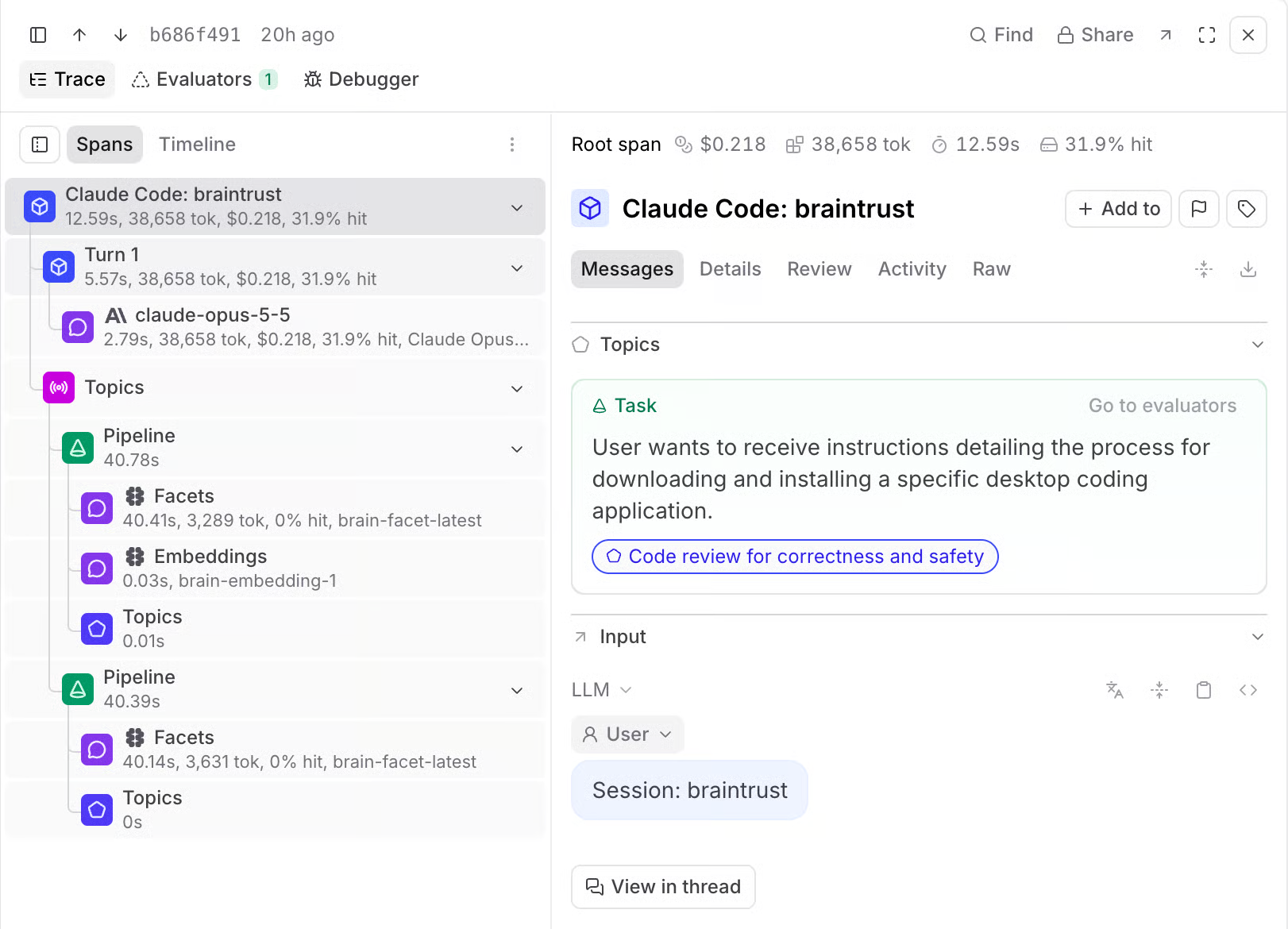
Braintrust's Spans layout connects the execution hierarchy with the selected span's messages and details.
Step 4. Check whether the response follows the tool result
Compare the tool arguments with the task you requested. In the calculator example, the tool should receive the calculation 17 × 23 and return 391. Check that the final response uses that result correctly.
Inspect any recorded error alongside the tool's output. A successful tool status confirms that the tool completed, but answer correctness still requires checking the underlying data and the agent's interpretation. An agent can receive the right result and misrepresent it in its response.
A single matching trace verifies one request, so repeat the check across representative tasks and failure cases.
Step 5. Inspect time and token usage
Switch to Timeline and keep the bars scaled by Duration to locate long model or tool calls. Additional cycle groups can reveal repeated attempts. Then scale by total, prompt, or completion tokens to compare usage across calls.
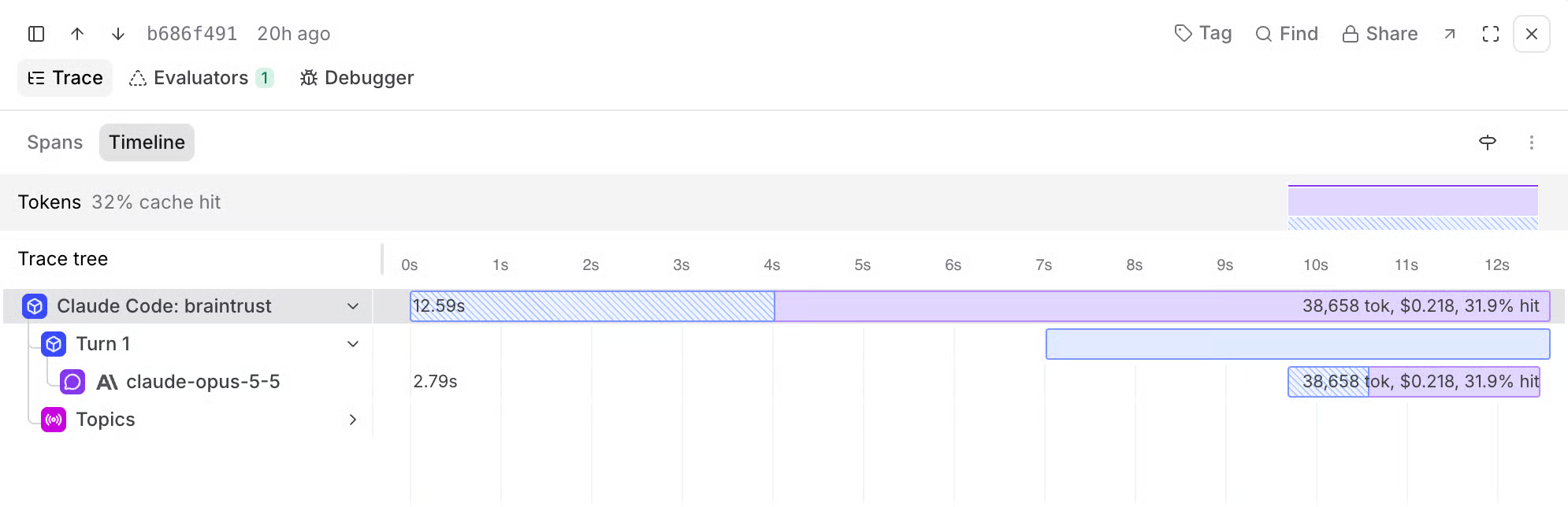
Braintrust's Timeline layout shows operation timing and token distribution across the trace.
Braintrust maps GenAI usage attributes into prompt_tokens, completion_tokens, and tokens. Compare individual model calls separately from the agent's aggregate totals to avoid counting the same usage twice. Check the request's duration and usage against your application's limits.
Troubleshooting missing or incomplete Strands traces
Start with the deployed runtime's startup and exporter logs for the affected invocation. A setup warning, failed export request, or missing parent span can explain why an agent responds successfully but leaves an incomplete record in Braintrust.
Exporter and endpoint misconfiguration
StrandsTelemetry logs exporter configuration failures without necessarily stopping the agent. Check for Failed to configure OTLP exporter, then use the export error to narrow the cause.
Braintrust's hosted OTLP trace endpoint rejects any request over 10 MB with 413 Content Too Large, and that limit is not configurable per project. For oversized export batches, inspect spans containing large documents, tool results, or base64 images. Reducing the number of spans per batch helps, starting around 128 spans per export and lowering it if rejections continue, but an oversized individual span also requires reducing its payload. Confirm that new exports stop returning 413 and that traces arrive. The OTLP traces endpoint payload limits guide covers the batch-size and attribute mitigations in detail.
Telemetry initialization order and tracer provider conflicts
Provider registration warning: Overriding of current TracerProvider is not allowed means a provider has already been registered. Inspect the launch command and startup initialization to identify which component registered it. An active opentelemetry-instrument wrapper is one possible cause. The Braintrust exporter must attach to the provider Strands actually uses.
Warning on every invocation: Check whether the request handler creates a new StrandsTelemetry instance. Repeated setup can attempt to register additional providers even when the original provider continues exporting. Guard the initialization so it runs once per process.
First invocation missing: Check whether the exporter was attached after the first spans ended. A newly attached processor cannot recover previously completed spans, so finish exporter setup before the agent handles requests.
Request context, session IDs, and orphaned spans
Missing root span: Incoming distributed tracing context can make the agent invocation a child of a span in the calling service. If Braintrust receives only child spans, the trace will be absent from the Traces table. Export the caller's root span to the same Braintrust destination and preserve the parent-child relationships across services.
Related requests are difficult to find: AgentCore callers identify a session through runtimeSessionId, and the Python entrypoint receives it through context.session_id. For a Strands agent created for that session, include the ID in trace_attributes under a consistent key such as session.id. Braintrust stores unmapped attributes in metadata, where log filters can find related invocations.
Partial or stuck traces: Investigate spans that never ended, application crashes, and pending exports at shutdown, and ensure custom spans close on error paths. For this OTLP pipeline, use the active OpenTelemetry provider's force_flush() during graceful shutdown and allow it to finish before the process exits, although abrupt termination can still lose queued spans. The troubleshooting traces stuck in progress guide covers the underlying lifecycle and delivery failures.
Debugging deployed Strands agents with Braintrust
A prompt change that fixes one failed request can alter how the agent handles other tasks. In Braintrust, developers test prompt, model, and tool changes against production examples and monitor the agent's performance after deployment.
Investigate failed requests
Braintrust's Debugger, currently in public preview, uses Loop to identify likely failure causes and cite supporting spans, tool calls, and model outputs. Developers can follow each finding back to the recorded evidence and check the diagnosis before changing the agent.
Find recurring issues
Topics classifies production traces through Task, Sentiment, and Issues facets. For a deployed Strands agent, these classifications surface common requests, frustrated interactions, and repeated response problems. Matching logs can also be assigned for human review when an issue needs closer assessment.
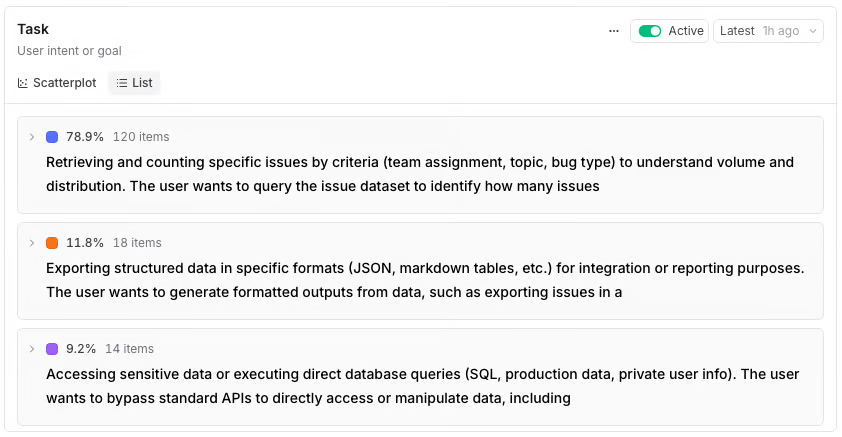
Braintrust's Topics list ranks discovered topics by their share of classified traces.
Turn production failures into regression tests
Developers can promote traces into evaluation datasets, review the expected answers, and run revised agent versions against the captured requests. Experiments preserve evaluation results so improvements and regressions can be compared before the next AgentCore deployment.
Check quality after deployment
Online scoring applies project scorers asynchronously to incoming production traces. Scorers can use custom code or LLM judges created in Braintrust's UI or SDK, with criteria such as answer correctness or task completion. Rules can target individual spans, complete traces, or related requests grouped by session, depending on the context needed to assess the result.
Trace new agents with native Strands instrumentation
New integrations can use the Python Strands integration, which captures agent invocations, event loop cycles, model calls, and tool executions directly through auto-instrumentation. It provides another tracing option for new integrations. Agents already using StrandsTelemetry can continue exporting through the OpenTelemetry pipeline configured in this guide.
Notion uses Braintrust to turn language-adherence failures into evaluation datasets and check for regressions.
Start free with Braintrust and trace your next AgentCore deployment from its first request.
FAQs: tracing Strands agents on Amazon Bedrock AgentCore
Do I need to disable AgentCore Observability to send Strands traces to Braintrust?
You need to disable only its trace instrumentation. Starting the agent without ADOT auto-instrumentation and setting DISABLE_ADOT_OBSERVABILITY=true puts trace export under the application's control, while AgentCore's built-in runtime metrics remain available in CloudWatch.
Why are my Strands agent traces not showing up in Braintrust?
Provider conflicts, failed exports, incorrect destinations, and missing root spans can prevent traces from appearing. Inspect startup warnings and export responses, then verify the deployed endpoint, credentials, and project ID to identify where delivery fails.
Should x-bt-parent use a project ID or a project name?
Use a project ID for deployed runtimes because it continues identifying the same project after a rename, although Braintrust also accepts project names. Giving staging and production separate destination projects keeps each environment's traces apart.
Can Braintrust trace Strands agents without configuring OpenTelemetry?
Braintrust's native Python Strands integration handles tracing without an OTLP exporter. Call braintrust.auto_instrument() and initialize the project logger before creating the agent. An existing StrandsTelemetry integration can continue using OpenTelemetry.
Does exporting Strands traces to Braintrust add latency to AgentCore requests?
Normal request handling does not wait for trace uploads because the exporter sends batches in the background. Capturing spans still adds processing work, and explicit flushing can block, so benchmark representative requests to measure the effect on your deployment.