Semantic caching lets LLM applications reuse generated answers for semantically similar requests, even when the wording differs. It stores responses alongside vector embeddings of the original requests and uses similarity scores to identify reusable answers. When a request meets the configured similarity threshold, the cache returns the stored response without calling the model, reducing generation costs and response latency.
The challenge is determining when a similar request can safely receive the same answer. Loose thresholds increase incorrect reuse, while strict thresholds miss opportunities to save model calls. Teams find that balance by evaluating thresholds against representative requests and accounting for conversation context, data freshness, and user permissions.
In Braintrust, teams evaluate semantic cache quality with datasets, experiments, and production scoring, comparing similarity thresholds, identifying incorrect reuse, and monitoring cached-answer quality alongside cost and latency. Semantic matching requires a separate caching layer, while the Braintrust Gateway provides exact-match response caching.
What is semantic caching?
Semantic caching is a response-reuse technique for LLM applications that identifies requests with the same meaning across different phrasings. It uses vector embeddings to compare new requests against previously cached questions and retrieves a stored response when the similarity score meets a configured threshold.
Consider two support conversations. One customer asks how to change the email associated with an account, while another asks how to update a login email address. Both questions require the same instructions, but an exact-match cache treats them as different requests. A semantic cache recognizes their similarity and can return the first generated answer to the second customer without another model call.
Where a semantic cache runs: A semantic cache sits before the model call and can operate within application code, an LLM gateway, or a dedicated caching service. Regardless of where it runs, semantic caching requires an embedding model to represent request meaning, a vector store to find similar requests, and a similarity threshold to determine when a stored response qualifies for reuse.
How semantic caching differs from exact matching: Exact-match caching requires requests to match the stored cache key, while semantic caching can reuse responses across paraphrased requests. However, two questions can have similar meanings while requiring different answers, so semantic caching introduces the risk of incorrect reuse. Similarity thresholds help control which stored responses qualify as matches.
How semantic caching works
Semantic caching processes each request through embedding generation, similarity search, and a threshold check to determine whether to reuse an existing response. If no suitable match exists, the application calls the model and stores the generated response for future requests.
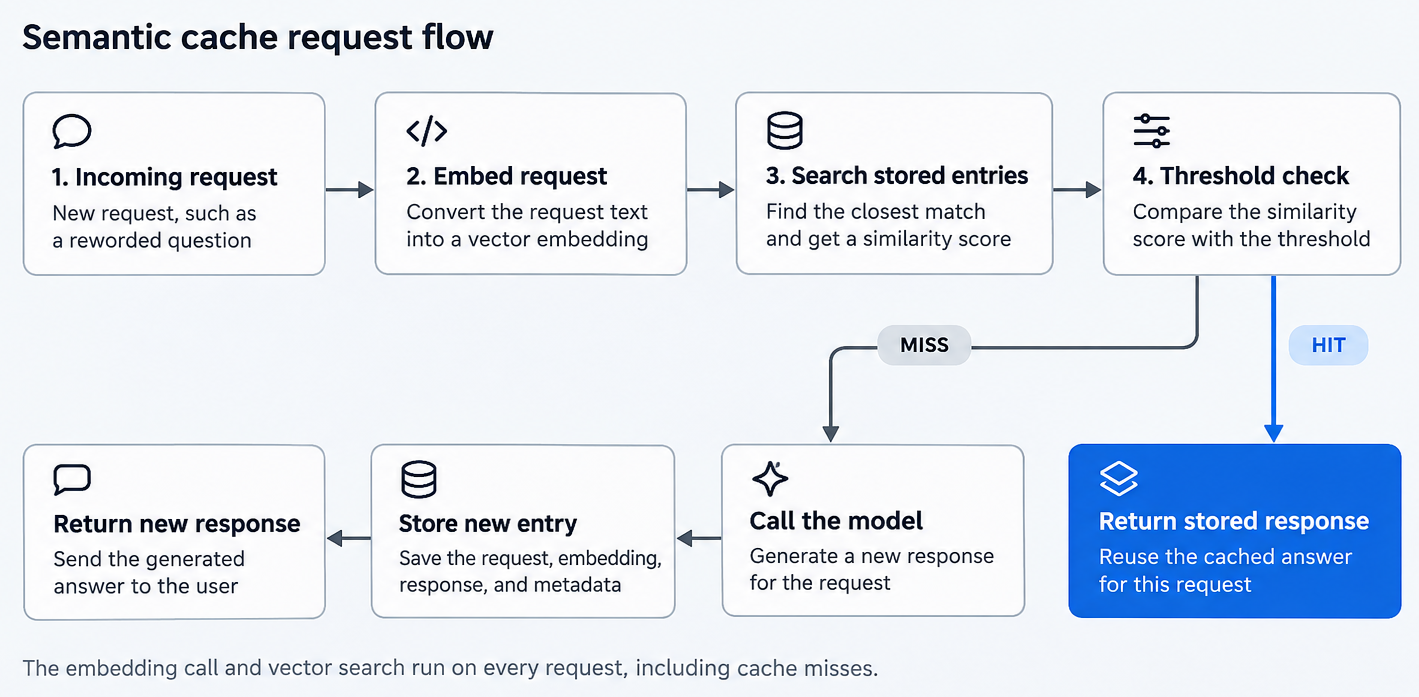
What a semantic cache stores
Each cache entry contains the original request, its vector embedding, and the generated response. Production implementations also store metadata such as the model and prompt version, tenant or user identifier, creation time, and expiration time. These fields help determine whether a stored answer is eligible for reuse.
Embedding similarity matching
An embedding model converts request text into a numerical vector that represents its meaning. The cache compares the new vector with stored embeddings and identifies the closest candidates using a similarity metric such as cosine similarity.
Similarity scores depend on the embedding model and the text included in the comparison. Two embedding models may assign different scores to the same pair of questions, so a threshold validated with one model may produce different results with another. The parts of a request included in the embedding, such as the system prompt or conversation history, also affect which requests qualify for reuse.
Cache hits and cache misses
Cache hit: When a stored entry meets the similarity threshold and any additional eligibility checks, the application returns its cached response without generating a new one. The request avoids the cost and latency of model generation, although embedding computation and vector search still require processing time and resources.
Cache miss: When no eligible entry meets the threshold, the application sends the request to the model for a new response. The cache then stores the generated answer, along with the request embedding and relevant metadata, making the entry available for future similarity searches.
Semantic caching vs. exact-match caching vs. prompt caching
LLM applications can reuse work at different points in a request, depending on the caching mechanism. Exact-match and semantic caching reuse complete responses, while provider prompt caching reuses previously processed input and still generates a new answer.
| Exact-match response caching | Semantic response caching | Provider prompt caching | |
|---|---|---|---|
| What gets reused | Complete stored response | Complete stored response | Processed prompt prefix |
| Match rule | Identical request content, model, and parameters | Embedding similarity above a threshold | Identical eligible prompt prefix |
| New model output | None on a cache hit | None on a cache hit | Generated on every request |
| Incorrect reuse risk | Stale or context-inappropriate responses | Incorrect similarity matches, stale or context-inappropriate responses | No stored-response mismatch; generated answers can still be incorrect |
| Where it runs | Application or gateway | Application, gateway, or caching service | Model provider |
| Main controls | TTL, cache mode, bypass rules | Threshold, TTL, scoping metadata | Prompt structure and provider-specific cache settings |
Exact-match response caching: The cache builds a key from the request content, model, and generation parameters, returning a stored response when a subsequent request produces the same key. The Braintrust Gateway uses exact-match caching with three modes. The default auto mode caches supported requests when temperature=0 or a seed is provided, while always and never offer explicit control. Cached responses expire after one week by default, with a configurable TTL between 1 and 604,800 seconds and an x-bt-cached response header that reports HIT or MISS.
Semantic response caching: A semantic cache compares request embeddings and returns a stored response when the similarity score meets the configured threshold. Embedding comparison extends reuse to differently worded questions, although incorrect matches remain possible when similar requests require different answers. Semantic caching also requires an embedding model and vector store to perform similarity searches.
Provider prompt caching: The model provider reuses previously processed input from an identical eligible prompt prefix, such as system instructions, tool definitions, or a fixed context block. The model still processes the remaining input and generates a new response, so output tokens are billed at the standard generation rate.
How the caching mechanisms work together
Multiple caching mechanisms can operate within the same request path. An exact-match cache checks for identical requests before a semantic cache searches for similar ones. If neither returns a stored response, the request reaches the model provider, where prompt caching may reduce repeated input processing. The Braintrust Gateway can serve identical requests directly from its response cache, while applications that need semantic matching require a separate caching component.
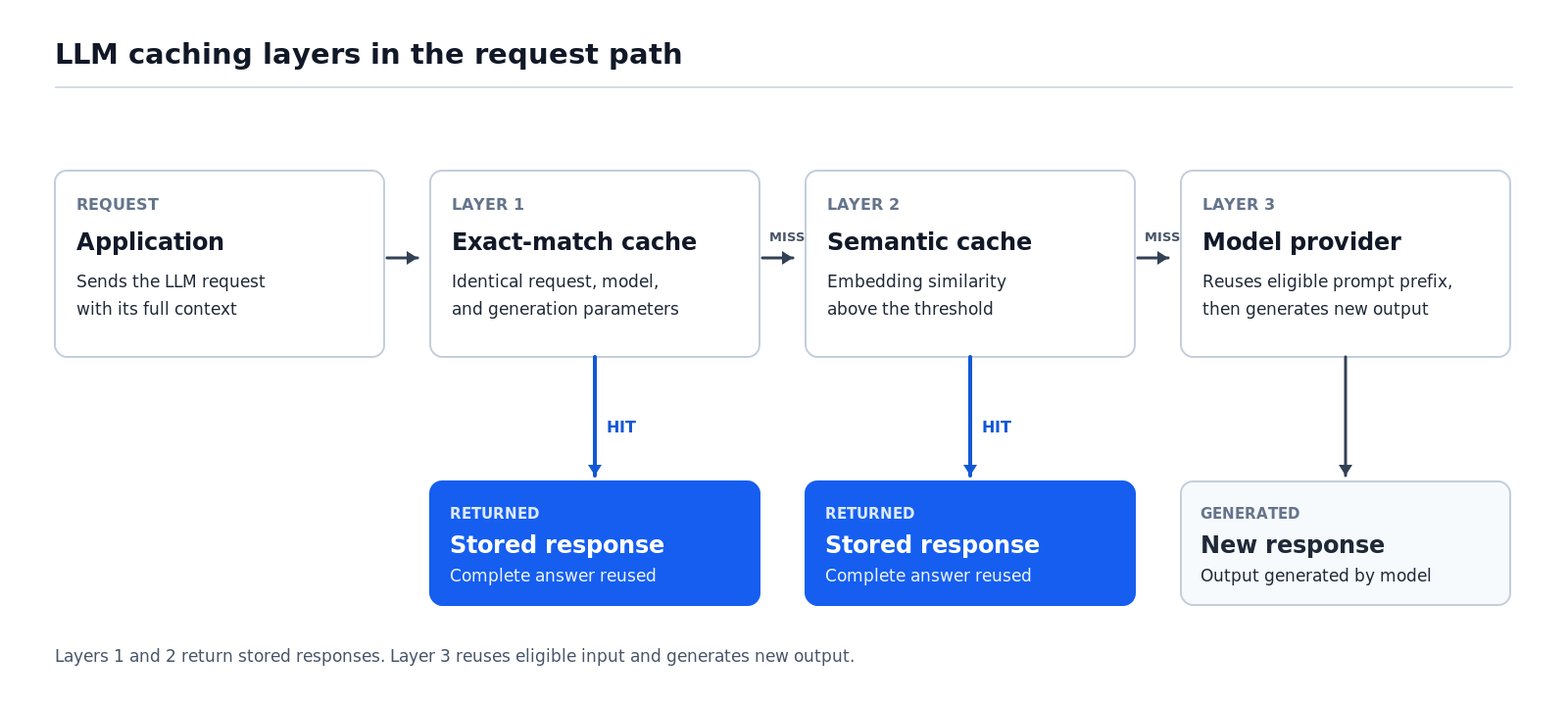
For implementation details, including cache modes, TTL configuration, and cache bypass controls, see how LLM gateway caching works.
Also read: Compare LLM gateways across caching, routing, failover, and observability
Best use cases for semantic caching
Semantic caching works best when requests repeatedly express the same intent in different words, and the correct answer remains consistent across those requests. High request volume alone is insufficient, since responses that depend on changing information, conversation history, or user-specific data may be unsuitable for reuse.
Workloads that suit semantic caching
Support and FAQ assistants: Customers ask about refund policies, password resets, and account settings using different phrasings. Approved instructions can be reused across similar questions as long as the underlying policies and procedures remain unchanged.
Product and documentation Q&A: Users frequently ask how features work, where settings are located, or how to configure a product. Cached answers remain useful when the questions refer to the same product version and documentation.
Internal knowledge assistants: Employees ask about benefits enrollment, expense policies, and IT procedures that apply across an organization. Answers can be reused for employees covered by the same policies and access permissions.
Semantic caching is particularly suitable for requests with four characteristics: recurring intent, relatively stable source information, consistent answers within the relevant access scope, and questions that make sense without earlier conversation turns.
Workloads that need exact matching or no cache
Unique or creative requests: Drafting, brainstorming, and open-ended analysis rarely produce requests with reliably interchangeable answers. Semantic caching adds embedding and lookup costs with few opportunities for safe reuse, especially when users expect different results from repeated requests.
Live or personalized data: Account balances, order statuses, inventory, and prices depend on current information or individual customer records. Reusing responses requires strict freshness and access controls, and applications may need to bypass caching when the underlying data changes frequently.
Multi-turn and agentic traffic: Follow-up questions depend on earlier messages, while agent actions rely on intermediate tool results and execution state. Semantic caching generally suits single-shot prompts better, since matching requests without accounting for surrounding context can return responses from unrelated conversations or agent executions.
Write actions and high-cost errors: Requests that issue refunds, modify account settings, or perform financial operations require current authorization and verified state. Similar wording says nothing about whether an action is appropriate for a particular request, so response reuse is unsuitable for operations where an incorrect result has significant consequences.
Similarity thresholds in semantic caching
A similarity threshold determines how closely a new request must match a stored one before the cache reuses its response. Higher thresholds accept fewer matches and reduce the risk of incorrect reuse, while lower thresholds increase cache hits but may return answers to questions that require different responses.
No single threshold works across applications. Similarity scores depend on the embedding model, comparison metric, and types of requests being processed, so the threshold needs to be validated against representative application traffic.
Useful matches, missed matches, and incorrect reuse
Every cache lookup produces one of four outcomes, depending on whether the cache returns a stored response and whether that response is valid for the new request.
| Stored answer is valid for the new request | Stored answer is wrong for the new request | |
|---|---|---|
| Cache returns a match | Useful match: The application skips generation and returns a correct cached answer. | Incorrect reuse: The application returns a cached answer that does not address the new request correctly. |
| Cache finds no match | Missed opportunity: The model generates a new response even though it could have reused an existing answer. | Correct miss: The request goes to the model because no stored answer is suitable. |
Incorrect reuse often occurs when two questions share similar wording but require different instructions. For example, canceling a subscription and canceling an order may produce closely related embeddings, although the procedures differ. Similar problems arise when matching password resets with two-factor authentication resets or refund policies for annual and monthly plans.
Choosing a threshold by the cost of a wrong answer
Threshold selection depends on the consequences of an incorrect answer versus the cost of generating a new one. A general shipping FAQ may tolerate a higher rate of imperfect matches, while questions involving account permissions, financial information, or contractual obligations require stricter reuse criteria.
Start strict and loosen gradually: Begin with a conservative similarity threshold and lower it incrementally while checking whether additional cache hits represent valid reuse. Evaluate each proposed adjustment against representative requests before applying it to production, particularly when incorrect matches could affect users.
Tune by request category: A single threshold may be too permissive for sensitive requests and unnecessarily restrictive for routine FAQs. Applications can use separate thresholds for different request categories, apply semantic caching where answers remain consistent, and reserve exact-match caching or fresh generation for requests with stricter correctness requirements.
Cache freshness, context, and tenant isolation
Semantic similarity alone cannot establish whether a cached answer is safe to reuse. The response must still reflect current information, fit the surrounding conversation, and be accessible to the person making the request. Each requirement needs a separate control to prevent incorrect or unauthorized reuse.
Freshness and invalidation
Cached responses reflect the source information, prompt, and model used when they were generated. If a company updates its return policy or changes a prompt version, previously stored answers may continue reflecting the old information until the corresponding entries expire or are invalidated.
Set TTLs by data volatility: Answers based on stable reference material can remain cached longer, while responses involving prices, schedules, or frequently updated policies need shorter expiration times or cache-bypass rules.
Invalidate on source changes: Storing document IDs, prompt versions, and model identifiers with cache entries lets applications identify and delete affected responses when underlying dependencies change. Targeted invalidation prevents outdated answers from remaining available until their TTL expires.
Conversation context
Follow-up questions often depend on information established earlier in a conversation. For example, a user asking about an annual plan may be referring to a specific product discussed in previous messages. Matching only the latest question could retrieve an answer about an unrelated product with a similar pricing structure.
Embed context with the request: Including relevant conversation history or a summary of earlier turns in the embedding input helps distinguish questions that depend on different contexts. However, additional context can reduce cache hit rates because conversations rarely contain identical histories.
Bypass caching for dependent turns: Applications can restrict semantic caching to self-contained requests and send context-dependent follow-ups directly to the model. Request classification can help determine whether a question contains enough information to qualify for safe reuse.
Permissions and tenant boundaries
Responses generated from private documents, customer configurations, or restricted records must remain within the appropriate access boundaries. A shared semantic cache that ignores user permissions could return one customer's information to another customer asking a similar question.
Scope entries to the right boundary: Attaching tenant, user, or role identifiers to cache entries allows applications to restrict similarity searches to responses available within the requester's authorized scope. Apply access restrictions during retrieval so unauthorized entries cannot qualify as matches.
Match the scope to how the answer was built: Responses generated from public documentation may be reusable across users, while answers involving private records require user-, tenant-, or role-specific restrictions. For comparison, the Braintrust Gateway encrypts its exact-match cached responses with AES-GCM using a key derived from your API key, which scopes them to an individual user by default; organizations can opt into sharing cached results across users.
Measuring semantic cache quality beyond hit rate
A high cache hit rate does not necessarily mean a semantic cache is performing well. Reusing an incorrect answer can reduce generation costs while introducing errors into the application. Evaluating cache performance therefore requires measuring response correctness alongside latency and cost savings.
Five metrics provide a more complete picture:
- Hit rate: The percentage of requests answered from cached responses, which shows how often the application avoids model generation.
- Incorrect-reuse rate: The share of cache hits whose returned answer does not suit the new request. Every point on this rate is an error introduced by reuse.
- Missed-match rate: The share of cache misses where a stored answer could have served the request correctly, representing savings lost to overly strict matching.
- Latency on hits and misses: The response time for cached answers compared with newly generated responses, including the embedding and lookup overhead incurred during cache misses.
- Net savings: Generation costs avoided through cache hits, minus the expenses of embedding requests and maintaining vector search infrastructure.
These metrics need to be measured through representative test cases, controlled threshold comparisons, and production monitoring.
Build a representative test set: Use actual application traffic to collect paraphrased questions that should share an answer, near-miss pairs requiring different responses, context-dependent follow-ups, and requests involving different user permissions. Label each case according to whether response reuse is acceptable and include the expected answer where available. The resulting dataset should reflect both common requests and situations where incorrect reuse could cause problems.
Compare thresholds on the same dataset: Test candidate similarity thresholds against identical cases and score whether each returned response correctly answers the new request. Comparing hit rates with incorrect-reuse rates reveals which settings increase reuse without exceeding the application's acceptable error rate.
Monitor cached answers in production: Record cache status, similarity scores, matched entry IDs, and entry age in request traces. Score cached responses separately from newly generated answers to identify incorrect matches as user questions, product information, and usage patterns change. Production findings can then inform subsequent threshold evaluations.
Evaluating semantic cache quality with Braintrust
A semantic cache needs a reliable way to establish which responses are safe to reuse before a threshold change reaches production. Braintrust connects cache decisions to evaluation datasets, experiments, and production scoring, so teams can enforce correctness requirements alongside cost and latency targets.
Step 1. Capture cache decisions in production traces
Instrument the application to write the same four cache fields (status, similarity score, matched entry ID, and entry age) as metadata on Braintrust traces, together with the incoming request and returned response, so reviewers can judge whether each cache hit was appropriate.
The semantic cache must supply these fields to Braintrust. Once recorded, the metadata becomes searchable alongside the request's input, output, and performance information, making it possible to investigate incorrect reuse without reconstructing the original cache lookup.
Step 2. Build evaluation datasets from real requests
Braintrust Topics automatically classifies production traces by task, surfacing recurring request categories such as account recovery, subscription changes, and documentation questions. Teams can filter Logs by these classifications and promote representative traces into an evaluation dataset.
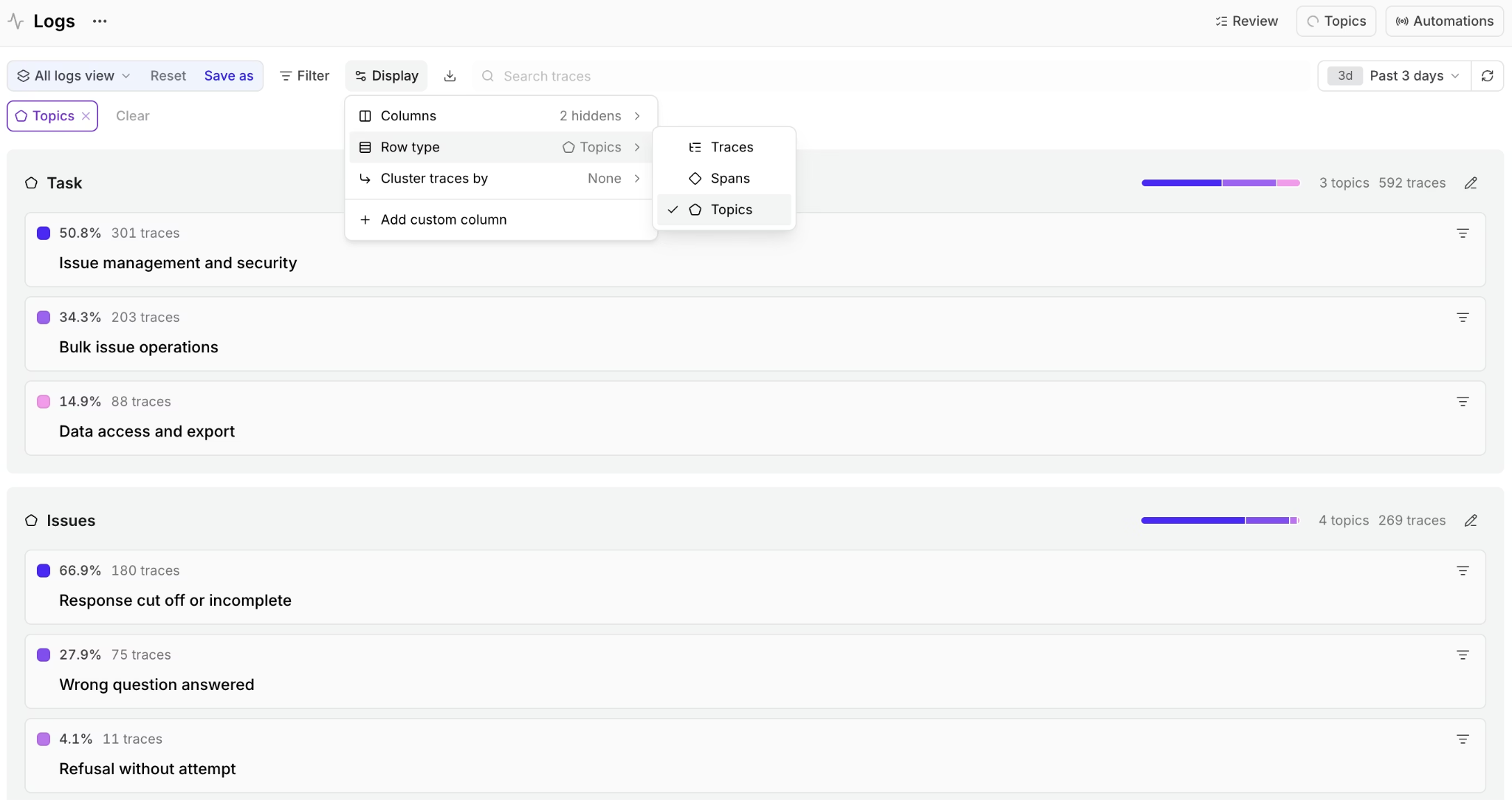
Each dataset case should capture whether the stored answer is valid for the new request, along with an expected response when available. Include both safe paraphrases and closely related questions that require different answers.
Loop, Braintrust's AI assistant, can help product and support teams investigate recurring cache errors using natural language and generate evaluation cases from production patterns, reducing the engineering work needed to maintain coverage.
Step 3. Compare thresholds and enforce release requirements
Run a Braintrust experiment for each candidate threshold against the same dataset. Custom code scorers or LLM-as-a-judge scorers assess whether the returned cached answer satisfies the new request, while experiment comparisons expose regressions across individual cases and request categories.
Define an acceptable incorrect-reuse rate before evaluating candidates. Braintrust's CI/CD evaluation integration can run the tests on pull requests, report regressions against the baseline, and enforce configured pass/fail criteria. Connecting threshold changes to these checks prevents merging configurations that exceed the accepted error limit.
Step 4. Score cached answers after deployment
Braintrust online scoring runs asynchronously on production traces without adding latency to user requests. A scoring rule can use an SQL filter on cache-status metadata to evaluate cached responses separately from fresh generations, with sampling controls determining how much matching traffic is scored.
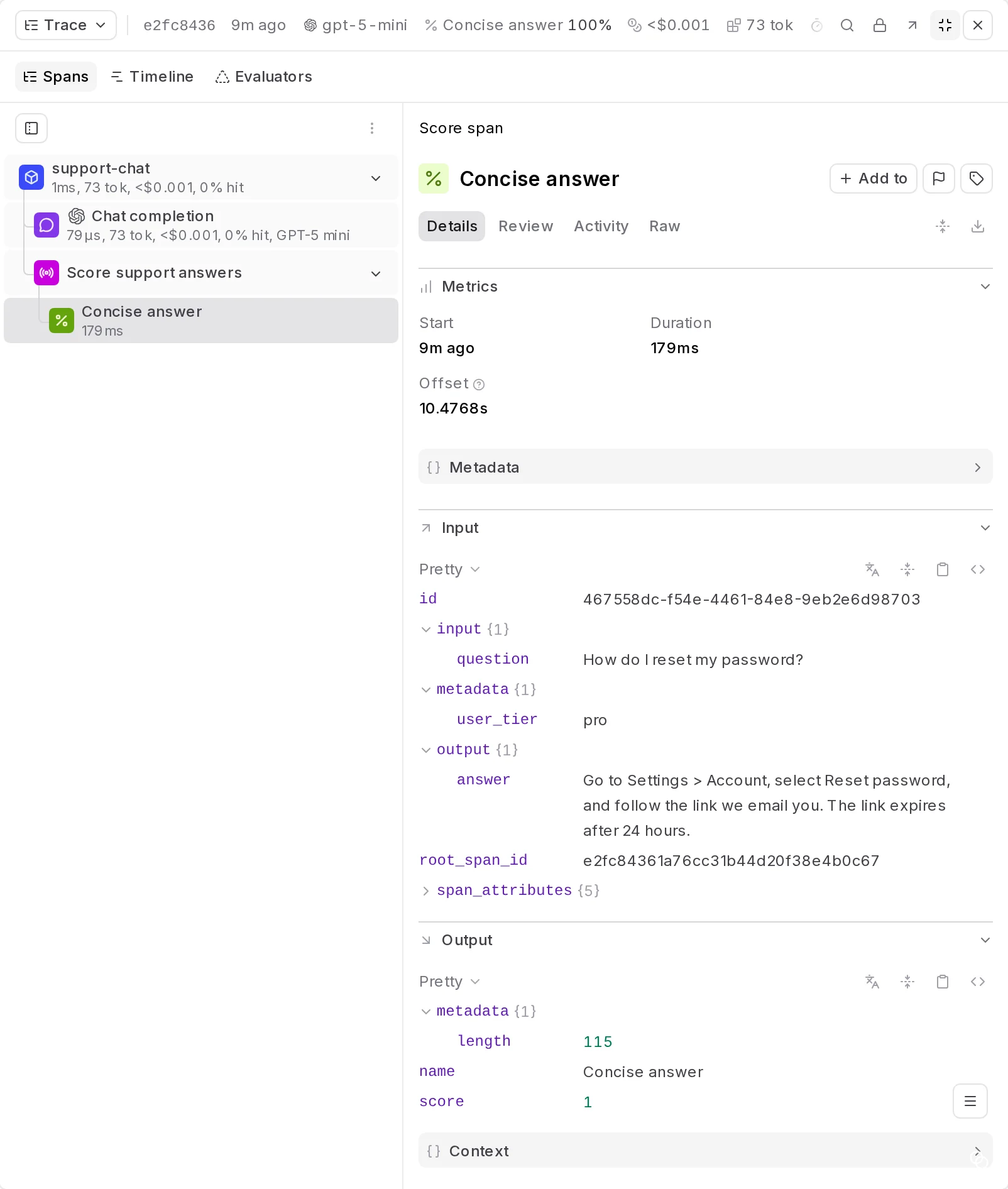
For multi-turn conversations recorded across several traces, group-scoped scoring can examine the relevant session history and catch reused answers that appear correct in isolation but conflict with earlier messages.
Step 5. Monitor correctness alongside efficiency
Braintrust dashboards bring score trends together with request volume, usage, cost, and latency metrics. Every project includes a read-only Cost and quality dashboard; filters and groupings show whether cache-hit quality varies by request category or application version, and creating your own dashboards and custom charts is a Pro and Enterprise feature.
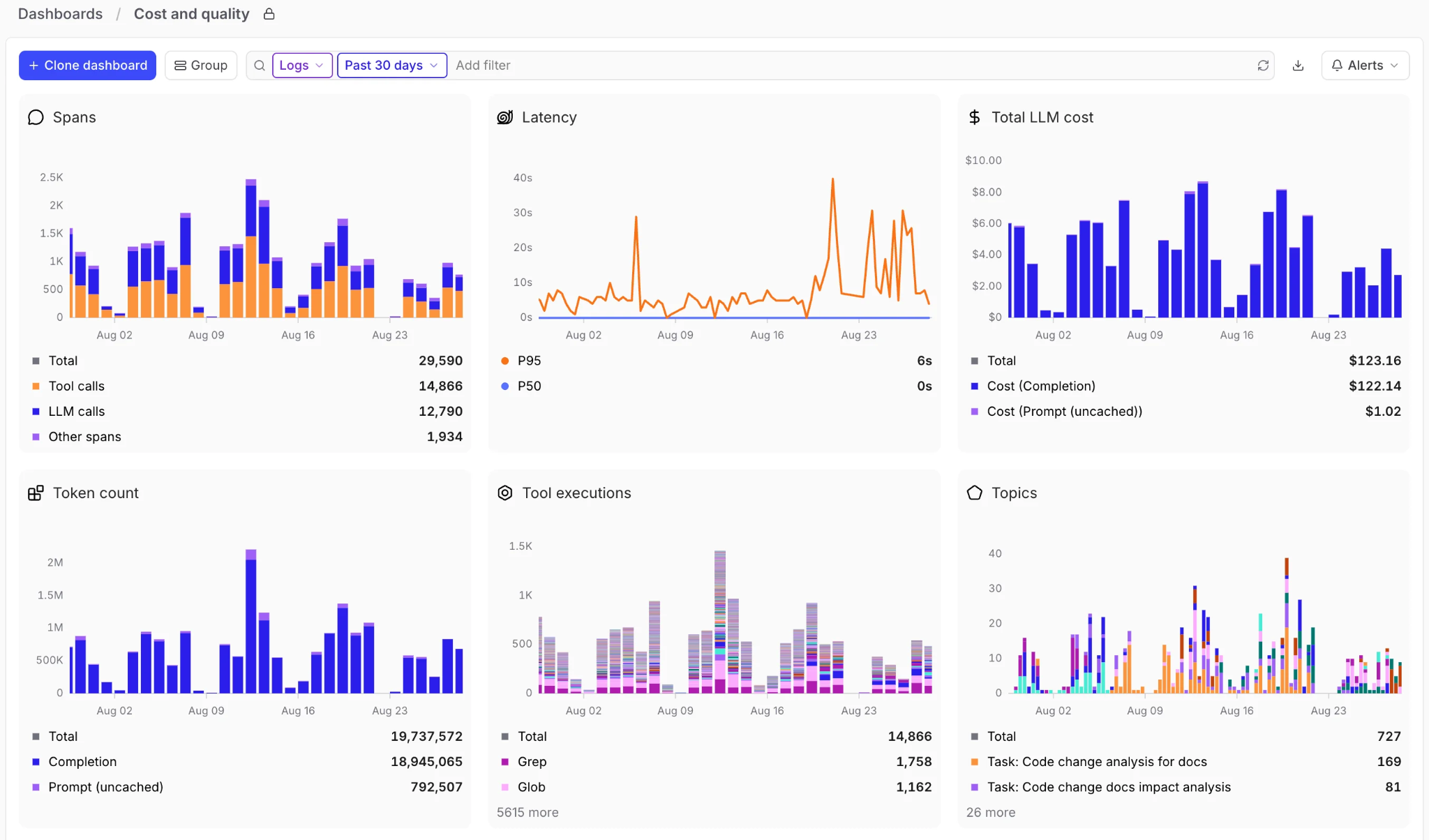
Comparing correctness with latency and cost data shows whether increased reuse delivers worthwhile savings. A configuration that reduces model calls but increases incorrect responses should fail the application's quality requirements, regardless of its hit rate.
Step 6. Turn incorrect reuse into regression coverage
When online scoring or user feedback identifies an incorrect cached response, promote the reviewed trace into the evaluation dataset as a new failure case. Repeating threshold experiments against the expanded dataset then confirms whether a proposed change rejects the incorrect matches already observed.
Braintrust can run these regression checks on every subsequent release, following the same workflow for turning production failures into regression tests, so an incorrect match observed once stays covered as request patterns and application versions change.
Braintrust Gateway for exact-match caching
For identical requests, the Braintrust Gateway supports response caching with configurable expiration and cache-bypass controls. Repeated deterministic prompts and evaluation runs can reuse stored outputs, reducing unnecessary generation costs without requiring a semantic cache.
Braintrust's free Starter plan includes 10,000 scores per month, 1 GB of processed data, 14-day retention, and unlimited users, datasets, and experiments.
Start free with Braintrust to evaluate semantic cache thresholds, enforce correctness requirements, and monitor cached answers in production.
FAQs about semantic caching (2026)
What is the difference between semantic caching and prompt caching?
Semantic caching is useful when differently worded requests can share a complete answer. Provider prompt caching is better suited to requests that repeat substantial instructions or context but still need individually generated responses. Both mechanisms can operate within the same application.
What similarity threshold should a semantic cache use?
The threshold should reflect the application's acceptable risk of incorrect reuse, established through testing on representative requests. Revalidate the setting when changing embedding models, request formats, or application behavior, since the same numerical threshold may produce different matching results.
Can semantic caching return the wrong answer?
Semantic caching can return incorrect answers when closely related requests differ in details that affect the required response. Even a high similarity score gives no guarantee that a cached answer is still accurate, current, or appropriate for the requester.
Is semantic caching safe for multi-tenant applications?
Semantic caching can be safe for multi-tenant applications when lookups enforce tenant boundaries and user permissions before returning stored responses. Similarity thresholds cannot provide data isolation, so shared cache entries should be restricted to information that every eligible requester is authorized to access.
Does Braintrust support semantic caching?
Braintrust supports evaluating semantic cache quality through datasets, experiments, and production scoring, allowing teams to enforce correctness requirements before release and monitor incorrect reuse afterward. The Braintrust Gateway provides exact-match response caching, while semantic matching runs in a separate application-managed or external caching component.