Evaluation-driven model routing: how to find the Pareto frontier
LLM performance varies by task, and a model that meets the quality requirements for one feature may miss them for another. Evaluation-driven routing uses measured quality, cost, and latency for each task type to decide which model receives its requests.
To find the Pareto frontier, evaluate candidates on the same examples within each task segment and exclude models that fail hard requirements. Remove any candidate that another eligible model matches or beats on every measured dimension and beats on at least one. The remaining models form the segment's frontier, and the routing policy selects among them according to the task's priorities.
Braintrust experiments compare candidate quality scores alongside estimated cost, duration, and errors, with results grouped by task segment. Evaluating the complete routing policy against single-model baselines tests whether routing preserves answer quality at lower cost before rollout.
Start free with Braintrust to route on measured quality, cost, and latency.
What the Pareto frontier means for LLM model selection
Model X dominates Model Y when it delivers equal or higher quality, equal or lower cost, and equal or lower latency, with a strict improvement on at least one measure. Removing dominated candidates leaves the Pareto frontier.
Consider a hypothetical evaluation of five models on the same 400 billing questions. Quality is the percentage of answers that pass the required checks, and cost is normalized to 1,000 requests.
| Model | Quality (pass rate) | Cost per 1,000 requests | Response time (p95) | On the frontier |
|---|---|---|---|---|
| A | 94% | $12.00 | 4.8s | Yes |
| B | 91% | $6.50 | 2.6s | Yes |
| C | 88% | $7.20 | 3.1s | No — dominated by B |
| D | 80% | $1.05 | 1.4s | Yes |
| E | 72% | $1.30 | 1.9s | No — dominated by D |
Model B remains on the frontier even though it leads on none of the individual measures. Moving from B to A raises quality but increases cost and response time, and moving from B to D reduces cost and latency but lowers quality. Neither alternative dominates B, although the feature's minimum quality and maximum response time determine which of the three frontier models can receive traffic.
Public benchmarks vs. workload-specific frontiers
Public benchmark rankings reflect the datasets, prompts, and scoring rules used by their authors. Production inputs can differ in context length, required output format, tool use, and domain-specific correctness requirements. Build the routing frontier from model evaluations on your application's inputs, using current provider prices and measured response times for the configurations you intend to deploy.
Workload-specific eval datasets and task segments
Each segment needs enough examples for a stable score, drawn from the traffic the routed model will serve.
1. Pull examples from production logs. Braintrust datasets can include production traces, user feedback, uploaded files, and examples added through the SDK. Sampling from logs keeps the question mix, input lengths, and edge cases close to live traffic. Review the expected answers before using them as evaluation references.
2. Define segments by traits the router can observe. Group requests by task type, input length, required output format, or tool requirements. The Task facet in Braintrust Topics groups recorded traces by user intent. Use those groups to define segments that the router can identify from the incoming request.
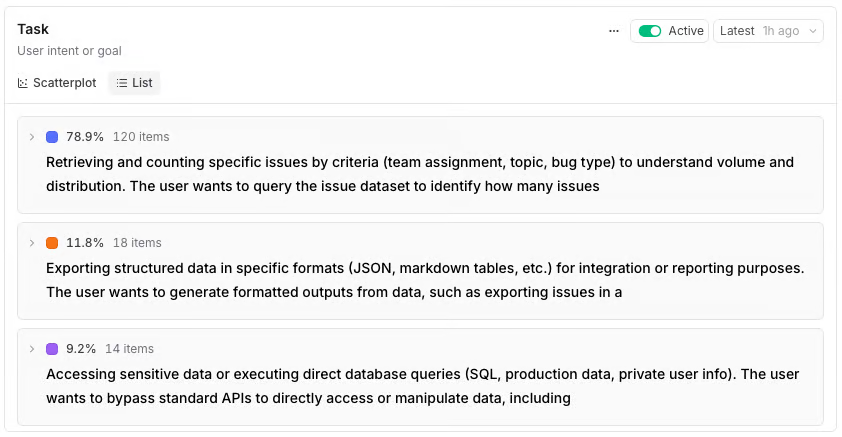
Topics groups recorded traces by user intent, which can seed the segment definitions a router keys on.
3. Label each row with its segment. Add a segment metadata field to each example. Braintrust can group experiment results by metadata, giving each segment its own quality, cost, and latency summaries.
4. Over-sample the hard cases. Include rare inputs that expose failures in smaller models, such as long, multi-part questions or ambiguous requests. Keep these cases identifiable so their results can be reported separately from the representative traffic sample.
5. Pin a dataset version for the comparison. Run every candidate against the same dataset version and scorer configuration. Named snapshots, available on Pro and Enterprise plans, pin a dataset at a point in time for experiments. Record each candidate's prompt and model settings so the comparison is reproducible.
Quality scorers tied to product requirements
The quality axis reflects what the scorers reward. For a billing feature, a fluent answer with incorrect account figures must fail the relevant correctness checks.
Define a pass/fail outcome for each case using the segment's required checks. The resulting pass rate measures the share of evaluated cases that met those criteria. Braintrust aggregate scores can combine multiple scores through a formula, but the formula should preserve mandatory requirements so strong performance on one check cannot cancel a critical failure on another.
Measuring quality, cost, latency, reliability, and variability
Run each model configuration as a separate Braintrust experiment. Record the model, provider, prompt version, and generation settings in experiment metadata, and trace the LLM calls to capture token usage and estimated cost.
Use a consistent API across candidates: The Braintrust Gateway accepts requests from any supported provider's SDK, including the OpenAI, Anthropic, and Gemini SDKs, and routes them to models from any configured provider. Changing the model name lets the evaluation task compare candidates through the same client where the required features are supported.
Disable response caching during benchmarks: The Gateway's default auto mode caches responses on supported paths when a request sets temperature=0 or a seed. Set x-bt-use-cache to never so repeated trials reach the provider and latency measurements reflect fresh calls. Provider-side prompt caching is a separate mechanism and should be configured consistently with the intended deployment.
Cost per successful task
A low per-request price can be offset by retries, fallback calls, and human follow-up. Calculate cost per successful task by dividing the total cost of all attempted tasks, including failures, by the number that pass the quality gate.
In the billing example, Model B costs about $7.14 per 1,000 passing answers and Model D about $1.31, using their recorded request costs and pass rates. These figures exclude downstream recovery costs, which must be added when evaluating the complete routing policy.
Braintrust's support-agent cost-efficiency study used the same accounting. Each ticket's cost included primary generation, retries and repairs, fallback calls, judge calls, and tool execution overhead, and a ticket counted as resolved only when it passed checks for tool correctness, destructive-action safety, unsupported claims, and response quality.
Measuring variance with trials
Repeated evaluations reveal inputs where a model's success depends on the run. Braintrust trials run each input multiple times, and trial_count sets the number of repetitions.
Eval(
    "My Project",
    data=my_dataset,
    task=my_task,
    scores=[Factuality],
    trial_count=10,  # Run each input 10 times
)
Select Display > Group by > Input to see each input's trials in an expandable group with aggregate statistics. This option appears only when the experiment was run with trials. Expand the group to inspect individual runs and identify cases that alternate between passing and failing. Per-case trial counts can concentrate additional runs on inputs with inconsistent results.
Comparing candidates side by side
The Summary table layout on the experiments list places experiments in columns and scores and metrics in rows, highlighting the best and worst values. Grouping by experiment metadata can also combine runs that share a model or configuration.
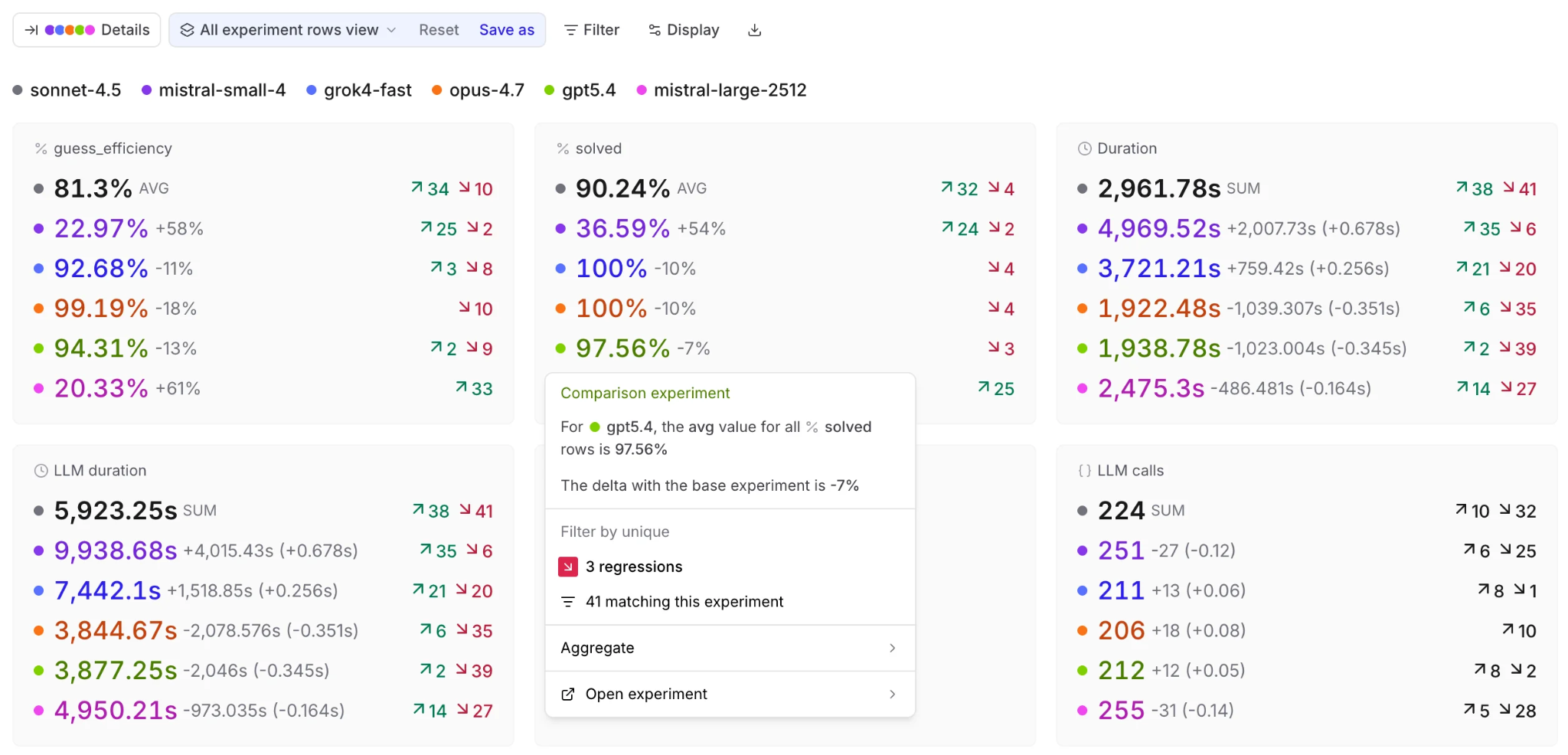
Comparing candidate models across scores and operational metrics, with per-candidate deltas and regression counts relative to the base experiment.
When comparing candidates against a baseline, the Comparison grade summarizes changes across scores and metrics as an improvement, regression, tradeoff, or tie. Inspect the individual metrics within each task segment before removing a candidate, since an overall improvement can conceal a regression in one segment.
Eliminating dominated models
A model that violates a required deployment condition cannot displace a model the product is allowed to use. Apply hard constraints before comparing eligible candidates within each segment.
1. Remove models that fail a hard requirement. Check the segment's minimum quality, latency limit, cost ceiling, permitted providers, and required context window.
2. Identify dominated candidates. Compare the remaining models across the dimensions selected for the frontier, and flag any model that another eligible candidate dominates. Include error rate when reliability is part of the comparison.
3. Check uncertain differences before removing a model. Define the smallest improvement that would affect a routing decision. For close comparisons, use confidence intervals on paired differences across the same inputs to assess uncertainty. Retain candidates when the evidence is insufficient to support removal, and collect more examples or trials where needed.
4. Record the frontier for each segment. Save the remaining models with their measured quality, cost, latency, and error rate, along with the constraints used. Mark unresolved comparisons so the routing decision reflects the strength of the evidence.
In the billing example, the quality floor excludes Models D and E, the latency limit excludes Model A, and Model B dominates Model C. Separate measurements on order lookups and contract summaries can produce different results. Continuing the same hypothetical, with each segment measured independently and carrying its own requirements:
| Task segment | Quality floor | Response-time limit | Segment frontier | Eligible after constraints |
|---|---|---|---|---|
| Billing questions | 85% | 4.0s | A, B, D | B |
| Order lookups | 70% | 2.0s | D, E | D, E |
| Contract summaries | 90% | 10.0s | A, C | A, C |
Models C and E can remain on the frontier for other tasks because dominance depends on the measurements within each segment.
Task-level routing policies
A model routing policy assigns requests to eligible models according to the feature's priority. Interactive chat may favor lower latency, and batch extraction may favor lower cost within its quality requirement. The application can make this choice through a fixed mapping, a classifier, or a cascade.
Evaluate the classifier on labeled requests: Measure which segments it confuses and how those mistakes affect answer quality. A low overall misroute rate can conceal frequent errors on a small, difficult segment, especially when complex requests are assigned to a cheaper model.
Validate the cascade check: Schema validation can detect malformed output, but an answer that passes the schema can still contain incorrect values. Test whether the escalation check catches the failures that make an answer unacceptable, and whether it unnecessarily escalates acceptable answers.
In Braintrust's support-agent study, the two escalation policies achieved the lowest cost per resolved ticket among strategies that met the study's quality threshold, so evaluate the escalation logic together with the model choices.
Record routing decisions on every trace: Log the policy version, assigned segment, and chosen model in production trace metadata. For cascades, also record the initial model, escalation reason, and final model so analysis can distinguish direct successes from requests that needed recovery. Braintrust can filter and group traces by metadata to compare the routes.
Offline validation of routing policies
Run the complete routing policy as the task in a Braintrust experiment, alongside the single-model baselines. Score the final answer and measure cost and duration across classification, runtime checks, retries, and fallback calls. Compare results within each segment to confirm that the complete policy meets its requirements.
Weighting the dataset to match production traffic
Use held-out requests that reflect both the segment proportions and the difficulty mix observed in production logs. When the validation dataset deliberately over-samples rare or difficult requests, apply traffic weights when calculating overall pass rate, average cost, and average duration. Weighting only by segment leaves the distortion from excess hard cases within each segment.
Run a separate evaluation on the difficult cases to test failure handling. Report these results separately so stress-test failures stay out of the production estimate.
Policy regression checks in CI
Changes to the routing map, classifier prompt, escalation checks, or model configuration should trigger policy evaluations before merge. Braintrust's GitHub Action runs evaluations on pull requests and creates or updates a single comment holding a result table and a link to the experiment in Braintrust, which requires granting the workflow pull-requests: write permission.
Set the experiment for the current production policy as the comparison baseline, using the same validation dataset and scorers for both policies. Define explicit failure criteria for segment-level quality, cost, latency, and permitted regressions. Note that bt eval exits non-zero only when an eval throws an exception, so a score that breaches those criteria does not fail CI on its own — a custom reporter whose report_run returns false is what makes the run fail.
Fallbacks, canary rollout, and production monitoring
Provider failover and model fallbacks
Provider failover switches the provider serving the requested model. Model fallback selects a different model, which needs its own evaluation against the segment's requirements.
The Braintrust Gateway supports provider failover when multiple configured providers can serve the requested model. Set x-bt-fallback-providers to a comma-separated list of backup provider credential names. The Gateway retries eligible provider failures, including rate limits (429) and provider server errors (5xx). It does not retry Gateway authentication errors, Gateway validation errors, or other provider client errors.
If a provider named in x-bt-fallback-providers is not configured for the requested model, the Gateway skips it and continues to the next usable provider, returning the original provider error if none remain. After successful failover, the x-bt-failover-from and x-bt-failover-to response headers identify the original and final model-provider pairs. The hosted Gateway is currently in public preview, free to use, and without a service-level agreement.
Define model fallback in the application's routing policy using a preselected model that meets the segment's hard constraints. Set retry and time budgets so recovery remains within the request's operational limits.
Canary rollout for routing changes
Use the application's routing layer to split traffic between the current policy and the candidate. Braintrust traces and scores provide the measurements for deciding whether to expand the rollout.
Start with a small traffic share: Randomly assign a fixed proportion of eligible requests, such as 5%, to the candidate policy.
Identify both policies in metadata: Record the policy version and segment so results can be compared within equivalent request groups.
Apply consistent scoring: Use the same scorers, filters, and sampling rates for both policies. Collect enough scored requests in each segment the rollout decision depends on before judging the result.
Expand against defined thresholds: Widen the split when the candidate meets the quality, cost, latency, and reliability criteria relative to the current policy. Keep an application-level switch available to restore the previous policy when a limit is breached.
Online scoring, dashboards, and alerts
Online scoring: Braintrust online scoring runs asynchronously on logged production data. Each rule runs at span, trace, or group scope, and its filters and sampling rate determine which interactions are evaluated. Match the scope to the scorer's inputs, including span scope for Autoevals. Model-based judge costs also need to be included when setting sampling rates.
Dashboards: Braintrust dashboards track request counts, latency, token usage, costs, and scores across logs or experiments. Group production charts by policy version and segment to compare rollout results, then inspect the traces behind a change. Groupings apply per span, so the routing metadata has to be present on the spans a chart measures; when a filtered field sits on a different span than the chart measures, such as root-span metadata on a chart of LLM spans, select cross-trace filtering. Experiment dashboards can track successive policy evaluations over time. The built-in Cost and quality dashboard is available on every plan, while creating dashboards and custom charts requires Pro or Enterprise.
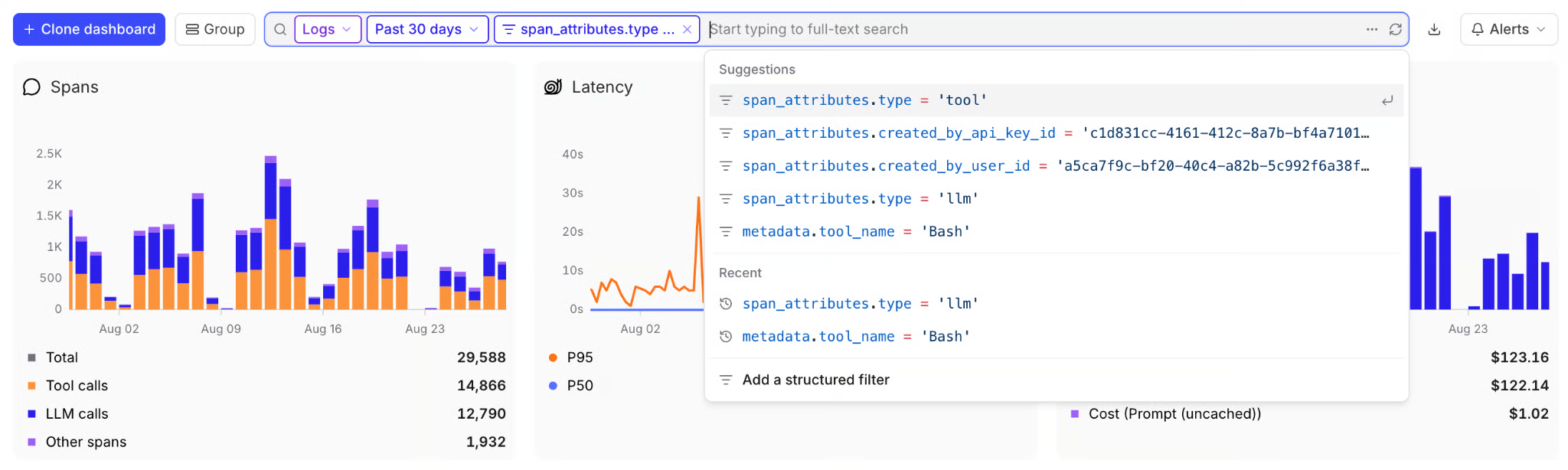
A dashboard tracking span counts, latency percentiles, and cost, filtered down to the spans a routing comparison depends on.
Alerts: Configure time window alerts for aggregate conditions such as a segment's pass rate falling below its floor or its error rate exceeding a limit. Notifications can go to a webhook, a Slack channel, or PagerDuty. Log alerts evaluate matching logs in batches and can flag expensive requests using a filter on estimated_cost().
Keeping the model routing frontier current
A model selected for a segment can become more expensive or less reliable even when the routing code stays unchanged. Refresh the measurements according to the change that triggered the review.
The Braintrust Topics chart shows classified log volume over time. Clicking a data point opens the logs for that time range, filtered to every trace classified under the clicked topic's facet rather than the single topic, so narrow to one topic with View logs with this topic in the snapshot view.
Keep the benchmark dataset version, scorers, and trial counts consistent when comparing successive measurements. Set each candidate's previous experiment as its baseline to inspect changes in scores and operational metrics.
Also evaluate candidates on a fresh production sample to catch request patterns missing from the fixed benchmark. When the dataset or scoring criteria change, re-run the incumbent models on the revised evaluation before judging new candidates against them.
Why Braintrust for evaluation-driven model routing
Braintrust stores candidate experiments and production traces in the same project and scores both with the same scorers, so a team can check whether a routing policy's offline pass rate holds on live traffic.
Braintrust's baseline comparisons show how a proposed routing policy changes quality, cost, and latency relative to the current policy. Production failures can also become evaluation cases for checking whether subsequent revisions resolve the problems observed on real requests.
Notion uses Braintrust to identify differences between new models and deploy them for specific use cases. Its engineers also turn production issues, including language-adherence failures, into targeted evaluations that help prevent regressions.
Also read: How to cut LLM costs with model routing and How to set up quality, cost, and latency alerts for AI agents
Start routing on measured quality, cost, and latency with Braintrust →
Evaluation-driven model routing FAQs (2026)
What is the Pareto frontier in LLM model selection?
The Pareto frontier contains models for which no tested alternative improves one measured dimension without worsening another. Frontier membership belongs to one workload, so a model dominated on billing questions can still sit on the frontier for contract summaries.
Can one model sit on the frontier for every task?
One model can sit on the frontier in every segment, typically at the high-quality, high-cost end. A segment with a lower quality floor or a tighter latency limit can still be assigned a cheaper or faster frontier model.
How often should a team re-evaluate its model routing?
Re-evaluate before deploying prompt or routing changes and whenever model behavior or provider pricing changes. Schedule separate reviews using fresh production samples, with shorter intervals for rapidly changing workloads. Unexpected deterioration in quality, cost, or latency should prompt an immediate review.
What is the difference between model routing and provider failover?
Model routing selects a model according to the request's requirements. Provider failover handles serving failures by retrying through another provider, typically keeping the selected model. The Braintrust Gateway supports failover for provider rate limits and server errors.
Does a routing layer add latency?
A lookup-based router usually adds little processing time. A separate classification call or sequential escalation adds inference time, so measure the complete request path, including retries, and check tail latency alongside the average.