

How to cut LLM costs with model routing without hurting quality
Model routing can lower LLM costs by assigning each query class to the least expensive model that meets its quality requirements. Prompt complexity and pricing help estimate cost, but they cannot show whether the selected model will return an accurate, relevant, and correctly formatted response. Routing on those signals alone may reduce spend while sending lower-quality responses to users.
Reliable routing starts by evaluating candidate models on representative queries for each task. A lower-cost model should receive a query class only after its results meet the acceptance criteria for that traffic.
This guide explains how to classify traffic, design evals, compare models, set routing rules, and monitor routed responses. Braintrust connects evaluation, gateway routing, and online scoring so teams can validate model changes before shifting traffic and continue measuring response quality in production. Start free with Braintrust.
Limitations of complexity-based and cost-based routing
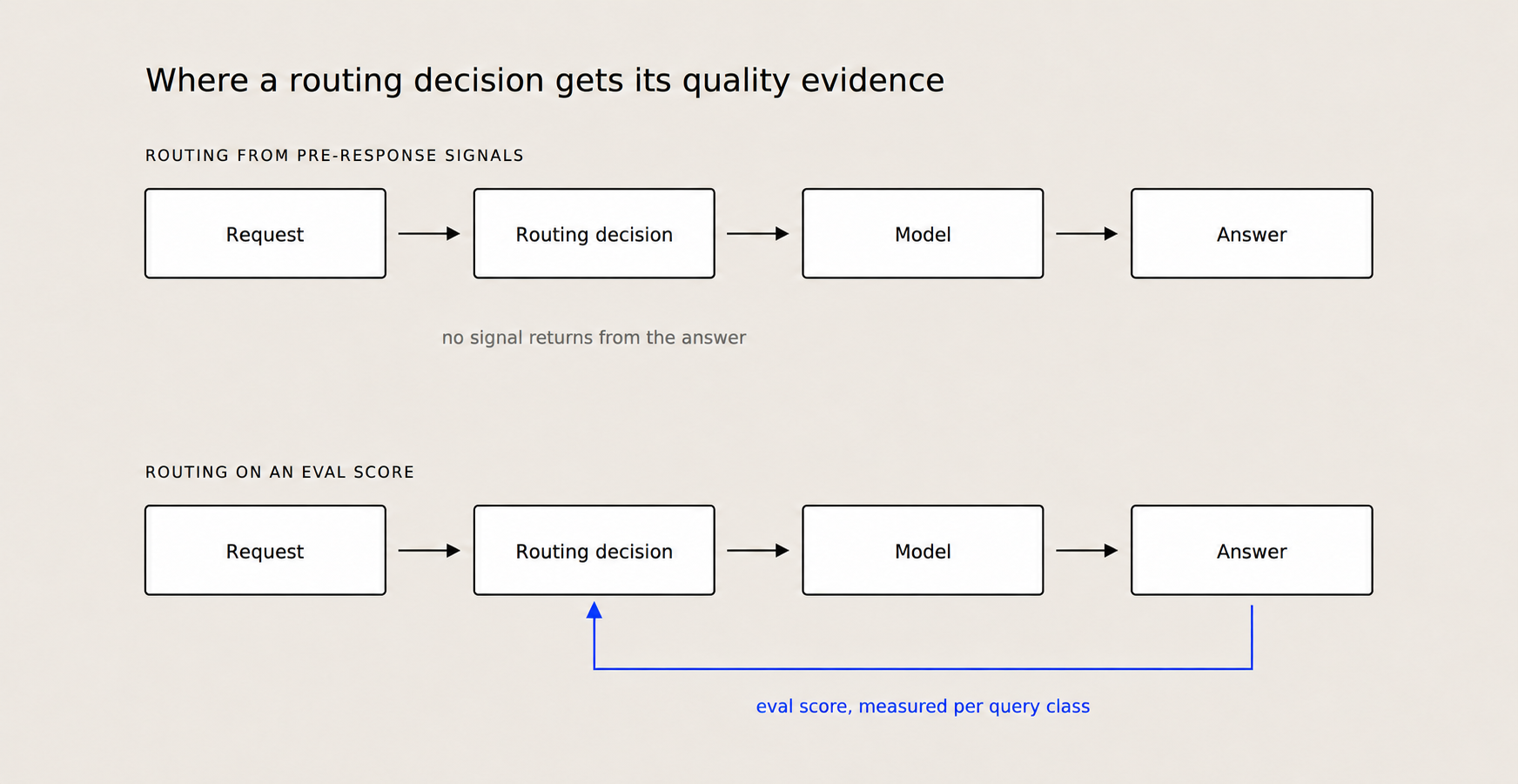
Pre-response signals select a model before any output exists. Eval scores measure how well completed responses meet the requirements of each query class.
Routing can lower spend only when a cheaper model preserves the task's required accuracy, relevance, safety, and output format. A router applies the selection policy consistently, and the evidence underlying that policy determines whether the cheaper route is safe.
OpenRouter bases Auto Router selection on task-level usage and cost controls
OpenRouter's openrouter/auto classifies each prompt into roughly 30 fine-grained task types, ranks candidate models by the OpenRouter community's spend share for that task over a trailing seven-day window, and applies the configured cost_tier. Teams can restrict eligible models with allowed_models and excluded_models, and session stickiness keeps a multi-turn conversation on the model an earlier turn landed on.
Spend share across the OpenRouter community reflects aggregate purchasing behavior within a task category. An individual application has its own prompts, proprietary data, and acceptance criteria, and performance against those is measured by running the model on them.
LiteLLM lets teams define classification rules and model tiers
LiteLLM's beta Auto Routing assigns requests to SIMPLE, MEDIUM, COMPLEX, and REASONING tiers using a heuristic scorer, an LLM classifier, or keyword rules. Each tier can route to one pinned model, a random pool, or an adaptive pool that Thompson-samples within the tier and attributes later feedback back to the model that served the response.
Teams control the classifier and model assignments, which determine where a request goes before any response is generated. Whether that response satisfies the application's requirements is settled afterward, by scoring the output. Adaptive selection also depends on whether the supplied feedback accurately represents output quality.
OpenRouter and LiteLLM both handle model access and routing policy execution. A production route also needs an application-specific benchmark that compares candidate models on representative examples from each query class and records the minimum score a cheaper model must maintain. Braintrust runs the eval for each query class, stores the scores for every candidate, and releases the route to a lower-cost model once that model clears the class's threshold.
Classify query types for model routing
A routing threshold should apply to one query class because each task has a different definition of quality and cost of failure. A classification error sends a customer to the wrong queue. An inaccurate summary is harder to catch, because it can read as credible enough to influence a decision. Combining both tasks under one threshold can allow strong results from the easier task to conceal a serious regression in the other.
Use production traces to define the classes: Existing traces capture prompt templates, endpoints, token usage, latency, and traffic volume. Begin by grouping recent requests by endpoint or prompt template, then separate requests when their expected outputs or failure consequences differ. Teams already tracking LLM costs can use the same span data to measure traffic volume and spend for each query class.
Prompt length, vocabulary, and general complexity describe the shape of a request without saying anything about what the output has to get right. A short extraction request may demand exact field accuracy. A generation request of the same length can require judgment across relevance, tone, and factual accuracy. The query class therefore determines which scorers and acceptance threshold should govern the route.
Build an eval for each query class
Build each eval from production requests that represent the traffic the router will handle, including common requests, difficult cases, and known failures. Then choose scoring logic that reflects a correct response for the specific task. Classification can use exact match against the allowed labels. For extraction, compare each required field against expected values drawn from the source. Summarization and open-ended generation require an explicit rubric that covers criteria such as factual accuracy, completeness, relevance, and tone. LLM-as-a-judge scores should be calibrated against human labels so automated results remain consistent with reviewer judgment.
Dataset size should reflect how close the candidate models are to each other. A sample of 50 examples can reveal a large difference in quality. When model scores differ by only a few percentage points, expand the dataset to 200 or more representative examples because normal variation has a greater influence on smaller samples.
Benchmark candidate models with the same eval
Run a frontier baseline and two lower-cost candidates on the same dataset with the same scorers. Keep the prompt and generation parameters fixed across the three runs when measuring the effect of model choice. Separate experiments can test temperature or prompt changes without mixing their influence into the model comparison.
The Braintrust model comparison cookbook provides the full setup for combinations, evalData, and callModel. The evaluation loop runs every configured combination as an experiment and records the model, temperature, and prompt in metadata for grouping and analysis.
const exactMatch = (args: { input; output; expected? }) => {
  return {
    name: "ExactMatch",
    score: args.output === args.expected ? 1 : 0,
  };
};

await Promise.all(
  combinations.map(async ({ model, temperature, prompt }) => {
    Eval("Model comparison", {
      data: () =>
        evalData.map(({ input, expected }) => ({
          input,
          expected,
        })),
      task: async (input) => {
        return await callModel(input, {
          model: model.name,
          apiKey: model.apiKey,
          temperature,
          systemPrompt: prompt,
        });
      },
      scores: [exactMatch, Levenshtein],
      metadata: {
        model: model.name,
        temperature,
        prompt,
      },
    });
  }),
);
Teams can also compare models in the Braintrust playground. Link the evaluation dataset, add the baseline and candidate models as tasks, and apply the same scorers to each task. Diff mode highlights output differences, score changes, and timing and token usage variations across the models.
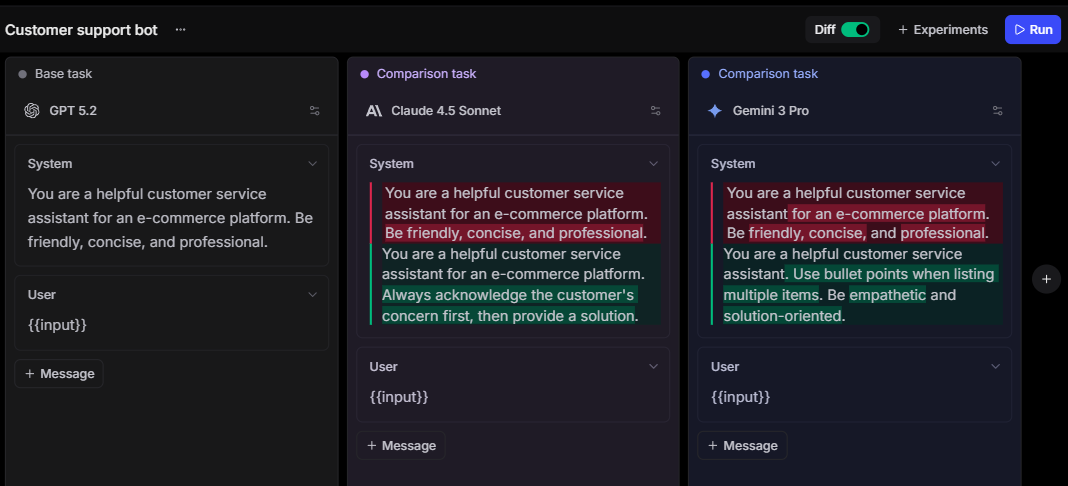
Diff mode compares a baseline task against candidate models on the same dataset and scorers.
Assess pass rate, relative cost, and p95 latency together. Pass rate determines whether a candidate meets the query class's acceptance criteria, relative cost quantifies the potential savings, and p95 latency exposes slow responses that the average can conceal.
Set the routing rule and quality floor
Convert the benchmark into a release rule for each query class by defining the minimum pass rate a candidate model must maintain before it receives traffic. The threshold should reflect the class's acceptance criteria and cost of failure. A candidate's 95% pass rate qualifies only if the class's required level sits at or below 95%.
Evaluate each candidate against two requirements: the maximum decline allowed from the baseline and the minimum pass rate required for the query class. With a 96% baseline and a rule that the candidate retain 95% of that performance, the first threshold lands at 91.2%. A query class that requires at least 94% raises the bar above that, so 94% becomes the score the candidate has to clear.
Pair the routing rule with an approved baseline fallback. Define a breach using a minimum sample size or rolling window, and automatically return the query class to the baseline model if its score remains below the floor. The window prevents one anomalous response from shifting all traffic.
Once a route is approved, the Braintrust AI gateway provides a unified API to call supported models from OpenAI, Anthropic, Google, AWS, and custom providers. Setting x-bt-parent records each Gateway request within the relevant Braintrust trace, connecting production traffic to the evaluation that authorized the model. Gateway provider failover covers outages, rate limits, and temporary server errors. Enforcing the quality-floor fallback stays with the application or the routing service.
Monitor routed traffic for quality drift
An approved route can lose quality even when its configuration remains unchanged. As the product evolves, new prompt patterns land inside an existing query class, and provider updates can change model behavior under the same model ID. Production monitoring shows whether every routed class continues to meet its quality floor.
Braintrust online scoring runs scorers asynchronously on production logs without adding latency to the application. Create a rule for each query class and configure its scorer, sampling rate, trace or span scope, and SQL filter. When the query class is stored in metadata, filtering on that field keeps the results separated by class.
Not every benchmark scorer transfers to production unchanged. Reference-based scorers such as exact match need an expected value, which production requests do not carry at inference time, so a rule that reuses one scores every response as a failure until ground truth arrives. Query classes with a downstream correction signal, such as an agent reassigning a misrouted ticket, can supply it by writing the confirmed answer back to the span with logFeedback and scoring the labeled subset. Classes without such a signal need a reference-free scorer instead, such as an LLM-as-a-judge rubric or a deterministic check on format and required fields.
curl https://api.braintrust.dev/v1/project_score \
  -H "Authorization: Bearer $BRAINTRUST_API_KEY" \
  -H "Content-Type: application/json" \
  -d '{
    "project_id": "<project_id>",
    "name": "Production scoring rule",
    "description": "Score production traces",
    "score_type": "online",
    "config": {
      "online": {
        "sampling_rate": 1,
        "scorers": [{ "type": "function", "id": "<scorer_function_id>" }],
        "apply_to_root_span": true
      }
    }
  }'
The example scores every root span using the selected scorer, at the top of the 50%–100% range that Braintrust recommends for low-volume or critical paths. For high-volume applications, the recommended range is 1% to 10% of logs. LLM-as-a-judge scorers cost more per call than code-based scorers, so their sampling rate should account for traffic volume and the number of scored responses needed to detect a decline.
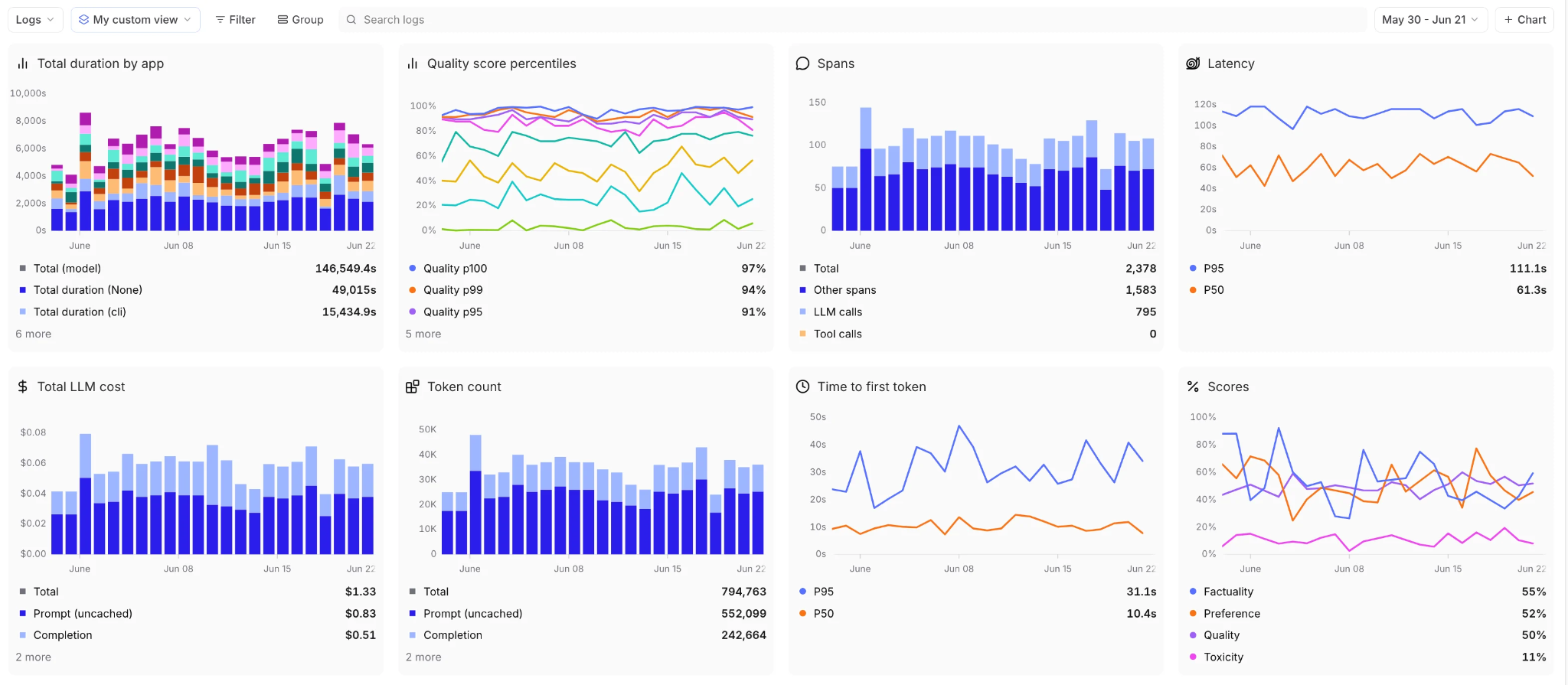
Separate dashboard series for score, cost, and latency show whether a lower-cost route continues to meet its acceptance criteria.
A dashboard that tracks those series side by side connects AI observability with LLM cost control by quantifying the savings from each route and identifying the query class responsible for a quality regression.
Example: Route support ticket classification to a lower-cost model
The example below uses illustrative traffic volumes, prices, and scores to show how benchmark results are used to produce a routing rule. Replace the figures with current data from your application.
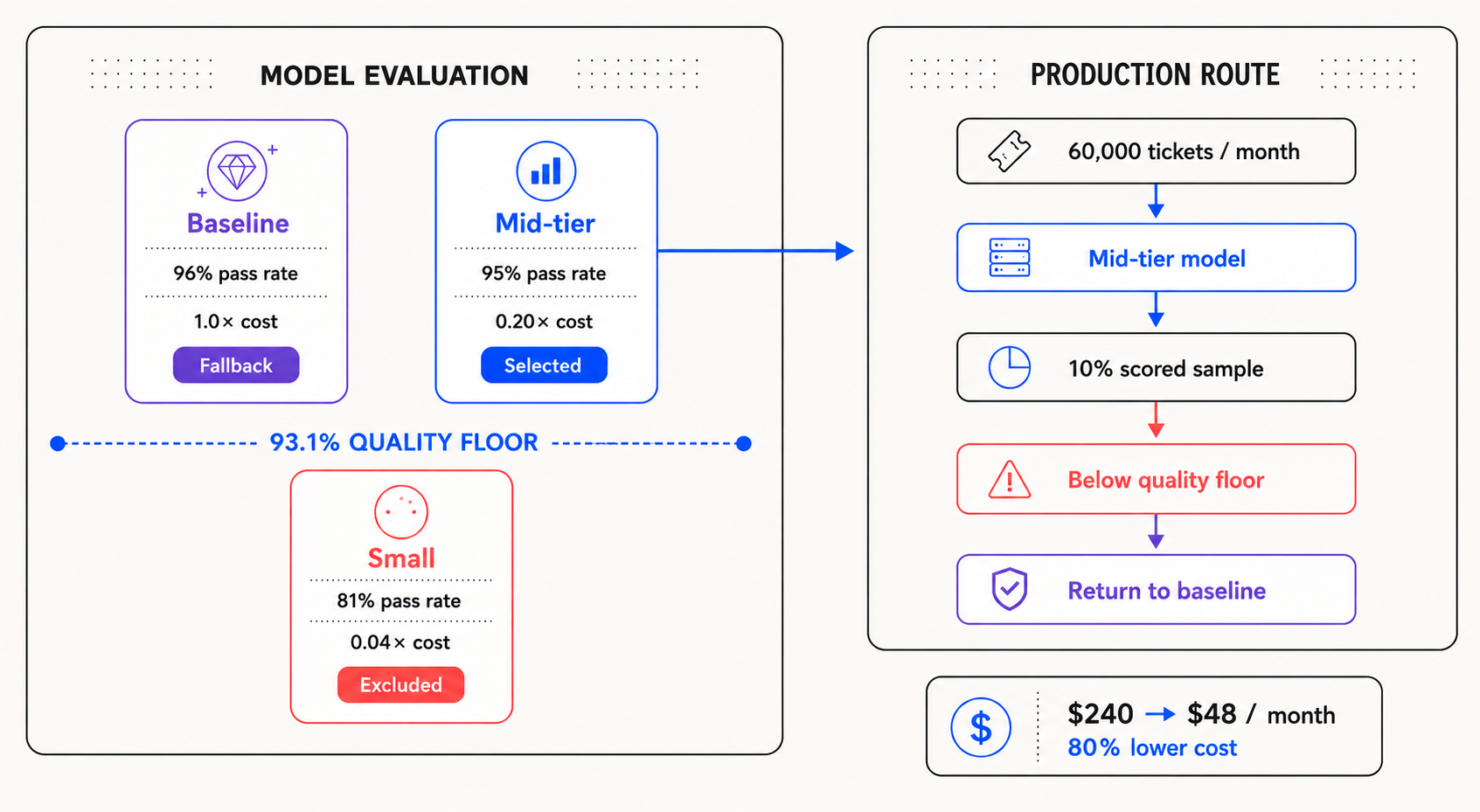
Evaluation approves the lower-cost route. Production scoring signals when the routing service should return traffic to the baseline model.
A support product classifies 60,000 incoming tickets per month into 12 queues. The classifier still runs on the frontier model selected when the feature launched, so the team tests whether a lower-cost model can maintain the required routing accuracy.
Step 1. Build the evaluation dataset: The team samples 200 recent tickets from production logs, weighted toward higher-volume queues while including known failures and lower-volume queues where misrouting carries greater operational cost. Human-corrected queue assignments provide the expected labels, and an exact-match scorer compares each model's prediction with the correct queue.
Step 2. Benchmark the candidate models: The baseline and two lower-cost models are evaluated using the same prompt, dataset, and scorer. The baseline achieves a 96% pass rate, while the mid-tier candidate achieves 95% at one-fifth the cost per ticket. The small model scores 81%, with most errors involving refund-related billing disputes.
Step 3. Set the routing floor: The policy requires a candidate to retain 97% of the baseline pass rate. With a 96% baseline, the candidate must score at least 93.1%. The mid-tier model qualifies at 95%, while the small model remains excluded until prompt changes and another evaluation demonstrate better performance on refund disputes.
Step 4. Route and monitor production traffic: At an assumed cost of $0.004 per ticket for the baseline and $0.0008 for the mid-tier model, the monthly classification cost falls from $240 to $48.
Reusing the benchmark's exact-match scorer in production requires ground truth on the production span, because exact match compares the output against an expected value that a live ticket does not carry at classification time. The support workflow already produces that label whenever an agent reassigns a misrouted ticket, so the application writes the corrected queue back to the originating span with logFeedback, which attaches expected values to an existing row. Online scoring then samples 10% of production tickets, and the pass rate is measured over the tickets that have a confirmed queue rather than over every sampled request. If that rate remains below 93.1% for the sample window defined in the routing policy, the routing service returns classification traffic to the baseline model.
Ticket classification alone saves $192 per month, an 80% reduction, while retaining a 95% benchmark pass rate. Because classification represents one of six query classes in the application, the team benchmarks each of the other five separately before changing its route.
Control model routing costs and quality with Braintrust
Each model route should remain a conditional release decision, with approval contingent on measured output quality. A successful benchmark authorizes the lower-cost model. Production scores then determine whether it stays eligible as prompts, traffic patterns, and provider behavior change. Cost reductions remain tied to the acceptance criteria for each query class throughout the route's lifetime.
Braintrust stores evaluation datasets, model comparison results, Gateway traces, and production scores in a single account, providing engineering and product teams with shared evidence to approve and monitor routes. Notion uses Braintrust to run regression and frontier evals, identify differences between models, and deploy new models for specific use cases in under 24 hours.
Braintrust's Starter plan is free, requires no credit card, and includes $10 per month in model credits, 1 GB of processed data, and 10,000 scores per month, along with unlimited users. Comparing three models on 200 examples with two scorers uses 1,200 scores, allowing teams to run an initial model-routing benchmark within the included score allowance. Start free with Braintrust →
FAQs: How to cut LLM costs with model routing
How many examples do I need per query class?
Dataset size depends on how precisely the pass rate must be estimated. When a candidate scores close to the routing floor, calculate a confidence interval around the result and collect more examples if the interval crosses the floor. Every important label, prompt pattern, and costly failure should also appear often enough to reveal recurring errors.
How often should I re-benchmark my routed models?
Re-benchmark whenever a model version, prompt, retrieval configuration, tool definition, response schema, or traffic distribution changes. Stable routes can follow a schedule based on request volume and failure severity, with high-volume or consequential classes reviewed more frequently. A production-score alert should initiate an immediate benchmark when quality begins to decline.
Can I combine evaluation-based model routing with a gateway's auto-router?
A gateway auto-router should select only among models that have already passed evaluation for the query class. Cost, latency, and availability may guide selection within the approved pool. Review automatic pool updates, record the model and version used for every response, and require new candidates to pass the class-specific eval before they receive traffic. Comparing the available options first helps here, since LLM routers differ in how much control they give over the eligible model pool.
What if I don't have logged traffic yet?
Create a provisional dataset from product requirements, support documentation, existing business processes, and examples written by subject-matter experts. Include ordinary requests, ambiguous inputs, and failures with costly consequences. After launch, collect prompts, outcomes, and reviewer corrections from real usage, then update the dataset before moving high-risk query classes to cheaper models.
Do I need a separate eval tool if my gateway already does A/B testing?
A separate eval system is necessary when the gateway cannot determine whether each response was correct or useful. An A/B test may provide enough evidence when the application records an objective outcome, such as a verified classification label or completed transaction. Generative tasks without immediate outcome labels require task-specific scorers and human review. Braintrust can score outputs from the gateway's A/B test, then run the same task-specific scorers on production responses after a model is selected.