

A prompt CI/CD pipeline gives prompt changes a controlled path from authoring to production. Each candidate version is tested against the current production version using a fixed dataset and the same quality, latency, and cost criteria, while release-critical scorers block unacceptable regressions before promotion. Approved versions then move through development, staging, and production environments without being bundled into an application deployment, and rollback restores a previously validated version if production scores fall below the release threshold.
Braintrust connects prompt versioning, evaluation, review, environment promotion, CI checks, online scoring, and production feedback in one release workflow. Production failures can return to the evaluation dataset, so every confirmed regression becomes part of the requirements future prompt versions must meet. Start free with Braintrust.
Why prompt changes need a release pipeline
Prompt changes can alter production behavior immediately without passing through the build and deployment steps that normally protect application code. A product manager might add one sentence to a system prompt and save it, causing subsequent requests to use the new instructions even though no automated test ran, no reviewer inspected the change, and no deployment process validated the result.
Prompt management provides the versioning, collaboration, and deployment controls needed to manage prompt changes, but release discipline depends on connecting those controls to evaluation and approval. A prompt CI/CD pipeline adds that release path by requiring each candidate version to clear defined quality checks before it can move into production.
Consider a customer support application with a ticket-triage prompt that assigns priority and routes each ticket to the appropriate queue. If support leadership adds a rule that sends high-value billing disputes directly to tier 2, the prompt change needs to be tested against both the new escalation cases and the routing behavior that already works. The sections that follow track that change from version creation through evaluation, promotion, rollout, and production monitoring.
Prompt versioning and metadata tracking in the pipeline
A prompt release can only be reproduced when the pipeline records the exact prompt version and the configuration evaluated with it. Version identifiers, model settings, dataset versions, and code commits provide the evidence needed to connect a passing evaluation to the configuration that produced it.
Immutable version identifiers
Every prompt save in Braintrust creates a new version with a unique identifier, while earlier versions remain available. Production code can pin a specific prompt version, such as 5878bd218351fb8e, so the ticket-triage escalation rule can be evaluated, promoted, monitored, and rolled back using the same version reference throughout the release pipeline.
Model and parameters travel with the prompt
Reproducing a prompt result also requires the model and generation settings that were active during the run. Defining the prompt as a versioned object keeps the message text, model, parameters, and metadata together.
const project = braintrust.projects.create({
  name: "Summarizer",
});

export const summarizer = project.prompts.create({
  name: "Summarizer",
  slug: "summarizer",
  description: "Summarize text",
  tags: ["summarization"],
  model: "claude-sonnet-4-5-20250929",
  params: {
    temperature: 0.7,
    max_tokens: 1000,
    response_format: { type: "json_object" },
  },
  messages: [
    {
      role: "system",
      content: "You are a helpful assistant that can summarize text.",
    },
    {
      role: "user",
      content: "{{{text}}}",
    },
  ],
  metadata: { version: "1.0" },
});
The prompt slug remains stable across updates, while the version ID identifies the exact revision used for a particular run. In the example above, summarizer is the documentation example and should be replaced with the project and prompt names used by the application.
Dataset and code versions complete the evaluation record
Two runs of the same prompt version can produce results that are not directly comparable if the evaluation dataset or surrounding application code changed between them. Pinning the dataset version and recording the corresponding code commit ties each result to the exact prompt, model configuration, test inputs, and application state that were evaluated.
Diffs show what changed before evaluation begins
When a prompt update is saved, the update dialog shows a Preview changes section with the diff against the previous version, and a Version comment field of up to 5,000 characters for describing what changed. The prompt's Activity tab lists version history alongside those comments, showing which version each new one replaced. For the ticket-triage example, the diff isolates the newly added escalation rule, so reviewers can check whether the intended billing cases improved without introducing regressions elsewhere.
Prompt change intake from Git, registries, and editors
Prompt changes can originate from different authoring workflows without creating different release paths. Whether a new version comes from application code, the Braintrust registry, or the Playground, the pipeline evaluates it against the same release criteria before promoting it.
Changes from Git: Engineers can define prompts in code, commit the changes alongside the application, and open a pull request for review. Pushing the prompt file with bt functions push creates a new version in Braintrust while preserving the Git history around the change.
bt functions push summarizer.ts
Changes from the prompt registry: Prompts edited directly in the Braintrust UI receive the same versioning treatment as prompts pushed from code. A version comment can document why the prompt changed, so a registry edit carries a persistent explanation attached to its version.
Changes from the Playground: Product managers, support leads, and other domain experts can iterate on prompts against representative inputs in the playground without editing application code. Once a configuration is ready for formal evaluation, saving the prompt produces a version that enters the same testing and approval process as a code-authored change.
The version ID is the common handoff across all three authoring paths. A Playground edit and a Git-authored prompt both enter evaluation at the same gate. Organizations that keep Git as the primary source can also pull UI changes back into the repository with bt functions pull to keep prompt definitions aligned across both locations.
Automated evaluation of candidate prompts against production baselines
A candidate prompt should be tested against the same production-relevant cases as the version already serving users. The comparison needs to show whether the proposed change improves the intended behavior without weakening quality elsewhere or introducing unacceptable increases in latency and cost.
Build the dataset from production traffic
The ticket-triage evaluation set should include real support requests that represent normal billing questions, the disputes targeted by the new escalation rule, and adversarial cases such as tickets that mention a dollar amount without describing a dispute. A dataset focused only on the newly added behavior would miss regressions in routing patterns that already work. Braintrust datasets hold a reusable set of production-derived cases for running the candidate and production prompts under the same conditions.
Combine deterministic checks with judged scores
Queue assignment and priority are structured outputs that code scorers can validate exactly, while the quality of the escalation reasoning requires a judgment-based criterion. Braintrust runs LLM-as-a-judge scoring alongside deterministic checks, so the same evaluation can enforce structural requirements and measure response quality.
Compare the candidate against the production version
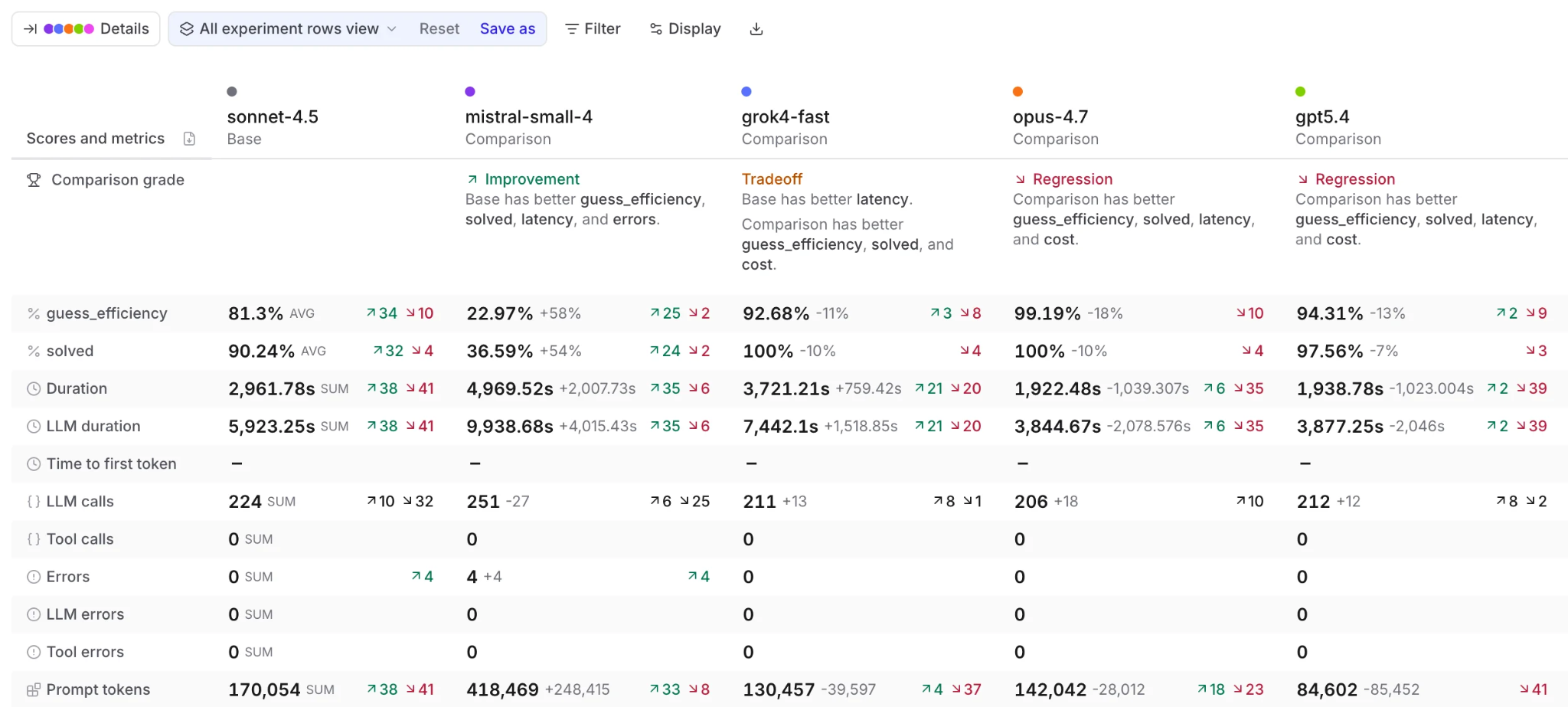
Experiment comparison grades each candidate against the baseline and surfaces the metrics that moved.
Running both versions against the same dataset exposes per-case movement that an aggregate score hides. If the new escalation rule improves billing-dispute handling but misroutes previously correct password-reset tickets, the regression should be visible before promotion. Braintrust experiment comparison shows score changes and case-level regressions between evaluated versions.
Measure latency and cost in the same evaluation
Prompt changes can alter operational performance even when quality improves. Adding instructions or examples increases token usage, and longer generations can increase response time, so latency and cost belong in the review alongside quality before a candidate advances to the next release stage.
Promotion criteria and review gates for release-critical scores
A prompt should move forward only when evaluation results meet the application's release criteria. Hard thresholds work for requirements that cannot regress, while tolerance bands and human review handle quality changes that need interpretation before promotion.
Define hard thresholds for release-critical scorers: Some requirements should fail the release automatically when they are not met. For the ticket-triage prompt, valid queue assignment and the absence of customer-facing PII in routing notes are pass-or-fail conditions. Braintrust supports pass thresholds for scorers, so a result below the required minimum is marked as failing in the eval results.
Use tolerance bands for secondary quality scores: Model-based scores naturally vary between runs, so a single fixed cutoff is too rigid for every quality dimension. Compare secondary scores with the production baseline and allow only a defined regression range, such as no more than a 2% decline, to separate acceptable variation from a meaningful quality drop.
Encode release criteria in the evaluation run: Marking a score as failing does not by itself stop a pipeline. bt eval returns a non-zero exit code only when an eval throws an exception, so blocking promotion on a threshold requires a custom reporter whose reportRun returns false when results fall below the release criteria. Any reporter included in the evaluated files is picked up by the bt eval CLI, allowing the same promotion rules to be enforced consistently in local testing and CI.
Reporter(
  "My reporter", // Replace with your reporter name
  {
    reportEval(evaluator, result, opts) {
      // Summarizes the results of a single evaluator and returns whatever you
      // want (the full results, a piece of text, or both)
    },

    reportRun(results) {
      // Takes all the results and summarizes them. Return a true or false
      // which tells the process to exit.
      return true;
    },
  },
);
Route mixed results to human review: If release-critical scorers pass but secondary scores improve on some cases and regress on others, the candidate should move to human review instead of being promoted or rejected automatically. The reviewer can inspect the affected cases alongside expected and generated outputs, then record the approval decision as a version comment so the reasoning remains attached to the prompt version.
Environment promotion from development to staging to production
Braintrust environments associate a specific prompt version with development, staging, or production. Production can remain pinned to a validated version while a newer candidate is evaluated elsewhere.
const prompt = await loadPrompt({
  projectName: "My Project",
  slug: "summarizer",
  environment: "production",
});

const { messages, model, temperature } = prompt.build({
  text: "Long text to summarize...",
});

// Use messages with your own LLM client
Promotion changes the environment assignment: Moving the validated ticket-triage version from staging to production reassigns which prompt version the production environment resolves to. The application binary and container image remain unchanged, so the prompt can progress through its own release process without waiting for unrelated application code to be redeployed.
Validate the same version before production promotion: Braintrust documents a progression from development through experiments, staging, and then production. The ticket-triage candidate can therefore be evaluated first against the regression dataset and then exercised in staging with recent, production-like tickets before the identical version receives the production assignment.
Resolve prompts by environment at runtime: When the application uses an environment-pinned prompt, loadPrompt() resolves the version currently assigned to that environment and pins the call to that concrete version at resolve time. Call loadPrompt() again to pick up a later environment reassignment, which keeps production tied to a validated prompt as assignments change.
Pull request checks, environment assignments, and approval controls
Once a candidate prompt has passed evaluation, the release process needs to carry that result into code review, automate non-production promotion where appropriate, and reserve production assignment for authorized approvers.
Run evaluation as a required pull request check: The braintrustdata/eval-action@v2 GitHub Action runs the evaluation suite on pull requests and posts a results summary directly in the review. The action requires pull-requests: write permission to create or update the comment. That summary puts prompt regressions in front of reviewers alongside the code changes.
name: Run evaluations

on:
  pull_request:
    branches: [main]

permissions:
  pull-requests: write
  contents: read

jobs:
  evaluate:
    runs-on: ubuntu-latest
    steps:
      - uses: actions/checkout@v4

      - name: Set up Node.js
        uses: actions/setup-node@v4
        with:
          node-version: 24

      - name: Install dependencies
        run: npm install

      - name: Run evals
        uses: braintrustdata/eval-action@v2
        with:
          api_key: ${{ secrets.BRAINTRUST_API_KEY }}
          runtime: node
Keep pull request runs fast and merge runs complete: Running the full evaluation dataset on every commit can add unnecessary time and model cost. The bt eval CLI can run smaller smoke tests with --first or --sample, followed by the complete suite when the change is ready to merge.
bt eval tests/ --first 20 --no-input --json   # smoke run on PR, non-final
bt eval tests/ --no-input --json              # full run on merge, final
Assign validated prompt versions from CI: After the evaluation passes and the change merges, CI can assign the validated version to an environment. A TypeScript prompt definition can carry an environments field so the pushed version lands in development or staging directly. To promote a version that already exists, use the environment-object endpoint with the _xact_id returned when the version was created, which moves that existing version into the selected environment without recreating the prompt. Production can remain excluded from automated assignment until final approval.
curl -X PUT https://api.braintrust.dev/environment-object/prompt/$PROMPT_ID/staging \
  -H "Authorization: Bearer $BRAINTRUST_API_KEY" \
  -H "Content-Type: application/json" \
  -d "{\"object_version\": \"$VERSION\"}"
See Promoting prompts across environments via API for the full promotion script. The environment-object endpoint is not yet covered in the API reference, so contact support if you need further detail on it.
Restrict production promotion to the appropriate reviewers: Braintrust permission groups are scoped to the organization, project, or object level, and object-level scope covers prompts specifically. The built-in Owner, Engineer, and Viewer groups available on paid plans apply to the entire organization, so restricting production assignment to a subset of contributors on a single project or prompt requires custom permission groups, which are an Enterprise feature.
Environment changes can also trigger Slack or webhook notifications through environment alerts, so each production assignment leaves a recorded event for audit trails or downstream automation.
Staged rollout, canary exposure, and prompt rollback
A version that clears staging can reach production traffic in stages. A staged rollout limits the number of requests affected by the candidate version, so production scoring has time to confirm that the behavior observed during evaluation continues under live traffic.
Limit initial exposure: For the ticket-triage change, only a fraction of billing traffic should reach the candidate prompt at first. Braintrust environments can hold separate prompt versions, while application routing determines which users or requests resolve to each environment. The same setup supports canary releases and A/B testing for LLM prompts when production behavior needs to be compared before exposure expands.
Set the rollback trigger before rollout begins: The signal that stops the rollout belongs in the release criteria before any live traffic reaches the candidate. For the triage prompt, that might mean tier 2 escalation volume exceeding a defined multiple of its baseline or the routing-accuracy score falling below the threshold used during evaluation. Predefined triggers keep the rollback decision tied to measured production behavior.
Roll back to the previously validated version: If a rollback trigger fires, reassign the production environment to the last validated prompt version. Applications that pin prompt versions directly can restore the previous behavior by changing the version identifier instead.
const prompt = await loadPrompt({
  projectName: "My Project",
  slug: "summarizer",
  version: "5878bd218351fb8e",
});
Earlier prompt versions remain retrievable, so the failed candidate stays available for diagnosis while production returns to the previously approved configuration. The cases that caused the rollback can then return to evaluation as regression coverage for the next candidate.
Production monitoring and evaluation dataset feedback
Production promotion confirms which prompt version is serving users, but the release decision still needs validation against live traffic. The routing, privacy, and quality criteria used before promotion should stay active after deployment, so the candidate version is held to the same standard once it is serving live traffic.
Score live traffic with the release scorers
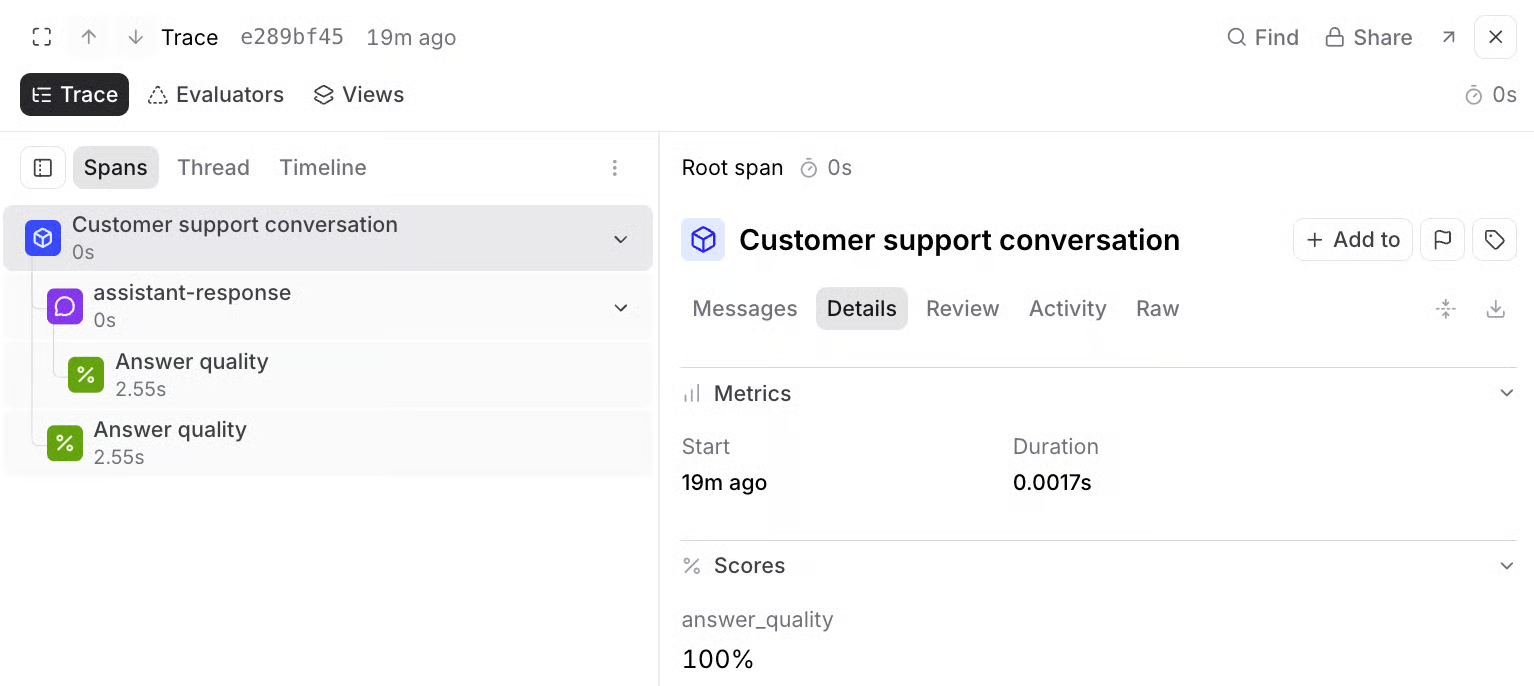
Online scoring records each scorer run as a score span inside the production trace.
Braintrust online scoring applies scorers to production traces asynchronously, so evaluation does not add latency to the user-facing request. For the ticket-triage rollout, the routing-accuracy and PII scorers used during pre-release evaluation can continue measuring the deployed version after promotion.
Control scoring volume with sampling and filters
Online scoring rules can target specific traces or spans and apply a configurable sampling rate. A SQL filter limited to billing tickets concentrates evaluation on the traffic affected by the new escalation rule, while sampling controls scorer volume and cost without requiring every production request to be evaluated.
Attribute production results to the prompt version
Braintrust records which prompt version produced a logged span, and the trace menu offers Go to origin prompt for moving from a production trace back to the prompt behind it. For a staged rollout, version-level attribution shows whether a failure came from the candidate prompt or from a request still handled by the previously validated version.
Alert when production quality crosses a release threshold
Braintrust log alerts can use SQL conditions to identify low-scoring production logs and notify Slack or a webhook. A routing-accuracy score falling below the accepted threshold for billing tickets can therefore trigger investigation or rollback while exposure to the candidate version is still limited.
Return confirmed failures to the evaluation dataset
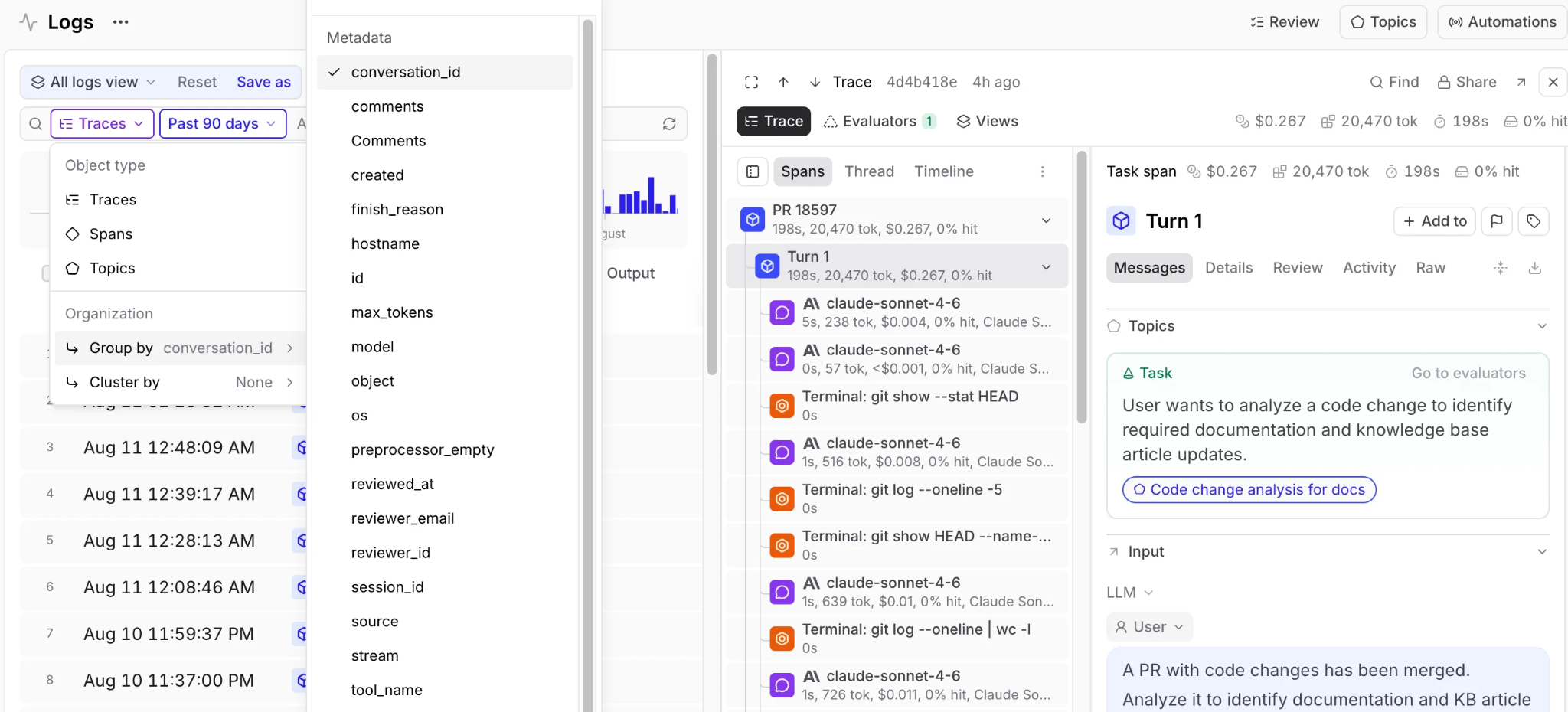
Production logs use the same data structure as experiments, so a reviewed trace can move straight into an evaluation dataset.
Misrouted tickets and other verified production failures should become regression cases for the next prompt version. Logs use the same data structure as experiments, so production traces can be promoted into evaluation datasets with the original request preserved for future testing. The next candidate is then evaluated against failures observed in real traffic before receiving production approval.
Prompt CI/CD pipeline reference workflow
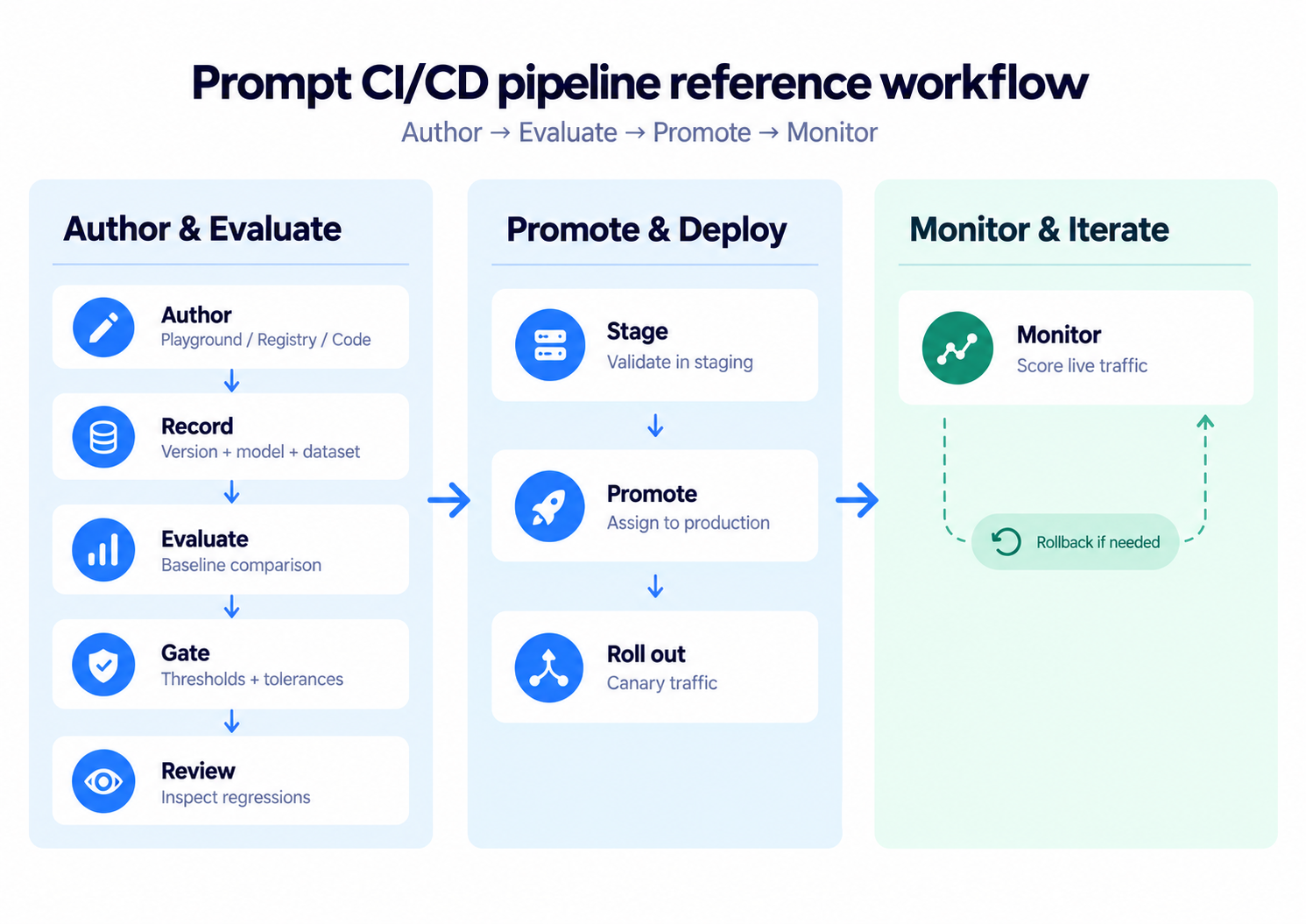
Author, evaluate, promote, monitor: each stage passes a specific prompt version to the next, and monitoring can return traffic to the last validated one.
1. Author: Create the ticket-triage change in the Playground, prompt registry, or application code. Saving or pushing the change produces a new prompt version with its own version ID.
2. Record the release context: Store the prompt text, model, and generation parameters with the version, then record the dataset version and code commit used during evaluation so the result remains reproducible.
3. Evaluate against production: Run the candidate and current production versions against the same dataset, comparing case-level quality alongside latency and cost.
4. Apply release gates: Release-critical scorers block the candidate when a required threshold is missed. Secondary scores are checked against their accepted regression tolerances before the version progresses.
5. Review mixed results: When mandatory checks pass but individual cases move in different directions, a reviewer inspects the regressions and records the approval decision against the prompt version.
6. Promote to staging: Assign the validated version to staging and test it against recent production-like inputs before granting production approval.
7. Promote to production: An authorized approver assigns the same validated version to the production environment. Contributors without production permissions can propose and evaluate the change but cannot make the assignment.
8. Limit initial production exposure: Route a defined share of eligible traffic to the new version and apply the same release scorers to live requests.
9. Complete the rollout or roll back: Expand exposure when production scores remain within the accepted range. If a predefined rollback condition fires, restore the previously validated version and add confirmed failures to the evaluation dataset for the next release cycle.
Building a prompt CI/CD pipeline with Braintrust
Braintrust turns prompt evaluation into release control by keeping prompt versions, evaluation results, approval criteria, and environment assignments connected throughout the release process. A candidate prompt can be measured against the production baseline before promotion, and only a validated version moves from development to staging and production.
After release, production traces remain tied to the prompt version that generated them, which makes quality regressions attributable to a specific change. Online scoring can apply the release criteria to live traffic, and confirmed production failures can be added to the evaluation dataset so later prompt versions are tested against behavior that has already failed in production. Evaluation requirements stay active from candidate review through production monitoring.
Notion uses Braintrust to keep 70 engineers aligned on evaluation and deploys frontier models within hours of release, running regression evaluations to verify existing behavior before introducing model changes.
Build prompt release checks with Braintrust for free →
FAQs about building prompt CI/CD pipelines (2026)
What is a prompt CI/CD pipeline?
A prompt CI/CD pipeline is the set of checkpoints a prompt change clears before it reaches users: a recorded version, an evaluation against the version currently in production, a promotion decision tied to defined scores, and continued scoring after release. A change that skips a checkpoint reaches users unmeasured.
How is prompt CI/CD different from application CI/CD?
Application CI/CD usually validates deterministic code and ships a build artifact, while prompt CI/CD evaluates non-deterministic model behavior using scorers, baselines, and case-level comparisons. Prompt promotion also works differently: an environment assignment changes the active prompt version without rebuilding or redeploying the application.
What should block a prompt from reaching production?
Release-critical failures should stop promotion automatically when they violate requirements that cannot be accepted in production, such as invalid structured output, safety failures, or leaked personal data. Secondary quality changes are better judged against the current production baseline with a defined tolerance, then routed to human review when some cases improve and others regress.
Can non-engineers submit prompt changes through the pipeline?
Yes. A prompt created or edited in the Braintrust Playground or prompt registry receives the same versioning and evaluation treatment as a prompt pushed from code. Product managers and domain experts can propose and test changes without bypassing release controls, while Braintrust environments and access permissions determine who can assign the validated version to production.
How do you roll back a prompt version in production?
Rollback means restoring the previously validated prompt version by reassigning the production environment or by changing the pinned version identifier when the application loads a specific revision. Braintrust keeps earlier prompt versions retrievable, so the failed candidate stays available for diagnosis and future regression testing after production returns to the approved version.