Deep research systems combine multiple agents with web retrieval to produce evidence-based reports. These tasks can involve dozens of searches and hundreds of documents, creating failure modes that Temporal’s durable execution helps protect against. This cookbook shows you how to build a deep research system with Temporal workflows and Braintrust observability.
By the end of this cookbook, you’ll learn how to:
- Build a multi-agent system with four specialized research agents
- Use Temporal workflows for durable, resilient AI task execution
- Add Braintrust tracing to debug and improve agent performance
- Use structured outputs to ensure reliable communication between agents
The deep research architecture
The system uses four specialized agents, each implemented as a Temporal activity:
- Planning - Decomposes the research question into specific aspects with priorities
- Query generation - Creates optimized search queries for each aspect
- Web search - Retrieves and analyzes relevant documents
- Report synthesis - Combines findings into a comprehensive report
The workflow orchestrates these agents, executing searches in parallel and continuing with partial results if some fail.
Getting started
To get started, you’ll need:
Set the required environment variables:
export OPENAI_API_KEY="your-openai-api-key"
export BRAINTRUST_API_KEY="your-braintrust-api-key"
export BRAINTRUST_PROJECT_NAME="deep-research" # optional
Clone the cookbook and install dependencies:
git clone https://github.com/braintrustdata/braintrust-cookbook.git
cd braintrust-cookbook/examples/TemporalDeepResearch/temporal-deep-research
uv sync
Running the example
This example requires three terminal tabs:
Terminal 1 - Start the Temporal dev server:
temporal server start-dev
Terminal 2 - Run the worker:
Terminal 3 - Start a research query:
uv run python -m start_workflow "What's the best restaurant in San Francisco?"
Creating the data structures
We use Pydantic models to ensure information passes between agents in a structured way. The complete models are in agents/shared.py.
The planning agent creates a ResearchPlan:
class ResearchPlan(BaseModel):
research_question: str
key_aspects: List[ResearchAspect]
expected_sources: List[str]
search_strategy: str
success_criteria: List[str]
The query generation agent creates search queries:
class SearchQuery(BaseModel):
query: str
rationale: str
expected_info_type: str
priority: int
The web search agent returns results with findings and citations:
class SearchResult(BaseModel):
query: str
sources: List[str]
key_findings: str
relevance_score: float
citations: List[str]
The report synthesis agent creates the final report:
class ResearchReport(BaseModel):
executive_summary: str
detailed_analysis: str
key_findings: List[str]
confidence_assessment: str
citations: List[str]
follow_up_questions: List[str]
Building the agents
Each agent is implemented as a Temporal activity that calls OpenAI’s API. We use a shared invoke_model activity that handles API calls with Braintrust tracing.
Research planning agent
The research planning agent analyzes the query and creates a comprehensive strategy. It decomposes the question into 3-7 key aspects, identifies expected source types, and defines success criteria:
RESEARCH_PLANNING_INSTRUCTIONS = """
You are a research planning specialist who creates focused research strategies.
CORE RESPONSIBILITIES:
1. Decompose the user's question into 3-7 key research aspects
2. Identify required sources and evidence types
3. Design a practical search strategy
4. Set clear success criteria
"""
async def plan_research(query: str) -> ResearchPlan:
result = await workflow.execute_activity(
invoke_model,
InvokeModelRequest(
model=COMPLEX_REASONING_MODEL,
instructions=RESEARCH_PLANNING_INSTRUCTIONS,
input=f"Research query: {query}",
response_format=ResearchPlan,
),
start_to_close_timeout=timedelta(seconds=300),
)
return result.response
The complete implementation is in agents/research_planning.py.
Setting an appropriate start_to_close_timeout is critical. If it’s too
short, the activity will fail with a timeout error, causing a retry loop.
Response times for reasoning models can vary significantly depending on query
complexity.
Query generation agent
The query generation agent converts the research plan into optimized web search queries. It targets different information types (factual data, expert analysis, case studies, and recent news) using varied query styles and temporal modifiers:
QUERY_GENERATION_INSTRUCTIONS = """
You are a search query specialist who crafts effective web searches.
CORE RESPONSIBILITIES:
1. Generate 3-5 diverse search queries based on the research plan
2. Balance specificity with discoverability
3. Target different information types (factual, analytical, recent, historical)
"""
async def generate_queries(research_plan: ResearchPlan) -> QueryPlan:
result = await workflow.execute_activity(
invoke_model,
InvokeModelRequest(
model=EFFICIENT_PROCESSING_MODEL,
instructions=QUERY_GENERATION_INSTRUCTIONS,
input=plan_context,
response_format=QueryPlan,
),
start_to_close_timeout=timedelta(seconds=300),
)
return result.response
The complete implementation is in agents/research_query_generation.py.
Web search agent
The web search agent executes searches using OpenAI’s web search tool. It prioritizes authoritative sources like academic papers, government sites, and established news outlets, then extracts key findings with proper citations and relevance scores:
WEB_SEARCH_INSTRUCTIONS = """
You are a web research specialist who finds and evaluates information.
CORE RESPONSIBILITIES:
1. Execute web searches using the web search tool
2. Prioritize authoritative sources
3. Extract key information relevant to the research question
4. Provide proper citations and assess reliability
"""
async def search_web(query: SearchQuery) -> SearchResult:
result = await workflow.execute_activity(
invoke_model,
InvokeModelRequest(
model=EFFICIENT_PROCESSING_MODEL,
instructions=WEB_SEARCH_INSTRUCTIONS,
input=search_input,
response_format=SearchResult,
tools=[{"type": "web_search"}],
),
start_to_close_timeout=timedelta(seconds=300),
)
return result.response
The complete implementation is in agents/research_web_search.py.
Report synthesis agent
The report synthesis agent combines all research findings into a comprehensive, well-cited report. It weighs authoritative sources more heavily, addresses contradictory findings transparently, and generates follow-up questions for deeper research:
REPORT_SYNTHESIS_INSTRUCTIONS = """
You are a research synthesis expert who creates comprehensive reports.
CORE RESPONSIBILITIES:
1. Synthesize all research into a coherent narrative
2. Structure information logically with evidence support
3. Provide comprehensive citations
4. Assess confidence levels and acknowledge limitations
"""
async def generate_synthesis(
original_query: str, research_plan: ResearchPlan, search_results: List[SearchResult]
) -> ResearchReport:
result = await workflow.execute_activity(
invoke_model,
InvokeModelRequest(
model=COMPLEX_REASONING_MODEL,
instructions=REPORT_SYNTHESIS_INSTRUCTIONS,
input=synthesis_input,
response_format=ResearchReport,
),
start_to_close_timeout=timedelta(seconds=300),
)
return result.response
The complete implementation is in agents/research_report_synthesis.py.
Creating the workflow
The DeepResearchWorkflow orchestrates the four-phase research process:
@workflow.defn
class DeepResearchWorkflow:
@workflow.run
async def run(self, query: str) -> str:
# Step 1: Research Planning
research_plan = await plan_research(query)
# Step 2: Query Generation
query_plan = await generate_queries(research_plan)
# Step 3: Web Search (parallel execution with resilience)
search_results = await self._execute_searches(query_plan.queries)
if not search_results:
raise ApplicationError(
"All web searches failed - cannot generate report",
non_retryable=True,
)
# Step 4: Report Synthesis
final_report = await generate_synthesis(query, research_plan, search_results)
return self._format_final_report(query, final_report)
The workflow executes searches in parallel and continues with partial results if some fail:
async def _execute_searches(self, search_queries) -> List[SearchResult]:
async def execute_single_search(search_query):
try:
return await search_web(search_query)
except Exception as e:
workflow.logger.exception(f"Search failed: {e}")
return None
search_tasks = [execute_single_search(q) for q in search_queries]
results = await asyncio.gather(*search_tasks)
return [r for r in results if r is not None]
Adding observability
Multi-agent systems like deep research are notoriously difficult to debug. When a report contains incorrect information, you need to trace back through the planning, query generation, and search phases to understand what went wrong. Did the planner miss a key aspect? Did a search query return irrelevant results? Did the synthesis agent misinterpret the findings?
With the BraintrustPlugin, you get automatic tracing for every workflow and activity execution. It captures the full execution graph, including parallel searches and retries:
from braintrust import init_logger
from braintrust.contrib.temporal import BraintrustPlugin
init_logger(project=os.environ.get("BRAINTRUST_PROJECT_NAME", "deep-research"))
worker = Worker(
client,
task_queue="deep-research-task-queue",
workflows=[DeepResearchWorkflow],
activities=[invoke_model.invoke_model],
plugins=[BraintrustPlugin()],
)
The invoke_model activity wraps the OpenAI client with Braintrust for detailed LLM call tracing:
client = wrap_openai(AsyncOpenAI())
resp = await client.responses.parse(**kwargs)
In the Braintrust logs, you’ll see the complete trace for each research request, including:
- The research plan generated by the planning agent
- Each search query and its rationale
- Web search results with relevance scores
- The final synthesized report
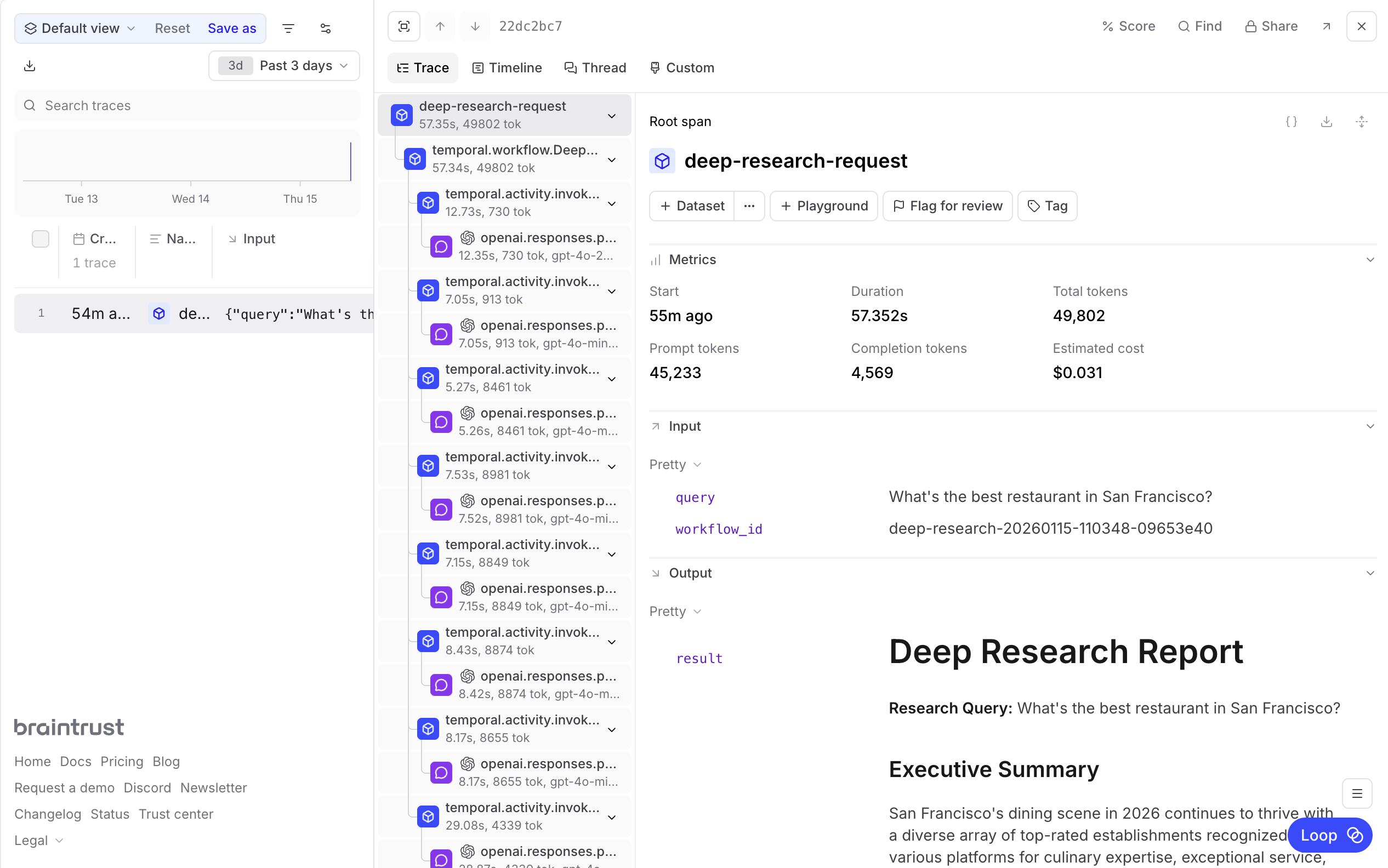
This visibility is essential for improving agent performance over time. You can identify which types of queries produce low-relevance results, spot patterns in planning failures, and build evaluation datasets from real research traces to systematically improve each agent.
Next steps